

Smart Home
The Best Smart Locks: 4 Compared (and One to Skip)
We compared four current smart locks on security, keyless entry, smart-home fit, install effort, and battery to find the honest winners.
The short version
Most people should buy the Schlage Encode Plus: it is BHMA AAA certified, has hub-free Wi-Fi, and adds Apple Home Key and a keypad for guests. If you want more entry options and wider compatibility for less, the Aqara U200 delivers fingerprint, keypad, NFC, and Matter over Thread at a mid-range price. The August Wi-Fi Smart Lock is the right call only if you must keep your existing key and hardware, since it retrofits over your deadbolt but lacks a built-in keypad. Skip the Wyze Lock Bolt v2: it is cheap and has fingerprint entry and Wi-Fi, but the maker lists only BHMA Grade 2 and no Apple Home Key or Matter. Best for: buyers who want proven security and simple setup should pick the Schlage Encode Plus.
Our picks at a glance
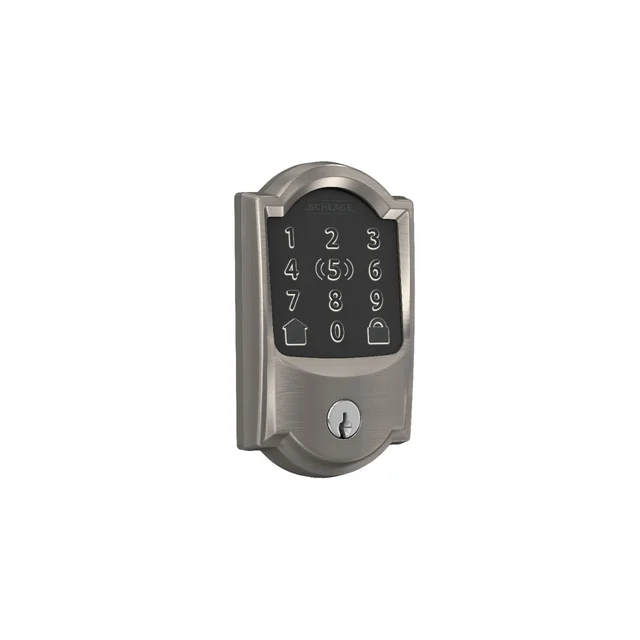
- Schlage Encode Plus Smart WiFi Deadbolt - Buy. The most secure of the group, with hub-free Wi-Fi and Apple Home Key baked in.
- Aqara Smart Lock U200 - Buy. The value pick: fingerprint, keypad, NFC, and Matter over Thread without a premium price.
- August Wi-Fi Smart Lock (4th Gen) - It depends. A renter-friendly retrofit that keeps your key and hardware but skips a built-in keypad.
- Wyze Lock Bolt v2 - Skip. A low-cost fingerprint deadbolt with built-in Wi-Fi, but its own page lists only BHMA Grade 2 and no Apple Home Key or Matter.
The verdict in 30 seconds
What mattered most
- Physical security
- Keyless entry methods
- Connectivity
- Smart-home platforms
- Installation
- Power
Smart locks in 2026 split into two camps: full deadbolt replacements with built-in keypads and phone-tap unlocking, and low-profile retrofits that keep your existing key. We weighed maker specs and owner reports across security grade, entry methods, connectivity, and day-to-day reliability. Two of these are easy recommendations, one suits a specific buyer, and one is a low-cost deadbolt whose own page shows a lower security grade.
The most secure of the group, with hub-free Wi-Fi and Apple Home Key baked in.
Best for: Apple households that want the strongest security and don't want to manage a hub.
- Maker lists a BHMA AAA certified deadbolt, the top residential security grade, in a sturdy build
- Built-in Wi-Fi with no separate hub or bridge required
- Native Apple Home Key tap-to-unlock plus Matter, Alexa, and Google support
- Backlit touchscreen keypad works for guests without a phone
- Bulky exterior escutcheon that some owners find dominates the door
- AA batteries drain faster than the rechargeable packs on newer rivals
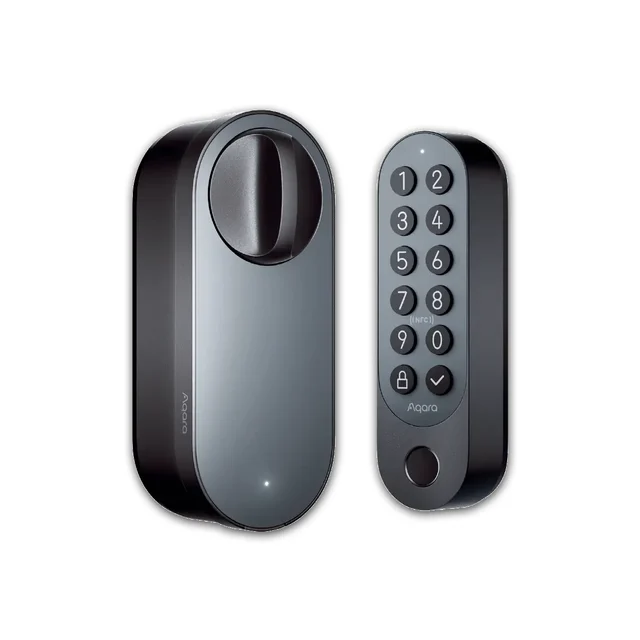
The value pick: fingerprint, keypad, NFC, and Matter over Thread without a premium price.
Best for: Anyone who wants the most features and the widest smart-home compatibility for the money.
- Most entry options here: fingerprint, PIN keypad, NFC card, app, and Apple Home Key
- Matter over Thread makes it cross-platform and future-proof
- Rechargeable battery rated by the maker for up to 6 months per charge at about 8 daily unlocks
- Fits many existing deadbolts, so exterior keyed access is retained
- Remote unlocking and automations rely on adding the Aqara Hub M3
- Owner reports note the app setup and automations have a learning curve
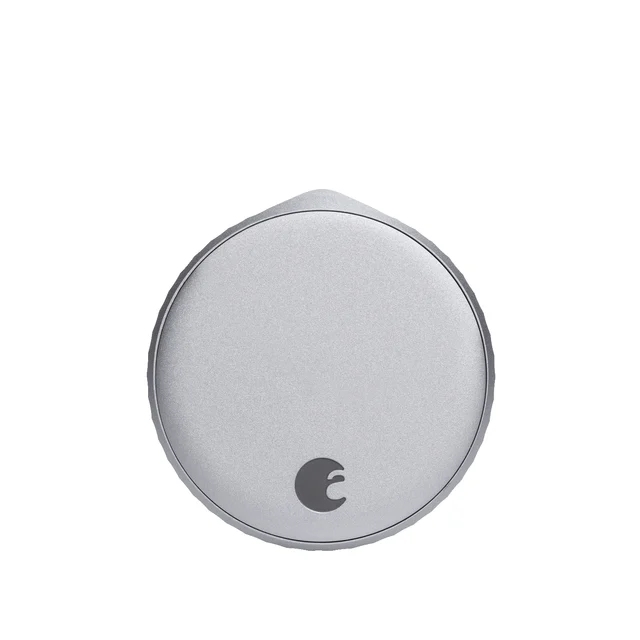
A renter-friendly retrofit that keeps your key and hardware but skips a built-in keypad.
Best for: Renters and anyone who must keep their existing keyed cylinder and landlord's hardware.
- Installs over your existing deadbolt in minutes, so exterior hardware and keys stay the same
- Built-in Wi-Fi, so no bridge is needed, with auto-lock and auto-unlock
- Compact interior unit that attaches over your existing deadbolt
- Works with Alexa, Google Home, and Apple Home
- No built-in keypad or fingerprint; you pay extra for the separate keypad accessory
- No native NFC Home Key tap, so guests without the app lean on a physical key
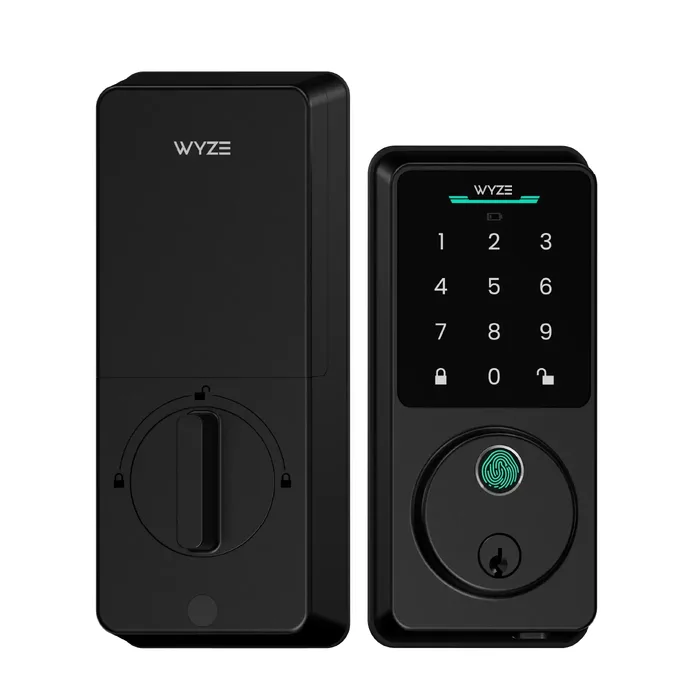
A low-cost fingerprint deadbolt with built-in Wi-Fi, but its own page lists only BHMA Grade 2 and no Apple Home Key or Matter.
Best for: Budget buyers on Android or Alexa who want fingerprint entry and accept a lower security grade.
- Fingerprint, touchscreen PIN, app, Alexa and Google Assistant, and a physical key all open it
- Built-in Wi-Fi, so no hub or bridge is listed for remote control
- Maker lists up to 8 months of battery life from the included 8 AA cells, with a USB-C emergency power port
- Maker lists BHMA Grade 2, a step below the AAA rating on the Schlage pick
- Smart-home support listed is Wyze automations, Google Home, and Alexa, with no Apple Home Key or Matter
- Maker lists IP53 weather resistance, and it replaces only a single-cylinder deadbolt
| Criteria | Schlage Encode Plus Smart WiFi Deadbolt Top pick Buy it Buy | Aqara Smart Lock U200 Buy it Buy | August Wi-Fi Smart Lock (4th Gen) It depends Buy | Wyze Lock Bolt v2 Skip it Buy |
|---|---|---|---|---|
| Best for | Apple households that want the strongest security and don't want to manage a hub. | Anyone who wants the most features and the widest smart-home compatibility for the money. | Renters and anyone who must keep their existing keyed cylinder and landlord's hardware. | Budget buyers on Android or Alexa who want fingerprint entry and accept a lower security grade. |
| Price tier | $$$ · premium | $$ · mid-range | $$ · mid-range | $ · budget |
| Physical security | BHMA AAA certified deadbolt | Fits over your existing lock | Retrofit keeps your existing bolt | Maker lists BHMA Grade 2 |
| Keyless entry methods | Touchscreen keypad + Home Key | Fingerprint, keypad, NFC + Home Key | App only (keypad sold separately) | Fingerprint, PIN keypad, app, key |
| Connectivity | Built-in Wi-Fi, hub-free | Thread; Aqara hub for remote unlocking | Built-in Wi-Fi, hub-free | Built-in Wi-Fi and Bluetooth |
| Smart-home platforms | Matter, Apple, Alexa, Google | Matter, Apple, Alexa, Google | Apple, Alexa, Google | Wyze, Alexa, Google (Apple not listed) |
| Installation | Full deadbolt swap | Fits many deadbolts | Interior retrofit, keeps key | Full deadbolt swap, single-cylinder |
| Power | AA batteries | Rechargeable (AAA backup) | CR123A batteries | 8 AA batteries, USB-C emergency power |
| Design/visibility | Large, prominent keypad | Compact keypad | Small interior knob | Tempered glass touchscreen keypad |
| Price tier | $$$ · premium | $$ · mid-range | $$ · mid-range | $ · budget |
Which one is right for you?
- Apple households that want the strongest security and don't want to manage a hub. Buy it Schlage Encode Plus Smart WiFi Deadbolt
- Anyone who wants the most features and the widest smart-home compatibility for the money. Buy it Aqara Smart Lock U200
- Renters and anyone who must keep their existing keyed cylinder and landlord's hardware. It depends August Wi-Fi Smart Lock (4th Gen)
- Budget buyers on Android or Alexa who want fingerprint entry and accept a lower security grade. Skip it Wyze Lock Bolt v2
How we judged the field
We don’t run our own lab. Instead we synthesize maker specifications and aggregated owner reports, then weigh the factors that actually decide whether you’ll be happy a year in: how physically secure the lock is, how many ways you can get in without a phone, how it connects to your home, how hard it is to install, and how the battery holds up. Smart locks live outdoors and get used every single day, so reliability and finish matter as much as headline features.
A useful early split: full deadbolt replacements (Schlage, Wyze) change your exterior hardware and usually add a keypad or fingerprint reader, while retrofits (August and the Aqara U200) keep your existing key and only change the inside. Neither is automatically better, but the choice narrows the field fast depending on whether you own or rent.
Schlage Encode Plus Smart WiFi Deadbolt
Buy itThe Encode Plus is a BHMA AAA certified deadbolt, the top residential security grade, which speaks to the kick-and-pry attacks that worry most buyers. It pairs that with built-in Wi-Fi that needs no hub, a bright touchscreen keypad for guests, and native Apple Home Key so you can tap your iPhone or Watch to get in. Matter, Alexa, and Google support round it out. The honest downsides are size and power: it’s a large, prominent unit, and its AA batteries don’t last as long as the rechargeable packs on newer rivals. If security and simple setup top your list, this is the safe pick.
Aqara Smart Lock U200
Buy itThe U200 is the value standout because it does almost everything the pricier locks do, for less. You get fingerprint, PIN keypad, NFC card, app, and Apple Home Key entry, plus Matter over Thread, which makes it cross-platform and future-proof. Owners like the rechargeable battery, which skips the drawer full of AAs, and the fact that it fits over your existing lock. Two caveats keep it from being the outright winner: getting remote unlocking working means adding the Aqara Hub M3, and owner reports note the app and automation setup take some patience. Get past that and it’s the most capable lock per dollar.
August Wi-Fi Smart Lock (4th Gen)
It dependsThe August is a different animal: instead of replacing your deadbolt, it clamps onto the inside and turns the existing thumbturn, so your exterior hardware and keys never change. That makes it the obvious choice for renters and anyone who can’t or won’t swap out the whole lock. It has built-in Wi-Fi, auto-lock and auto-unlock, and a compact interior unit. But it’s a conditional recommendation for a reason: there’s no built-in keypad or fingerprint reader, so guests without the app fall back on a physical key unless you buy the separate keypad, and there’s no tap-to-unlock Home Key. Right lock, but only for the right situation.
Wyze Lock Bolt v2
Skip itThe Wyze Lock Bolt v2 is a low-cost deadbolt replacement with a tempered glass touchscreen keypad, fingerprint reader, built-in Wi-Fi, and a physical key, and the maker lists up to 8 months of battery life from the 8 AA cells in the box. The reason to skip it for a main entry door is on Wyze’s own page: it lists BHMA Grade 2, a step below the AAA rating on the Schlage pick. Its listed smart-home support is Wyze automations, Google Home, and Alexa, with no Apple Home Key or Matter, and the weather rating is IP53. For a side door, a rental unit or a buyer on Android who wants fingerprint entry for less, it can be a fair fit. For the front door, pick a lock with the higher grade.
Schlage Encode Plus vs Aqara U200: which should you buy?
These are the two we’d steer most people toward, and the decision is refreshingly clear. Buy the Schlage Encode Plus if security and no-fuss setup matter most: it’s BHMA AAA certified, its Wi-Fi needs no hub, and Apple Home Key plus a keypad cover guests easily. Its costs are size, price, and AA batteries.
Buy the Aqara U200 if you want the most ways to unlock and the widest compatibility for less money. Fingerprint entry, a rechargeable battery, and Matter over Thread give it real day-to-day and future-proofing advantages, as long as you’re comfortable adding the Aqara hub and spending a little time in the app. In short: Schlage for peace of mind, Aqara for features and value.
What to look for
- Security grade: Look for a BHMA Grade 1 or AAA style rating if the lock guards a main entry.
- Entry methods: Decide whether you need a keypad or fingerprint for guests, or whether phone and key are enough.
- Hub or no hub: Built-in Wi-Fi is simplest; Thread and Bluetooth locks may need a hub or bridge for remote access.
- Install type: Retrofits keep your key and suit renters; full replacements let you add keypads and new finishes.
- Power: Rechargeable packs are convenient; replaceable cells are easy to swap in a pinch. Either way, check that the app warns you early.
- Ecosystem fit: Confirm Apple Home Key, Alexa, Google, or Matter support matches the smart home you already run.
Our final take
Most buyers should get the Schlage Encode Plus. It’s BHMA AAA certified, its hub-free Wi-Fi keeps setup painless, and Apple Home Key plus a keypad make daily use easy for the whole household. If you’d rather spend less and get more entry options, the Aqara U200 is the smarter value, with fingerprint unlocking and the broadest compatibility, provided you don’t mind adding a hub. Choose the August Wi-Fi Smart Lock only if you must keep your existing key and hardware, and skip the Wyze Lock Bolt v2 for a main entry door, since its own page lists a lower BHMA grade and no Apple Home Key.
Questions, answered
Do smart locks work if the Wi-Fi or power goes out?
Generally yes. These locks keep working locally when the internet drops; you just lose remote control from your phone until it returns. The Schlage and Aqara keypads, the Aqara fingerprint reader, Apple Home Key taps, and physical keys still function. Because they run on batteries, a household power outage doesn't lock you out either.
Which of these is best for a renter?
The August Wi-Fi Smart Lock. It retrofits onto the inside of your existing deadbolt, so the exterior hardware and your landlord's keys stay exactly as they were and it's easy to remove when you move out. The trade-off is no built-in keypad, so budget for the separate keypad accessory if you want code entry.
What is Apple Home Key and which of these support it?
Home Key stores a digital key in your iPhone or Apple Watch so you tap the phone to the lock to unlock, similar to Apple Pay. The Schlage Encode Plus and Aqara U200 support it natively; the August Wi-Fi Smart Lock works with Apple Home but not tap-to-unlock Home Key, and the Wyze Lock Bolt v2 page lists Wyze, Google Home, and Alexa instead. Aqara's remote unlocking needs its hub.
Do I need a separate hub or bridge?
It depends on the lock. The Schlage Encode Plus, August, and Wyze Lock Bolt v2 have Wi-Fi built in and need no hub. The Aqara U200 uses Thread and needs the Aqara Hub M3 for remote access.
How long do the batteries last?
It depends on use, and heavy keypad and auto-unlock activity shortens it. Aqara rates its rechargeable pack at up to 6 months at about 8 daily unlocks. The Schlage and August use replaceable cells (the August uses CR123 batteries), and Wyze lists up to 8 months from the 8 AA cells in the box of the Lock Bolt v2. Check each app's low-battery alerts.
Deciding between the top two? See our head-to-head: Schlage Encode Plus Smart WiFi Deadbolt vs Aqara Smart Lock U200.
More in Smart Home
Smart Locks, Explained Plain-English guide → Schlage Encode Plus Smart WiFi Deadbolt vs Aqara Smart Lock U200 Head-to-head →  The Best Smart Plugs (2026): Matter, Energy Monitoring, and One to Skip
  The Best Smart Smoke & Carbon Monoxide Detectors: 4 Compared (and One to Skip)
  The Best Smart Speakers: 4 Compared (and One to Skip)
  Best Smart Thermostats of 2026: Honest Picks and One to Skip