Explained
Smart Displays, Explained
After reading this you will know which assistant to commit to, how big a screen you really need, and how to tell a true smart display from a glorified speaker or clock.
In this guide
A smart display is a voice speaker with a touchscreen, but the screen is only half the story. The bigger decision is which voice assistant lives on your counter, because that choice ties you to a phone, calendar, and smart-home world you will not easily switch later. The thing that trips up first-time buyers is assuming every display does the same job; some are full home hubs, and some are alarm clocks wearing the label.
The 30-second version
- Pick the assistant first. matching Alexa or Google Assistant to the phone and services you already use matters more than any spec on the box.
- Size the screen to the room. a 7-to-8-inch panel suits a bedside or desk, while a 15-inch display only earns its place in a shared, central space.
- Confirm it is a real hub. look for Matter, Thread, or Zigbee radios if you want to control devices directly instead of buying a separate bridge.
- Decide how you feel about a camera. it enables video calls but adds a privacy surface, so favor a camera-free model or one with a physical shutter if that worries you.
- Watch for the fake display. a segmented LED clock face is not a touchscreen, so check that you are buying a genuine display and not a voice speaker in disguise.
The products this guide is about
Our verdict on each, with the full reasoning on the companion review.
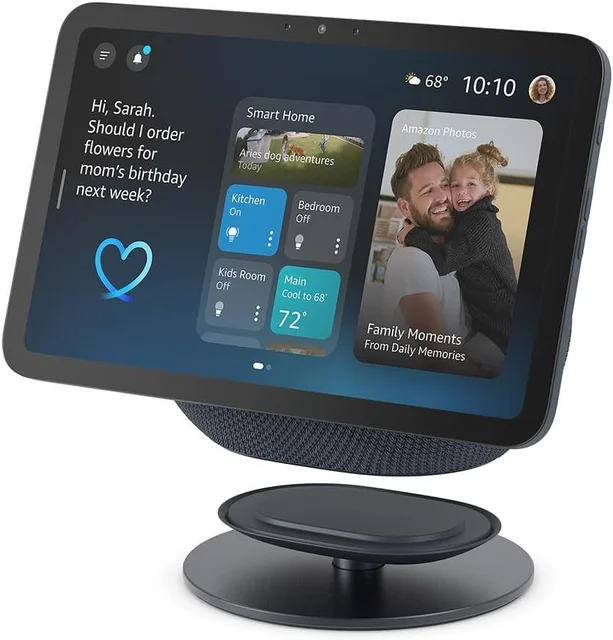
- Buy Amazon Echo Show 8 (2025 release) A well-rounded smart display: Alexa+, a built-in smart-home hub, and a screen that fits anywhere. Amazon
- Buy Amazon Echo Show 15 A wall-sized family command center with built-in Fire TV, for people who want the display to be the hub of the house. Amazon
- It depends Google Nest Hub (2nd Gen) A camera-free pick for Google households, but an older platform. Amazon
- Skip Lenovo Smart Clock Essential with Alexa A likeable Alexa alarm clock wearing the smart-display label, but it is not really a smart display.
What actually matters
- Voice assistant and ecosystem - the assistant decides how naturally the device understands you and how well it syncs with your phone, calendar, and existing speakers; switching ecosystems later is painful, so this is the first and biggest choice.
- Screen size and quality - size determines whether the display suits a nightstand or a kitchen wall, and sharpness and brightness decide whether dashboards and video are actually readable across a room.
- Smart-home hub capability - a real hub with Matter, Thread, or Zigbee on board can control devices directly, while a lesser device only issues voice commands and needs a separate bridge.
- Camera and video calling - a camera enables auto-framed video chat, but not everyone wants one; decide whether calling is a priority or a privacy liability.
- Privacy hardware - a physical microphone switch and, ideally, a camera shutter are the baseline controls that let you cut off listening and watching on your own terms.
- Media and entertainment - some displays stream video from a full app catalog or built-in TV platform, while others are limited to music, radio, and a handful of services.
- Subscriptions - the most advanced assistant features can sit behind a paid plan, so weigh the ongoing cost, not just the hardware price.
The specs, in plain English
Green flags vs red flags
Green flags
- The device matches the phone, calendar, and speakers you already own, so everything stays in sync.
- It has Matter, Thread, or Zigbee built in, meaning it can run smart-home devices without a separate hub.
- There is a physical microphone switch and, if it has a camera, a physical shutter.
- The screen size fits the room you are placing it in rather than dominating or straining it.
- It is a current, buyable model that the maker is still actively supporting.
Red flags
- The "display" is actually a segmented LED clock readout, not a real touchscreen, so there is no dashboard or video.
- The platform is aging and third-party apps have been quietly disappearing from it over time.
- A successor model is rumored or hinted, meaning you may buy something one refresh from obsolete.
- The features that sold you require an ongoing subscription you did not budget for.
- It cannot act as a smart-home hub even though it is marketed as a home control center.
Who's who: the brands
- Amazon - Makes the Echo Show line running Alexa; the broadest range of true smart displays, from compact counter models to wall-sized family hubs.
- Google - Makes the Nest Hub running Google Assistant; known for clean design, strong Google-services integration, and camera-free options.
- Lenovo - Makes budget Alexa- and Google-powered smart clocks and displays; useful for simple bedside devices but light on full-display capability.
How to read a listing without getting fooled
When you scan a product listing, start with the assistant, because that single word, Alexa or Google, tells you more about daily life with the device than any other spec. Next, look at the screen: note both the inches and whether it says HD or Full HD, since a big panel with low resolution looks soft. Then hunt for the smart-home words Matter, Thread, and Zigbee; if a listing avoids them and only promises "voice control," the device is probably not a real hub. Check whether a camera is present and whether it mentions a physical shutter, and confirm there is a microphone switch. Finally, read past the word "display" itself: if the fine print describes an LED clock face rather than a touchscreen, you are looking at a speaker with a clock, not a smart display.
How much should you spend?
Spend according to the room and the job, not the biggest number you can afford. The value sweet spot sits with a compact-to-midsize display that pairs a capable assistant with a genuine smart-home hub; that combination does the most in the most rooms. Stepping up to a large, wall-sized panel is worth it only when the display will be a shared family command center in a central space, since a big screen is wasted on a nightstand. At the budget end, be careful: the cheapest "smart display" is often a clock that competes with a plain voice speaker, so paying a little more for a real touchscreen and hub is usually the smarter buy. Remember that the sticker is not the whole cost, because the most advanced assistant features and accessories like wall mounts may carry ongoing or extra charges.
Questions, answered
Alexa or Google Assistant, which should decide my choice?
For most buyers it is the single biggest factor. If your phone, calendar, and speakers are already Google, a Nest Hub keeps everything in sync. If you shop with Amazon and own Alexa gear, the Echo Show line is the smoother fit. Because switching ecosystems later is a hassle, decide this first and let it steer the rest.
Do I need a separate smart-home hub?
Often not. Many displays now include Matter, Thread, or Zigbee radios, so they can control lights, plugs, and sensors directly. The exception is basic clock-style devices, which only issue voice commands and cannot serve as a hub. If controlling devices without extra boxes matters to you, confirm the hub radios are listed before buying.
Are smart displays a privacy risk?
They listen for a wake word rather than recording constantly, and reputable models include a hardware microphone switch that cuts the mics. If a camera worries you, look for a model with a physical shutter, or choose a camera-free display; devices without any camera are why many people are comfortable putting them in bedrooms. This is general guidance, so review each maker's privacy settings for the specifics.
How big a screen do I actually need?
Match it to the room. A 7-to-8-inch display is ideal for a bedside table, desk, or small kitchen counter. A large 15-inch panel only makes sense as a shared hub in a central, high-traffic room where several people glance at calendars and dashboards; in a bedroom it is simply too much.
Do I need a subscription to use one?
The core features, timers, weather, smart-home control, calendars, music, and calls, work without paying anything extra. The most advanced conversational features may be tied to a paid plan or membership, so factor that in only if those smarter interactions are the reason you are buying.
Is a smart clock the same as a smart display?
No, and this is the most common mix-up. A true smart display has a real touchscreen for dashboards, video, and web content. A smart clock often has a small segmented LED readout that cannot show any of that; it is essentially a voice speaker with a clock face. If a display is what you want, make sure the listing describes an actual touchscreen.
Or jump to the head-to-head: Amazon Echo Show 8 (2025 release) vs Google Nest Hub (2nd Gen).