

Tech & Gadgets
The Best Smart Displays: 4 Compared (and One to Skip)
We compared four buyable-in-2026 smart displays on assistant smarts, screen quality, smart-home control, and privacy.
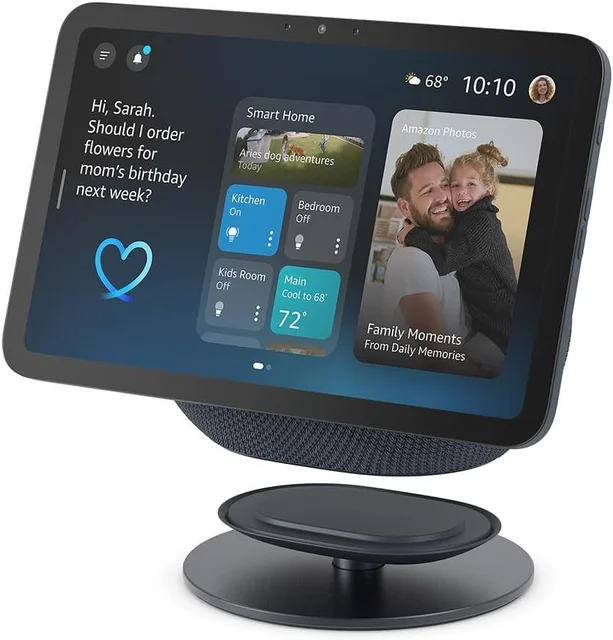
The short version
Smart displays come down to which assistant you trust and how big a screen you need. The Amazon Echo Show 8 (2025 release) is the best all-rounder, with Alexa+, a built-in Matter/Thread/Zigbee hub, and strong audio in an 8-inch frame. Step up to the Echo Show 15 if you want a wall-sized family hub with built-in Fire TV. The Google Nest Hub (2nd Gen) is still a solid camera-free pick for Google households, but its older platform makes timing a real question. The Lenovo Smart Clock Essential is a fine Alexa bedside clock but not a genuine smart display, so skip it if a display is what you actually want. Best for: most buyers, the Echo Show 8 (2025 release).
Our picks at a glance
- Amazon Echo Show 8 (2025 release) - Buy. A well-rounded smart display: Alexa+, a built-in smart-home hub, and a screen that fits anywhere.
- Amazon Echo Show 15 - Buy. A wall-sized family command center with built-in Fire TV, for people who want the display to be the hub of the house.
- Google Nest Hub (2nd Gen) - It depends. A camera-free pick for Google households, but an older platform.
- Lenovo Smart Clock Essential with Alexa - Skip. A likeable Alexa alarm clock wearing the smart-display label, but it is not really a smart display.
The verdict in 30 seconds
What mattered most
- Assistant ecosystem
- Screen
- Smart-home control
- Camera and video calls
- Privacy controls
- Media and entertainment
A smart display is really two decisions in one: which voice assistant you want living on your counter, and how much screen you actually need. We worked from the makers' published specifications and owner reports across the current Amazon, Google, and Lenovo lineups to sort the genuinely useful hubs from the ones that only look the part. Two here are easy recommendations, one is an it-depends call on an older Google platform, and one is a smart display in name only.
A well-rounded smart display: Alexa+, a built-in smart-home hub, and a screen that fits anywhere.
Best for: Most people, especially anyone already invested in Alexa and smart-home gear.
- Runs Alexa+, Amazon's newer conversational assistant, which Amazon says is free for Prime members
- Built-in Matter, Thread and Zigbee hub controls many devices with no extra bridge
- Redesigned 8.7-inch HD screen with spatial audio
- Alexa+ is free with Prime but needs a paid monthly plan without it, and availability varies by country
- The 13MP camera adds capability but also a privacy surface some buyers would rather not have
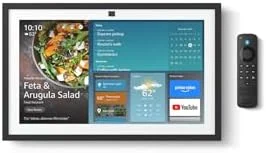
A wall-sized family command center with built-in Fire TV, for people who want the display to be the hub of the house.
Best for: Busy families who want one large, glanceable organization and entertainment hub in a central room.
- The 15.6-inch Full HD panel makes shared calendars, sticky notes and smart-home dashboards genuinely readable across a kitchen
- Built-in Fire TV turns it into a secondary streaming screen for Netflix, Prime Video and more, with a remote in the box
- Same Alexa+ assistant and Matter/Zigbee smart-home control as the smaller Echo Show, on a much bigger canvas
- It is big and best wall-mounted or given real counter space, so it is overkill for a bedside or desk
- Costs meaningfully more than an 8-inch display, and the wall mount is a separate purchase
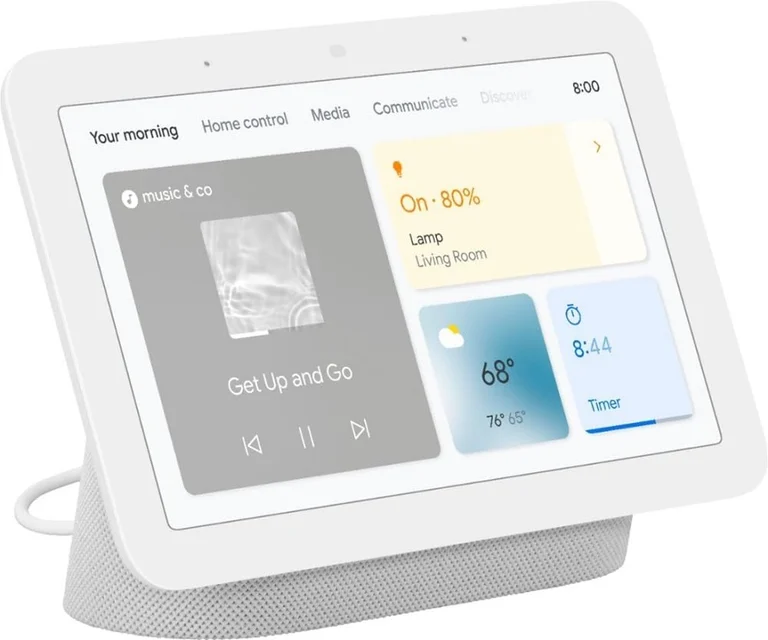
A camera-free pick for Google households, but an older platform.
Best for: Google Assistant loyalists who want a camera-free display and can live with an older platform.
- No camera by design; its Quick Gestures use Motion Sense rather than a camera
- Touchscreen with a Google Home dashboard for controlling compatible smart-home devices
- Ties into Google services, with Netflix, YouTube and several music services listed on Google's page
- The hardware is an older generation
- Google may have a newer display by the time you buy, so check its current lineup first
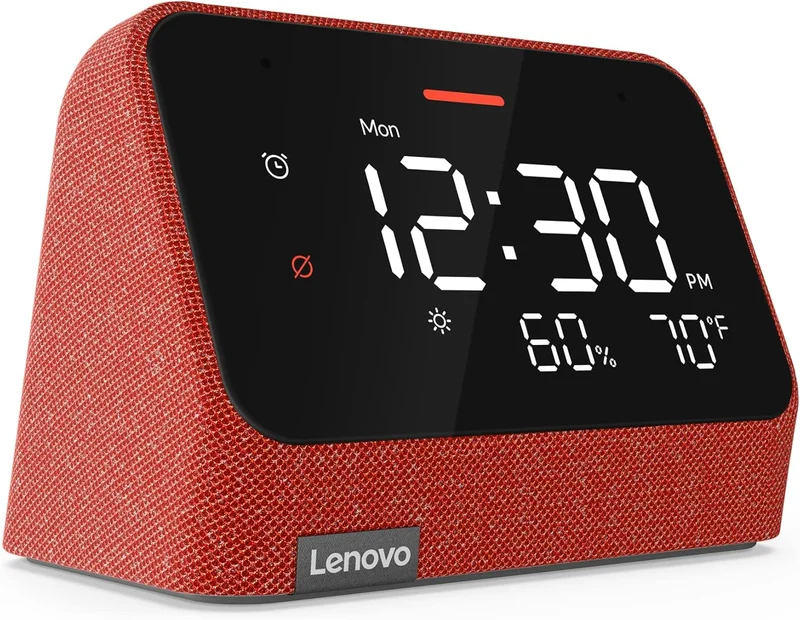
A likeable Alexa alarm clock wearing the smart-display label, but it is not really a smart display.
Best for: Someone who only wants a tidy voice-enabled bedside clock and knows they are not buying a true display.
- Cheap, compact and pleasant on a nightstand, with an auto-dimming LED readout that owners like in the dark
- Alexa is built in for voice timers, alarms, weather and basic smart-home commands
- No camera and a simple mic-mute switch keep the privacy story easy
- The 4-inch panel is a segmented LED clock face, not a real touchscreen, so there is no dashboard, video or web content
- You lose almost everything that makes a smart display useful; it competes with a voice speaker, not the Echo Show or Nest Hub
Amazon had no buyable listing for this when we last checked. The link still works if it returns.
Check price on Amazon Read our detailed assessment| Criteria | Amazon Echo Show 8 (2025 release) Top pick | Amazon Echo Show 15 | Google Nest Hub (2nd Gen) | Lenovo Smart Clock Essential with Alexa |
|---|---|---|---|---|
| Verdict | Buy it | Buy it | It depends | Skip it |
| Best for | Most people, especially anyone already invested in Alexa and smart-home gear. | Busy families who want one large, glanceable organization and entertainment hub in a central room. | Google Assistant loyalists who want a camera-free display and can live with an older platform. | Someone who only wants a tidy voice-enabled bedside clock and knows they are not buying a true display. |
| Price tier | $$ · mid-range | $$$ · premium | $ · budget | $ · budget |
| Assistant ecosystem | Alexa+, Amazon's newer assistant | Alexa+ on a larger screen | Google Assistant | Alexa built-in, minimal clock UI |
| Screen | 8.7" HD touchscreen | 15.6" Full HD, wall-mountable | Touchscreen display | 4" LED clock, not a true touchscreen |
| Smart-home control | Matter, Thread and Zigbee hub built in | Matter and Zigbee hub, big dashboard | Google Home dashboard control | Voice control only, no on-screen dashboard |
| Camera and video calls | 13MP auto-framing camera | 13MP camera for calls | No camera, audio calls only | No camera, no video |
| Privacy controls | Mic/camera off switch plus physical shutter | Mic/camera off switch plus shutter | No camera by design, mic switch | Mic-mute switch, no camera |
| Media and entertainment | Prime Video and select streaming, no full app store | Built-in Fire TV for full streaming | Netflix, YouTube and music services per Google | Music and radio only |
| Price tier | $$ · mid-range | $$$ · premium | $ · budget | $ · budget |
Which one is right for you?
- Most people, especially anyone already invested in Alexa and smart-home gear. Buy it Amazon Echo Show 8 (2025 release)
- Busy families who want one large, glanceable organization and entertainment hub in a central room. Buy it Amazon Echo Show 15
- Google Assistant loyalists who want a camera-free display and can live with an older platform. It depends Google Nest Hub (2nd Gen)
- Someone who only wants a tidy voice-enabled bedside clock and knows they are not buying a true display. Skip it Lenovo Smart Clock Essential with Alexa
How we judged the field
We do not run our own lab. We work from the makers’ published specifications and a read of owner reports, then weigh them against what a smart display is actually for. Four things mattered most. First, the assistant: how naturally it understands you and how well it fits the phone and services you already use. Second, the screen: size, sharpness and whether it earns its counter space. Third, smart-home control: whether the device is a real hub with Matter, Thread or Zigbee on board, or just a voice remote. Fourth, privacy: microphone and camera controls, and whether a camera exists at all.
We also insisted every pick is current and buyable in 2026. Where a lineup has shifted, we point it out, because a display you will own for years should not be one refresh from obsolete.
Amazon Echo Show 8 (2025 release)
Buy itThis is the one to beat. The redesigned 8.7-inch HD panel adds spatial audio. More importantly, it runs Alexa+, Amazon’s newer conversational assistant. Underneath, a built-in Matter, Thread and Zigbee hub means it can run a smart home without a separate bridge. The trade-offs are honest: Alexa+ is free with Prime but needs a paid monthly plan without it, and availability varies by country, and the camera adds a privacy surface. But for the footprint, nothing else here does as much.
Amazon Echo Show 15
Buy itIf the Echo Show 8 is the everyday display, the Echo Show 15 is the household noticeboard. The 15.6-inch Full HD screen makes shared calendars, reminders and smart-home dashboards readable from across a kitchen, and built-in Fire TV turns it into a genuine secondary streaming screen with a remote included. It uses the same Alexa+ brain and smart-home control as its smaller sibling. It is not for everyone: it wants wall space or a real chunk of counter, the wall mount is a separate buy, and it sits at a premium price. For a busy family that wants one big, glanceable hub in a central room, it is worth it.
Google Nest Hub (2nd Gen)
It dependsThe Nest Hub remains the display we recommend to Google households and to anyone who simply does not want a camera in the room, because it has none by design. The touchscreen is clean, the Google Home dashboard is easy to read, and Google lists Netflix, YouTube and several music services on its page. The caveat is that it is an older generation, so check Google’s current lineup before buying. That makes it a good buy for the right person and a wait-and-see for everyone else.
Lenovo Smart Clock Essential with Alexa
Skip itWe like this little clock, but it is not a smart display and we would not have you buy it as one. The 4-inch face is a segmented LED clock readout, not a touchscreen, so there is no dashboard, no video, no web content and no smart-home screen. What you get is a tidy, affordable, camera-free Alexa alarm clock for a nightstand. That is a perfectly good thing to own, but it competes with a voice speaker, not with the Echo Show or Nest Hub. If a display is what you are after, skip it.
Echo Show 8 vs Nest Hub: which should you buy?
This is the decision most people are really making, and it comes down to ecosystem. The Echo Show 8 (2025 release) is the more capable device on paper: Alexa+ as the assistant, stronger audio, a camera with auto-framing for video calls, and a built-in hub that speaks Matter, Thread and Zigbee. The Nest Hub answers with things the Echo cannot: it has no camera at all, which is exactly why many people choose it for a bedroom, and it slots into Google accounts.
Choose the Echo Show 8 if you want the most features, video calling, and a newer design. Choose the Nest Hub if you live in Google’s world, want a camera-free device, and are comfortable with an older platform. When the ecosystem is a wash, the Echo Show 8 is the safer long-term pick.
What to look for
- Pick the assistant first: match it to the phone, calendar and speakers you already use, because switching later is painful.
- Size the screen to the room: 7 to 8 inches suits a bedside or desk, while 15 inches earns its place only in a shared, central space.
- Confirm it is a real hub: look for Matter, Thread or Zigbee on board if you want to control devices without buying a separate bridge.
- Decide on the camera: it enables video calls but is a privacy surface, so favor a camera-free model or one with a physical shutter if that matters to you.
- Check for a mic switch and, ideally, a camera shutter as baseline privacy hardware.
- Weigh subscriptions: the most advanced assistant features may need a paid plan, so price that in, not just the hardware.
Our final take
Buy the Amazon Echo Show 8 (2025 release) if you want the best all-round smart display; it does the most, in the most rooms, for a fair price. Step up to the Echo Show 15 if a big, shared family hub with built-in Fire TV is the goal. The Google Nest Hub (2nd Gen) is still the right call for Google households and anyone who wants no camera, provided you are comfortable buying an older platform. And give the Lenovo Smart Clock Essential a pass as a display; it is a nice Alexa clock, but that is a different purchase entirely.
Questions, answered
Alexa or Google Assistant - which should decide my choice?
For most buyers it is the single biggest factor. If your phone, calendar and existing speakers are Google, the Nest Hub keeps everything in sync. If you shop with Amazon and own Alexa gear, the Echo Show line is the smoother fit.
Do I need a subscription to use one?
The core features - timers, weather, smart-home control, calendars, music and calls - work without paying anything extra. On the Echo Show, the most advanced Alexa+ conversational features are tied to a Prime membership or a paid Alexa+ plan, so factor that in if those smarter interactions are the reason you are buying.
Are smart displays a privacy risk?
They listen for a wake word rather than recording constantly, and the models here are built around a microphone-off control. If a camera worries you, the Echo Show devices add a physical camera shutter, and the Nest Hub and Lenovo clock have no camera at all, which is why privacy-minded owners often prefer them for bedrooms.
Do I need a separate smart-home hub?
Often not. The Echo Show 8 and Echo Show 15 include Matter, Thread or Zigbee radios so they can control many devices directly, and the Nest Hub controls compatible devices through Google Home. The Lenovo Smart Clock is the exception - it only issues voice commands and cannot serve as a hub.
Which one is best for video calls?
The Echo Show 8 (2025 release) and Echo Show 15 both have 13MP cameras with auto-framing that keeps you centered as you move, making them the clear picks for video chat. The Nest Hub has no camera, and the Lenovo Smart Clock has no camera either.
Deciding between the top two? See our head-to-head: Amazon Echo Show 8 (2025 release) vs Google Nest Hub (2nd Gen).
More Tech & Gadgets reviews
 The Best Smart Garage Door Openers: 4 Compared (and One to Skip)
  The Best Smart Glasses Without a Display: 4 Compared (and One to Skip)
  The Best Smart Home Hubs: 4 Compared (and One to Skip)
  The Best Smart Light Bulbs: 4 Compared (and One to Skip)
  The Best Smart Locks: 4 Compared (and One to Skip)
  The Best Smart Plugs (2026): Matter, Energy Monitoring, and One to Skip