Explained
Prebuilt Gaming PCs, Explained
After reading this you will understand every line of a prebuilt gaming PC's spec sheet and know which parts actually decide how well it plays your games.
In this guide
A prebuilt gaming PC is a desktop tower that a company assembles, tests, and warranties for you, so you skip picking parts and building it yourself. The spec sheets are dense with model numbers, and the trap most first-time buyers fall into is chasing the biggest headline GPU or CPU while ignoring the supporting parts and the resolution they actually play at. This guide decodes the terms so you can tell a genuinely good machine from an expensive one.
The 30-second version
- Match the GPU to your monitor, not to the biggest number you can afford. The graphics card is what mostly decides your frame rate, and a card built for 4K is wasted money on a 1080p screen.
- Look past the headline CPU and GPU. The power supply, cooling, and memory quietly separate a reliable machine from a fragile one that runs hot and loud.
- Favor standard parts over proprietary ones, because a normal motherboard and case let you upgrade RAM, storage, and the graphics card for years, while custom layouts lock you in.
- Treat 16GB of RAM as a starting point, not a finish line, in 2026; 32GB is the comfortable target for a machine you want to keep.
- Judge value against the loose-parts price, so you know whether you are paying a fair assembly premium or a heavy brand markup for the same performance.
The products this guide is about
Our verdict on each, with the full reasoning on the companion review.
- Buy Skytech Gaming Azure 3 (Ryzen 7 9700X, RTX 5060) A genuinely well-specced budget tower that undercuts what the same parts cost to buy loose. Amazon
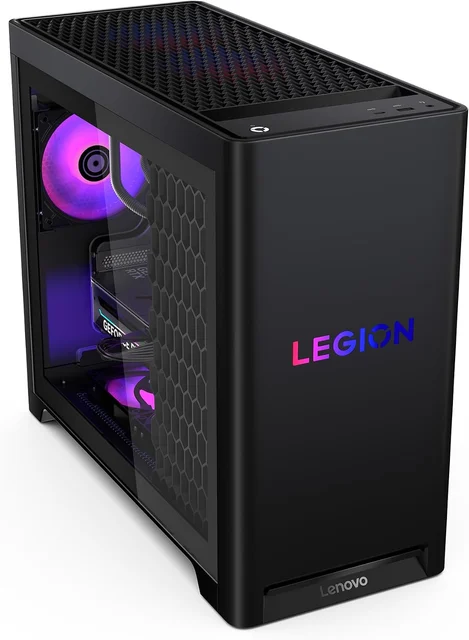
- Buy Lenovo Legion Tower 5 (2026, Ryzen 7 7800X3D, RTX 5070) The best all-round value: a top-tier gaming CPU, a sensible GPU, and a quiet, serviceable chassis. Amazon
- It depends Corsair Vengeance i7500 (Core i9-14900KF, RTX 5090) A no-compromise flagship built entirely from standard, upgradeable parts, if you can justify the price.
- Skip HP OMEN 45L (Core Ultra 9 285K, RTX 5080) A powerful machine wrapped in a proprietary, premium-priced package that undercuts its own value.
What actually matters
- Graphics card (GPU) tier matters most because it is the single biggest factor in how many frames per second your games run at, especially at higher resolutions.
- CPU-to-GPU balance matters because a mismatched pair bottlenecks: a weak processor holds back a strong graphics card, and vice versa, wasting money on the part you overspent on.
- Target resolution and refresh rate matter because 1080p, 1440p, and 4K each demand very different hardware, and buying above your monitor's needs is pure waste.
- Power supply quality matters because a cheap or underrated unit is where budget builders cut corners, and it is the part most likely to fail or limit future upgrades.
- Cooling and noise matter because sustained gaming loads generate heat, and a poorly cooled tower either throttles its own performance or roars like a hairdryer.
- Upgrade friendliness matters because standard components let you extend the machine's life cheaply, while proprietary boards and cases can trap you into replacing the whole thing.
- Memory and storage headroom matter because 16GB and 1TB fill up fast in 2026, and a machine with room to add more ages far more gracefully.
The specs, in plain English
Green flags vs red flags
Green flags
- A quality, adequately rated power supply (80+ Gold or better) is named in the spec sheet, not hidden.
- The CPU and GPU are sensibly matched for the same resolution rather than one being far stronger than the other.
- The build uses standard components on a common platform, so RAM, storage, and the GPU can be upgraded later.
- 32GB of memory as standard, or at least a free slot so you can add more without replacing anything.
- Effective cooling for the tier (a real air cooler or an AIO) and owner reports of quiet, cool operation under load.
- The total price is close to what the same parts cost loose, meaning you pay a fair assembly premium, not a heavy markup.
Red flags
- A flagship GPU paired with a weak CPU, small PSU, or single stick of RAM, signaling money spent on the headline part only.
- An unnamed or generic power supply, or one whose wattage looks marginal for the hardware.
- A proprietary motherboard, connectors, or case that make future upgrades and repairs difficult.
- Only 8GB of VRAM on a card sold for high-resolution or ray-traced gaming.
- A clear price premium over an equivalent standard build with nothing extra to justify it.
- Reports of the tower running hot and loud under sustained load, especially with a glass front and tight internal layout.
Who's who: the brands
- Lenovo (Legion) - A major manufacturer whose Legion gaming line is known for balanced specs, quiet cooling, and mostly standard, serviceable parts.
- Corsair - A components maker whose prebuilts use its own standard parts, which keeps upgrades straightforward.
- HP (OMEN) - A large PC brand with a polished, retail-grade design and nationwide support, though some models lean on proprietary layouts.
- Skytech Gaming - A value-focused system builder that sells budget and mid-range towers.
How to read a listing without getting fooled
Read a prebuilt's spec sheet from the parts that matter down to the parts that impress. Start with the GPU and confirm it fits your monitor's resolution, then check that the CPU is a sensible match rather than a bottleneck in either direction. Next look for the parts marketing likes to gloss over: the exact power supply (brand, wattage, and efficiency rating), the cooling solution, and whether the RAM is one stick or two. Note the platform and case, because 'standard' components signal you can upgrade later while 'proprietary' or 'custom' usually means you cannot. Finally, mentally price the same parts loose; if the machine costs far more with nothing extra to show for it, you are paying for a badge, not performance.
How much should you spend?
How much to spend comes down to the resolution you play at, not the biggest number on the shelf. A modest, well-balanced machine is plenty for 1080p and entry 1440p, and paying up for a flagship graphics card here buys headroom you will never touch. The value sweet spot for most gamers sits in the mid-range, where a strong gaming CPU and a mainstream GPU deliver the frames a high-refresh 1440p monitor can actually show, with money left for cooling and memory that keep the machine reliable. Spending more is genuinely worth it only if you game at 4K or ultrawide, or do serious creative work, where a top-tier card earns its keep. The wasteful spend is a premium paid for proprietary design or a brand name that delivers the same performance you could get for less, so weigh any machine against what the equivalent parts cost elsewhere before deciding.
Questions, answered
Is a prebuilt gaming PC worth it, or should I build my own?
For most people in 2026, a well-chosen prebuilt is worth it. Because of how component prices move, a good prebuilt often costs about the same as buying the parts loose, and you get a single warranty on the whole system plus support if something fails. Building your own still wins if you want to hand-pick every part or squeeze out cost at the very high end, but you take on the assembly and troubleshooting yourself.
What graphics card do I actually need for 1080p, 1440p, and 4K?
Match the card to your screen. An entry card is happy at 1080p and light 1440p, a mainstream card is the sweet spot for high-refresh 1440p, and you only need a high-end or flagship card for 4K and ultrawide at high settings. Buying above your monitor's resolution mostly wastes money, and buying below it means turning settings down.
Is 16GB of RAM enough for gaming in 2026?
It is the practical minimum. Plenty of current games run fine on 16GB, but background apps and newer titles increasingly benefit from 32GB. If you can, start at 32GB or make sure the machine has a free memory slot so adding more later is cheap and easy rather than a full replacement.
Can I upgrade a prebuilt gaming PC later?
It depends heavily on the machine. Towers built on standard components let you swap RAM, storage, and the graphics card down the line, which keeps them useful for years. Others use proprietary motherboards, cases, or connectors that make upgrades awkward or impossible. If long-term upgrading matters to you, favor systems that stick to standard parts.
Why do some powerful-looking prebuilts get a 'skip' recommendation?
Because raw specs are only half the story. A machine with fast headline hardware can still be a poor buy if it charges a premium over an equivalent standard build, uses a proprietary layout that blocks upgrades, or runs hot and loud under load. The best value comes from balance and flexibility, not just the biggest CPU and GPU on the box.
How important is the power supply and cooling if the GPU is what matters?
Very. The graphics card decides your frame rate, but the power supply and cooling decide whether the machine stays stable, quiet, and alive over time. A cheap or underrated PSU is a common corner-cut and a real failure risk, and weak cooling makes even a top GPU throttle its own performance. Treat these as part of the value, not an afterthought.
Or jump to the head-to-head: Lenovo Legion Tower 5 (2026, Ryzen 7 7800X3D, RTX 5070) vs Corsair Vengeance i7500 (Core i9-14900KF, RTX 5090).