

Gaming
The Best Prebuilt Gaming PCs: 4 Compared (and One to Skip)
We compared four buyable 2026 gaming desktop towers across budget, mid-range, and flagship tiers on value, cooling, and upgrade room.
The short version
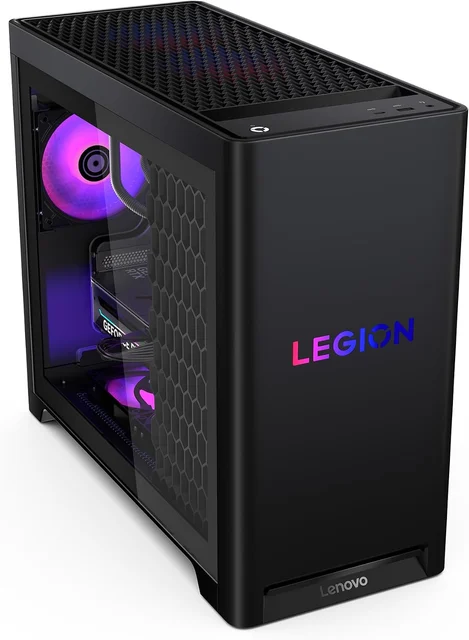
For most people the Lenovo Legion Tower 5 (2026) is the pick: its Ryzen 7 7800X3D is a gaming powerhouse, the RTX 5070 is ideal for high-refresh 1440p, and it stays quiet and upgradeable. On a tight budget, the Skytech Gaming Azure 3 is a legitimately good deal with liquid cooling rarely seen at its price. If you game at 4K and price is not a concern, the Corsair Vengeance i7500 is a flagship built from standard, upgradeable parts. We would skip the HP OMEN 45L: it is powerful but proprietary, pricey, and beaten on value by everything else here. Best for: 1440p high-refresh gamers who want top value without building it themselves.
Our picks at a glance
- Skytech Gaming Azure 3 (Ryzen 7 9700X, RTX 5060) - Buy. A genuinely well-specced budget tower that undercuts what the same parts cost to buy loose.
- Lenovo Legion Tower 5 (2026, Ryzen 7 7800X3D, RTX 5070) - Buy. The best all-round value: a top-tier gaming CPU, a sensible GPU, and a quiet, serviceable chassis.
- HP OMEN 45L (Core Ultra 9 285K, RTX 5080) - Skip. A powerful machine wrapped in a proprietary, premium-priced package that undercuts its own value.
- Corsair Vengeance i7500 (Core i9-14900KF, RTX 5090) - It depends. A no-compromise flagship built entirely from standard, upgradeable parts, if you can justify the price.
The verdict in 30 seconds
What mattered most
- GPU class
- CPU
- Target resolution
- Upgrade friendliness
- Cooling & noise
- Memory as configured
A good prebuilt gaming PC saves you the hassle of sourcing parts and gives you a warranty on the whole machine, but the market runs from genuine bargains to systems that quietly overcharge for locked-down hardware. We looked at four current towers spanning a budget RTX 5060 box to a no-compromise RTX 5090 flagship. Two are easy recommendations, one is a great machine you only need if the price makes sense, and one is a capable PC we still think most people should walk past.
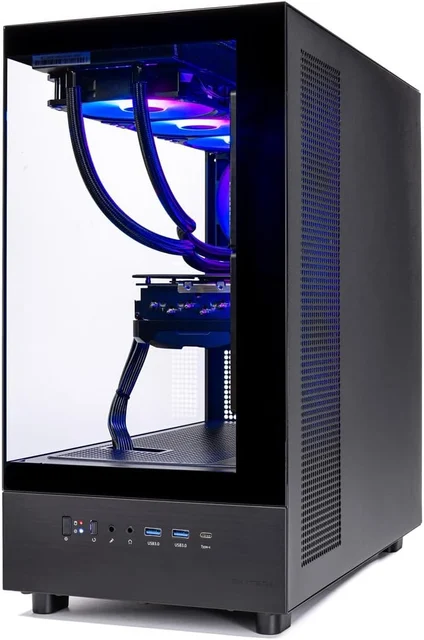
A genuinely well-specced budget tower that undercuts what the same parts cost to buy loose.
Best for: Budget buyers playing esports and mainstream titles at 1080p or entry 1440p who want assembled-and-warrantied hardware without paying a builder premium.
- Liquid cooling and a standard-part build are uncommon at this tier
- Ryzen 7 9700X plus RTX 5060 is a balanced 1080p/1440p combo with no obvious bottleneck
- DDR5 memory and Wi-Fi included, so it works out of the box
- Owners consistently note tidy assembly and quiet operation for a budget build
- 16GB of RAM is the bare minimum in 2026 and you will want to add another kit soon
- The RTX 5060's 8GB of VRAM limits ray tracing and higher-resolution textures
Own the Skytech Gaming Azure 3 (Ryzen 7 9700X, RTX 5060)? Tell us how it held up.
Thanks. Counted, and shown once enough owners have weighed in.
The best all-round value: a top-tier gaming CPU, a sensible GPU, and a quiet, serviceable chassis.
Best for: 1440p high-refresh gamers who want the best balance of performance, build quality, and price without building it themselves.
- The Ryzen 7 7800X3D is one of the strongest pure-gaming CPUs available and pairs ideally with the RTX 5070 for high-refresh 1440p
- Mesh-topped chassis with a liquid cooler stays cool and stays quiet under load, per owner reports
- Mostly standard components on an AM5 platform, so RAM, storage, and the GPU are straightforward to upgrade later
- Comes with a proper manufacturer warranty and support, plus 32GB of memory as standard
- 1TB of storage fills quickly with modern game installs
- Front-panel and airflow layout is functional rather than flashy, with restrained RGB
Own the Lenovo Legion Tower 5 (2026, Ryzen 7 7800X3D, RTX 5070)? Tell us how it held up.
Thanks. Counted, and shown once enough owners have weighed in.
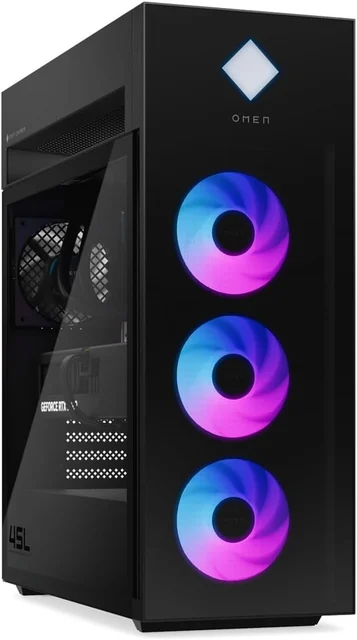
A powerful machine wrapped in a proprietary, premium-priced package that undercuts its own value.
Best for: Buyers who specifically want HP's design and support and don't plan to tinker; most shoppers get more performance-per-dollar and upgrade freedom elsewhere.
- Strong headline hardware with a Core Ultra 9 285K and RTX 5080 that games hard at 4K
- Distinctive Cryo Chamber cooler design and a polished, retail-grade look
- Backed by HP's warranty and nationwide support network
- Independent testing and owner reports point to a proprietary motherboard and layout that make future upgrades awkward
- You pay a clear premium over the same performance from more standard builds
- The glass front and tight layout can leave it running warm and audible under sustained load
Amazon had no buyable listing for this when we last checked. The link still works if it returns.
See our pick instead Find it on Amazon anyway Read our detailed assessmentOwn the HP OMEN 45L (Core Ultra 9 285K, RTX 5080)? Tell us how it held up.
Thanks. Counted, and shown once enough owners have weighed in.
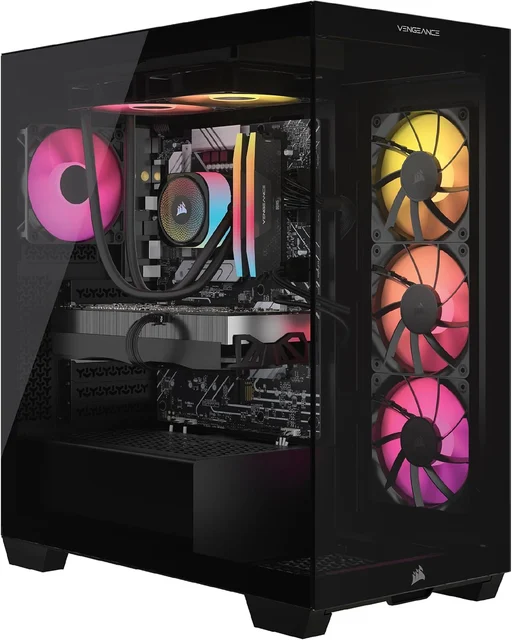
A no-compromise flagship built entirely from standard, upgradeable parts, if you can justify the price.
Best for: 4K/ultrawide max-settings gamers and creators who want flagship power in a machine they can keep upgrading for years.
- Built from standard Corsair components with a liquid CPU cooler, which keeps upgrades straightforward
- RTX 5090 plus 64GB of DDR5 handles 4K and ultrawide at max settings and heavy content creation
- Reviewers and owners praise the clean cable management and iCUE software integration
- Mid-tower case with a wraparound glass design and room for up to a 360mm radiator
- Expensive, and the RTX 5090 is overkill unless you truly game at 4K or do serious creative work
- The Core i9-14900KF is a hot, power-hungry chip
Amazon had no buyable listing for this when we last checked. The link still works if it returns.
Find it on Amazon Read our detailed assessmentOwn the Corsair Vengeance i7500 (Core i9-14900KF, RTX 5090)? Tell us how it held up.
Thanks. Counted, and shown once enough owners have weighed in.
| Criteria | Skytech Gaming Azure 3 (Ryzen 7 9700X, RTX 5060) Buy it Buy | Lenovo Legion Tower 5 (2026, Ryzen 7 7800X3D, RTX 5070) Top pick Buy it Buy | HP OMEN 45L (Core Ultra 9 285K, RTX 5080) Skip it | Corsair Vengeance i7500 (Core i9-14900KF, RTX 5090) It depends |
|---|---|---|---|---|
| Best for | Budget buyers playing esports and mainstream titles at 1080p or entry 1440p who want assembled-and-warrantied hardware without paying a builder premium. | 1440p high-refresh gamers who want the best balance of performance, build quality, and price without building it themselves. | Buyers who specifically want HP's design and support and don't plan to tinker; most shoppers get more performance-per-dollar and upgrade freedom elsewhere. | 4K/ultrawide max-settings gamers and creators who want flagship power in a machine they can keep upgrading for years. |
| Price tier | $ · budget | $$ · mid-range | $$$ · premium | $$$$ · flagship |
| GPU class | RTX 5060 (entry) | RTX 5070 (mainstream) | RTX 5080 (high-end) | RTX 5090 (flagship) |
| CPU | Ryzen 7 9700X | Ryzen 7 7800X3D (gaming-optimized) | Core Ultra 9 285K | Core i9-14900KF |
| Target resolution | 1080p / entry 1440p | 1440p high-refresh | 4K | 4K / ultrawide max |
| Upgrade friendliness | Good (standard parts) | Good (standard AM5) | Limited (proprietary board) | Excellent (standard parts) |
| Cooling & noise | Liquid cooler, quiet for the tier | AIO, cool and quiet | Big cooler but warm under load | 240mm liquid cooler (case fits up to 360mm) |
| Memory as configured | 16GB DDR5 | 32GB DDR5 | 32GB+ DDR5 | 64GB DDR5 |
| Value for money | Excellent | Excellent | Below average | Fair |
| Price tier | $ · budget | $$ · mid-range | $$$ · premium | $$$$ · flagship |
Which one is right for you?
- Budget buyers playing esports and mainstream titles at 1080p or entry 1440p who want assembled-and-warrantied hardware without paying a builder premium. Buy it Skytech Gaming Azure 3 (Ryzen 7 9700X, RTX 5060)
- 1440p high-refresh gamers who want the best balance of performance, build quality, and price without building it themselves. Buy it Lenovo Legion Tower 5 (2026, Ryzen 7 7800X3D, RTX 5070)
- 4K/ultrawide max-settings gamers and creators who want flagship power in a machine they can keep upgrading for years. It depends Corsair Vengeance i7500 (Core i9-14900KF, RTX 5090)
- Buyers who specifically want HP's design and support and don't plan to tinker; most shoppers get more performance-per-dollar and upgrade freedom elsewhere. Skip it HP OMEN 45L (Core Ultra 9 285K, RTX 5080)
How we judged the field
We don’t run our own lab. Instead we synthesize independent testing, expert teardowns, and aggregated owner reports to figure out which prebuilt towers actually deliver, and which ones lean on a flashy spec sheet. For gaming desktops the criteria that mattered most were: real gaming performance for the resolution each machine targets, the quality of the supporting parts (power supply, cooling, memory) rather than just the headline CPU and GPU, thermals and noise under sustained load, how easy the system is to upgrade later, and honest value for money against what the same performance costs elsewhere. We deliberately spread the field across a budget box, a mid-range all-rounder, and two high-end machines so you can see where the price jumps buy you real gains and where they don’t.
Skytech Gaming Azure 3 (Ryzen 7 9700X, RTX 5060)
Buy itBudget prebuilts are usually where corners get cut, so the Azure 3 stands out for what it doesn’t skimp on. A liquid cooler and a standard-part build are things you rarely see at this price, and the Ryzen 7 9700X paired with an RTX 5060 is a balanced combination with no glaring bottleneck for 1080p and entry-level 1440p play. Owners regularly note clean assembly and quiet running. The compromises are honest ones: 16GB of memory is the bare minimum in 2026 and the RTX 5060’s 8GB of VRAM will hold you back on ray tracing and high-resolution textures. But as a way to get warrantied, assembled hardware without paying a builder’s markup, it’s an easy recommendation.
Lenovo Legion Tower 5 (2026, Ryzen 7 7800X3D, RTX 5070)
Buy itThis is our top pick, and it earns it on balance. The Ryzen 7 7800X3D is one of the best pure-gaming processors you can buy thanks to its large cache, and pairing it with an RTX 5070 makes for a superb high-refresh 1440p machine. Reviewers and owners describe a mesh-topped chassis with a liquid cooler that keeps temperatures and noise in check, and because it’s built on a largely standard AM5 platform, upgrading memory, storage, or the graphics card down the road is straightforward. It ships with 32GB of memory and a proper manufacturer warranty. The only real gripes are a 1TB drive that fills fast and a look that’s more understated than showy. For the money, nothing here matches its blend of speed, quality, and sanity.
HP OMEN 45L (Core Ultra 9 285K, RTX 5080)
Skip itThe OMEN 45L is not a weak machine, which is exactly why the skip verdict needs explaining. On paper the Core Ultra 9 285K and RTX 5080 are a strong 4K pairing, and HP wraps them in a distinctive Cryo Chamber cooler with a retail-grade finish and nationwide support. The problem is value and flexibility. Independent testing and owner reports repeatedly flag a proprietary motherboard and internal layout that make future upgrades awkward, a clear price premium over equivalent performance from more standard builds, and a glass-fronted design that can run warm and audible under sustained load. If you specifically want HP’s design and support and never plan to open the case, it’s defensible. Most people should take that budget elsewhere.
Corsair Vengeance i7500 (Core i9-14900KF, RTX 5090)
It dependsThe Vengeance i7500 is the flagship done right, with one big caveat: the price. The parts are standard Corsair components, so upgrades are straightforward, and the RTX 5090 with 64GB of DDR5 chews through 4K, ultrawide, and heavy content-creation workloads. Reviewers praise the clean cable management, the airflow-focused case, and the iCUE software tie-in. So why “it depends”? Because it’s expensive and the Core i9-14900KF is a hot, power-hungry chip. An RTX 5090 is overkill unless you genuinely play at 4K or do serious creative work. If you do, this is a machine you can keep upgrading for years. If you don’t, you’re paying flagship money for headroom you’ll never use.
Sources
Specs in this review come from these pages.
Lenovo Legion Tower 5 vs Corsair Vengeance i7500: which should you buy?
These are the two strongest machines here, but they answer different questions. The Legion Tower 5 is the smart-money choice: the 7800X3D is arguably a better dedicated gaming CPU than the Corsair’s i9, and at 1440p the RTX 5070 delivers the frames most gamers actually see on their monitor, all while staying quieter, smaller, and far cheaper. The Corsair only pulls decisively ahead when you push to 4K, ultrawide, or creative workloads that can feed an RTX 5090, and it backs that power with standard, upgradeable parts. Put simply: buy the Legion Tower 5 unless you have a 4K or ultrawide display and the budget to match, in which case the Vengeance i7500 is the flagship worth the stretch.
What to look for
- Match the GPU to your monitor. An RTX 5060 suits 1080p, an RTX 5070 is ideal for high-refresh 1440p, and you only need an RTX 5080 or 5090 for 4K and ultrawide.
- Look past the CPU and GPU. A quality power supply, real cooling, and dual-channel DDR5 separate a good prebuilt from a fragile one.
- Start at 32GB of RAM if you can, or make sure there’s a free slot so you can add more later.
- Favor standard parts. Proprietary motherboards and layouts limit upgrades and repairs; standard components keep the machine useful for years.
- Check storage headroom. 1TB fills fast with modern installs; plan to add an SSD.
- Weigh value, not just the badge. If a system costs noticeably more than the same performance elsewhere, ask what you’re actually paying for.
Our final take
Most people should buy the Lenovo Legion Tower 5 (2026): it combines one of the best gaming CPUs available with a sensibly matched GPU, quiet cooling, and standard, upgradeable parts at a mid-range price. On a budget, the Skytech Gaming Azure 3 punches well above its cost thanks to genuinely good supporting components. If you game at 4K and price isn’t the deciding factor, the Corsair Vengeance i7500 is a flagship built from standard parts. The one to leave on the shelf is the HP OMEN 45L, a fast but locked-down machine that asks a premium and gives back less freedom and value than everything else in this comparison.
Questions, answered
Are prebuilt gaming PCs worth it compared with building your own?
In 2026, yes for most people. Component prices mean a well-chosen prebuilt often costs about the same as buying the parts loose, and you get a single warranty on the whole system plus support if something fails. Building your own still wins on picking exactly the parts you want and on cutting cost at the very high end, but you take on the assembly and the troubleshooting yourself.
What GPU do I actually need for 1440p versus 4K?
For high-refresh 1440p, an RTX 5070-class card like the one in the Legion Tower 5 hits the sweet spot. An RTX 5060 is happier at 1080p or entry-level 1440p. For 4K at high settings you want an RTX 5080 or the RTX 5090 in the Corsair; anything less means turning settings down. Match the card to your monitor, not to the biggest number you can afford.
Is 16GB of RAM enough for a gaming PC in 2026?
It is the practical minimum. Plenty of current games run fine on 16GB, but background apps and newer titles increasingly benefit from 32GB, which is why we treat the Skytech's 16GB as an early upgrade rather than a dealbreaker. If you can, start at 32GB (as the Legion Tower 5 does) or leave a free slot so you can add a kit later.
Can I upgrade a prebuilt gaming PC later?
It depends heavily on the machine. Systems built on standard components, like the Corsair Vengeance i7500 and the Legion Tower 5, let you swap RAM, storage, and the graphics card down the line. Others, such as the HP OMEN 45L, use a more proprietary motherboard and layout that make upgrades harder. If long-term upgrading matters to you, favor towers that stick to standard parts.
Why do you rate the HP OMEN 45L as a skip when the specs look great?
The hardware is genuinely fast. Our concern is value and flexibility: independent testing and owner reports flag a proprietary board and layout, a price premium over equivalent standard builds, and warm, audible operation under sustained load. It is not a bad PC, but at its price the other machines here give you more performance per dollar and far more freedom to upgrade.
Deciding between the top two? See our head-to-head: Lenovo Legion Tower 5 (2026, Ryzen 7 7800X3D, RTX 5070) vs Corsair Vengeance i7500 (Core i9-14900KF, RTX 5090).
More in Gaming
Prebuilt Gaming PCs, Explained Plain-English guide → Lenovo Legion Tower 5 (2026, Ryzen 7 7800X3D, RTX 5070) vs Corsair Vengeance i7500 (Core i9-14900KF, RTX 5090) Head-to-head →  Racing Wheels: Which to Buy and Which to Skip
  The Best Stream Decks: 4 Compared (and One to Skip)
  The Best VR Headsets: 4 Compared (and One to Skip)
  The Best OLED Gaming Monitors: 4 Compared (and One to Skip)