

Gaming
The Best Stream Decks: 4 Compared (and One to Skip)
We compared four macro control pads for streamers and creators on keys, dials, software depth, build and value to find the best picks.
The short version
A stream deck is worth it the moment your hotkeys outgrow your memory. The Elgato Stream Deck MK.2 is the pick for most people: 15 keys and a mature software and plugin library. The AJAZZ AKP03E is the value play, adding physical knobs at a much lower price with rougher software. Choose the Stream Deck + only if you'll genuinely use its dials for audio or editing. Skip the Stream Deck Mini, which charges mid-range money for six cramped keys. Best for: streamers and creators who want fast, reliable, labeled control over their software.
Our picks at a glance
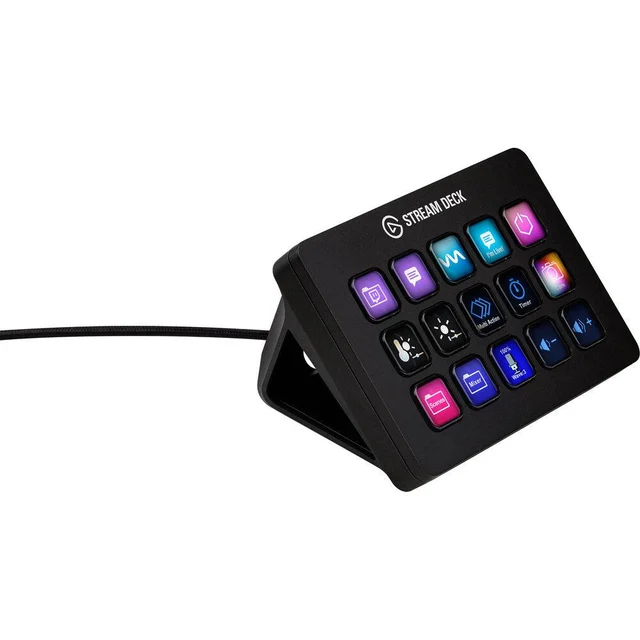
- Elgato Stream Deck MK.2 - Buy. The 15-key standard the whole category is measured against, and still the safest buy for most creators.
- AJAZZ AKP03E Desk Controller - Buy. Six LCD keys plus three knobs for a fraction of Elgato money.
- Elgato Stream Deck + - It depends. Eight keys plus four tactile dials and a touch strip, brilliant if you'll actually turn the knobs and overkill if you won't.
- Elgato Stream Deck Mini - Skip. Elgato's compact six-key entry costs mid-range money for budget capability, and its own siblings beat it.
The verdict in 30 seconds
What mattered most
- LCD keys
- Physical dials
- Software & plugins
- Build quality
- Reliability (owner reports)
- Value per key
A stream deck turns a wall of hotkeys into a grid of labeled, one-tap buttons for switching scenes, firing sound effects, muting mics and launching apps. Elgato defined the category and has a mature software ecosystem, but budget rivals now undercut it and a dial-equipped model tempts video and audio editors. Below: two we'd happily buy, one that only makes sense for specific creators, and one we'd steer you away from.
The 15-key standard the whole category is measured against, and still the safest buy for most creators.
Best for: Streamers and creators who want the most dependable software and room to grow without fuss.
- 15 crisp LCD keys with mature, well-regarded software and a large plugin marketplace
- Native, well-maintained integrations for OBS, Twitch, YouTube, Discord and hundreds of apps
- Solid build with interchangeable faceplates and a removable stand
- No physical dials, so audio and scrubbing still happen on-screen
- You pay a premium per key next to budget rivals
Own the Elgato Stream Deck MK.2? Tell us how it held up.
Thanks. Counted, and shown once enough owners have weighed in.
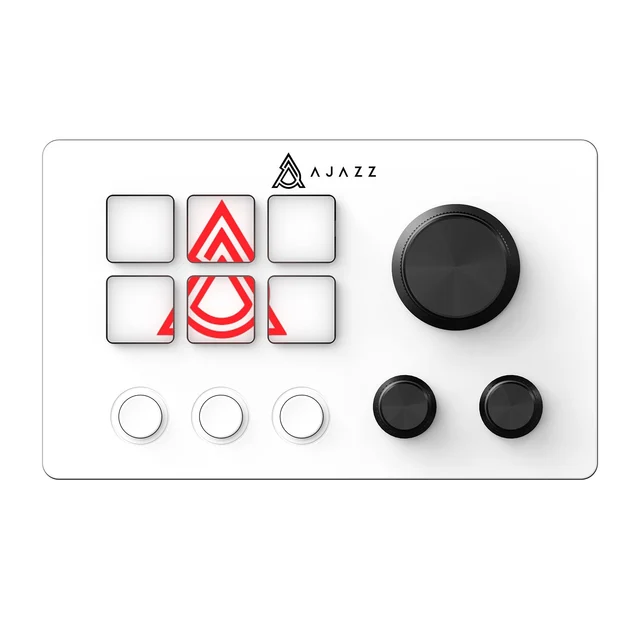
Six LCD keys plus three knobs for a fraction of Elgato money.
Best for: Budget-conscious streamers who want physical knobs and don't mind fiddlier software.
- Costs far less than a comparable Elgato while adding three knobs and extra buttons
- Some owner reports describe stable performance over long streaming sessions once configured
- Hardware knobs for volume and value tweaks that Elgato offers only on its pricier Stream Deck +
- Companion software feels rougher and its icon library is more basic than Elgato's polished app
- Only six LCD keys, and long-term plugin support and updates are less certain than an established brand
Own the AJAZZ AKP03E Desk Controller? Tell us how it held up.
Thanks. Counted, and shown once enough owners have weighed in.
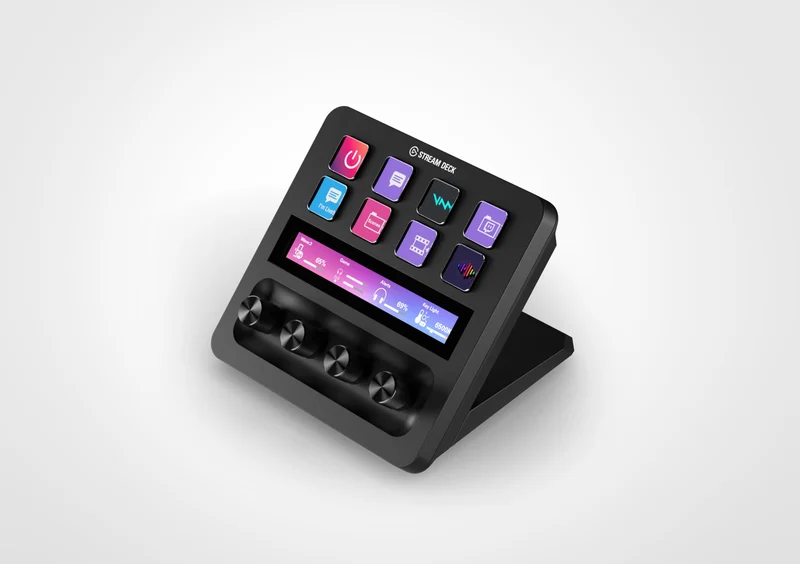
Eight keys plus four tactile dials and a touch strip, brilliant if you'll actually turn the knobs and overkill if you won't.
Best for: Video, audio and photo editors who want physical knobs alongside their keys.
- Four clicky dials and a touchscreen strip give hands-on control of audio levels, camera settings and editing scrubs
- Runs the same mature Elgato software and plugin ecosystem as the MK.2
- A strong pick for creators who live in audio mixers, Adobe apps or DAWs
- Costs meaningfully more than the MK.2 yet gives you fewer buttons
- The dials are wasted money if your workflow is mostly scene switching and hotkeys
Own the Elgato Stream Deck +? Tell us how it held up.
Thanks. Counted, and shown once enough owners have weighed in.
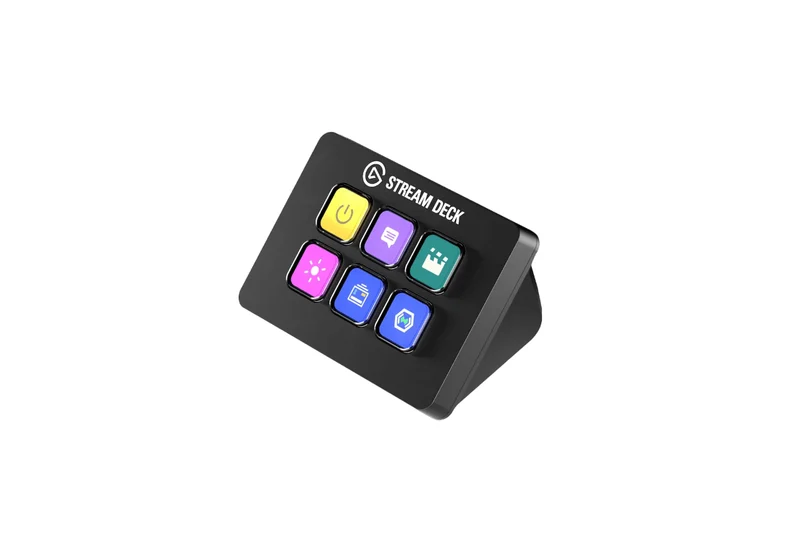
Elgato's compact six-key entry costs mid-range money for budget capability, and its own siblings beat it.
Best for: Few buyers at its current price; look to the AKP03E or a larger Elgato instead.
- Runs Elgato's excellent software, so the app experience is as good as the flagship
- Compact footprint that tucks into a crowded desk
- Only six keys that fill up fast once you add scenes, sounds and app shortcuts
- Priced too close to fuller models, so you overpay for less than budget rivals deliver
- An older design that skips the extras of the newer decks
Own the Elgato Stream Deck Mini? Tell us how it held up.
Thanks. Counted, and shown once enough owners have weighed in.
| Criteria | Elgato Stream Deck MK.2 Top pick Buy it Buy | AJAZZ AKP03E Desk Controller Buy it Buy | Elgato Stream Deck + It depends Buy | Elgato Stream Deck Mini Skip it Buy |
|---|---|---|---|---|
| Best for | Streamers and creators who want the most dependable software and room to grow without fuss. | Budget-conscious streamers who want physical knobs and don't mind fiddlier software. | Video, audio and photo editors who want physical knobs alongside their keys. | Few buyers at its current price; look to the AKP03E or a larger Elgato instead. |
| Price tier | $$ · mid-range | $ · budget | $$$ · premium | $$ · mid-range |
| LCD keys | 15 | 6 (plus 3 buttons) | 8 | 6 |
| Physical dials | None - 3 knobs | 4 dials + touch strip | None | - |
| Software & plugins | Mature, large ecosystem | Workable but rough, small ecosystem | Mature, large ecosystem | Mature, large ecosystem |
| Build quality | Premium, removable faceplate | Good, with knobs | Premium | Basic, older design |
| Reliability (owner reports) | Dependable | Reports vary | Dependable | Dependable |
| Value per key | Fair | Excellent | Lower (you pay for dials) | Poor |
| Best use | All-round streaming | Budget setups wanting knobs | Editing with knobs | Tight desks on a budget |
| Price tier | $$ · mid-range | $ · budget | $$$ · premium | $$ · mid-range |
Which one is right for you?
- Streamers and creators who want the most dependable software and room to grow without fuss. Buy it Elgato Stream Deck MK.2
- Budget-conscious streamers who want physical knobs and don't mind fiddlier software. Buy it AJAZZ AKP03E Desk Controller
- Video, audio and photo editors who want physical knobs alongside their keys. It depends Elgato Stream Deck +
- Few buyers at its current price; look to the AKP03E or a larger Elgato instead. Skip it Elgato Stream Deck Mini
How we judged the field
We don’t run our own lab. Instead we synthesize maker specifications and aggregated owner reports, then weigh what actually matters day to day for streamers and creators: how many keys you get and how quickly they fill up, whether there are physical dials, and above all the software, because a control pad is only as good as the app that programs it. We also looked hard at build quality, real-world reliability over long sessions, and value per key rather than sticker price alone.
Four devices made the cut: the category-defining Elgato Stream Deck MK.2, a genuinely good budget challenger in the AJAZZ AKP03E, the dial-equipped Elgato Stream Deck +, and the Elgato Stream Deck Mini that we think most people should now avoid.
Elgato Stream Deck MK.2
Buy itThe MK.2 is the one everything else is compared to, and it earns that position on software more than hardware. Its 15 LCD keys are crisp, but the reason reviewers and owners keep recommending it is the Stream Deck app: native integrations for OBS, Twitch, YouTube and Discord, a large plugin marketplace, and multi-action sequences. Build quality is a step up too, with interchangeable faceplates and a removable stand. It has no dials and you pay a premium per key, but for a first deck that you won’t outgrow or fight with, it is the low-risk answer.
AJAZZ AKP03E Desk Controller
Buy itThe AKP03E is the budget pick. For much less than a comparable Elgato, you get six LCD keys plus three knobs and extra buttons, which is more physical control than Elgato gives you at this price. Some owner reports describe stable performance across long streams once it’s configured. The catches are real but livable: the companion software is rougher and its icon library more basic, and long-term plugin support is less certain than an established brand. If your budget is tight and you want knobs, it’s an easy recommendation.
Elgato Stream Deck +
It dependsThe Stream Deck + swaps some buttons for hardware: eight keys, four tactile dials and a touchscreen strip, all driven by the same Elgato software. For creators who live in audio mixers, Adobe apps or a DAW, those dials are a big help for setting levels, scrubbing timelines and nudging camera or lighting values. But it costs more than the MK.2 while giving you fewer keys, so if your day is mostly scene switching and hotkeys, you’re paying for knobs you won’t turn. Buy it for the dials or not at all.
Elgato Stream Deck Mini
Skip itThe Mini runs the same Elgato software, but that’s the main thing in its favor. Six keys fill up fast the moment you add scenes, sounds and shortcuts, the design is smaller than the rest of the line, and the price sits too close to fuller models. That’s the problem: you pay mid-range money for budget capability. The budget AJAZZ gives you the same six keys plus knobs for less, and a larger Elgato gives you room to grow for a little more. Few buyers are best served here.
Sources
Specs in this review come from these pages.
Elgato Stream Deck MK.2 vs AJAZZ AKP03E: which should you buy?
This is the real decision for most people: pay up for Elgato’s polish or save big with AJAZZ. The MK.2 wins on keys (15 versus six), on software maturity and ecosystem. The AKP03E wins on price and adds three physical knobs the MK.2 doesn’t have. If a stream deck is central to how you work and you want it to be invisible and reliable, the MK.2 is worth the premium. If you’re outfitting a first setup, watching your spend, or specifically want knobs on a budget, the AKP03E gets you most of the way there for a fraction of the cost. Your budget decides.
What to look for
- Key count: six keys fill up fast; 15 is the comfortable sweet spot for most streamers.
- Software depth: the app matters more than the hardware; look for maintained native integrations and a real plugin ecosystem.
- Dials: only pay for them if you’ll adjust audio, lighting or timelines continuously.
- Build and cable: a detachable cable, removable faceplate and a stable stand age better on a busy desk.
- Reliability: favor devices with a track record of crash-free long sessions in owner reports.
- Value per key: compare what you pay per usable button, not just the sticker price.
Our final take
Buy the Elgato Stream Deck MK.2 if you want a safe, capable all-rounder and don’t want to think about software again. Save real money with the AJAZZ AKP03E if you’re on a budget or want physical knobs without paying premium. Step up to the Stream Deck + only when its dials fit how you actually work. And skip the Stream Deck Mini: at its current price, its siblings do more for your money.
Questions, answered
Do I even need a stream deck if my keyboard already has macro keys?
A stream deck's advantage is the labeled, changeable LCD screens on each key, so you always see what a button does and can reprogram it per app or per scene. Macro keys work, but you have to memorize them and they don't relabel themselves. If you juggle scenes, sound effects, mics and app shortcuts live, the visual feedback saves real mistakes.
Will these work with OBS, Twitch and YouTube?
Yes for the Elgato models, which list OBS, Twitch and YouTube plugins; the AJAZZ relies on its own app. Elgato's software has native integrations and a large plugin marketplace, while the budget AJAZZ leans on its own app plus generic keystroke and app-launch actions, which covers the essentials but with less polish.
Are cheap alternatives like the AJAZZ actually reliable?
Some owner reports are positive for the price, describing stable streaming sessions once the device is set up. The trade-offs are a rougher app, a smaller icon and plugin library, and less certainty about long-term software updates, rather than flaky hardware.
Do I need the dials on the Stream Deck +?
Mainly if your workflow involves a lot of continuous adjustment, such as mixing audio levels, scrubbing a timeline or dialing in camera and lighting values. For scene switching and hotkeys, the dials add cost. If you want knobs on a budget, the AJAZZ AKP03E includes three.
What's the best budget starting point?
The AJAZZ AKP03E gives you the most capability for the least money, including knobs (check the current listing), and is a sensible first deck. If you want Elgato's smoother software and expect to expand, stretch to the 15-key MK.2 rather than settling for the cramped, overpriced Mini.
Deciding between the top two? See our head-to-head: Elgato Stream Deck MK.2 vs AJAZZ AKP03E Desk Controller.
More in Gaming
Stream Decks, Explained Plain-English guide → Elgato Stream Deck MK.2 vs AJAZZ AKP03E Desk Controller Head-to-head →  The Best VR Headsets: 4 Compared (and One to Skip)
  The Best OLED Gaming Monitors: 4 Compared (and One to Skip)
  The Best 4K Gaming Monitors: 4 Compared (and One to Skip)
  Best Budget 1440p Gaming Monitors (27"): What's Actually Worth It