Explained
MIDI Keyboard Controllers, Explained
After reading, you will know exactly which specs matter on a MIDI keyboard controller and which are marketing noise, so you can match one to how you actually make music.
In this guide
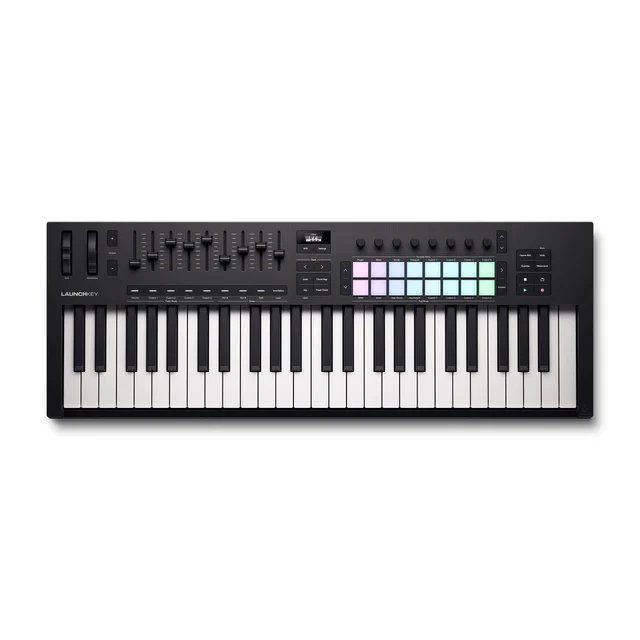
A MIDI keyboard controller doesn't make any sound on its own. It is a physical set of keys, pads, and knobs that tells the software instruments on your computer what to play and how. That surprises a lot of first-time buyers, and it is also why the spec that matters most, how the thing feels and works with your software, is the one spec sheets are worst at describing.
The 30-second version
- It controls software, it doesn't make sound. the keyboard sends note and control data to a DAW or virtual instrument on your computer, which is where the actual audio comes from.
- Keybed feel and DAW integration matter most. these are the two things you touch every session, and they are exactly what a spec list can't convey, so lean on hands-on testing and owner reports.
- 49 keys is the producer sweet spot. big enough for two-handed parts, small enough for a desk; go to 25 keys only for portability or 61-plus for piano-heavy playing.
- More controls on the box isn't automatically better. a unit crammed with pads and knobs can still frustrate if the software integration behind them is shallow or poorly documented.
- The bundled software can be a real chunk of the value. a strong included instrument library is worth paying attention to, not a throwaway freebie, when two controllers are otherwise close.
The products this guide is about
Our verdict on each, with the full reasoning on the companion review.
- Buy Novation Launchkey 49 MK4 The most complete all-rounder for producers who want deep, hands-on DAW control out of the box. Amazon
- Buy Arturia KeyLab Essential 49 mk3 A great-feeling keybed and a genuinely valuable software bundle make this the best pick for players first. Amazon
- It depends Native Instruments Kontrol S49 MK3 A superb, screen-guided controller that only justifies its premium if you live in the Native Instruments ecosystem. Amazon
- Skip M-Audio Oxygen Pro 49 A tempting spec sheet undermined by shallow, poorly documented integration that frustrates in daily use. Amazon
What actually matters
- Keybed feel is how the keys respond under your fingers. Semi-weighted and velocity-sensitive keys suit production and synths; fully weighted hammer-action feels like a piano but is heavier and pricier. This is the thing you notice every single time you play, so weight it heavily.
- DAW integration is how deeply the controller talks to your specific software (Ableton, Logic, FL Studio, and so on). Deep, two-way integration lets you launch clips, drive the mixer, and tweak devices without the mouse. Shallow integration means it just sends notes and you do everything else by hand.
- Pads and performance controls (drum pads, arpeggiators, scale and chord modes, faders, encoders) speed up sketching beats and mixing. How many you need depends entirely on whether you finger-drum and perform or mostly play keys.
- Expression and aftertouch determine how much nuance you can add by pressing harder or moving the mod wheel. Nice for expressive playing, but a comfort feature rather than a make-or-break one.
- Bundled software is the instruments and effects included in the box. A generous, genuinely useful library can offset a chunk of the price; a long list of thin demos cannot.
- Connectivity and size cover how it plugs in (USB-C is now common) and whether it has old-school 5-pin MIDI DIN for hardware synths, plus the key count that fits your desk and your playing.
The specs, in plain English
Green flags vs red flags
Green flags
- A keybed that reviewers and owners consistently describe as feeling good to play, not just as having a spec.
- Documented, two-way integration with the specific DAW you actually use, covering transport, mixer, and device control.
- USB-C connectivity and, if you use hardware, a 5-pin MIDI DIN output.
- A bundled instrument library that people cite as a genuine reason to buy, not filler.
- A control layout (pads, faders, encoders) that matches how you work rather than just looking impressive.
Red flags
- A busy spec sheet paired with reports of shallow or thinly documented software integration.
- Setup that owners describe as confusing and different from one DAW to the next.
- The deepest features locked to a single ecosystem you don't plan to buy into, at a price that assumes you will.
- Fully weighted hammer-action keys marketed to producers who mostly play synths and beats, adding cost and weight you won't use.
- Missing basics like velocity sensitivity or parameter labeling that rivals at the same price include.
Who's who: the brands
- Novation - Known for well-rounded controllers with strong pads and especially deep Ableton Live integration.
- Arturia - Praised for good-feeling keybeds and generous bundled instrument libraries aimed at players.
- Native Instruments - Premium, screen-guided controllers built around their own Komplete and NKS plugin ecosystem.
- M-Audio - Value-focused controllers that pack in lots of physical controls, though integration depth can lag rivals.
- Akai - Long-running maker of MPK-series keyboards and MPC-style pad controllers popular for beat-making.
- Nektar - Budget-friendly controllers noted for surprisingly capable DAW transport and mixer control.
How to read a listing without getting fooled
Read a controller listing from the bottom up. The headline numbers, key count, pad count, number of knobs and faders, tell you what's physically on the box but nothing about whether it's pleasant to use, so treat them as a starting filter, not a verdict. Next, hunt for the two things spec sheets hide: does the description say the keybed is semi-weighted or velocity-sensitive with aftertouch (good for production) or fully weighted hammer-action (a piano feel most producers don't need), and does it name your specific DAW as having deep, two-way integration rather than just generic MIDI? A phrase like 'works with all major DAWs' usually means basic note output, not hands-free mixer and transport control. Finally, check the bundled software list against what you'd actually load: one deep, well-regarded instrument library beats a long roster of thin demos every time.
How much should you spend?
Think in tiers rather than numbers. Entry-level controllers get you playing and are fine for total beginners, but often cut corners on keybed feel and integration. The mid-range is where most producers should land: a solid semi-weighted or velocity-sensitive keybed, useful pads and performance controls, and a bundled library with real value, all without paying for features you won't use. Spending up to the flagship tier only pays off for specific needs, chiefly polyphonic aftertouch, a premium metal build, screen-guided plugin browsing, or deep lock-in to one plugin ecosystem. If none of those describe you, the extra money buys benefits you'll rarely touch, and a good mid-range unit will serve you better per dollar. Cheapest is a false economy if a poor keybed or confusing setup makes you want to stop playing.
Questions, answered
Does a MIDI keyboard make sound by itself?
No. It sends performance data to a DAW or virtual instrument on your computer, and the software produces the audio. You need music software (many controllers include a starter version) to hear anything.
How many keys should I get?
For most producers, 49 keys are the sweet spot: enough for two-handed parts and chords but still desk-friendly. Choose 25 keys if portability is the priority, or 61-plus if you play a lot of piano-style parts.
Do I need weighted keys?
Only if you are primarily a pianist. Fully weighted hammer-action feels great for acoustic piano but is heavier, pricier, and less ideal for synths and beats. Semi-weighted or velocity-sensitive keys are the versatile choice for production.
What is aftertouch and does it matter?
Aftertouch adds expression when you press harder on a held key, handy for vibrato or filter sweeps. Channel aftertouch affects all held notes at once; polyphonic aftertouch works per note and is far more expressive but adds cost. It is a nice-to-have, not essential.
Will any controller work with my DAW?
Most are class-compliant and will send MIDI to any DAW on macOS or Windows. The difference is depth: some integrate deeply with a particular DAW for hands-free mixer and transport control. Confirm your specific software is supported at that level if it matters to you.
Is a more expensive controller worth it for a beginner?
Usually not. A mid-range 49-key controller with a decent keybed and a useful software bundle covers everything a new producer needs. Save the flagship spend for when you know you want polyphonic aftertouch or you're committed to a specific plugin ecosystem.
Or jump to the head-to-head: Novation Launchkey 49 MK4 vs Arturia KeyLab Essential 49 mk3.