

Audio & Headphones
The Best MIDI Keyboard Controllers: 4 Compared (and One to Skip)
We compared four current 49-key MIDI controllers on keybed feel, DAW integration, pads, and bundled software for real music production.
The short version
For most producers, the Novation Launchkey 49 MK4 is the best all-round MIDI controller: a good keybed, expressive pads, and the deepest hands-on DAW workflow, especially in Ableton. If how the keys feel and a big included instrument library matter more to you, the Arturia KeyLab Essential 49 mk3 is the equally easy pick. The Native Instruments Kontrol S49 MK3 is a superb, screen-guided flagship, but its premium only pays off if you live in the Komplete/NKS ecosystem. Skip the M-Audio Oxygen Pro 49: it looks well-equipped on paper, but its shallow, poorly documented integration makes it more frustrating than its mid-range rivals. Best for: home and project-studio producers who want one 49-key controller that just works.
Our picks at a glance
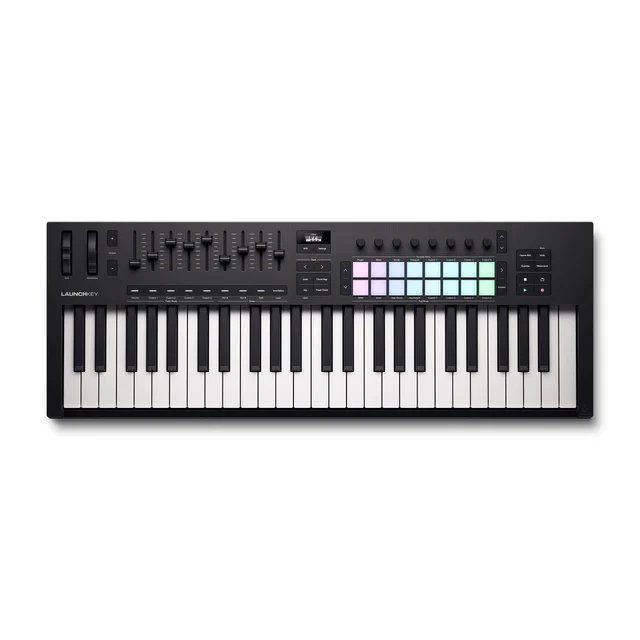
- Novation Launchkey 49 MK4 - Buy. The most complete all-rounder for producers who want deep, hands-on DAW control out of the box.
- Arturia KeyLab Essential 49 mk3 - Buy. A great-feeling keybed and a genuinely valuable software bundle make this the best pick for players first.
- Native Instruments Kontrol S49 MK3 - It depends. A superb, screen-guided controller that only justifies its premium if you live in the Native Instruments ecosystem.
- M-Audio Oxygen Pro 49 - Skip. A tempting spec sheet undermined by shallow, poorly documented integration that frustrates in daily use.
The verdict in 30 seconds
What mattered most
- Keybed feel
- DAW integration
- Pads & performance
- Software bundle
- Expression (aftertouch)
- Build & display
A MIDI keyboard controller is the hub that turns a laptop full of virtual instruments into something you can actually play. The category is crowded, and marketing spec sheets rarely tell you which one feels good under your fingers or actually talks to your DAW. We focused on 49-key models, the sweet spot for producers, and synthesized independent testing with owner reports. The result is two easy recommendations, one that only makes sense for a specific buyer, and one we think most people should walk past.
The most complete all-rounder for producers who want deep, hands-on DAW control out of the box.
Best for: Producers who want the most usable controls and DAW workflow for the money, especially Ableton users.
- Excellent semi-weighted, waterfall-style keybed that plays well above its price
- Deep two-way integration with Ableton Live and strong mapping for other major DAWs
- 16 RGB pads with polyphonic aftertouch plus onboard arpeggiator, scale and chord modes make idea-sketching fast
- Nine faders and eight encoders give real mixer and device control
- Integration is deepest in Ableton; other DAWs get less of the magic
- Plastic chassis feels functional rather than premium
Own the Novation Launchkey 49 MK4? Tell us how it held up.
Thanks. Counted, and shown once enough owners have weighed in.
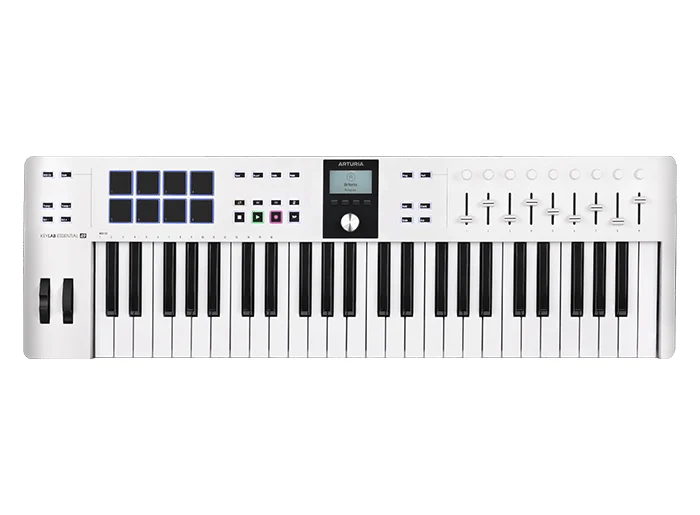
A great-feeling keybed and a genuinely valuable software bundle make this the best pick for players first.
Best for: Players who care most about how the keys feel and want a huge instrument library included.
- Velocity-sensitive hybrid-feel keys that reviewers consistently praise for feel
- Bundled Analog Lab library is deep enough to be a reason to buy on its own
- Clean layout with a small display and DAW command controls for major platforms
- USB-C plus 5-pin MIDI DIN out for connecting to hardware synths
- Eight physical pads (two banks) versus Novation's 16, and no aftertouch on the keys
- DAW control is capable but shallower than dedicated clip-launching workflows
Own the Arturia KeyLab Essential 49 mk3? Tell us how it held up.
Thanks. Counted, and shown once enough owners have weighed in.
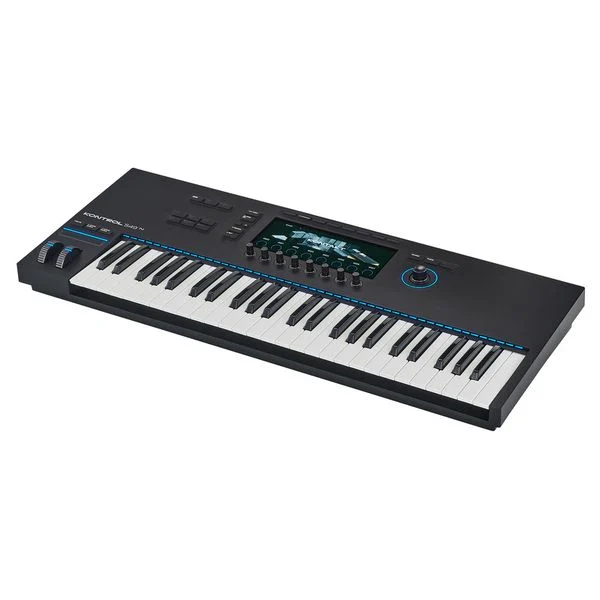
A superb, screen-guided controller that only justifies its premium if you live in the Native Instruments ecosystem.
Best for: Committed Komplete/NKS users who want expressive keys and want to work away from the screen.
- Fatar keybed with true polyphonic aftertouch, among the most expressive in the class
- Full-color screen and NKS browsing let you audition and tweak plugins without the mouse
- Glass screen and anodized aluminum encoders and wheels feel genuinely premium
- MIDI 2.0 support and deep control of Komplete and NKS-ready instruments
- Costs several times more than the mid-range picks
- The best experience is locked to Native Instruments and NKS software; generic DAW control is less special
- Overkill for anyone not invested in that plugin ecosystem
Own the Native Instruments Kontrol S49 MK3? Tell us how it held up.
Thanks. Counted, and shown once enough owners have weighed in.
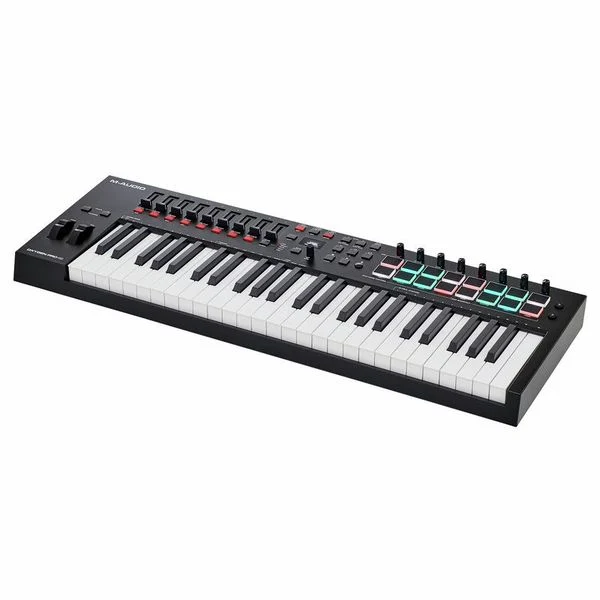
A tempting spec sheet undermined by shallow, poorly documented integration that frustrates in daily use.
Best for: Almost no one at this price; the mid-range rivals do the same job more smoothly.
- Loads of physical controls: pads, knobs, faders and buttons for the price
- Generous bundled software suite to get started
- Channel aftertouch on its semi-weighted keys, plus presets for major DAWs
- Independent testing found DAW integration underdeveloped and thinly documented
- Missing niceties like parameter labeling and pad aftertouch that rivals include
- Keybed and overall feel trail the similarly priced Novation and Arturia
- Setup across different DAWs can be confusing rather than plug-and-play
Own the M-Audio Oxygen Pro 49? Tell us how it held up.
Thanks. Counted, and shown once enough owners have weighed in.
| Criteria | Novation Launchkey 49 MK4 Top pick Buy it Buy | Arturia KeyLab Essential 49 mk3 Buy it Buy | Native Instruments Kontrol S49 MK3 It depends Buy | M-Audio Oxygen Pro 49 Skip it Buy |
|---|---|---|---|---|
| Best for | Producers who want the most usable controls and DAW workflow for the money, especially Ableton users. | Players who care most about how the keys feel and want a huge instrument library included. | Committed Komplete/NKS users who want expressive keys and want to work away from the screen. | Almost no one at this price; the mid-range rivals do the same job more smoothly. |
| Price tier | $$ · mid-range | $$ · mid-range | $$$$ · flagship | $$ · mid-range |
| Keybed feel | Semi-weighted, waterfall keys; excellent | Velocity-sensitive hybrid keys; excellent | Fatar semi-weighted with poly aftertouch; best-in-class | Serviceable but trails rivals |
| DAW integration | Deepest, especially Ableton | Solid across major DAWs | Best inside NKS/Komplete | Underdeveloped and thinly documented |
| Pads & performance | 16 RGB pads, arp, scale, chord modes | Fewer pads, player-focused | No pads; Light Guide and screen-driven browsing | Many pads but no pad aftertouch |
| Software bundle | Useful starter suite | Analog Lab; standout value | Deep if you buy into Komplete | Generous on paper |
| Expression (aftertouch) | Polyphonic aftertouch on pads; none on keys | Pressure-sensitive pads; none on keys | Polyphonic aftertouch on keys | Channel aftertouch on keys; none on pads |
| Build & display | Functional plastic, small display | Clean plastic, small display | Aluminum controls with full-color screen | Plastic, basic display |
| Best use | All-round production and DAW control | Playing and instrument library | NKS-centric expressive studios | Skip in favor of the above |
| Price tier | $$ · mid-range | $$ · mid-range | $$$$ · flagship | $$ · mid-range |
Which one is right for you?
- Producers who want the most usable controls and DAW workflow for the money, especially Ableton users. Buy it Novation Launchkey 49 MK4
- Players who care most about how the keys feel and want a huge instrument library included. Buy it Arturia KeyLab Essential 49 mk3
- Committed Komplete/NKS users who want expressive keys and want to work away from the screen. It depends Native Instruments Kontrol S49 MK3
- Almost no one at this price; the mid-range rivals do the same job more smoothly. Skip it M-Audio Oxygen Pro 49
How we judged the field
We do not run our own lab. Instead, we synthesize independent testing, expert reviews, and aggregated owner reports to find where the consensus lands and where it splits. For MIDI keyboard controllers aimed at music production, four things decide whether a unit earns a place on your desk: how the keybed feels to actually play, how deeply and reliably it integrates with your DAW, how useful the pads and performance controls (arpeggiators, scale and chord modes, faders and encoders) are, and whether the bundled software adds real value. We weighted keyfeel and integration most heavily, because those are what you notice every session. We concentrated on 49-key models, the size most producers settle on, and we looked for an honest spread rather than four safe winners.
Novation Launchkey 49 MK4
Buy itThe Launchkey 49 MK4 is the controller we would hand most producers without hesitation. Reviewers consistently rate its semi-weighted, waterfall-style keybed as playing above its price, and the control surface is where it pulls ahead: sixteen velocity-sensitive RGB pads with polyphonic aftertouch, nine faders, eight encoders, plus onboard arpeggiator, scale and chord modes that make sketching ideas genuinely fast. Owners highlight how much of the workflow is hands-free, particularly in Ableton Live, where the two-way integration lets you launch clips, control devices and drive the mixer without touching the mouse. The trade-offs are minor: the chassis is functional plastic, and the deepest integration is reserved for Ableton while other DAWs get a still-capable but less magical experience. As an all-rounder, nothing else here matches its blend of playability and control.
Arturia KeyLab Essential 49 mk3
Buy itIf your priority is how the keys feel and what comes in the box, the KeyLab Essential 49 mk3 is the pick. Independent testing praises its velocity-sensitive, hybrid-feel keybed, and the bundled Analog Lab library is deep enough that some buyers justify the purchase on the software alone. It carries a clean layout, a small display, DAW command controls for the major platforms, and both USB-C and 5-pin MIDI DIN out for driving hardware synths. It is less of a performance box than the Launchkey: eight physical pads instead of sixteen, no key aftertouch, and DAW control that is competent rather than clip-launch-focused. But for a player who wants an inspiring keybed and a serious instrument collection to play through, it is an easy recommendation.
Native Instruments Kontrol S49 MK3
It dependsThe Kontrol S49 MK3 is the most impressive controller here, and also the hardest to recommend broadly. Its Fatar keybed offers true polyphonic aftertouch that reviewers call among the most expressive in the class, the glass screen and anodized aluminum controls feel premium, and the full-color display lets you browse, audition and tweak NKS-ready plugins away from your computer display. It also supports MIDI 2.0. The catch is the premium price and the ecosystem lock-in: the experience is genuinely special when you are working inside Komplete and NKS software, and merely good as a generic DAW controller. If you are committed to that ecosystem and want expressive keys, it is worth every penny. If you are not, you are paying a flagship price for benefits you will not fully use.
M-Audio Oxygen Pro 49
Skip itOn paper the Oxygen Pro 49 looks like a bargain: pads, knobs, faders, buttons and a generous software bundle, plus channel aftertouch on the keys. In practice, independent testing found the DAW integration underdeveloped and only sparsely documented, missing niceties such as parameter labeling and pad aftertouch that rivals include, with setup that varies confusingly from one DAW to the next. The keybed and general feel also trail the similarly priced Novation and Arturia. It is not broken, and someone will be happy with it, but at this price the mid-range alternatives do the same job more smoothly and more enjoyably. That makes it the one to walk past.
Sources
Specs in this review come from these pages.
Novation Launchkey 49 MK4 vs Arturia KeyLab Essential 49 mk3: which should you buy?
These are the two we would actually choose between, and the decision comes down to how you work. The Launchkey 49 MK4 is the better production and control instrument: more and better pads, richer performance features, and the deepest hands-on DAW workflow, particularly if Ableton Live is your home. The KeyLab Essential 49 mk3 wins on the two things that matter to players first: a keybed reviewers love and the Analog Lab bundle, which is a substantial instrument library rather than a token freebie. Both have 5-pin MIDI out for hardware. Pick the Launchkey if you want to drive your DAW and finger-drum; pick the KeyLab if you want to play, and want a big palette of sounds included. Both are mid-range and both are safe buys.
What to look for
- Keybed feel: Semi-weighted or velocity-sensitive keys suit production; fully weighted hammer action is for pianists. Try before you commit if you can.
- DAW integration: Confirm your specific DAW gets deep, two-way control (transport, mixer, devices), not just basic MIDI.
- Pads and performance controls: Arpeggiators, scale and chord modes, faders and encoders speed up writing and mixing. Judge by how you actually work.
- Expression: Channel aftertouch is common and useful; polyphonic aftertouch is far more expressive but costs more.
- Bundled software: A strong instrument library can be worth a large share of the price. Check what is actually included.
- Connectivity and size: Look for USB-C and, if you use hardware, 5-pin MIDI out. Match the key count (25 / 49 / 61) to your desk and playing style.
Our final take
Most producers should buy the Novation Launchkey 49 MK4: it is the most complete, most usable controller for the money, with a keybed that plays well and the deepest hands-on DAW workflow in this group. Players who care most about feel and a big included instrument library should take the Arturia KeyLab Essential 49 mk3 instead, and be just as happy. The Native Instruments Kontrol S49 MK3 is a beautiful, screen-guided flagship that is worth its premium only if you live inside the Komplete and NKS ecosystem. And the M-Audio Oxygen Pro 49, despite a busy spec sheet, is the one we would skip; its shallow integration makes the similarly priced alternatives the smarter buy every time.
Questions, answered
How many keys should a MIDI controller for production have?
For most producers, 49 keys hit the sweet spot: enough range to play two-handed parts and chords, but still compact enough for a desk. Go to 25 keys only if portability is the priority, or 61-plus keys if you play a lot of piano-style parts.
Do I need weighted keys?
Only if you are primarily a pianist. Fully weighted, hammer-action keys feel great for acoustic piano but are heavier, pricier, and less ideal for synths and beats. Semi-weighted or velocity-sensitive keys, like those on our top picks, are the versatile choice for production.
What is aftertouch and does it matter?
Aftertouch sends extra expression when you press harder on a held key, useful for vibrato or filter sweeps. Channel aftertouch applies to all held notes at once; polyphonic aftertouch, as on the Kontrol S49 MK3, works per note and is far more expressive but adds cost. It is a nice-to-have, not essential.
Will these work with any DAW?
All four connect over USB and send standard MIDI to any DAW. The difference is depth of integration: the Launchkey shines in Ableton, and the Kontrol series is deepest with Native Instruments software. Check that your specific DAW is supported for hands-free mixer and transport control if that matters to you.
Is a pricier controller worth it for a beginner?
Usually not. A mid-range 49-key controller with a decent keybed and a useful software bundle covers everything a new producer needs. Save the flagship spend for when you know you want polyphonic aftertouch or are committed to a specific plugin ecosystem.
Deciding between the top two? See our head-to-head: Novation Launchkey 49 MK4 vs Arturia KeyLab Essential 49 mk3.
More in Audio & Headphones
MIDI Keyboard Controllers, Explained Plain-English guide → Novation Launchkey 49 MK4 vs Arturia KeyLab Essential 49 mk3 Head-to-head →  The Best Music Streamers: 4 Compared (and One to Skip)
  The Best Premium Noise-Cancelling Headphones: 4 Compared (and One to Skip)
  The Best Open-Back Headphones: 4 Compared (and One to Skip)
  The Best Open-Ear Headphones: 4 Compared (and One to Skip)