Explained
Microphone Boom Arms, Explained
After reading this you will be able to weigh your own microphone rig, read a boom arm's capacity and mounting specs properly, and pick an arm that still holds position in three years.
In this guide
A microphone boom arm has exactly one job: hold your mic where you put it and keep holding it. Nearly every arm passes that test on day one, which is why the spec sheet is such a poor guide to which ones are still passing it a year later. Almost all the disappointment in this category comes from two things people get wrong at the point of purchase: they compare the arm's rated capacity against the weight of the bare microphone instead of the whole assembly, and they buy a desk clamp without checking whether their desk edge will actually accept one.
The 30-second version
- Weigh the whole assembly, not the mic. A metal shock mount can add a few hundred grams, and a pop filter adds more on top of that. The number that has to fit inside the arm's rating is microphone plus mount plus anything else bolted to the end.
- Treat rated capacity as a budget, not a target. Published ratings are usually static holding figures measured in a favourable position, while the real load peaks with the arm extended straight out over your desk. Buying roughly 30 to 40 percent above your measured total is what keeps an arm from creeping downward in month three.
- The tension mechanism predicts long-term sag better than the number does. Enclosed damped springs and gas springs hold position for years; exposed coils tightened by friction screws are on a countdown, because the screws are the wear item and usually cannot be replaced.
- Mounting is a separate decision from the arm itself. A clamp is the default, but thick desks, edge lips, glass tops, and walls behind the desk all rule it out. Grommet inserts and freestanding risers exist for exactly those cases, and not every arm offers them.
- A gas spring needs load to behave. High-capacity gas arms are the answer for heavy broadcast dynamics, but hang a very light USB condenser on one and it will float upward until you dial the pressure down. Capacity you cannot use is not a feature.
The products this guide is about
Our verdict on each, with the full reasoning on the companion review.
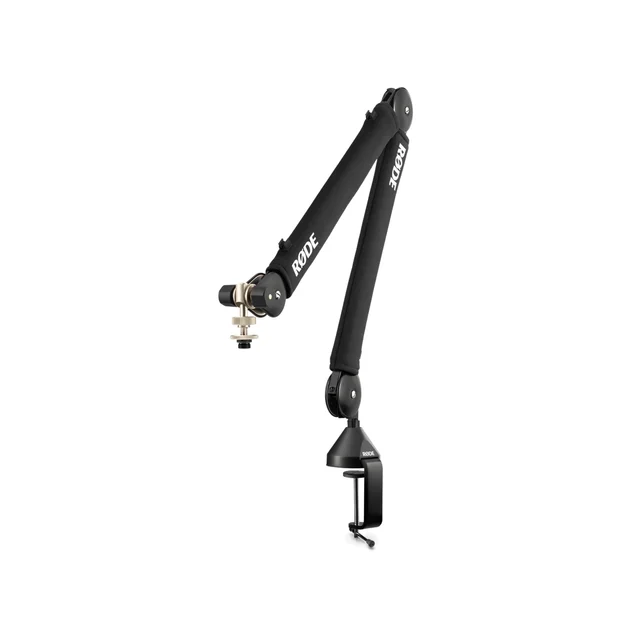
- Buy RØDE PSA1+ Professional Studio Boom Arm The default answer for most desks: silent damped springs, a sane weight window, and it stays where you put it. Amazon
- Buy Elgato Wave Mic Arm Pro A gas spring rated to 3 kg, which is the only spec in this group that leaves genuine headroom for a heavy mic plus a heavy mount. Amazon
- It depends Gator Frameworks GFWMICBCBM3000 Deluxe Desktop Mic Boom Stand The most load per dollar in the group, with a captive XLR cable that is either the best feature or the reason you skip it. Amazon
- Skip InnoGear Upgraded Microphone Boom Arm Marketed for the SM7B and rated at 4.4 lb, but the joints and springs are the part owners end up fighting.
What actually matters
- Rated weight capacity versus your actual load. This is the single criterion that decides whether you are happy in two years. Put the microphone and its shock mount on a kitchen scale, add anything else that will hang off the end, and only then look at arm ratings. Most disappointment in this category is a rating compared against the wrong number.
- Tension mechanism. Internally damped coil springs, exposed coil springs plus friction screws, and gas springs behave completely differently over time. Coils relax under constant tension; gas cylinders hold by pressure and do not. Friction joints polish themselves smooth and then stop gripping no matter how hard you tighten.
- Joint and housing materials. Metal load-bearing joints survive years of repositioning. Plastic ones deform and crack, and on cheap arms they are not replaceable parts, so a sagging arm becomes a disposal rather than a repair.
- Mounting compatibility with your actual desk. Check the clamp's maximum jaw thickness against your desk, and check that you have clear access to the edge. Check the maker's figure; Elgato's Wave Mic Arm Pro clamp, for example, opens to 60 mm. If your desk is thicker, has a decorative lip, or sits flush to a wall, you need a grommet insert or a riser base instead.
- Reach and how far the clamp point sits from your face. An arm that technically reaches your mouth only at full horizontal extension is an arm permanently running at its worst mechanical disadvantage. More reach than you need is cheap insurance; exactly enough reach is not.
- Movement noise. If the arm creaks or clunks when you reposition it, that sound goes into a live recording. Damped and gas designs are effectively silent; exposed-spring designs often are not.
- Cable routing. Internal channels that take your own cable are the flexible default. An arm with a captive cable permanently routed inside is tidier out of the box and impossible to fix or change later.
The specs, in plain English
Green flags vs red flags
Green flags
- The listing publishes a weight window or is explicit that the rating is for the microphone plus its mount, rather than quoting one impressive number with no context
- Springs are enclosed and damped, or the arm uses a gas cylinder, with no user-facing friction screw you are expected to keep retightening
- Load-bearing joints and the clamp body are metal, and the manufacturer sells replacement hardware
- The clamp's maximum desk thickness is stated in millimetres or inches, and a grommet or through-desk insert is offered for desks the clamp will not fit
- Cable routes through internal channels using a cable you supply, so you can change cable type or length later
- Long-running owner reports mention repositioning the arm regularly without creak, sag, or retightening
Red flags
- A heavy broadcast microphone pictured in the compatibility graphic next to a capacity figure that is barely above that microphone's bare weight
- Load-bearing joints or the clamp jaw are visibly plastic, especially where the arm segments pivot
- The tension mechanism is exposed coil springs plus friction screws, and the instructions tell you to retighten periodically as normal maintenance
- No stated maximum desk thickness, or a clamp so shallow it only suits thin desktops
- A captive cable permanently routed through the arm with no replacement path, on a product with no spare parts
- Owner reports that cluster around the same story: fine for a couple of months, then slow drooping, then stripped screws
Who's who: the brands
- RØDE - Australian microphone maker whose studio arms are the default recommendation for podcast desks, known for damped internal springs, published weight windows, and a long owner record free of droop complaints.
- Elgato - Creator-hardware brand whose premium arm uses a gas spring for far more headroom than coil designs, plus an unusually accommodating clamp for thick or awkward desk edges.
- Gator Frameworks - Stands-and-cases manufacturer offering steel arms with high rated capacity and long reach for less money, sometimes with an XLR cable permanently routed inside.
- Blue (Compass and similar) - Studio-microphone brand whose arms pair hidden springs with internal cable channels, aimed at people who want an arm that disappears visually on a tidy desk.
- InnoGear and other budget sellers - A large field of low-cost arms sold under many names with near-identical hardware. They work with light USB condensers and are the source of most sag complaints when loaded with heavy dynamics.
- Yellowtec and other broadcast suppliers - Professional radio-studio equipment makers whose arms are built for permanent installation and serviceability rather than desk aesthetics, priced accordingly.
How to read a listing without getting fooled
Start at the end of the listing, not the top. Find the rated weight capacity and write it down, then find your own total: microphone on a kitchen scale, plus shock mount, plus pop filter if it goes on the arm. If your total is more than about two thirds of the rating, keep shopping, because that is the load level at which springs relax fastest and friction joints start slipping. Next, ignore the hero photo and hunt for the words that describe the mechanism, gas spring, damped, internal springs, or tension screws, because that phrase predicts three-year behaviour better than any number. Then check two mounting facts: the maximum desk thickness the clamp accepts, and whether a grommet insert exists as an option or is included. Measure your desk before you decide, including any lip on the underside. Be sceptical of compatibility graphics showing a heavy broadcast dynamic, since those establish that the mic will physically thread on, not that the arm will hold it up indefinitely. Finally, read owner reports filtered to the longest time frames you can find and look for the specific words creep, sag, droop, and retighten. If the same sequence keeps appearing, the number on the box is describing a different situation than the one you are buying for.
How much should you spend?
Boom arms are one of the categories where the cheapest option most reliably costs you twice, because a sagging arm is usually a disposal rather than a repair. The floor of the market gets a light USB condenser off the desk and does that job adequately, so if your microphone is genuinely light and the setup is temporary, there is no shame in spending very little. The moment a heavy dynamic and a metal shock mount enter the picture, though, the budget tier is being asked to do the exact thing it is worst at, and the mid tier becomes the real starting point. What you buy as you move up is not more capacity on paper but a better mechanism behind it: enclosed damped springs, metal load-bearing joints, and no friction screw designated as the wear item. That is where the value sweet spot sits for most people, and it is a buy-once purchase that outlives several microphones. Spending into the premium tier is worth it in two specific cases: when your assembly is heavy enough that you want gas-spring headroom rather than a coil arm running near its ceiling, and when your desk edge is thick or awkward enough that you need a clamp with unusual jaw capacity. Spending more than that buys broadcast-grade serviceability and a permanent-install aesthetic, which matters in a radio studio and rarely at home. What extra money does not buy is relevance to a light microphone, since an over-sprung premium arm handles a very light mic worse than a mid-priced damped one does.
Questions, answered
How much weight does my boom arm actually need to hold?
Weigh the whole assembly, not the microphone. Put the mic on a kitchen scale, then add the shock mount, which can add a few hundred grams, and add a pop filter if it will hang on the arm rather than a separate stand. Take that total and shop for an arm rated at least 30 to 40 percent above it. Springs lose tension fastest when they sit near their limit, so the headroom is not wasted capacity, it is the thing buying you years without sag.
Why does my arm droop even though my mic is under the rated weight?
Two reasons, and cheap arms have both. First, published ratings are usually static holding figures measured with the arm in a favourable position, while the load on the springs actually peaks when the arm is extended horizontally over your desk, which is where it lives. Second, coil springs relax over time under constant tension and friction joints polish themselves smooth, so the grip fades whatever the number said. Retightening the screws works for a while, then the interval gets shorter, then a screw strips or a plastic joint cracks.
Should I get a desk clamp, a grommet mount, or a riser base?
A clamp is the right default for most desks, and it is reversible, which matters if you rent or expect to rearrange. Check two things before you commit: the maximum thickness the clamp accepts, which the maker should state (Elgato's Wave Mic Arm Pro opens to 60 mm), and whether you have genuinely clear access to the desk edge. A grommet or through-desk insert bolts through a hole in the surface instead, which is sturdier and tidier and the better choice for a permanent studio, but it means drilling and it is a one-way decision, so confirm the desk is yours to modify and that the arm offers the part. A freestanding riser or weighted base is the fallback when neither works: glass tops that a clamp could crack, desks with a decorative lip, or a desk pushed flush against a wall. Bases cost you desk space and transmit a little more surface vibration, but they mount anywhere.
Is a gas spring arm better than a coil spring arm?
For heavy microphones, usually yes. A gas spring holds position by pressure inside a sealed cylinder rather than by metal tension, so it does not suffer the slow relaxation that makes coil arms droop, and gas designs generally carry considerably more weight. The trade-off is the minimum load. Hang a very light USB condenser on a gas arm and it will tend to float upward until you back the pressure off, and it can still feel over-sprung after that. Coil arms with enclosed damping handle light and mid-weight microphones more gracefully and are quieter than exposed-spring designs. Match the mechanism to your rig rather than assuming the bigger number wins.
Will a boom arm stop my keyboard and desk noise getting into recordings?
Partly, and it is a real improvement rather than a marketing one. Lifting the microphone off a desk stand removes the direct path for typing and mug thumps travelling up through the surface. It does not isolate the mic completely, because the clamp is still bolted to the same desk, so a heavy keystroke still has a route in. Pair the arm with a proper shock mount for the rest, and remember that the shock mount is exactly the weight most people forget to include when they size the arm.
Do I need thread adapters to fit my microphone?
Probably not separately, because most arms ship with them. Microphone mounts use 5/8 inch threading as the common standard in the United States and 3/8 inch across much of Europe, and creator-focused arms often use 1/4 inch camera threading at the tip with bushings for the other two in the box. Check the listing for the adapters before you buy rather than after, since a missing bushing is a cheap part that nonetheless stops you recording on day one.
Or jump to the head-to-head: RØDE PSA1+ Professional Studio Boom Arm vs Elgato Wave Mic Arm Pro.