Explained
Label Makers, Explained
After reading, you will know whether you need laminated tape or inkless thermal, and how to read a label maker's spec sheet without getting fooled.
In this guide
Label makers look interchangeable, but they split into two very different families: cartridge-tape units that print tough, laminated labels, and inkless thermal printers that pair with a phone app and run on cheap paper rolls. The single mistake most first-time buyers make is choosing on sticker price alone, then discovering the labels fade in a sunny window or that the refills cost more than the printer over time. The right question is not which model is best, but where your labels will live.
The 30-second version
- Match technology to environment. Laminated tape survives sun, water, and rubbing; inkless thermal is cheap to run but fades in heat and sunlight, so it belongs indoors.
- The refills matter more than the printer. A cheap printer with pricey cartridges can cost far more over a year than a slightly dearer unit that feeds on inexpensive rolls.
- Decide how you want to type. App-driven units give the most design control, while a built-in keyboard lets anyone print without pairing a phone.
- Right-size the label width. Narrow-tape handhelds are fine for cables and shelves, but shipping and product labels need a model that prints wider stock.
- Watch for refill lock-in. Most brands tie you to their own tape or rolls; confirm price and availability before you commit, and treat the cheapest third-party media with caution.
The products this guide is about
Our verdict on each, with the full reasoning on the companion review.
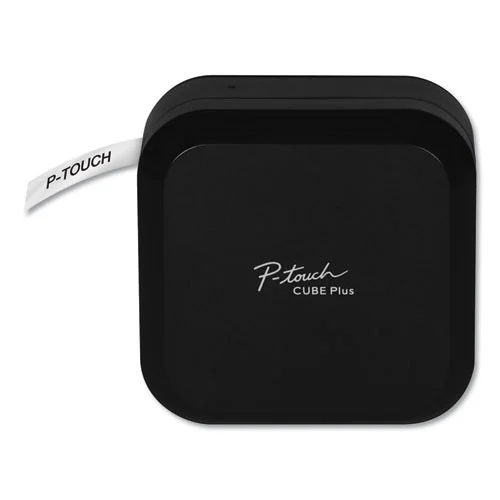
- Buy Brother P-touch Cube Plus (PT-P710BT) The durability pick: laminated TZe tape that survives sunlight, water, and abrasion, driven entirely from a phone or PC. Amazon
- Buy Niimbot B1 The value pick: an inkless thermal printer with dirt-cheap rolls, up to two-inch-wide labels, and foolproof roll auto-detection. Amazon
- It depends DYMO LabelManager 160 The no-phone handheld: a QWERTY keyboard and screen for quick standalone labels, with no app in sight. Amazon
- Skip Phomemo M110 A capable business-oriented thermal printer that most home users will find is neither the cheapest nor the most durable option. Amazon
What actually matters
- Print technology decides everything downstream. Thermal-transfer onto laminated tape gives rugged, long-life labels; direct thermal is inkless and cheap but fades over time.
- Label durability is about whether the print survives sunlight, moisture, and handling. Laminated tape shrugs it off; unlaminated tape and thermal paper do not.
- Running cost of consumables is the true long-term expense. Inexpensive rolls beat tape cartridges per label, but the cheapest labels are also the ones most likely to fade.
- Connectivity and workflow determine who can use the device. A Bluetooth app suits design control; a physical keyboard suits shared households that dislike phone gadgets.
- Maximum label width limits what jobs the printer can handle, from narrow cable flags to wide shipping and product labels.
- Print resolution affects how crisp small text, barcodes, and QR codes look, especially on small labels.
- Cutter and power shape day-to-day comfort: an automatic cutter and a rechargeable battery make long labeling sessions far more pleasant.
The specs, in plain English
Green flags vs red flags
Green flags
- Laminated tape if the labels will face sun, moisture, or heavy handling
- Clearly stated, widely available refills with reasonable per-label cost
- An automatic cutter and rechargeable battery for comfortable long sessions
- A label width that comfortably covers your biggest intended job
- Automatic roll or cartridge recognition that removes fiddly setup
Red flags
- A very cheap printer paired with expensive or hard-to-find refills
- Direct-thermal media marketed for outdoor or long-term use where it will fade
- App-only operation when you actually need to hand the device to others
- Reliance on the cheapest unofficial rolls, which often print faint or patchy
- Narrow-tape-only handhelds sold for shipping or product labeling
Who's who: the brands
- Brother - Known for the P-touch line and durable laminated TZe tape aimed at labels that must last.
- Niimbot - Value-focused inkless thermal printers with very cheap rolls and automatic RFID roll detection.
- DYMO - Long-established maker of both standalone keyboard handhelds and app-driven units, using D1 tape.
- Phomemo - Business-oriented thermal printers with broad roll support and template-heavy companion apps.
How to read a listing without getting fooled
Start with the print technology line, because it predicts durability and running cost at a glance: laminated tape means rugged and long-lasting but pricier per label, while direct thermal means cheap and inkless but prone to fading. Next, look past the printer's price to the refills - find the exact tape or roll it uses, check what a pack costs and how easy it is to buy, and be wary of listings that lean on the cheapest third-party media to look economical. Confirm the maximum label width matches your biggest job, since a narrow handheld cannot print a shipping label. Treat resolution numbers such as 180 or 203 dpi as a minor tiebreaker rather than a headline feature. Finally, check how you drive the device: an app gives design control but needs a phone, whereas a built-in keyboard lets anyone print without pairing anything.
How much should you spend?
Spend according to where your labels will end up rather than chasing the lowest price. If your labels stay indoors - pantry shelves, file folders, storage bins in a closet - an inexpensive inkless thermal printer with cheap rolls delivers the best value, and paying more buys little that matters. If your labels face sunlight, moisture, or constant handling, it is worth stepping up to a laminated-tape unit even though the cartridges cost more per label, because a faded or peeling label is a false economy. Reserve the top of the range for genuine needs such as wide labels, heavy volume, or an automatic cutter for long sessions. Above all, price the refills into your decision: a modest printer that feeds on expensive cartridges can cost far more over a year than a slightly dearer one that runs on cheap media.
Questions, answered
Tape or thermal - which should I choose?
It comes down to durability versus running cost. Laminated cartridge-tape models print labels that resist fading, water, and abrasion, but the cartridges cost more per label. Inkless thermal units use very cheap rolls and never need ink, but the print can yellow and fade in direct sunlight or heat over months. Choose tape for anything outdoors or long-term, and thermal for high-volume indoor labeling.
Do I need a phone to use a label maker?
Not always. Standalone handheld units have their own keyboard and screen, so you type and print directly on the device with nothing to install. Many modern models, however, are designed around a Bluetooth phone app, sometimes with USB to a computer, and have no built-in keyboard. If you want to hand the device to anyone without setup, choose a keyboard-equipped handheld.
Which type is cheapest to run over time?
Inkless thermal printers usually win on running cost because their paper rolls are inexpensive and there is no ink or ribbon to replace. Laminated tape cartridges cost more per label. The trade-off is that the cheapest thermal labels are also the ones most likely to fade, so lowest cost per label does not always mean the longest-lasting label.
Will thermal labels really fade?
Direct-thermal labels have no ink and darken by heating the paper, so independent testing and owner reports agree they can fade or yellow when exposed to sunlight, heat, or long periods of time. For a pantry, a filing cabinet, or indoor cable tags this is rarely a problem. For anything in a window, garage, car, or outdoors, laminated tape holds up far better.
Are the refills locked to each brand?
Largely, yes. Most makers use their own tape cartridges or rolls, and while compatible third-party versions of some formats exist and can lower cost, quality varies. Some rolls carry a chip the printer recognizes automatically, which is foolproof but ties you to compatible media. Factor the price and availability of refills into your decision, not just the printer's sticker price.
Or jump to the head-to-head: Brother P-touch Cube Plus (PT-P710BT) vs Niimbot B1.