

Tech & Gadgets
The Best Label Makers: 4 Compared (and One to Skip)
We compared four current label makers on tape versus thermal printing, connectivity, print quality, and the long-term cost of their consumables.
The short version
Choose your label maker by where the labels will live. For anything exposed to sun, water, or rubbing, the Brother P-touch Cube Plus and its laminated tape are worth the higher per-label cost and app-only workflow. For high-volume indoor labeling on a budget, the inkless Niimbot B1 has a low running cost and automatic roll detection, though thermal print fades over time. The DYMO LabelManager 160 is the right call only if you want a standalone keyboard and refuse to use a phone app. The Phomemo M110 is competent but sits awkwardly between the two, so most buyers can skip it. Best for: durable, long-lasting labels, buy the Brother; for cheap indoor volume, buy the Niimbot.
Our picks at a glance
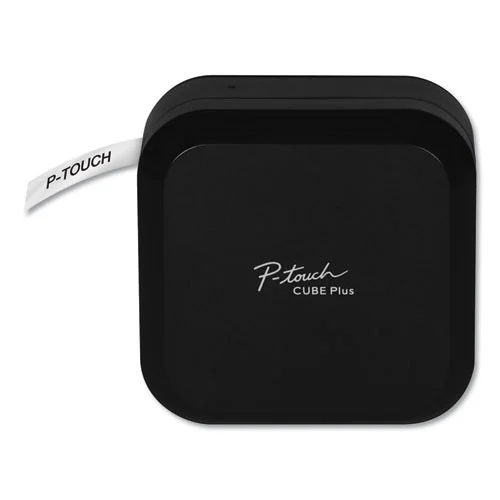
- Brother P-touch Cube Plus (PT-P710BT) - Buy. The durability pick: laminated TZe tape that survives sunlight, water, and abrasion, driven entirely from a phone or PC.
- Niimbot B1 - Buy. The value pick: an inkless thermal printer with dirt-cheap rolls, up to two-inch-wide labels, and foolproof roll auto-detection.
- DYMO LabelManager 160 - It depends. The no-phone handheld: a QWERTY keyboard and screen for quick standalone labels, with no app in sight.
- Phomemo M110 - Skip. A capable business-oriented thermal printer that most home users will find is neither the cheapest nor the most durable option.
The verdict in 30 seconds
What mattered most
- Print technology
- Connectivity
- Label durability
- Running cost of consumables
- Max label width
- Best use
Label makers split into two camps: cartridge-tape units that print durable, laminated labels, and inkless thermal printers that pair with a phone app and run on cheap paper rolls. We worked from maker specs and owner reports across four current models to sort out which technology suits which job. Two earn a clear buy, one is a solid grab-and-go if you never want to touch a phone, and one is easy to skip for most households.
The durability pick: laminated TZe tape that survives sunlight, water, and abrasion, driven entirely from a phone or PC.
Best for: Anyone labeling cables, outdoor gear, storage bins, or anything that needs to stay readable for the long haul.
- Laminated TZe tape is designed to resist fading, water, and rubbing off
- Clean app and desktop software (Bluetooth or USB) with strong font, symbol, and template control
- Automatic full cutter and rechargeable battery make it pleasant for long labeling sessions
- No built-in keyboard or screen, so it is unusable without a paired phone or computer
- Genuine tape cartridges carry a higher cost per label than thermal rolls
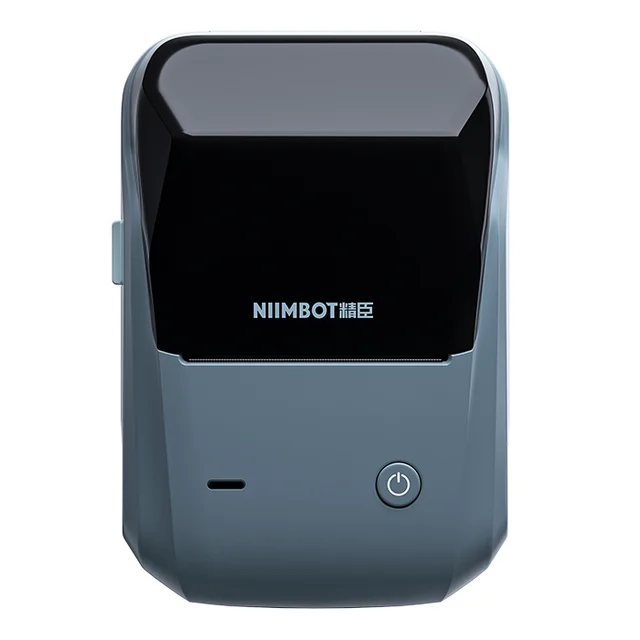
The value pick: an inkless thermal printer with dirt-cheap rolls, up to two-inch-wide labels, and foolproof roll auto-detection.
Best for: Home organizers, resellers, and small businesses who print a lot of indoor labels and want the cheapest ongoing cost.
- No ink or ribbon and inexpensive rolls give it a low running cost
- RFID-chipped rolls are recognized automatically, so size and type are set for you
- Prints wide labels up to roughly two inches for shipping, product tags, and file folders
- Thermal labels can yellow and fade in direct sun or heat over time
- Rolls are proprietary, and very cheap third-party media prints faint or patchy
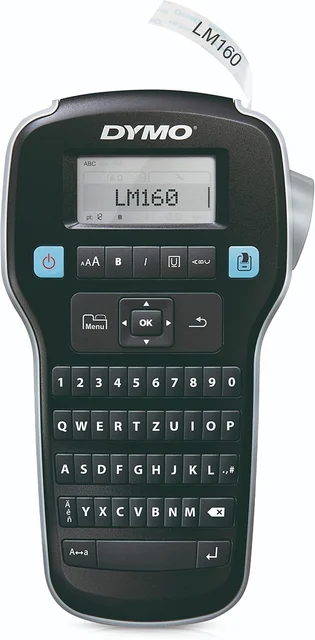
The no-phone handheld: a QWERTY keyboard and screen for quick standalone labels, with no app in sight.
Best for: People who want to grab a device, type, and print without pairing anything to a phone.
- Fully self-contained with a physical keyboard and display, so no phone or software is needed
- Fast for one-off labels and easy for anyone who dislikes app-driven gadgets
- Inexpensive to buy and simple to hand to any family member or coworker
- D1 tape is not laminated, so print is less rugged than Brother's laminated tape
- No Bluetooth, no app, limited fonts, and D1 cartridges are pricey per label
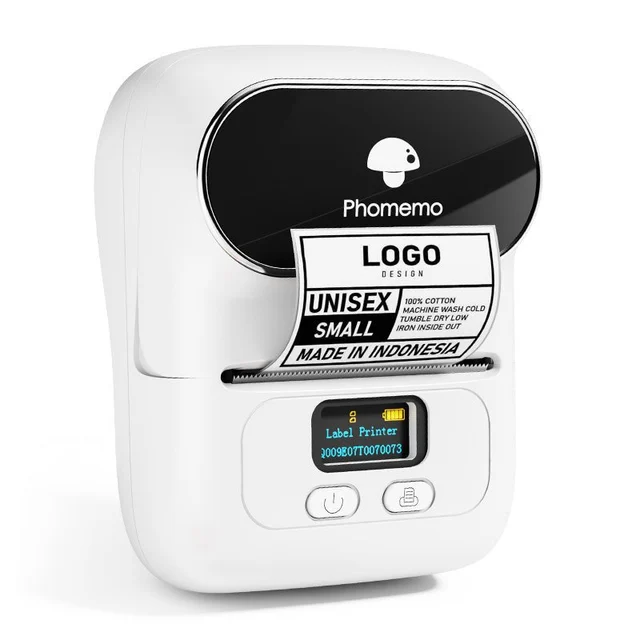
A capable business-oriented thermal printer that most home users will find is neither the cheapest nor the most durable option.
Best for: Small-business sellers who specifically want its template library; general households are better served elsewhere.
- Handles wide labels and a broad range of roll shapes and sizes
- The Print Master app is well stocked with templates for products, QR codes, and price tags
- Inkless thermal design means no ribbons or cartridges to buy
- Priced above the cheaper Niimbot while sharing thermal's tendency to fade in sun and heat
- Proprietary rolls and an app-only workflow with no keyboard or standalone use
| Criteria | Brother P-touch Cube Plus (PT-P710BT) Top pick | Niimbot B1 | DYMO LabelManager 160 | Phomemo M110 |
|---|---|---|---|---|
| Verdict | Buy it | Buy it | It depends | Skip it |
| Best for | Anyone labeling cables, outdoor gear, storage bins, or anything that needs to stay readable for the long haul. | Home organizers, resellers, and small businesses who print a lot of indoor labels and want the cheapest ongoing cost. | People who want to grab a device, type, and print without pairing anything to a phone. | Small-business sellers who specifically want its template library; general households are better served elsewhere. |
| Price tier | $$ · mid-range | $ · budget | $ · budget | $$ · mid-range |
| Print technology | Thermal transfer onto laminated TZe tape | Direct thermal (inkless) | Thermal transfer onto D1 tape | Direct thermal (inkless) |
| Connectivity | Bluetooth app + USB to PC; no keyboard | Bluetooth app; no keyboard | Standalone QWERTY keyboard; no app | Bluetooth app; no keyboard |
| Label durability | Excellent - laminated, water and fade resistant | Fades in sun/heat over time | Moderate - unlaminated tape | Fades in sun/heat over time |
| Running cost of consumables | Higher per label (tape cartridges) | Low per label (cheap rolls) | Higher per label (D1 cartridges) | Low per label (rolls) |
| Max label width | Up to about 24 mm | Up to about 2 inches | Up to about 12 mm | Up to about 48 mm |
| Best use | Durable, long-life labels | High-volume indoor labeling | Quick standalone typing | Business/product labeling |
| Price tier | $$ · mid-range | $ · budget | $ · budget | $$ · mid-range |
Which one is right for you?
- Anyone labeling cables, outdoor gear, storage bins, or anything that needs to stay readable for the long haul. Buy it Brother P-touch Cube Plus (PT-P710BT)
- Home organizers, resellers, and small businesses who print a lot of indoor labels and want the cheapest ongoing cost. Buy it Niimbot B1
- People who want to grab a device, type, and print without pairing anything to a phone. It depends DYMO LabelManager 160
- Small-business sellers who specifically want its template library; general households are better served elsewhere. Skip it Phomemo M110
How we judged the field
We do not run our own lab. Instead we work from maker specs and owner reports, then weigh the factors that actually decide whether a label maker earns its shelf space. Four things mattered most.
- Print technology and durability: whether a model uses cartridge tape or inkless direct-thermal paper, and how well the finished label survives handling, moisture, and sunlight.
- Connectivity: whether you drive it from a phone app, a computer, or a self-contained keyboard, and how pleasant that workflow is.
- Print quality: crispness of text, barcodes, and symbols at the resolution each maker advertises.
- Running cost: the real long-term expense of the consumables, not just the price of the printer.
Across those criteria, two models stood out for different reasons, one served a specific niche well, and one struggled to justify itself.
Brother P-touch Cube Plus (PT-P710BT)
Buy itThis is the model to buy when the label has to last. Brother’s laminated TZe tape sandwiches the print between layers of film, and it is designed to resist water, sunlight, and rubbing off. That makes it the natural choice for cables, outdoor equipment, kitchen and bathroom storage, and anything handled often. The Cube Plus has no keyboard or screen; you design labels in Brother’s phone app over Bluetooth or in the desktop software over USB, which gives you generous control over fonts, symbols, and templates. The automatic cutter and rechargeable battery make longer sessions comfortable. The trade-off is cost per label: genuine tape cartridges are the priciest consumable here. If durable labels are the goal, that premium is easy to accept.
Niimbot B1
Buy itThe B1 is the value champion. It is a direct-thermal printer, so there is no ink and no ribbon, and the paper rolls are inexpensive, giving it a very low running cost in this comparison. Its rolls carry an RFID chip that the printer reads automatically, so label size and type are set without fiddling. It also prints wider labels than a typical handheld, up to roughly two inches, which suits shipping labels, product tags, and file folders. The catch is inherent to thermal printing: owners report the labels can fade or yellow in direct sun or heat over time, and while the auto-recognized official rolls print cleanly, very cheap third-party media can come out faint or patchy. For high-volume indoor labeling on a budget, it is hard to beat.
DYMO LabelManager 160
It dependsThe LabelManager 160 is the answer to a specific question: what if you never want to use a phone? It is a self-contained handheld with a QWERTY keyboard and a display, so you type and print on the spot with nothing to pair or install. That simplicity is genuinely valuable for shared households and offices, and it is inexpensive to buy. But it prints on unlaminated D1 tape, which owners find less rugged than Brother’s laminated tape, its font and formatting options are limited, and D1 cartridges are pricey per label. It is a good buy for the keyboard-first user and an easy pass for anyone comfortable with an app.
Phomemo M110
Skip itThe M110 is a capable thermal printer with a well-stocked template app and support for a wide range of roll sizes, and small-business sellers who want those templates have a reason to consider it. For most buyers, though, it lands in an awkward middle. It costs more than the cheaper Niimbot B1 while sharing thermal printing’s tendency to fade in sun and heat, and like the other app-driven units it has no keyboard or standalone mode. If you want the lowest running cost, the B1 is cheaper to buy and to feed; if you want labels that last, the Brother is more durable. The M110 does little that one of those two does not do better for the money, so most households can skip it.
Brother P-touch Cube Plus vs Niimbot B1: which should you buy?
This is the real decision for most people, and it hinges on a single question: where will the labels live? The Brother prints laminated tape that shrugs off sunlight, moisture, and abrasion, so it is the one to own if your labels go outdoors, into a garage or car, or onto anything handled daily. You pay for that with a higher cost per label and an app-only workflow. The Niimbot B1 is the opposite trade: its inkless rolls are cheap enough that heavy labelers can save money over time, and RFID auto-detection makes it effortless, but its thermal labels are best kept indoors and out of direct sun. Put simply, buy the Brother for durability and buy the Niimbot for cheap indoor volume. Many organized homes could justify owning both.
What to look for
- Match the technology to the environment: laminated tape for anything exposed to sun, water, or wear; inkless thermal for high-volume indoor labels where fading is not a concern.
- Decide how you want to type: an app gives you the most design control, while a built-in keyboard lets anyone print without a phone.
- Look past the sticker price: cheap thermal rolls versus pricier laminated cartridges can change the true cost more than the printer itself.
- Check refill lock-in: confirm the price and availability of compatible tape or rolls, and be cautious with the cheapest third-party media.
- Right-size the label width: if you need shipping or product labels, choose a model that prints wider stock rather than a narrow-tape handheld.
Our final take
There is no single best label maker, only the best one for where your labels will end up. For durable, long-lasting labels the Brother P-touch Cube Plus is the confident pick, and its laminated tape justifies the higher consumable cost. For cheap, high-volume indoor labeling the Niimbot B1 is the smarter value, provided you accept that thermal print fades over time. The DYMO LabelManager 160 remains a sensible standalone option for anyone who refuses to use an app, while the Phomemo M110 is competent but hard to recommend over the two winners. Decide on durability versus running cost first, and the right model falls out of that choice.
Questions, answered
Tape or thermal - which should I choose?
It comes down to durability versus running cost. Cartridge-tape models such as the Brother P-touch Cube Plus print laminated labels that resist fading, water, and abrasion, but the cartridges cost more per label. Inkless thermal units like the Niimbot B1 and Phomemo M110 use very cheap rolls and never need ink, but owners report the print can yellow and fade in direct sunlight or heat over months. Pick tape for anything outdoors or long-term, and thermal for high-volume indoor labeling.
Do I need a phone, or can I type labels on the device itself?
Only the DYMO LabelManager 160 has its own keyboard and screen for standalone use. The Brother P-touch Cube Plus, Niimbot B1, and Phomemo M110 are all designed around a Bluetooth phone app (the Brother also offers USB to a computer) and have no built-in keyboard. If you dislike app-driven gadgets or want to hand the device to anyone without setup, the handheld DYMO is the friendlier choice.
Which has the lowest long-term running cost?
The inkless thermal printers win on running cost because their paper rolls are inexpensive and there is no ink or ribbon to replace; the Niimbot B1 is inexpensive to feed. Laminated tape cartridges for the Brother cost more per label, and DYMO's D1 tape is also relatively pricey. Owners note the trade-off: the cheap thermal labels are the ones most likely to fade, so the lowest cost per label does not always mean the longest-lasting label.
Will thermal labels fade, and does that matter?
Direct-thermal labels have no ink and darken by heating the paper, so they can fade or yellow when exposed to sunlight, heat, or long periods of time. For a pantry, a filing cabinet, or cable tags indoors this is rarely a problem. For anything in a window, a garage, a car, or outdoors, a laminated tape label from the Brother will hold up far better.
Are the label refills locked to each brand?
Largely, yes. Brother uses TZe tape cartridges and DYMO uses D1 cartridges; compatible third-party versions of both exist and can lower cost, though quality varies. The Niimbot B1 uses RFID-chipped rolls that the printer recognizes automatically, which makes setup foolproof but ties you to compatible media, and owners report that very cheap unofficial rolls can print faint or patchy. Factor the price and availability of refills into your decision, not just the sticker price of the printer.
Deciding between the top two? See our head-to-head: Brother P-touch Cube Plus (PT-P710BT) vs Niimbot B1.
More Tech & Gadgets reviews
 The Best Laptop Sleeves: 4 Compared (and One to Skip)
  The Best Smart LED Strip Lights: 4 Compared (and One to Skip)
  The Best Logic Analyzers: 4 Compared (and One to Skip)
  The Best Mechanical Model Kits: 4 Compared (and One to Skip)
  Best Mesh Wi-Fi Systems: Wi-Fi 7 Picks So You Don't Overpay
  The Best microSD Cards: 4 Compared (and One to Skip)