Explained
Laptop Sleeves, Explained
After reading this you will be able to look at any laptop sleeve listing and tell within a minute whether it will actually protect your laptop, or just keep it from getting scratched.
In this guide
A laptop sleeve looks like the simplest purchase in tech: a padded pouch, pick a colour, done. But sleeves are sold on fabric and looks, while the thing that decides whether your machine survives being set down hard is structure at the corners, and almost no listing talks about that. The other trap is sizing, because "fits 14-inch" covers a surprisingly wide range of actual dimensions, and a sleeve your laptop slides around inside is doing much less than you think.
The 30-second version
- Corners are where laptops die, so reinforced or structured corners matter more than any other single feature. Many damaged machines took a corner-first impact rather than a flat-face one.
- Padding thickness is the wrong number to shop on, because a uniformly thick sleeve of soft foam absorbs less than a thinner sleeve with structure exactly where impacts land.
- Fit precision beats size class, since a loose laptop accelerates inside the sleeve before it hits the padding, which is the exact scenario the padding exists to prevent.
- The shell fabric decides how the sleeve ages, not how well it protects. Coated polyester and treated woven blends shed spills and resist abrasion; untreated neoprene soaks and pills.
- Price barely tracks protection in this category, so the most expensive sleeve on a page is often the slimmest and least protective, and a budget armoured sleeve can outperform it outright.
The products this guide is about
Our verdict on each, with the full reasoning on the companion review.
- Buy tomtoc Defender-A13 Laptop Sleeve Strong protection for the money, thanks to reinforced corners most sleeves skip. Amazon
- Buy Incase Compact Sleeve with Woolenex The slim sleeve that actually survives years of use, because the fabric is the point. Amazon
- It depends Bellroy Laptop Sleeve A good-looking, slim sleeve undermined by a closure owners keep calling too weak. Amazon
- Skip Case Logic Reflect Laptop Sleeve Cheap, everywhere, and soft in exactly the places a sleeve needs to be firm. Amazon
What actually matters
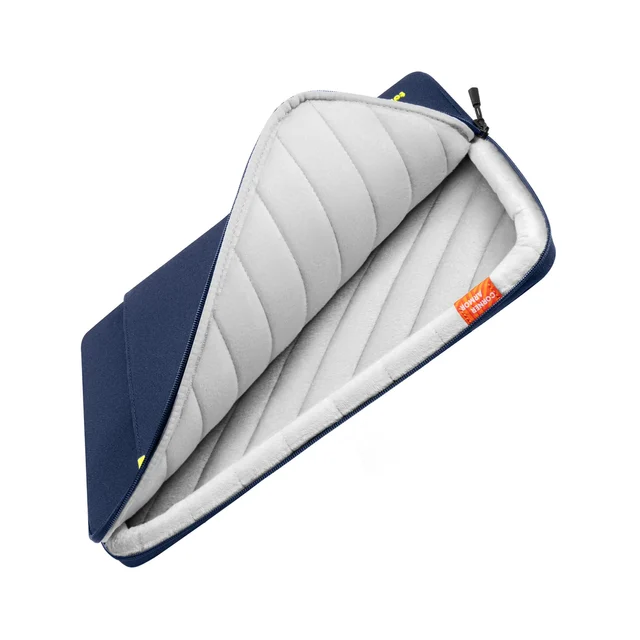
- Corner and edge structure. This is the single best predictor of whether a sleeve saves your laptop. Some makers build reinforced, shaped foam into the four corners; most just run the same flat panel all the way round. Squeeze a corner between two fingers, and if it collapses like the middle of the sleeve, there is no armour there.
- Padding type, not padding depth. Structured or closed-cell foam resists compression and spreads an impact out. Soft memory foam feels reassuring against your palm but compresses instantly and passes most of the energy straight through. A listing quoting a millimetre figure tells you nothing unless it also tells you what the foam is.
- Interior fit tolerance. Sleeves are sold by screen size, but laptops of the same nominal size differ by centimetres. Compare the listed interior dimensions against your exact model. Snug is correct, and a new sleeve that is slightly tight usually relaxes within a week or two.
- Shell fabric and weather treatment. A water-repellent coated shell buys you the seconds you need to react to rain or a knocked-over drink. Untreated neoprene does the opposite: it absorbs moisture and holds it against the machine. None of these are waterproof, so treat weather resistance as spill insurance rather than a dry bag.
- Closure security. Zips stay shut. Magnetic flaps open faster and look better, but the magnet strength varies wildly between brands and a weak one lets the sleeve gape when carried loose. If the sleeve travels outside a bag, favour a zip.
- Slimness versus armour. These two pull against each other and you have to pick. A protective sleeve eats depth in a backpack laptop compartment; a slim sleeve fits anywhere but gives up drop margin. Decide whether the sleeve is your only protection or a liner inside an already-padded bag.
- Hardware and small details. Zipper brand and pull quality, whether the pull can drag across your lid on the way in, and whether there is an external pocket that actually takes your charger. A sleeve you can carry alone for a short trip is far more useful than one that forces a second bag.
The specs, in plain English
Green flags vs red flags
Green flags
- The listing explicitly describes corner or edge reinforcement, with a photo or diagram showing where it sits.
- Interior dimensions are published in millimetres or inches, not just a screen-size class.
- The lining is described as quilted, fleece or foam-backed rather than a thin smooth liner.
- The shell is a coated or treated woven fabric with a stated denier, and the zipper hardware is named.
- There is an external pocket that genuinely takes a charger and cable, not a token slot.
- Owner reports spanning a year or more mention the fabric and hardware still looking presentable.
Red flags
- "Shockproof" or "military grade" with no description of what the padding actually is.
- Only a screen-size class is given, with no interior measurements anywhere on the page.
- The padding is described purely as soft or memory foam, with a millimetre figure doing all the persuading.
- A magnetic or flap closure with repeated owner comments about it popping open in a bag.
- Untreated neoprene sold at a price that assumes you think stretchiness equals protection.
- Sizing described as roomy or generous, or a single sleeve claiming to fit two or three screen sizes.
Who's who: the brands
- tomtoc - Value-focused Chinese bag maker best known for building reinforced corners into inexpensive sleeves, which is why its protective models keep beating pricier rivals.
- Incase - Long-running Apple-adjacent accessory brand; its coated woven Woolenex fabric replaced neoprene across the line and wears far better over years.
- Bellroy - Australian design house making slim, good-looking sleeves, with strong warranty support but modest padding and, on some models, a weak magnetic closure.
- Case Logic - Ubiquitous budget brand stocked almost everywhere in a lot of sizes and colours, generally built to a price with soft foam and no corner structure.
- Thule - Swedish carry brand with a more structural approach to padding and good hardware, sitting between the budget and boutique tiers.
- Peak Design and similar boutique makers - Design-led specialists selling on materials, magnetic systems and ecosystem compatibility; excellent build, but priced on design rather than drop protection.
How to read a listing without getting fooled
Start at the bottom of the listing, not the top. Ignore the hero shot and the colour options and go straight to the specification table, looking for three things: what the padding is made of, whether the corners are called out separately, and what the interior dimensions are. If any of the three is missing, that is information in itself, because a maker who has built corner armour will tell you about it in the first line. Next, translate the marketing words. "Shockproof" and "military grade" are unregulated and mean nothing on their own; "6mm memory foam" is a number attached to the wrong kind of foam; "water resistant" usually means a repellent coating that handles rain and spills, not immersion. Then check the fit properly by putting your laptop's actual width, depth and thickness next to the sleeve's interior figures rather than trusting the screen-size class, and prefer the size that sounds slightly too tight. Finally, read the negative owner reviews rather than the positive ones, and look for repeats: one person complaining about a zip is noise, thirty people describing the same closure popping open is a design fault. Photos in owner reviews after a year of use tell you more about the shell fabric than any spec line will.
How much should you spend?
This is one of the few accessory categories where spending more does not reliably buy more protection, so decide what you are actually paying for before you shop. At the bottom of the market you are buying soft foam wrapped in untreated neoprene, and that money mostly buys scratch protection. The value sweet spot sits just above that, in the budget-to-lower-mid tier, where a handful of makers put structured corner reinforcement and a coated shell into a sleeve that still costs less than the fashionable slim options. That is where most people should land, and paying more than that will usually get you a sleeve that protects less. Stepping up into the mid and premium tiers buys three things that are real but different: better-wearing fabrics that still look good after years, sharper design and slimmer profiles, and warranty and after-sales support that some brands genuinely honour. Those are worth paying for if your sleeve lives inside an already-padded bag and its job is to look good and last. They are not worth paying for if the sleeve is the only thing between your laptop and a hard floor. The one place it is usually worth spending a little more is hardware and fabric treatment, because named zippers and a water-repellent shell are the parts that fail first on the cheapest sleeves, and they cost very little to upgrade.
Questions, answered
Do I still need a sleeve if my backpack has a padded laptop compartment?
Usually yes. Most backpack laptop compartments pad the flat faces well and leave the bottom corners exposed, and many sit close enough to the base of the bag that setting it down hard transmits straight through. A sleeve with structured corners is the cheapest way to close that gap. The exception is a bag with a genuinely suspended laptop pocket that keeps the machine off the floor of the bag, where a slim sleeve is enough.
Is a hard shell case better than a padded sleeve?
They solve different problems. A snap-on hard shell protects the lid and base from scratches while you use the machine, but adds essentially nothing for a corner drop, and owner reports commonly mention heat build-up and scuffed finishes when shells are left on permanently. A sleeve protects during transit, which is when almost all damage happens. If you want both, pair a thin shell with a slim sleeve rather than forcing a thick shell into a tight one.
How much padding is actually enough?
Where the padding sits matters far more than how thick it is. A sleeve with structured corners tends to outperform a uniformly thicker one, because a corner-first impact concentrates all the force into a tiny area. A useful rule of thumb: if you can pinch a corner completely flat between two fingers, there is no meaningful protection there, whatever the millimetre figure on the listing says.
Should I size up so my laptop slides in easily?
No. A loose sleeve lets the machine build up speed inside before it hits the padding, which defeats the point of the padding. Buy the size matched to your specific model, using interior dimensions rather than the screen-size class, and expect it to be tight for the first week or two. Most sleeves relax with use, and the snug ones are snug deliberately.
Is a water-resistant sleeve worth paying for?
For anyone who commutes, yes. Coated polyester and treated woven fabrics shed rain and a knocked-over drink long enough for you to react, while untreated neoprene absorbs moisture and holds it against the machine. None of them are waterproof, so a sleeve is no substitute for a dry bag if you cycle in real weather. Owners repeatedly describe spill resistance as the feature they underestimated before buying.
Are magnetic flap closures a bad idea?
Not inherently, but they are the feature with the widest quality spread. A strong magnetic flap is genuinely faster than a zip when you are pulling a laptop out mid-meeting. A weak one gapes when the sleeve is carried loose or slid into a tight bag, and owner complaints about specific models are usually consistent enough to trust. If the sleeve will ever travel on its own, a zip is the safer choice.
Or jump to the head-to-head: tomtoc Defender-A13 Laptop Sleeve vs Incase Compact Sleeve with Woolenex.