Explained
Kids Drones, Explained
After reading, you'll understand what kids drone specs really promise, which claims come only from the maker, and what to check before you buy.
In this guide
First-time buyers often compare camera resolution and skip the figures that decide whether a drone is fun: battery count, flight time per battery and how well it takes a bump. Titles lean on words like safe, kid-friendly and beginner, which are marketing rather than measurements. Age grades, weight and range are only worth trusting when the maker or retailer states them on the page. This guide explains the terms so you can compare listings on what they actually say.
The 30-second version
- Count the batteries, because a few minutes per battery is normal on a small drone.
- Guards reduce contact, not risk, and Holy Stone says so in its own FAQ.
- Age grades are not universal, so use only what the maker or retailer states.
- Know where the video goes, since some drones need a phone and others have a screen on the remote.
- Weight matters for registration, and accessories can change it.
The products this guide is about
Our verdict on each, with the full reasoning on the companion review.
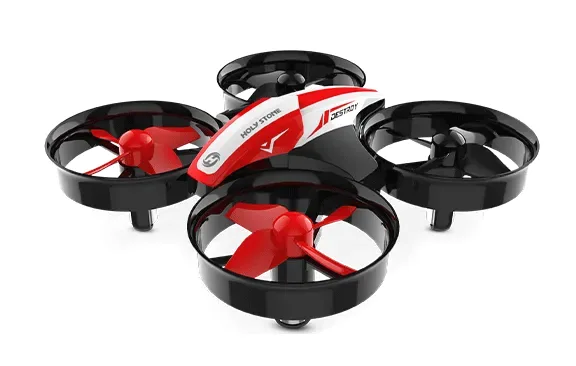
- Buy Holy Stone HS210 A 24.8 g indoor trainer with three batteries in the box and no camera to distract a beginner. Amazon
- Buy Contixo F15 Astro Mini Drone A 68 g mini with a 720p camera and a remote that has its own 2.4 inch screen, so no phone is needed. Amazon
- Buy Snaptain K30 Mini Drone An indoor kids drone that lists up to 18 minutes of flying with two batteries and full propeller guards.
- It depends Force1 Scoot A hand-guided flying ball with a webbed shell, made for ages 8 and up and flown with no controller. Amazon
- It depends Potensic ATOM SE A foldable GPS drone with a 4K-capable camera and up to 31 minutes per battery, aimed at a teen who has outgrown toys. Amazon
- Skip Sharper Image Pocket Video Drone A folding phone-controlled mini whose listing leaves out flight time and the beginner aids found on rivals.
What actually matters
- Flight time per battery - Makers quote best-case time in calm conditions. Check whether the figure is per battery or a total across several.
- Battery count - Small drones fly for minutes, so the number of packs in the box sets how long you can play before charging.
- Propeller guards - Rings or a shell around the rotors reduce contact with the blades. Read what the maker says about their limits.
- Beginner aids - Altitude hold, headless mode and speed modes make the first hours easier. Check that the listing actually names them.
- Camera path - Video can show on a phone app or on a screen built into the remote. Phone-app models need a compatible device.
- Takeoff weight - It affects registration rules, and accessories such as guards can add to it.
- Indoor or outdoor guidance - Small, light drones are sensitive to wind, so follow what the maker says about where to fly.
The specs, in plain English
Green flags vs red flags
Green flags
- A flight time figure stated per battery, with the battery count in the box
- Propeller guards or a shell named on the maker's page, with the maker's own limits
- An age grade or supervision note that the maker or retailer states
- Beginner aids such as altitude hold and headless mode named in the listing
- Weight, range and spare propellers published in a spec table
Red flags
- No flight time on the page, only a charge time
- Beginner aids and guards missing from the feature list
- Compatibility lists that name very old phone operating systems
- Vague claims such as safe or kid-proof with no description of the guards
- Weight not stated on a drone you may need to register
Who's who: the brands
- Holy Stone - Sells a wide line from indoor mini drones for kids up to GPS camera drones, and publishes detailed spec tables and FAQs.
- Contixo - Sells an F-series of beginner drones, including minis with screen remotes.
- Snaptain - Sells kids' indoor mini drones as well as GPS beginner models.
- Force1 - Known for LED stunt drones and the hand-guided Scoot family.
- Potensic - Sells the ATOM line of foldable GPS camera drones and publishes accessory pages with weight notes.
How to read a listing without getting fooled
Start with the spec table, not the title. Look for flight time per battery and the number of batteries in the box, then check weight, range and any age grade. Read the safety wording on guards and the FAQ for outdoor guidance. If a figure such as flight time is missing, note it and weigh it against models that publish one. Finally, check where the video goes, to a phone app or to a screen on the remote, so you know what else you need to buy.
How much should you spend?
Kids' drones sit in a few tiers. The budget tier covers indoor mini trainers and hand-guided flyers like the Holy Stone HS210 and Force1 Scoot. The mid-range tier adds cameras, as on the Contixo F15 and Snaptain K30. The premium tier is GPS camera drones such as the Potensic ATOM SE. Spending more buys flight time, range and a camera, not necessarily a better first drone, so match the tier to the child. Budget for spare batteries and propellers, since crashes are part of learning.
Questions, answered
What is headless mode on a kids drone?
It is a control mode where the drone moves relative to the pilot's position rather than the direction its nose points. That helps beginners who lose track of orientation. Holy Stone describes it as reducing early direction confusion, and suggests pilots rely on it less as confidence grows. Several kids' models, including the HS210 and Snaptain K30, list it.
Why do some drones need a phone and others do not?
It depends on where the video goes. Models such as the Snaptain K30 and the Sharper Image Pocket Video Drone show the camera feed in a phone app. The Contixo F15 puts a 2.4 inch screen on the remote, so no phone is needed. The Potensic ATOM SE connects a phone to its controller by a USB OTG cable. Check what your child has access to.
Do spare batteries matter?
Yes, because flight times are short. Holy Stone puts three batteries in the HS210 box, each rated up to 9 minutes, and Contixo includes two in the F15, each up to 6 minutes. A longer session means swapping packs and waiting for charges. Spare batteries from the maker are the simplest way to extend play.
What does the FAA say about small drones?
The FAA says all drones must be registered, except those that weigh 0.55 pounds or less (less than 250 grams) and are flown under the Exception for Limited Recreational Operations. It also says an owner under 13 needs a person 13 or older to register. We only report what the FAA states, so check its registration page for your own situation.
Or jump to the head-to-head: Holy Stone HS210 vs Contixo F15 Astro Mini Drone.