Explained
Karaoke Microphones, Explained
After reading, you'll understand which type of karaoke mic fits the gear you own and how to read the specs on a listing.
In this guide
Most karaoke mic regret comes from buying the wrong type, not a bad model. An all-in-one Bluetooth mic plays music through its own small speaker, while a wireless pair is silent until you plug its receiver into a speaker with a mic input. Listings blur the two and often skip the numbers that matter, like receiver battery life or which plug the receiver uses. This guide explains the terms so you can match a mic to your setup.
The 30-second version
- Decide the type first, because an all-in-one mic needs only a phone while a wireless pair needs a speaker with a mic input.
- Check your speaker's jacks, since most small Bluetooth speakers have no mic input at all.
- Compare receiver battery life, because a plug-in receiver can go flat before the mics do.
- Look for adapters in the box, as many receivers ship with only a 1/4-inch plug.
- Treat missing specs as a warning, since makers tend to publish the numbers they are proud of.
The products this guide is about
Our verdict on each, with the full reasoning on the companion review.
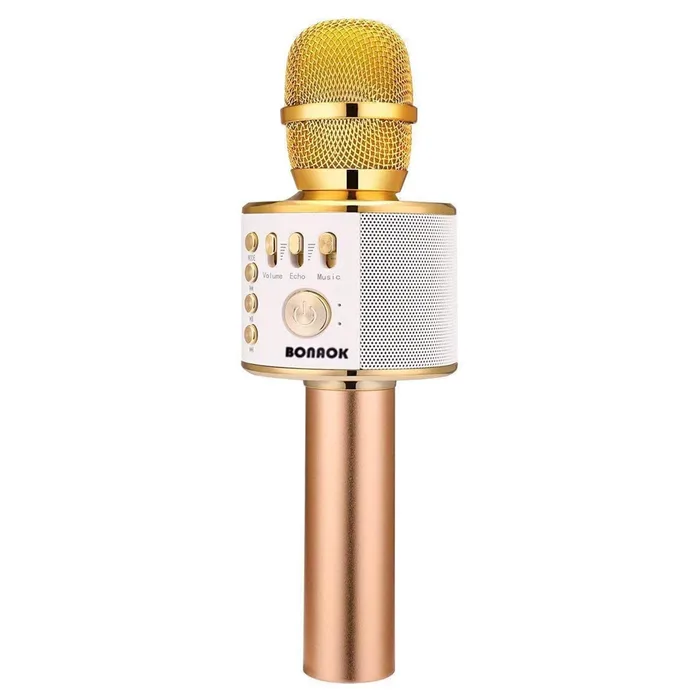
- Buy BONAOK Q37 Wireless Bluetooth Karaoke Microphone A handheld mic with a built-in 6W speaker that plays your phone's backing track over Bluetooth and mixes your voice on top. Amazon
- Buy Phenyx Pro PDP-2-2H Dual Digital Wireless Microphone System Two digital wireless handhelds and a pocket-size rechargeable receiver that plugs straight into a speaker's mic input. Amazon
- Buy Gemini Sound Gemini GMU-M200 UHF Dual Wireless Microphone System Two rechargeable UHF handhelds and a pocket-size receiver with a 1/4-inch plug, all charged over USB-C.
- It depends Ikarao MICBOX PRO Wireless Microphone System A rechargeable two-mic system with a 2.4 GHz plug-in receiver and a storage case that runs a UV cleaning cycle. Amazon
- It depends Amazmic Kids Karaoke Microphone A light-up handheld karaoke mic and speaker aimed at kids aged 3 to 12, with voice-changer modes. Amazon
- Skip TONOR TW-820 Dual Wireless Microphone A metal UHF two-mic system with a tabletop receiver that costs more than the Phenyx and asks more of you. Amazon
What actually matters
- Mic type - All-in-one handhelds carry their own speaker and pair with a phone; wireless pairs need a separate speaker. Picking the right type matters more than any single spec.
- Mic input - A wireless receiver plugs into a 1/4-inch or 3.5 mm mic jack on a speaker or karaoke machine. Without that jack, a wireless pair is useless.
- Speaker output - On an all-in-one mic, watts give a rough sense of loudness. A handheld rated around 6W suits a small room, not a crowd.
- Battery life - Mics and receivers each have their own rating. The shorter of the two sets how long you can sing.
- Wireless band - UHF and 900MHz systems avoid the busy 2.4 GHz band. 2.4 GHz systems pair simply but share the air with Wi-Fi and Bluetooth.
- Number of mics - Duets need two mics. All-in-one handhelds are single mics, so a pair means buying two units.
- Controls - Separate mic, echo and music volume let you balance your voice against the track. Without them, every fix goes through the phone.
The specs, in plain English
Green flags vs red flags
Green flags
- A spec list that states speaker watts, battery hours and range
- Separate controls for mic volume, echo and music
- A 3.5 mm adapter included with a 1/4-inch receiver
- Receiver battery hours stated separately from mic hours
- Selectable channels or frequency groups on wireless pairs
Red flags
- No output power published for a mic with a built-in speaker
- Battery life given only as 'long lasting' with no hours
- A wireless pair sold without saying which jack it needs
- Compatibility notes that exclude the device you plan to use
- Model names that change between the title and the spec list
Who's who: the brands
- BONAOK - Known for colorful all-in-one Bluetooth karaoke mics with built-in speakers and a wide range of lookalike models.
- Phenyx Pro - Known for affordable wireless mic systems for karaoke, churches and small events, including digital models.
- Ikarao - Known for karaoke machines with built-in screens and, more recently, premium rechargeable wireless mic systems.
- TONOR - Known for budget USB and wireless microphones plus karaoke speakers.
- Gemini Sound - Known for DJ gear, PA speakers and affordable UHF wireless microphone systems.
How to read a listing without getting fooled
Start with the type: does the listing say it has a built-in speaker, or does it come with a receiver? For an all-in-one mic, look for speaker watts, battery hours, Bluetooth range and whether it accepts a cable or memory card. For a wireless pair, find the receiver's output plug, any adapters in the box, the receiver's battery rating and the mic power source. Read the compatibility notes closely, because some makers state outright that their system will not work with phones, TVs or AV receivers. Treat range figures as best-case open-space numbers, and be wary of any listing that gives features but no figures.
How much should you spend?
Budget all-in-one handhelds cover casual singing well, and spending more within that type mostly buys lights and styling rather than a bigger speaker. Budget wireless pairs work if your speaker has a 1/4-inch input, though you may trade off adapters, receiver battery life or rechargeable mics. Mid-range pairs tend to add digital transmission, better receivers and adapters for 3.5 mm jacks. Premium systems add rechargeable mics, longer run times and extras like cleaning cases, which pay off mainly for people who sing often.
Questions, answered
Can I use two all-in-one karaoke mics together?
Each one is its own speaker playing whatever its paired phone sends. Two units can run side by side for a duet, but they will not share one music track unless each is fed separately. For a true duet through one sound system, a wireless pair into a speaker works better.
Do I need a karaoke app?
All-in-one Bluetooth mics play whatever your phone sends, so any karaoke app or lyrics video works. Wireless pairs do not care about apps at all; they only carry your voice to the speaker. The app or video provides the backing track and lyrics in both cases.
Why does my mic squeal?
That is feedback: the mic picks up its own sound from the speaker and loops it. Point the mic away from the speaker, step back, and lower the mic volume or echo. Cardioid mics help because they reject sound from behind.
Can I use a karaoke mic for video calls or recording?
Wireless pairs that plug into a speaker are built for live sound, and some makers state they do not work with phones or laptops. Some all-in-one mics include a recording function for your singing. For calls, streaming or podcasts, a USB microphone is the better tool.
Or jump to the head-to-head: BONAOK Q37 Wireless Bluetooth Karaoke Microphone vs Phenyx Pro PDP-2-2H Dual Digital Wireless Microphone System.