Explained
Internal NVMe SSDs, Explained
After reading this you'll know which SSD specs actually make a system feel fast, which ones are marketing noise, and how to match a drive to your PC, laptop, or PS5.
In this guide
An internal NVMe SSD is a small stick of storage that slots straight into your motherboard or laptop, and it's the single upgrade most people feel every day. The trouble is that the box shouts one giant speed number while hiding the specs that actually matter, so shoppers routinely overpay for headline speed they'll never notice and underpay on the things that make a system feel snappy. This guide decodes the jargon so you can tell the difference.
The 30-second version
- The biggest number on the box is the least important. Peak sequential speed is what marketing loves, but random-access performance is what makes a PC boot, launch apps, and load games feel instant.
- A DRAM cache and TLC flash matter more than the interface generation. These two under-advertised specs are what keep a drive fast and consistent during real work, not the PCIe 5.0 badge.
- Faster interfaces only help if your slot and workload can use them. A PCIe 5.0 drive in an older slot just runs slower, and even in the right slot most people never feel the difference in games.
- Capacity is a performance feature, not just a storage number. Bigger drives are usually faster and stay fast longer, so buying enough headroom is one of the easiest wins.
- The PS5 has its own checklist. A console needs a specific form factor, interface generation, and a heatsink, and ignoring any one of those wastes money.
The products this guide is about
Our verdict on each, with the full reasoning on the companion review.
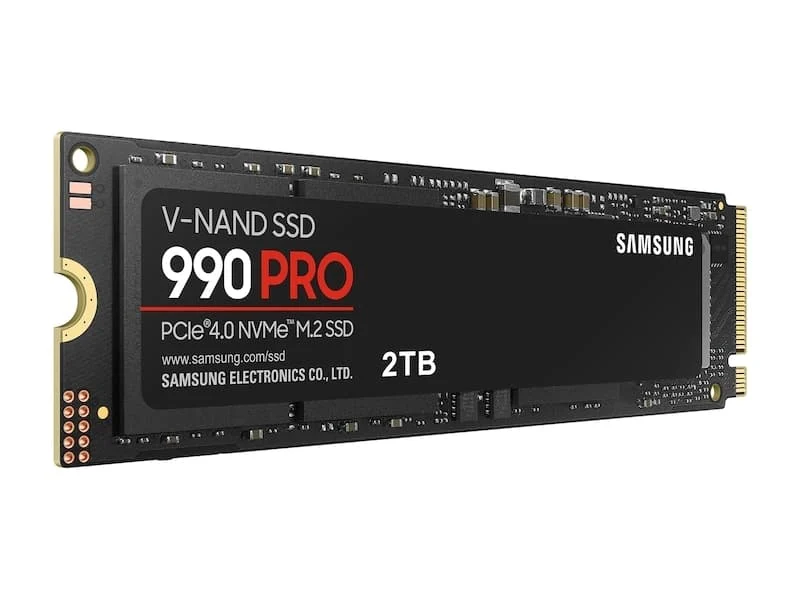
- Buy Samsung 990 PRO (PCIe 4.0 NVMe M.2) The most well-rounded PCIe 4.0 drive going - fast where it counts, cool, and PS5-ready in the heatsink version. Amazon
- Buy Western Digital WD_BLACK SN850X NVMe SSD The gaming and PS5 value pick that trades almost nothing to the pricier flagships. Amazon
- It depends Samsung 9100 PRO (PCIe 5.0 NVMe M.2) Genuinely blistering PCIe 5.0 speed - but only a specific rig actually feels it. Amazon
- Skip Western Digital WD Blue SN5000 NVMe SSD A fine cheap laptop drive that quietly disappoints anyone who came here for performance.
What actually matters
- Random read/write performance is the speed of grabbing thousands of small, scattered files at once, and it's what actually governs how responsive a system feels day to day, far more than the headline sequential number.
- DRAM cache is a small onboard memory chip that helps the drive keep track of where everything is; drives that have it stay consistently fast, while DRAM-less drives borrow slower system memory and can stutter under load.
- Sustained write speed is how fast the drive stays once its short burst of top speed is used up, which is what you feel during big game installs and large file copies.
- Flash type (TLC vs QLC) determines both consistency and lifespan; TLC is the sweet spot for anything demanding, while QLC trades endurance and sustained speed for a lower price.
- Thermals matter because a drive that overheats deliberately slows itself down; higher-end and faster-generation drives in particular can need a heatsink or airflow to hold speed.
- Interface generation vs. your slot decides whether you even get the speed you paid for, since a drive is capped at whatever your motherboard or laptop actually supports.
- Capacity affects speed and longevity, because larger drives usually have more flash working in parallel and more headroom before a nearly-full slowdown kicks in.
The specs, in plain English
Green flags vs red flags
Green flags
- The spec sheet clearly states it has a DRAM cache and uses TLC flash.
- Strong random read/write (IOPS) numbers, not just a big sequential figure.
- A heatsink version is offered, especially if a PS5 or a fast desktop drive is the goal.
- A generous endurance (TBW) rating and a long warranty, signaling the maker's confidence.
- The interface generation matches the slot you actually have, so you pay only for speed you can use.
Red flags
- The listing shouts one huge sequential number and stays silent on random performance or DRAM.
- 'DRAM-less' or 'host memory buffer' language, which points to a budget design that can stutter under load.
- QLC flash paired with a low endurance rating on a drive you plan to write to heavily.
- A fast Gen5 drive with no heatsink or cooling mention, which risks throttling.
- Being sold as PS5-ready without a heatsink or without confirming it's the right interface generation.
Who's who: the brands
- Samsung - The reference-point brand for high-end consumer SSDs, known for polished software and cool, efficient, well-rounded drives.
- Western Digital (WD / WD_BLACK) - A storage heavyweight whose WD_BLACK line targets gamers and PS5 owners with strong value, while the Blue line covers budget builds.
- Crucial - Micron's consumer brand, a reliable mainstream pick that often competes hard on price for solid mid-range drives.
- SK hynix / Solidigm - A flash manufacturer whose own-brand drives frequently punch above their price on efficiency and real-world responsiveness.
- Seagate - A long-time storage maker whose gaming-focused NVMe drives are common picks for console and PC expansion.
How to read a listing without getting fooled
Read a listing from the small specs up, not the big number down. Skip past the giant sequential MB/s headline first, because it's the least useful figure for most buyers, and hunt for three things: does it explicitly have a DRAM cache, does it use TLC (not QLC) flash, and what are the random read/write numbers. Then match the PCIe generation to what your machine actually has, since paying for Gen5 in a Gen4 laptop buys you nothing. Note the form factor (almost always M.2 2280, but confirm), check whether a heatsink version exists if you need one, and glance at the endurance (TBW) rating and warranty as a proxy for how confident the maker is. If a product page brags about peak speed but goes quiet on DRAM, flash type, and sustained performance, treat that silence as the answer.
How much should you spend?
Think in tiers rather than dollars. The value sweet spot for almost everyone is a current-generation drive with a full DRAM cache and TLC flash, which delivers the responsiveness you'll actually feel without the flagship tax. Stepping up to the very fastest, newest-generation drives pays off only if you have a compatible slot and genuinely move large amounts of data, such as high-resolution video work; in a typical gaming rig or a console, that extra money buys a bigger number you won't notice. Going the other way, the cheapest DRAM-less budget drives are a false economy for anything demanding, because the money you save comes straight out of sustained and random performance. The smartest place to spend a little extra is usually capacity, since a larger drive tends to be faster, lasts longer, and spares you the slowdown that hits a nearly full SSD.
Questions, answered
Do I need a PCIe 5.0 (Gen5) SSD for gaming or a PS5?
No. A PS5 can't use Gen5 speeds at all, and reviewers commonly find real-world game load times barely differ between good Gen4 and Gen5 drives. A strong current-generation drive with a DRAM cache is the sweet spot; the newest generation mainly helps large-file creative and data work on a compatible desktop.
What does 'DRAM-less' mean and why should I care?
A DRAM-less drive skips the small onboard memory chip that acts as its index and borrows a slice of your system RAM instead. It keeps the price down and is fine for light use, but owner reports show weaker random performance and sustained-write speeds that fall off once its fast cache fills, which you'll notice during big game installs or large file transfers.
Does a bigger capacity actually make an SSD faster?
Often, yes, up to a point. Larger models usually have more flash chips working in parallel and a bigger cache, so they tend to sustain higher speeds than the smallest versions of the same drive. A roomier drive also gives you more headroom before the performance-sapping slowdown that hits a nearly-full SSD.
Will one of these speed up my older laptop or desktop?
Only if it has a free M.2 NVMe slot, so check that first, along with which PCIe generation it is and the physical length it accepts (usually 2280). A newer-generation drive still works in an older slot but is capped at that slower speed, so on genuinely old machines a mid-range drive is the sensible spend. Either way, any NVMe SSD will feel dramatically faster than a hard drive or an older SATA SSD.
What do I specifically need for a PlayStation 5?
A PS5 needs an M.2 2280 drive on the PCIe 4.0 generation, fitted with a heatsink so it doesn't overheat in the console. Many popular drives sell a heatsink version that drops straight in. A newer Gen5 drive is overkill and no faster in a PS5, and a cheap DRAM-less drive is a poor fit for a console.
Or jump to the head-to-head: Samsung 990 PRO (PCIe 4.0 NVMe M.2) vs Western Digital WD_BLACK SN850X NVMe SSD.