

Tech & Gadgets
The Best Portable SSDs: Fast, Rugged, and Which One to Skip
We compared four portable SSDs on real-world speed, durability, and track record. The Samsung T9 wins, the Lexar SL500 is the value pick, and one drive we won't recommend.
The short version
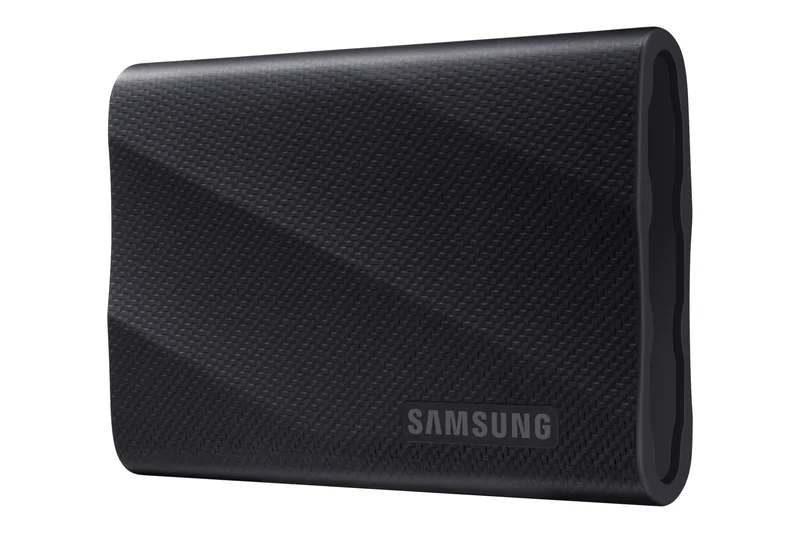
The Samsung T9 is our overall pick, delivering sustained ~2,000 MB/s over USB 3.2 Gen 2x2 with a trustworthy track record. The Lexar SL500 is the value runner-up, offering nearly the same 20Gbps speed in a slim, magnetic, phone-friendly design for less. Choose the Samsung T7 Shield if you need IP65 ruggedness more than peak speed, accepting its 10Gbps ceiling. Skip the SanDisk Extreme Pro despite its speed; owner reports of drives losing data make it too risky for anything you care about.
Our picks at a glance
- Samsung T9 Portable SSD - Buy. The fastest mainstream 20Gbps drive that also holds its speed under load.
- Lexar Professional SL500 - Buy. A slim, magnetic 20Gbps drive that delivers near-T9 speed for less money.
- Samsung T7 Shield Portable SSD - It depends. Slower on paper, but the rugged, dependable choice for fieldwork.
- SanDisk Extreme Pro Portable SSD - Skip. Genuinely fast, but a documented history of data-loss failures we can't ignore.
The verdict in 30 seconds
What mattered most
- Interface & rated speed
- Sustained write behavior
- Durability
- Encryption & software
- Warranty
- Track record
Portable SSDs have gotten fast enough that the interface, not the flash, is usually the bottleneck. We focused on drives that actually hold their speed, survive a bag, and haven't burned owners with firmware problems. Here's how the Samsung T9, Lexar SL500, Samsung T7 Shield, and SanDisk Extreme Pro compare, and why one of them stays off our list.
The fastest mainstream 20Gbps drive that also holds its speed under load.
Best for: Creators and pros who want the fastest widely compatible drive without gambling on firmware.
- Sustained ~2,000 MB/s reads with Dynamic Thermal Guard limiting throttling
- Rubberized grip shell rated for drops up to around 3m
- Needs a USB 3.2 Gen 2x2 host to hit rated speed
- Bulkier than slim aluminum rivals
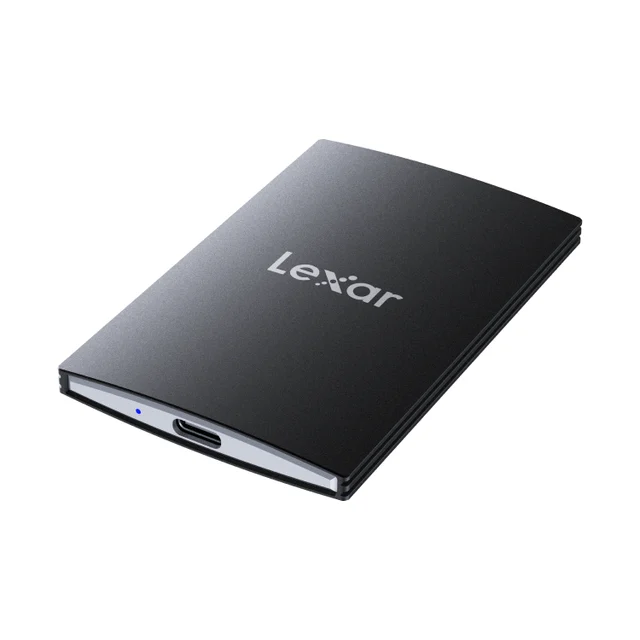
A slim, magnetic 20Gbps drive that delivers near-T9 speed for less money.
Best for: Value-minded creators who want flagship 20Gbps speed in a pocketable, phone-friendly design.
- Rated ~2,000/1,800 MB/s over USB 3.2 Gen 2x2 in a 43g, 7.8mm aluminum body
- MagSafe-style magnetic back and Apple ProRes capture support for phone-first shooters
- Passive cooling can throttle on very long continuous writes
- Only reaches rated speed on a 20Gbps host
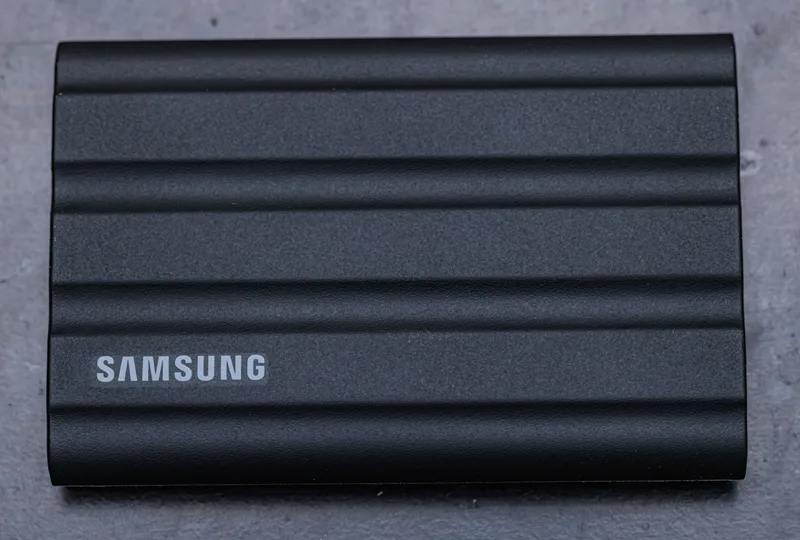
Slower on paper, but the rugged, dependable choice for fieldwork.
Best for: Travel, location shoots, and anyone who values surviving abuse over peak throughput.
- IP65 dust and water resistance plus a grippy rubber shell rated to around 3m drops
- Very steady ~1,050 MB/s with no dramatic thermal dropoffs
- 10Gbps interface caps it at roughly half a 20Gbps drive's speed
- Not the pick if raw transfer speed is your priority
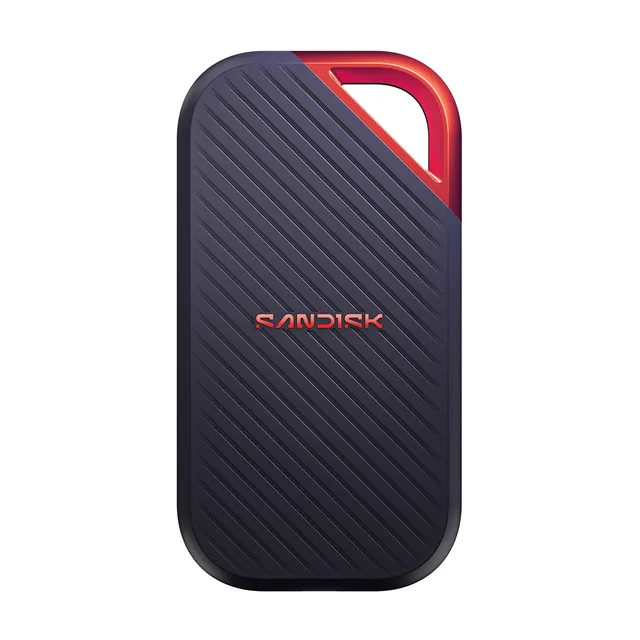
Genuinely fast, but a documented history of data-loss failures we can't ignore.
Best for: Hard to recommend today; wait until the firmware track record is convincingly cleaned up.
- Rated ~2,000 MB/s over USB 3.2 Gen 2x2
- IP55 rating and a rugged aluminum core with a carabiner loop
- Well-documented owner reports of drives dropping data or bricking
- The speed doesn't matter if the files aren't there when you need them
| Criteria | Samsung T9 Portable SSD Top pick | Lexar Professional SL500 | Samsung T7 Shield Portable SSD | SanDisk Extreme Pro Portable SSD |
|---|---|---|---|---|
| Verdict | Buy it | Buy it | It depends | Skip it |
| Best for | Creators and pros who want the fastest widely compatible drive without gambling on firmware. | Value-minded creators who want flagship 20Gbps speed in a pocketable, phone-friendly design. | Travel, location shoots, and anyone who values surviving abuse over peak throughput. | Hard to recommend today; wait until the firmware track record is convincingly cleaned up. |
| Price tier | $$$ · premium | $$ · mid-range | $$ · mid-range | $$$ · premium |
| Interface & rated speed | USB 3.2 Gen 2x2 (20Gbps), ~2,000 MB/s | USB 3.2 Gen 2x2 (20Gbps), ~2,000/1,800 MB/s | USB 3.2 Gen 2 (10Gbps), ~1,050 MB/s | USB 3.2 Gen 2x2 (20Gbps), ~2,000 MB/s |
| Sustained write behavior | Holds up well; Dynamic Thermal Guard | Strong, but passive cooling can throttle on long writes | Lower ceiling but very steady | Fast, but a history of dropouts |
| Durability | Rubberized shell, drop ~3m, no IP rating | Aluminum body, IP54, drop ~2m | IP65, rugged rubber shell, drop ~3m | IP55, aluminum core, carabiner loop |
| Encryption & software | 256-bit AES + Samsung Magician | 256-bit AES (DataShield) | 256-bit AES + Samsung Magician | 256-bit AES + bundled software |
| Warranty | 5-year | 5-year | 5-year | 5-year |
| Track record | Clean, widely trusted | Newer but stable | Proven and dependable | Documented data-loss failures |
Which one is right for you?
- Creators and pros who want the fastest widely compatible drive without gambling on firmware. Buy it Samsung T9 Portable SSD
- Value-minded creators who want flagship 20Gbps speed in a pocketable, phone-friendly design. Buy it Lexar Professional SL500
- Travel, location shoots, and anyone who values surviving abuse over peak throughput. It depends Samsung T7 Shield Portable SSD
- Hard to recommend today; wait until the firmware track record is convincingly cleaned up. Skip it SanDisk Extreme Pro Portable SSD
How we judged the field
A portable SSD only earns a spot in a bag if it does three things well: hit its rated speed in real transfers, survive being carried around, and not lose your files. Plenty of drives nail the first and fail the third, which is exactly why raw benchmark numbers can’t be the whole story.
We weighed four drives on the interface they use, how they behave during long sustained writes (where cheap drives fall apart), physical durability, encryption and software, warranty, and - crucially - their real-world track record with owners. Speed matters, but a drive that occasionally drops data is worse than a slower one that never does. That principle shaped every verdict below, and it’s the reason one otherwise-fast drive lands on the skip list.
One housekeeping note: our former runner-up in this class has been discontinued as its maker steps away from the consumer SSD business. We’ve replaced it with a current, in-production drive in the same 20Gbps performance class so the recommendation stays buyable.
Samsung T9 Portable SSD - buy (our pick)
Buy itThe T9 is the drive we’d hand most people. It runs on USB 3.2 Gen 2x2 (20Gbps) and holds close to its rated ~2,000 MB/s reads in actual file transfers, not just a five-second benchmark. That consistency comes from Samsung’s Dynamic Thermal Guard, which manages heat well enough that the drive doesn’t nosedive partway through a big copy the way passively-cooled rivals sometimes do.
The rubberized grip shell shrugs off drops up to around three meters, and it pairs with Samsung Magician for firmware updates and 256-bit AES password protection. The T9 needs a 20Gbps host to shine, and it’s chunkier than the slim aluminum crowd. But it’s the rare drive that’s both genuinely fast and genuinely trustworthy.
What we liked more: it sustains its speed under load instead of collapsing mid-transfer.
What we liked less: it’s bulkier than the slim magnetic drives, and you only get full speed on a 20Gbps port.
Lexar Professional SL500 - buy (runner-up)
Buy itThe SL500 is the value play, and it’s a strong one. It’s also a USB 3.2 Gen 2x2 drive rated around 2,000 MB/s read and 1,800 MB/s write, so on the right port it’s within striking distance of the T9 - but in a strikingly slimmer package. At 7.8mm thick and 43 grams, it’s roughly a credit card’s footprint, with an aluminum unibody that doubles as a heatsink.
Two features set it apart: a magnetic back that snaps onto MagSafe-style phone mounts, and support for capturing Apple ProRes footage directly from a compatible iPhone. For a phone-first creator, that’s genuinely useful. The catch is cooling. Because it’s passively cooled, very long continuous writes can trigger throttling - the aluminum shell and firmware manage heat well for normal use, but marathon multi-gigabyte exports may see speeds dip. It also carries a 5-year warranty, matching the pick.
What we liked more: near-flagship 20Gbps speed in a pocketable, phone-friendly body for less money.
What we liked less: passive cooling can throttle during sustained heavy writes.
Samsung T7 Shield Portable SSD
It dependsThe T7 Shield trades speed for toughness, and whether that’s the right trade is entirely about your workflow. It runs on the older USB 3.2 Gen 2 (10Gbps) interface, capping it near 1,050 MB/s - roughly half a 20Gbps drive. If peak throughput is your priority, that’s a real gap.
But it’s IP65 rated against dust and water, wrapped in a grippy rubber shell, and rated for drops around three meters. And because it isn’t pushing a hot 20Gbps controller, its performance is rock-steady, without the thermal dropoffs faster drives can hit. For location shoots, travel, or anyone who’ll drop it in the dirt, that dependability outweighs the slower ceiling.
What we liked more: IP65 ruggedness and completely steady performance under stress.
What we liked less: the 10Gbps interface leaves a lot of speed on the table.
SanDisk Extreme Pro Portable SSD
Skip itOn paper, the Extreme Pro belongs with the leaders: USB 3.2 Gen 2x2, around 2,000 MB/s, IP55 rating, rugged aluminum core, and a handy carabiner loop. In isolation it’s a fast, well-built drive.
We still can’t recommend it. There’s a well-documented pattern of these drives dropping data or bricking outright, and that history hangs over the whole line. A portable SSD’s entire job is to hold your files reliably in exactly the conditions - travel, field use, constant plugging and unplugging - where this drive has repeatedly let owners down. We want to treat it fairly: the hardware is capable, and a properly fixed firmware story could change our mind. But speed is meaningless if the data isn’t there when you go looking for it, so today it’s a skip.
What we liked more: genuinely fast 20Gbps hardware with a rugged, travel-friendly build.
What we liked less: a reliability record serious enough that we won’t trust it with real work.
Samsung T9 Portable SSD vs Lexar Professional SL500: which should you buy?
These two are close, and either will make most people happy. The T9 is the safer, more consistent choice: it holds its speed better under long sustained loads thanks to active thermal management, and Samsung’s reliability record in this category is spotless. If you routinely dump huge continuous transfers - long video exports, full-disk backups - the T9 is less likely to throttle midway.
The SL500 wins on portability, price, and phone integration. It’s dramatically slimmer and lighter, its magnetic back and ProRes capture make it a natural for mobile shooters, and it delivers most of the T9’s speed for noticeably less. The tradeoff is its passive cooling, which can dip on marathon writes. Buy the T9 if you want maximum consistency and don’t mind the bulk; buy the SL500 if you want flagship-class speed in your pocket and shoot from a phone.
What to look for
Start with your port. If your machine only has a 10Gbps or standard USB-C connection, the 20Gbps drives will run at roughly half their rated speed, which narrows the real gap between them and the T7 Shield considerably - check before you pay for speed you can’t use.
Then weigh your priorities. Want the fastest, most consistent all-rounder? T9. Want nearly that speed, slimmer and cheaper, with phone-friendly extras? SL500. Need something that survives dust, water, and drops more than it needs to be fast? T7 Shield. And whatever you pick, turn on the built-in AES encryption - it’s free and costs you nothing in speed. The one thing we’d steer you away from is chasing the Extreme Pro’s benchmark numbers, because reliability, not peak throughput, is what a portable drive is actually for.
Our final take
The Samsung T9 is the best portable SSD for most people: fast, consistent, and trustworthy. The Lexar SL500 is the value runner-up, matching most of that speed in a slimmer, magnetic, phone-ready body for less. Choose the T7 Shield when ruggedness matters more than raw speed, and skip the SanDisk Extreme Pro until its data-loss reputation is convincingly behind it.
Questions, answered
Do I need a special port to get 2,000 MB/s?
Yes. The Samsung T9, Lexar SL500, and SanDisk Extreme Pro only reach ~2,000 MB/s on a USB 3.2 Gen 2x2 (20Gbps) port. On the more common 10Gbps ports they run at roughly half speed, closer to the T7 Shield.
Why is the Lexar SL500 the runner-up over faster drives?
It matches the T9's 20Gbps class in a slimmer, lighter, magnetic body for less money, works on ordinary USB ports, and carries a 5-year warranty. Its only real tradeoff is passive cooling that can throttle on very long continuous writes.
Is the Samsung T7 Shield too slow to bother with?
No, but know what you're buying. Its 10Gbps interface caps it near 1,050 MB/s, roughly half the T9. In exchange you get IP65 dust and water resistance and steady, throttle-free performance, which matters more than peak speed for fieldwork.
Why skip the SanDisk Extreme Pro if it's fast?
Because there's a well-documented history of these drives dropping data or bricking. Peak speed is worthless if your files vanish. Until that firmware reputation is convincingly repaired, we can't recommend trusting it with anything important.
Does encryption slow these drives down?
Not meaningfully. All four support 256-bit AES hardware encryption, which runs on the controller rather than your CPU. You can enable a password without a noticeable speed penalty, and we'd recommend it for any drive you carry around.
Deciding between the top two? See our head-to-head: Samsung T9 Portable SSD vs Lexar Professional SL500.
More Tech & Gadgets reviews
 The Best PC Power Supplies: 4 Compared (and One to Skip)
  The Best Prebuilt Gaming PCs: 4 Compared (and One to Skip)
  The Best RC Cars for Gifts: 4 Compared (and One to Skip)
  The Best Sharpening Stones: 4 Compared (and One to Skip)
  The Best Smart Bird Feeders: 4 Compared (and One to Skip)
  The Best Smart Blind & Shade Motors: 4 Compared (and One to Skip)