

Tech & Gadgets
The Best Portable Monitors of 2026: Honest Picks for Travel and Work
We compare four portable monitors still sold in 2026 across panel quality, brightness, weight and stands, plus one battery model most buyers should skip.
The short version
The ASUS ZenScreen OLED MQ16AH has the image quality to beat, with true blacks and accurate color, though it lacks a proper kickstand and costs the most. The Lenovo ThinkVision M14 is the smarter buy for travel: lightest here, with a rigid built-in stand and single-cable USB-C, provided your laptop outputs video over USB-C. The espresso Display 15 suits minimalists who accept software-only controls. Skip the battery-equipped ZenScreen Go MB16AHP, which trades picture quality and weight for a battery you rarely need.
Our picks at a glance
- ASUS ZenScreen OLED MQ16AH - Buy. The most convincing image in the group, held back by a fussy stand and a premium price.
- Lenovo ThinkVision M14 - Buy. The most practical travel panel here: light, stable and simple, if your laptop supports USB-C video.
- espresso Display 15 - It depends. A thin, touch-capable panel that asks you to accept software-only controls and glare.
- ASUS ZenScreen Go MB16AHP - Skip. You pay in weight and picture quality for a battery you probably will not need.
The verdict in 30 seconds
What mattered most
- Panel & image quality
- Brightness
- Weight & thickness
- Stand
- Connections & touch
- Best for
Portable monitors have quietly become standard travel kit, but the gap between a good one and a frustrating one is wide. We compared four models still sold in 2026, from a color-focused OLED to a battery-equipped panel we think most people should avoid. Below is where each one earns its keep, and where it does not.
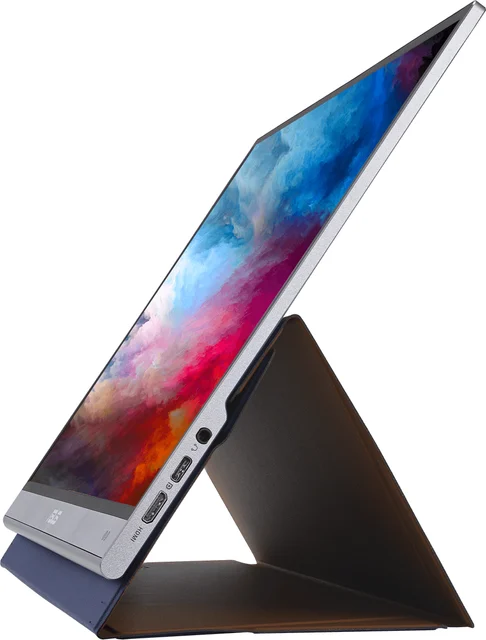
The most convincing image in the group, held back by a fussy stand and a premium price.
Best for: Photo, video and media work where color and contrast matter more than saving money
- OLED panel covers the full DCI-P3 color space with rated color error under two, so blacks are truly black and color looks right untouched
- Metal chassis about five millimetres thin and near 650 grams, with a proximity sensor that dims the screen when you step away
- No integrated kickstand; you prop it on a folding cover, which blocks the mini-HDMI port in portrait orientation
- 1080p over 15.6 inches looks soft up close, and the glossy surface throws glare under overhead lighting
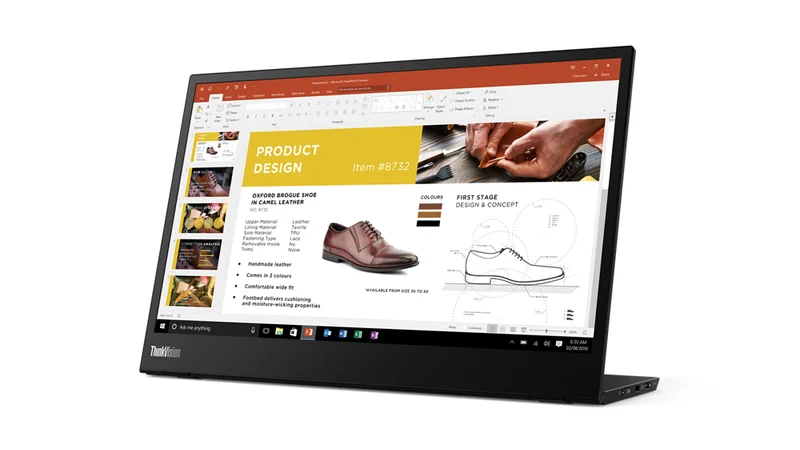
The most practical travel panel here: light, stable and simple, if your laptop supports USB-C video.
Best for: Business travelers who want the lightest, most stable single-cable second screen
- Built-in two-stage kickstand tilts and raises the panel, far steadier than the folding covers rivals ship
- Two USB-C ports with power pass-through run the screen and charge the laptop from one adapter, over a matte anti-glare coat
- Runs on USB-C DisplayPort Alt Mode only, with no HDMI and no DisplayLink, so hosts without USB-C video output cannot drive it
- Middling brightness, no touch and no speakers, and the bundled sleeve is thin enough that most owners buy a case
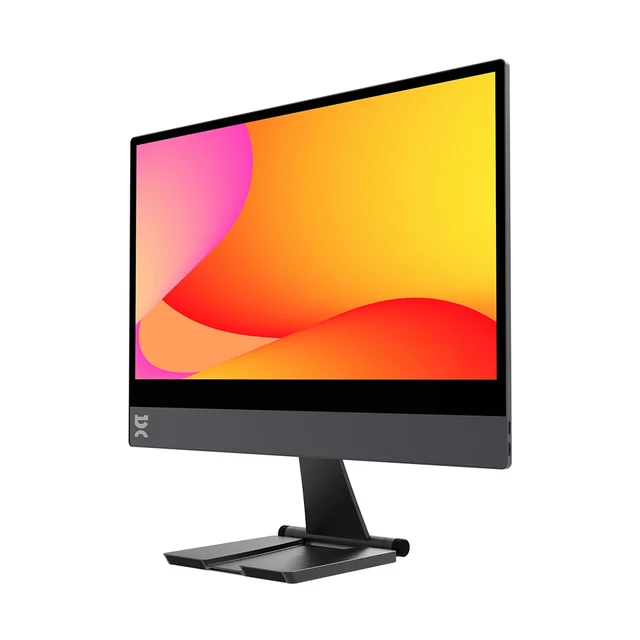
A thin, touch-capable panel that asks you to accept software-only controls and glare.
Best for: Minimalists and touch users willing to manage brightness through software
- Aluminium-and-glass body is among the thinnest sold, and the magnetic Stand+ snaps on and adjusts height and tilt
- Touch model adds responsive finger and pen input on Windows and macOS, which none of the others offer
- No speakers and no physical buttons or on-screen menu; brightness is set only through software
- Glossy glass reflects heavily, and touch, the stand and the right cable push the real cost up
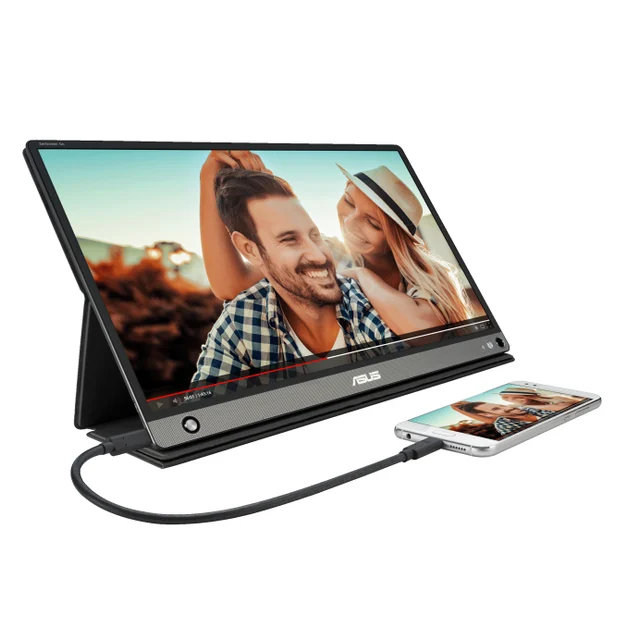
You pay in weight and picture quality for a battery you probably will not need.
Best for: The narrow case of needing a screen where no power source exists; most should skip it
- 7800mAh internal battery runs the screen untethered for roughly four hours
- Auto-rotate plus a foldable smart-case stand and both USB-C and micro-HDMI inputs
- Around 220 nits and 700-to-one contrast leave it dim and flat next to current panels
- The battery adds weight toward 860 grams and degrades over years, while most people leave it plugged in anyway
| Criteria | ASUS ZenScreen OLED MQ16AH Top pick | Lenovo ThinkVision M14 | espresso Display 15 | ASUS ZenScreen Go MB16AHP |
|---|---|---|---|---|
| Verdict | Buy it | Buy it | It depends | Skip it |
| Best for | Photo, video and media work where color and contrast matter more than saving money | Business travelers who want the lightest, most stable single-cable second screen | Minimalists and touch users willing to manage brightness through software | The narrow case of needing a screen where no power source exists; most should skip it |
| Price tier | $$$ · premium | $$ · mid-range | $$$ · premium | $$ · mid-range |
| Panel & image quality | OLED, full DCI-P3, true blacks | IPS, matte, accurate but average contrast | Glossy IPS glass, vivid but reflective | IPS, dim and low-contrast |
| Brightness | Bright for the class, ~400-nit HDR peak | Around 300 nits, matte | Around 300 nits, glossy | Dim, about 220 nits |
| Weight & thickness | ~650g, ~5mm metal | ~598g, lightest here | Thin aluminium, light | ~860g, bulkier from battery |
| Stand | Folding cover only, no kickstand | Rigid built-in kickstand, tilt + height | Magnetic Stand+, height + tilt | Foldable smart-case cover |
| Connections & touch | 2x USB-C + mini-HDMI, no touch | 2x USB-C only (Alt Mode), no touch | USB-C + mini-HDMI, touch optional | USB-C + micro-HDMI, no touch |
| Best for | Color & media | Light travel | Minimalist / touch | Untethered use only |
Which one is right for you?
- Photo, video and media work where color and contrast matter more than saving money Buy it ASUS ZenScreen OLED MQ16AH
- Business travelers who want the lightest, most stable single-cable second screen Buy it Lenovo ThinkVision M14
- Minimalists and touch users willing to manage brightness through software It depends espresso Display 15
- The narrow case of needing a screen where no power source exists; most should skip it Skip it ASUS ZenScreen Go MB16AHP
How we judged the field
RBE does not run its own lab tests. We read independent expert testing and long-term owner reports, then weigh them against price and how people actually work. For portable monitors that comes down to four things: whether the panel is bright and accurate enough to work on, how well it stands up on a cramped desk or a tray table, how it connects to hardware you already own, and how much you have to carry. A screen that needs its own power brick, a separate stand and a video adapter is not really portable. We looked only at models still in production in 2026 and left out anything discontinued. Three earned a recommendation for different buyers; one we think most people should pass on.
ASUS ZenScreen OLED MQ16AH
Buy itThis is the panel to beat. The OLED covers all of the DCI-P3 color space with a rated color error under two, so blacks are genuinely black rather than the washed grey a backlit IPS screen gives you, and color looks right without tweaking. It is about five millimetres thin, wrapped in metal, near 650 grams, and a proximity sensor dims it when you step away. Expert and owner reports agree the image is the reason to buy it.
What holds it back is practical, not visual. There is no built-in kickstand; you prop the screen on a folding cover, and in portrait that cover blocks the mini-HDMI port. At 15.6 inches, 1080p looks soft if you sit close, and the glossy finish shows reflections under office lighting. It also costs the most here. If the picture is the point, the trade is defensible.
Lenovo ThinkVision M14
Buy itThe M14 is the one we would pack first. At roughly 598 grams it is the lightest in the group, and unlike its rivals it has a real hinged kickstand that tilts and raises the panel, so it holds an angle on an uneven desk instead of folding flat when you nudge it. Two USB-C ports mean one cable carries video and passes power through to charge the laptop.
The catch is the connection. It runs on USB-C DisplayPort Alt Mode only. There is no HDMI and no DisplayLink fallback, so a laptop or handheld that cannot output video over USB-C will not drive it. Brightness is average, there is no touch, no speakers, and the bundled sleeve is thin enough that most owners buy a case. Confirm your host supports USB-C video and this is the most fuss-free travel screen here.
espresso Display 15
It dependsespresso sells build quality. The aluminium-and-glass body is among the thinnest made, and the magnetic Stand+ snaps onto the back and adjusts height and tilt without a separate hinge. The Touch version adds responsive finger and pen input on Windows and macOS, which none of the others offer.
The compromises are deliberate. There are no speakers, no physical buttons and no on-screen menu; brightness is changed in software, which is awkward when you move between machines. The glass is glossy and reflects a lot, and once you add touch, the stand and the right cable, the real outlay climbs toward the OLED. For a minimalist who values the look and the option of touch, it fits; for plug-and-forget work, the M14 is simpler.
ASUS ZenScreen Go MB16AHP
Skip itOn paper the draw is the built-in battery, good for about four hours away from an outlet, plus auto-rotate and both USB-C and micro-HDMI. In practice it is the weakest screen here. Brightness sits near 220 nits and contrast around 700 to one, so it looks dim and flat next to the others, and the battery pushes weight up toward 860 grams. Batteries also age; in a few years the runtime that justified the purchase will have shrunk. Most people use a portable monitor beside a laptop that is already plugged in, which leaves the battery as dead weight most of the time. Unless you truly need a screen where no power exists, buy a brighter panel and a small power bank instead.
ASUS ZenScreen OLED MQ16AH vs Lenovo ThinkVision M14: which should you buy?
These two win for opposite reasons. The ZenScreen OLED is about the picture: if you edit photos, watch films or want contrast a backlit panel cannot match, nothing else here is close, and you accept a fiddly cover-stand and a higher price to get it. The M14 is about getting a stable second screen up in seconds and forgetting about it. It is lighter, its kickstand is far steadier, and one USB-C cable does everything, though the panel is ordinary and it depends on your laptop supporting USB-C video. For most travelers and remote workers, the M14’s practicality wins. For creative and media work, take the OLED.
What to look for
Start with how you will connect it. Many cheaper laptops and some handhelds only send video over full-feature USB-C; if yours does not, you want a monitor with HDMI, which rules the M14 out. Next, look at the stand: a built-in hinge is steadier than a folding magnetic cover, which matters on a train tray or a thin desk. Then brightness, if you work near windows, since anything under roughly 300 nits struggles in daylight. Treat touch and speakers as extras, not essentials. Finally, be skeptical of built-in batteries; unless you regularly work away from any outlet, a lighter screen plus a power bank is more flexible and ages better.
Our final take
There is no single winner, only the right tool for how you work. The ASUS ZenScreen OLED MQ16AH is the pick if image quality leads and you can live with propping it on a cover. The Lenovo ThinkVision M14 is the better all-round travel choice for its weight, stand and single-cable simplicity, as long as your laptop drives it over USB-C. The espresso Display 15 rewards minimalists who want touch. And the ZenScreen Go MB16AHP is the one to avoid: you pay in brightness and weight for a battery most buyers will rarely use.
Questions, answered
Do portable monitors work with any laptop?
Not always. Many run on USB-C DisplayPort Alt Mode, which some laptops and handhelds do not support. If your device lacks USB-C video output, choose a monitor with HDMI, or one bundling a DisplayLink adapter, and confirm the port before buying.
Do I need a separate power supply?
Usually the monitor draws power over the same USB-C cable that carries video, so one cable can be enough from a laptop. Brighter screens or weaker laptop ports may need a second cable to a charger or power bank to hold full brightness.
Is OLED burn-in a real risk on a portable monitor?
For typical mixed use it is a low risk. Burn-in comes from static elements shown bright for long periods. Vary content, use auto-dimming and screensavers, and avoid leaving fixed taskbars on screen for hours, and an OLED like the MQ16AH should hold up.
Is a touchscreen worth paying extra for?
For most laptop users, no. Touch helps if you sketch, annotate or run touch-first apps, as the espresso Display 15 Touch does. For spreadsheets, email and browsing, a non-touch panel with a good stand and brighter screen is usually the better value.
Should I buy a portable monitor with a built-in battery?
Rarely. A battery adds weight and cost, degrades over a few years, and sits unused whenever your laptop is plugged in. Unless you routinely work where no outlet exists, a lighter monitor paired with a small USB-C power bank is more flexible.
Deciding between the top two? See our head-to-head: ASUS ZenScreen OLED MQ16AH vs Lenovo ThinkVision M14.
More Tech & Gadgets reviews
 The Power Banks Worth Buying (and the 'Mega-mAh' One to Skip)
  The Best Portable Power Stations: 4 Compared (and One to Skip)
  The Best Portable Projectors: 4 Compared (and One to Skip)
  The Best Portable SSDs: Fast, Rugged, and Which One to Skip
  The Best PC Power Supplies: 4 Compared (and One to Skip)
  The Best Prebuilt Gaming PCs: 4 Compared (and One to Skip)