

Tech & Gadgets
The Best Network Switches: 4 Compared (and One to Skip)
We compared four desktop switches for a home or small office on the figures their makers actually print: switching capacity, packet forwarding rate, total PoE budget, and whether the box runs without a fan.
The short version
The TP-Link TL-SG108-M2 is the switch most home and small-office buyers should get in 2026: eight 2.5GbE ports, a published 40 Gbps switching capacity that is exactly twice the sum of its port speeds, 15.6 W maximum draw, and no fan. The TRENDnet TEG-S350 is the value pick if five ports is enough, with the same 2.5G speed, a published 25 Gbps capacity and a 9.5 W ceiling. The Ubiquiti UniFi Flex 2.5G PoE is genuinely excellent and genuinely conditional: it needs the UniFi Network application at version 9.0.114 or later, and its PoE budget swings from 16 W to 196 W depending purely on how you power it. Skip the NETGEAR GS308PP unless your needs are small and fixed, because it is gigabit only and its eight nominally PoE+ ports share one 83 W budget. The pattern worth internalising is that PoE budget is a total, not a per-port promise. Best for: anyone who wants more ports and more speed without a management interface they will never open.
Our picks at a glance
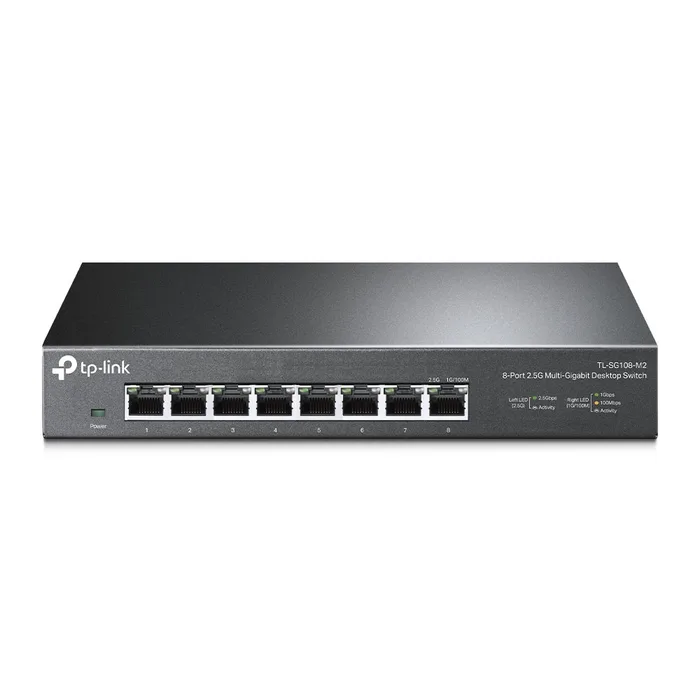
- TP-Link TL-SG108-M2 8-Port 2.5G Desktop Switch - Buy. Eight 2.5GbE ports, no fan, no menus, and a published switching capacity that covers every port at once.
- TRENDnet TEG-S350 5-Port Unmanaged 2.5G Switch - Buy. Five 2.5G ports in a metal box that draws under ten watts and has nothing to configure.
- Ubiquiti UniFi Flex 2.5G PoE (USW-Flex-2.5G-8-PoE) - It depends. A superb eight-port 2.5G PoE++ switch whose usefulness depends entirely on running UniFi and on how you feed it power.
- NETGEAR GS308PP 8-Port Gigabit Unmanaged PoE+ Switch - Skip. Eight PoE+ ports sharing 83 watts, on a gigabit-only fabric, at a tier where 2.5G PoE now exists.
The verdict in 30 seconds
What mattered most
- Ports
- Published switching capacity
- Packet forwarding rate
- PoE budget
- Management
- Cooling
A network switch is the least interesting box on your desk, and that is exactly what you want from it. The real decisions are narrow: how many ports, whether anything you own can move faster than gigabit, whether a camera or access point needs power down the same cable, and whether the thing will sit there humming. We pulled the published spec sheets for current desktop and small-rack switches from TP-Link, TRENDnet, Ubiquiti and NETGEAR and compared what each maker prints rather than what the box front says. The short version is that a plain unmanaged switch is the right answer for most homes, and the interesting differences are in PoE budgets and cooling, not in fabric bandwidth.
Eight 2.5GbE ports, no fan, no menus, and a published switching capacity that covers every port at once.
Best for: The household or small office that wants every port faster than gigabit and does not want a configuration page.
- TP-Link publishes both a 40 Gbps switching capacity and a 29.8 Mpps forwarding rate, which is full rate for all eight 2.5G ports.
- Listed as fanless with a metal casing, and rated at 15.6 W maximum power and 53.4 BTU/h heat dissipation.
- Every port runs 100M, 1G or 2.5G under IEEE 802.3bz, so older gigabit gear plugs in without thought.
- TP-Link's spec sheet lists no management interface, so there are no VLANs, no port mirroring and no traffic stats.
- No PoE on any port, so cameras and access points still need their own supplies or an injector.
- There is no SFP or 10G uplink, so a fast NAS is capped at 2.5G.
- TP-Link publishes no acoustic figure, only the word fanless, so coil noise is unknowable from the sheet.
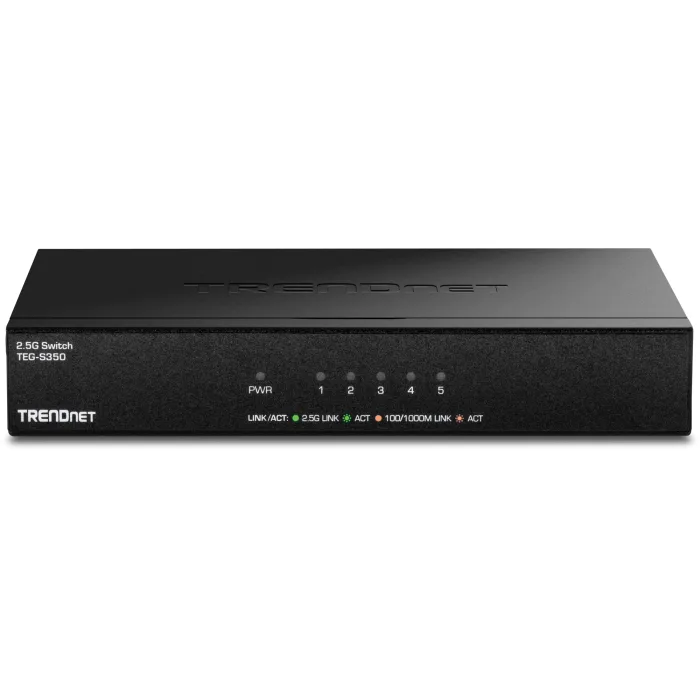
Five 2.5G ports in a metal box that draws under ten watts and has nothing to configure.
Best for: A desk, a media cabinet or a bedroom where you need to split one wall port four ways at 2.5G and forget about it.
- Published 25 Gbps switching capacity and 18.6 Mpps forwarding rate at 64-byte packets, which covers all five ports.
- The spec sheet has an explicit Fan and Acoustics line that reads fanless, and a 9.5 W maximum consumption.
- Sturdy metal housing, wall mountable, and TRENDnet lists it as NDAA and TAA compliant with a lifetime warranty.
- Five ports goes quickly once a router, a NAS, a console and a desktop are plugged in.
- The current v2.0R sheet lists a 4K MAC address table, smaller than the 16K on several rivals.
- No PoE, no SFP, no management, and no 10G uplink of any kind.
- TRENDnet publishes no decibel figure, so fanless is the only noise information you get.
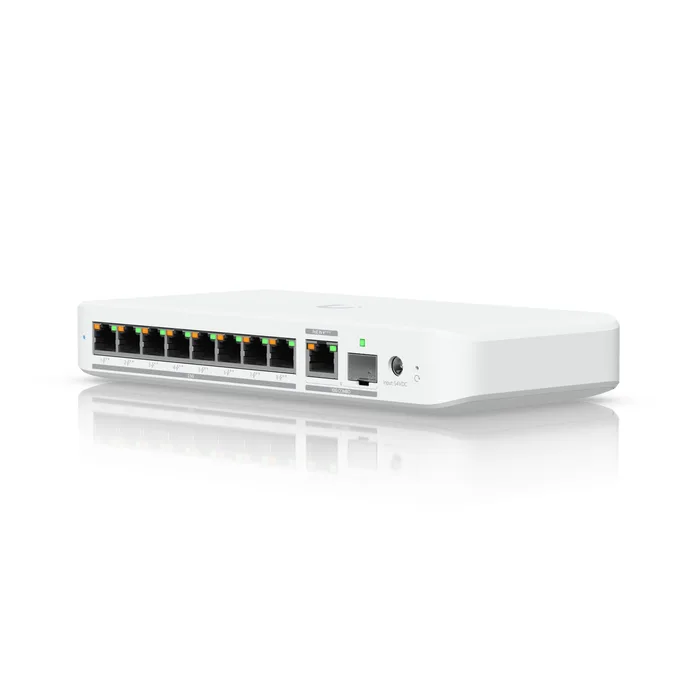
A superb eight-port 2.5G PoE++ switch whose usefulness depends entirely on running UniFi and on how you feed it power.
Best for: Someone already running a UniFi controller who wants PoE++ and 2.5G at the edge and will read the power table before ordering.
- Eight 2.5 GbE ports all capable of PoE++ output, plus a 10 GbE RJ45 and 10G SFP+ marked as one combo uplink.
- Ubiquiti publishes 60 Gbps switching capacity, 30 Gbps total non-blocking throughput and 45 Mpps forwarding, which is the clearest statement of the full-duplex doubling of any sheet we read.
- It can be powered by PoE itself, so it can hang off an upstream switch with no wall adapter of its own.
- The PoE budget is entirely input-dependent: 16 W on PoE+ input, 46 W on PoE++, 76 W on PoE+++ and 196 W on the 210 W AC adapter, which Ubiquiti lists as excluded.
- It requires the UniFi Network application at version 9.0.114 or later, so it is not a switch you plug in and ignore.
- Ubiquiti's tech specs publish no cooling type and no acoustic figure at all, so you cannot confirm fanless from the sheet.
- The MAC address table is listed at 4,000 entries, which is modest for a switch at this tier.
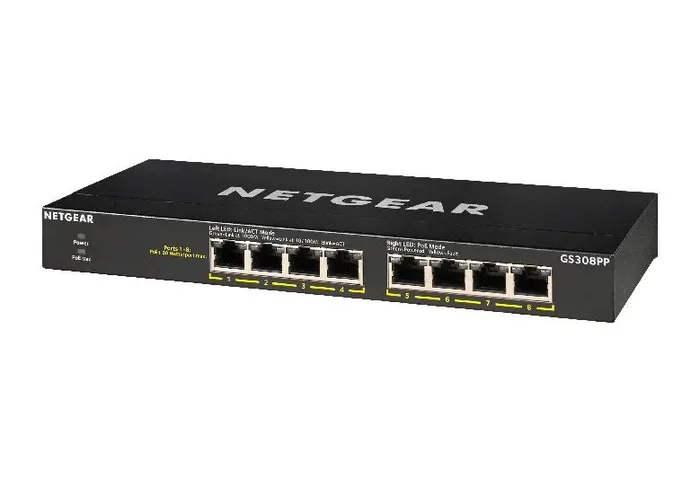
Eight PoE+ ports sharing 83 watts, on a gigabit-only fabric, at a tier where 2.5G PoE now exists.
Best for: A fixed, small job: two or three low-draw gigabit cameras or doorbells that will never grow.
- NETGEAR states the constraint honestly on its own page: 8 PoE+ at 30 W each until budget is met.
- Fanless with a published fan count of zero, in a metal case, and backed by a limited lifetime hardware warranty.
- FlexPoE lets the 83 W budget be raised to 123 W with an optional power supply.
- The published PoE budget is 83 W total across eight ports, so at IEEE 802.3at Class 4 the switch can sustain roughly two devices at full 30 W draw.
- Every port is gigabit, which caps a modern access point or a NAS well below what its own hardware can do.
- Even the upgraded 123 W FlexPoE budget is around half of what eight full PoE+ ports would need.
- NETGEAR publishes no switching capacity figure for it, only a wire-speed claim, and no acoustic figure.
| Criteria | TL-SG108-M2 8-Port 2.5G Desktop Switch Top pick | TEG-S350 5-Port Unmanaged 2.5G Switch | UniFi Flex 2.5G PoE (USW-Flex-2.5G-8-PoE) | GS308PP 8-Port Gigabit Unmanaged PoE+ Switch |
|---|---|---|---|---|
| Verdict | Buy it | Buy it | It depends | Skip it |
| Best for | The household or small office that wants every port faster than gigabit and does not want a configuration page. | A desk, a media cabinet or a bedroom where you need to split one wall port four ways at 2.5G and forget about it. | Someone already running a UniFi controller who wants PoE++ and 2.5G at the edge and will read the power table before ordering. | A fixed, small job: two or three low-draw gigabit cameras or doorbells that will never grow. |
| Price tier | $$ · mid-range | $ · budget | $$$ · premium | $$ · mid-range |
| Ports | 8 x 100M/1G/2.5G | 5 x 100M/1G/2.5G | 8 x 2.5GbE PoE++ plus one 10G RJ45 and SFP+ combo | 8 x 10/100/1000, all PoE+ |
| Published switching capacity | 40 Gbps | 25 Gbps | 60 Gbps (30 Gbps non-blocking) | Not published |
| Packet forwarding rate | 29.8 Mpps | 18.6 Mpps at 64 bytes | 45 Mpps | Not published |
| PoE budget | None | None | 16 W to 196 W, depending on input | 83 W total, 123 W with optional PSU |
| Management | None listed | None listed | UniFi Network 9.0.114 or later | None listed |
| Cooling | Fanless | Fanless | Not published | Fanless, fan count 0 |
| Max power draw | 15.6 W | 9.5 W | 210 W with AC adapter, including PoE output | 90 W |
| MAC address table | 16 K | 4 K | 4,000 | 4 K |
Which one is right for you?
- The household or small office that wants every port faster than gigabit and does not want a configuration page. Buy it TP-Link TL-SG108-M2 8-Port 2.5G Desktop Switch
- A desk, a media cabinet or a bedroom where you need to split one wall port four ways at 2.5G and forget about it. Buy it TRENDnet TEG-S350 5-Port Unmanaged 2.5G Switch
- Someone already running a UniFi controller who wants PoE++ and 2.5G at the edge and will read the power table before ordering. It depends Ubiquiti UniFi Flex 2.5G PoE (USW-Flex-2.5G-8-PoE)
- A fixed, small job: two or three low-draw gigabit cameras or doorbells that will never grow. Skip it NETGEAR GS308PP 8-Port Gigabit Unmanaged PoE+ Switch
How we judged the field
Five things decide whether a switch is right for you, and only two of them are on the front of the box. Port count and port speed come first, because a switch you outgrow in a year is a switch you buy twice. Switching capacity and forwarding rate come second: a switch should be non-blocking, meaning its fabric equals twice the sum of its port speeds, because Ethernet is full duplex and every port can send and receive simultaneously. Third is the total PoE budget, which is a shared pool and not a per-port promise. Fourth is cooling, because a fan in a home office is a daily annoyance and a decibel figure is rarely printed. Fifth is management, and here the honest answer is that most buyers do not need any.
The field splits cleanly along those lines. At the bottom sit plain unmanaged switches, which now routinely include 2.5GbE and which cover what most households actually do; we took the eight-port TP-Link TL-SG108-M2 and the five-port TRENDnet TEG-S350 as the two honest sizes of that answer. In the middle sit PoE switches, where the interesting number is never the port count but the shared wattage, and where the NETGEAR GS308PP shows what happens when a gigabit-era design meets a multi-gig-era shopping list. At the top sit ecosystem and managed switches, represented here by the Ubiquiti UniFi Flex 2.5G PoE, which is excellent hardware attached to a requirement: a controller running the UniFi Network application. We picked one of each so the comparison is about what tier you need rather than which brand won.
TP-Link TL-SG108-M2 8-Port 2.5G Desktop Switch
Buy itTP-Link’s TL-SG108-M2 is the switch we would put in most houses. Eight ports that each negotiate 100M, 1G or 2.5G under IEEE 802.3bz, a published 40 Gbps switching capacity and a 29.8 Mpps forwarding rate, which works out to full line rate on all eight ports at once with nothing oversubscribed. TP-Link lists it as fanless in a metal casing, drawing at most 15.6 W and dissipating 53.4 BTU/h, so it can live on a shelf behind a monitor without announcing itself. The spec sheet lists no management interface, only 802.3X flow control and 802.1p and DSCP QoS, which is to say it is a plug-and-play box. That is the trade. There is no SFP cage, no 10G uplink and no PoE, so anything that needs power down the cable needs an injector, and a NAS that can push past 2.5G will be held back. For a household where the router, the desktop, the NAS and the TV all now speak 2.5G, none of that matters. It is for the buyer who wants everything faster than gigabit and wants to never think about the switch again.
TRENDnet TEG-S350 5-Port Unmanaged 2.5G Switch
Buy itThe TRENDnet TEG-S350 is the same argument in a smaller box and at a lower tier. Five 2.5GBASE-T ports, a published 25 Gbps switching capacity and 18.6 Mpps at 64-byte packets, which again is full rate across the whole port set. What makes it stand out on paper is the discipline of the sheet: TRENDnet prints an explicit Fan and Acoustics line that reads fanless, a 9.5 W maximum consumption, a 674,176 hour MTBF, and NDAA and TAA compliance, backed by a lifetime warranty. The metal housing is wall mountable. The limits are real though. Five ports disappears fast once a router, a console, a desktop and a NAS are connected, and the current v2.0R sheet lists a 4K MAC address table where the eight-port rivals list 16K, which only matters on a network with a lot of devices behind it. There is no PoE and no uplink port of any kind. It is for the person splitting one wall jack four ways at 2.5G in a room where silence is the point.
Ubiquiti UniFi Flex 2.5G PoE (USW-Flex-2.5G-8-PoE)
It dependsThe UniFi Flex 2.5G PoE is the most capable switch here and the one most likely to be the wrong purchase. Eight 2.5 GbE ports that can all output PoE++, plus a 10 GbE RJ45 and a 10G SFP+ that Ubiquiti explicitly marks as one combo uplink, not two independent ports. Ubiquiti publishes 60 Gbps switching capacity against 30 Gbps of total non-blocking throughput, which is the cleanest illustration on any sheet we read of why capacity is twice the sum of port speeds. Two things make it conditional. First, it needs the UniFi Network application at version 9.0.114 or later, which means a Cloud Key, a Dream Machine or a self-hosted server; it is not a switch you plug in cold. Second, the PoE budget is set by how you feed it: 16 W on a PoE+ input, 46 W on PoE++, 76 W on PoE+++ and 196 W on the 210 W AC adapter, which is listed as excluded. Ubiquiti also publishes no cooling type and no acoustic figure. It is for someone already inside UniFi who will read the power table first.
NETGEAR GS308PP 8-Port Gigabit Unmanaged PoE+ Switch
Skip itThe NETGEAR GS308PP is a competent piece of hardware aimed at a job that has moved on. It gives you eight gigabit ports, all of them 802.3at PoE+ capable, in a fanless metal case with a published fan count of zero and a limited lifetime hardware warranty. The problem is arithmetic that NETGEAR prints plainly and buyers still miss: the total PoE budget is 83 W, and NETGEAR’s own wording is 8 PoE+ at 30 W each until budget is met. Under IEEE 802.3at a Class 4 port sources up to 30 W, so 83 W sustains roughly two devices at full draw and a handful more at lower classes. FlexPoE raises that to 123 W with an optional supply, still around half of what eight full PoE+ ports would need. On top of that every port is gigabit, which caps a current access point or NAS below its own hardware, and NETGEAR publishes no switching capacity figure for the model. It suits a fixed, small job: two or three low-draw cameras that will never grow.
Sources
Specs in this review come from these pages.
- TP-Link, TL-SG108-M2 specifications (tp-link.com)
- TRENDnet, TEG-S350 5-Port Unmanaged 2.5G Switch specifications (trendnet.com)
- Ubiquiti, UniFi Flex 2.5G PoE tech specs (techspecs.ui.com)
- NETGEAR, GS308PP 8-Port Gigabit Unmanaged PoE+ Switch (netgear.com)
- NETGEAR, XS508M 8-Port 10G Multi-Gigabit Unmanaged Switch (netgear.com)
- Ethernet Alliance, Overview of 802.3bt Power over Ethernet (ethernetalliance.org)
TP-Link TL-SG108-M2 8-Port 2.5G Desktop Switch vs TRENDnet TEG-S350 5-Port Unmanaged 2.5G Switch: which should you buy?
The choice between the TL-SG108-M2 and the TEG-S350 is almost entirely about port count, and you should decide it by counting cables rather than by reading specs. Both are unmanaged, both are fanless, both are metal, and both publish a switching capacity equal to twice the sum of their port speeds, so neither will bottleneck anything you plug into it. The TP-Link gives you eight ports, a 16K MAC address table and a 15.6 W ceiling. The TRENDnet gives you five ports, a 4K table and a 9.5 W ceiling, at a lower tier.
The practical rule is to count what you will connect today, add two, and buy for that number. A switch is one of the few purchases where outgrowing it means daisy-chaining a second one, which works but adds a hop and another power brick to the pile. If your count lands at four or fewer devices plus the uplink, the TEG-S350 is the cheaper, smaller and slightly cooler-running answer. If it lands at five or more, or if you are wiring a room you expect to keep adding to, take the eight-port TP-Link and stop thinking about it. Neither one has PoE, so if a camera or access point is in the plan, price an injector into the decision or move up to the UniFi.
What to look for
- Count ports, then add two: the cheapest upgrade path is buying one size up now, because outgrowing a switch means chaining a second one and adding another power brick.
- Check that capacity is twice the sum of port speeds: eight 2.5G ports should show 40 Gbps, five should show 25 Gbps, and anything lower means the fabric cannot carry every port at once.
- Use the forwarding rate when capacity is missing: some makers print only Mpps, and full rate is roughly 1.488 Mpps per gigabit port or 3.72 Mpps per 2.5G port.
- Read the PoE budget as one shared pool: a switch listing eight PoE+ ports and 83 W total can sustain about two devices at the full 30 W that IEEE 802.3at allows per port.
- Look for the word fanless in the spec table: decibel figures are rarely published, so the fan count or a fanless line is usually the only noise information you will get.
- Match the hardware version to the sheet: revisions quietly change things like MAC table size, so confirm the version letter on the spec page matches the one on the box.
Our final take
Buy the boring one. For a home or a small office in 2026, an unmanaged 2.5GbE switch with a fanless metal case and a published capacity equal to twice the sum of its port speeds is the correct purchase, and the TP-Link TL-SG108-M2 is the clearest example of it. Step down to the five-port TRENDnet TEG-S350 if the cable count allows. The upsells worth resisting are the smart or web-managed tier, which most people open once and never again, and 10GBASE-T on the desk, which still costs several times the power and usually brings a fan. The upsell worth taking seriously is PoE, but only after you have added up what your devices actually draw and compared it to the total budget rather than the port count.
Questions, answered
Do I actually lose anything by buying an unmanaged switch?
For most homes, no. An unmanaged switch learns MAC addresses and forwards frames at full rate, and that is the entire job. What you give up is VLANs, port mirroring, link aggregation, per-port statistics, SNMP and the ability to see which port is misbehaving. Those matter if you want to isolate cameras or guest devices onto their own network, if you want to bond two ports to a NAS, or if you are troubleshooting something that only shows up in counters. If none of that describes you, the management page is a feature you will open once and never again.
Is any consumer switch actually oversubscribed?
We could not find one. A non-blocking switch needs a fabric equal to twice the sum of its port speeds, because Ethernet is full duplex and every port can send and receive at once. Across every current desktop switch whose sheet we read, the published figure matched that arithmetic exactly: 40 Gbps for eight 2.5G ports, 25 Gbps for five, 66 Gbps on a mixed gigabit and 10G model, 160 Gbps for eight 10G ports. Ubiquiti prints it most plainly, listing 60 Gbps switching capacity alongside 30 Gbps of non-blocking throughput. The catch is that not every maker publishes the number at all, so the figure to look for instead is the packet forwarding rate.
Why can't an eight-port PoE+ switch power eight PoE+ devices?
Because the wattage on the box is a shared pool, not a per-port guarantee. Under IEEE 802.3at, a Class 4 port sources up to 30 W, so eight of them at once would need 240 W from the supply. Real desktop switches ship far less. The NETGEAR GS308PP publishes 83 W total, expandable to 123 W with an optional supply, which is roughly two to four PoE+ devices at full draw. NETGEAR states this on its own page as 30 W each until budget is met, which is accurate but easy to skim past. Add up what your cameras and access points actually draw before you count ports.
Do switch makers publish noise figures?
Some do and most do not. NETGEAR is the outlier that prints real numbers: its fanless GS308 lists 0 dBA, and its fanned XS508M lists 28 dB at 25 C. TP-Link and TRENDnet publish the word fanless without a decibel figure, which at least tells you there is no fan to fail. Ubiquiti's tech specs for the Flex 2.5G PoE include no cooling field at all. MikroTik publishes a cooling type line that reads one fan on the CRS310-8G+2S+IN, with no decibel figure. For a switch living in a home office, fanless in the spec table is the single most useful thing to check.
Is 10GbE over copper still a heat and power problem in 2026?
Yes, and the published numbers show it. NETGEAR's eight-port 10G copper XS508M lists 39 W maximum draw and one low-noise active fan at 28 dB. TP-Link's eight-port 2.5G switch lists 15.6 W and no fan, and TRENDnet's five-port 2.5G lists 9.5 W and no fan. So 10GBASE-T still costs several times the power of 2.5G and usually brings a fan with it. That is fine in a rack or a closet and irritating on a desk. Unless you have storage that genuinely saturates a 2.5G link, 2.5GbE gets you most of the benefit silently.
Deciding between the top two? See our head-to-head: TP-Link TL-SG108-M2 8-Port 2.5G Desktop Switch vs TRENDnet TEG-S350 5-Port Unmanaged 2.5G Switch.
More Tech & Gadgets reviews
 The Best Outdoor Security Cameras: Wide Coverage Without the Monthly Trap
  The Best Ethernet Patch Panels: 4 Compared (and One to Skip)
  The Best PC Cases: 4 Compared (and One to Skip)
  The Best Photo and Film Scanners: 4 Compared (and One to Skip)
  The Best Pixel Art Displays: 4 Compared (and One to Skip)
  The Best Portable Monitors of 2026: Honest Picks for Travel and Work