

Tech & Gadgets
The Best Photo and Film Scanners: 4 Compared (and One to Skip)
We compared a print scanner, two dedicated 35mm film scanners and a popular screen-equipped film digitizer on sensor, true optical resolution, dust removal, file formats and batch handling.
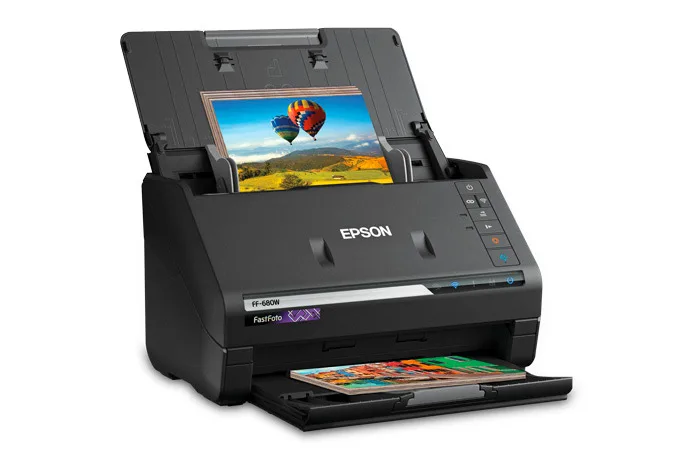
The short version
The Epson FastFoto FF-680W is the best overall pick because most families have far more prints than film, and Epson rates it at up to one photo per second at 300 dpi with a 36-photo feeder. The Plustek OpticFilm 8200i SE is the value pick for 35mm negatives and mounted slides, with a 7200 dpi CCD, a built-in infrared channel for dust and scratch removal, and SilverFast SE Plus in the box. The Pacific Image PrimeFilm XA Plus depends on your collection: it auto-feeds uncut 35mm rolls of up to 40 frames and saves DNG files, but it is a premium, 35mm-only machine that is overkill for a shoebox of slides. Skip the Magnasonic FS70: its 25MP headline is interpolated from a 13MP CMOS sensor, it is fixed focus, it saves only JPEG, and Magnasonic says it cannot fill in scratches. Best for: anyone digitizing a family archive who wants prints done fast and film done properly.
Our picks at a glance
- Epson FastFoto FF-680W - Buy. A sheet-fed duplex photo scanner that turns stacks of prints into files at up to one photo per second.
- Plustek OpticFilm 8200i SE - Buy. A dedicated 35mm film and slide scanner with a 7200 dpi CCD and an infrared dust channel.
- Pacific Image PrimeFilm XA Plus - It depends. A 35mm film scanner that auto-feeds uncut rolls of up to 40 frames, with autofocus and DNG output.
- Magnasonic FS70 Film Scanner - Skip. A screen-equipped film digitizer whose 25MP headline is interpolated from a 13MP CMOS sensor.
The verdict in 30 seconds
What mattered most
- What it scans
- Sensor
- Optical resolution
- Infrared dust and scratch removal
- File formats
- Batch handling
Digitizing a family archive starts with one question: are your memories on prints, or on negatives and slides? Prints want a fast sheet-fed scanner, while film wants a dedicated scanner with a real optical sensor and an infrared dust channel. We compared Epson's print scanner with two CCD film scanners and one of the cheap screen-equipped film digitizers that sell in big numbers. Every spec here comes from the maker's own page, and where a maker does not publish something we say so.
A sheet-fed duplex photo scanner that turns stacks of prints into files at up to one photo per second.
Best for: Families with boxes of loose 4x6 and 5x7 prints who want them digitized in an afternoon rather than a month.
- Epson rates it at up to one photo per second at 300 dpi, with a feeder that holds 36 photos and handles mixed sizes in one batch.
- One-pass duplex scanning captures the picture and any handwritten notes on the back together.
- It saves 600 dpi TIFF files for archiving, connects over USB 3.0 or Wi-Fi, and includes a carrier sheet for delicate prints.
- It is built for prints, Polaroids, panoramas and documents; Epson lists no negative or slide scanning.
- Optical resolution is 600 dpi, and Epson's footnote says the 1200 dpi option is interpolated.
- Feeding old prints through rollers is a risk for curled or cracked photos, which need the carrier sheet and slow mode.
- It is a premium spend if you only have a few albums.
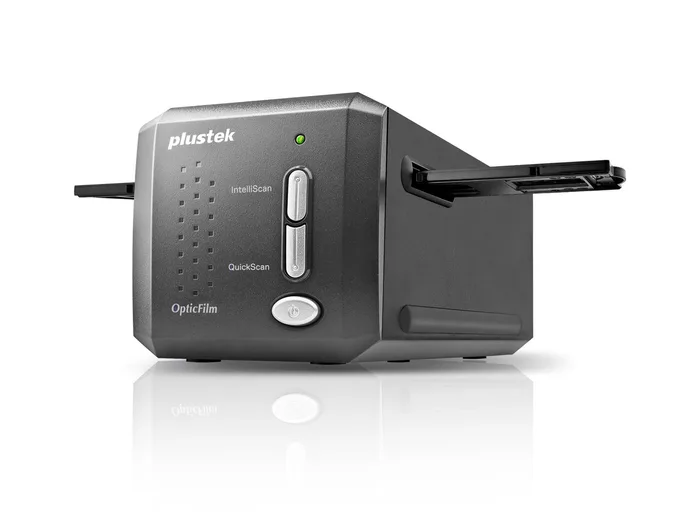
A dedicated 35mm film and slide scanner with a 7200 dpi CCD and an infrared dust channel.
Best for: Anyone with a few hundred to a few thousand 35mm negatives or slides who wants real optical detail and automatic dust removal.
- Plustek states 7200 dpi optical resolution from a CCD sensor, with output files up to 68.9 megapixels.
- A built-in infrared channel feeds SilverFast iSRD, which finds dust and scratches on the film and removes them during the scan.
- SilverFast SE Plus is bundled, including NegaFix profiles for converting color negatives and Multi-Exposure for shadow detail.
- It scans one frame at a time from manual holders, and Plustek lists about 113 seconds per frame at 7200 dpi with multi-sampling on.
- It takes 35mm negatives and mounted slides only, so 120 medium format and prints are out.
- SilverFast has a learning curve, and Plustek's stated requirements include 8 GB of RAM and a four-core 64-bit processor.
- The interface is USB 2.0, and the bundled QuickScan software is Windows only.
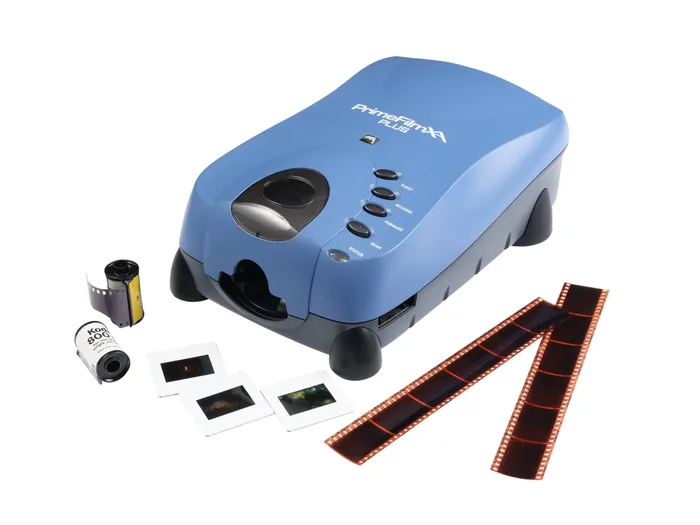
A 35mm film scanner that auto-feeds uncut rolls of up to 40 frames, with autofocus and DNG output.
Best for: Photographers and archivists with many uncut or long 35mm strips who value unattended batches and raw files.
- Its auto film feeder takes uncut 35mm rolls of up to 40 frames, or filmstrips of three frames or more, and scans them in one run.
- Pacific Image states 10,000 dpi, a 4.2 dynamic range, a linear CCD, and autofocus on each frame.
- Infrared MagicTouch dust removal, Multipass Xposure and JPG, TIF and DNG output come in the bundled CyberView X software.
- Mounted slides are scanned manually, so a slide-heavy collection gets little benefit from the auto feeder.
- It handles 35mm only, and the maker recommends 8 GB of RAM and at least 50 GB of free disk space.
- It weighs 4.9 lb, runs over USB 2.0, and costs well above the Plustek.
- Software comes from a smaller maker, so support and updates depend on Pacific Image alone.
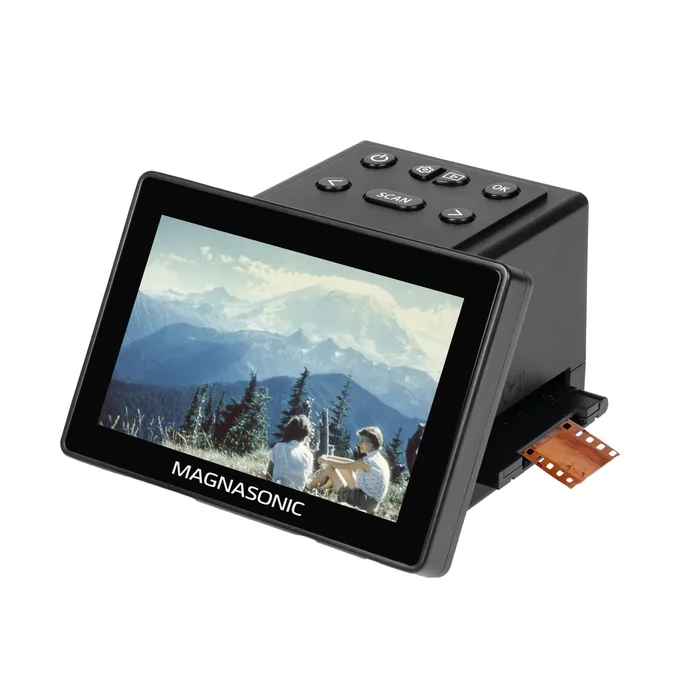
A screen-equipped film digitizer whose 25MP headline is interpolated from a 13MP CMOS sensor.
Best for: Nobody building an archive; at most, someone who wants quick phone-quality previews of a few negatives before sending the keepers out.
- It works without a computer, saving to 64MB of internal memory or an SD card up to 128 GB.
- Magnasonic lists a 3 to 5 second scan time and a 5 inch screen for previewing frames.
- Inserts cover 35mm, 110, 126 and Super 8 film plus 135, 126 and 110 slides.
- Its spec table lists a 13 Mega CMOS sensor with 13MP or 25MP output, and the 25MP figure is marked as interpolation.
- It is fixed focus and saves JPEG only, with no TIFF or raw option for archiving.
- Magnasonic's own FAQ says it can adjust color and brightness but cannot fill in scratches or fading, and there is no infrared dust channel.
- Optical scan quality is listed at 3000 dpi, well below the CCD scanners here.
| Criteria | Epson FastFoto FF-680W Top pick | Plustek OpticFilm 8200i SE | Pacific Image PrimeFilm XA Plus | Magnasonic FS70 Film Scanner |
|---|---|---|---|---|
| Verdict | Buy it | Buy it | It depends | Skip it |
| Best for | Families with boxes of loose 4x6 and 5x7 prints who want them digitized in an afternoon rather than a month. | Anyone with a few hundred to a few thousand 35mm negatives or slides who wants real optical detail and automatic dust removal. | Photographers and archivists with many uncut or long 35mm strips who value unattended batches and raw files. | Nobody building an archive; at most, someone who wants quick phone-quality previews of a few negatives before sending the keepers out. |
| Price tier | $$$ · premium | $$ · mid-range | $$$ · premium | $ · budget |
| What it scans | Prints, Polaroids, panoramas, documents | 35mm negatives and mounted slides | 35mm rolls, strips and mounted slides | 35mm, 110, 126, Super 8 film; 135/126/110 slides |
| Sensor | 600 dpi CIS | CCD | Linear array color CCD | 13MP CMOS |
| Optical resolution | 600 dpi (1200 dpi interpolated) | 7200 dpi | 10,000 dpi | 3000 dpi (4300 dpi listed) |
| Infrared dust and scratch removal | No (auto enhance, color restoration) | Yes, iSRD | Yes, MagicTouch | No |
| File formats | TIFF and JPEG | 48-bit output via SilverFast | JPG, TIF, DNG | JPEG only |
| Batch handling | 36-photo feeder | Manual holders, one frame at a time | Auto feed up to 40 frames | Manual inserts |
| Connection | USB 3.0 and Wi-Fi | USB 2.0 | USB 2.0 | Standalone, SD card, USB-C |
| Weight (maker stated) | 8.2 lb | 3.5 lb | 4.9 lb | 1.04 lb |
Which one is right for you?
- Families with boxes of loose 4x6 and 5x7 prints who want them digitized in an afternoon rather than a month. Buy it Epson FastFoto FF-680W
- Anyone with a few hundred to a few thousand 35mm negatives or slides who wants real optical detail and automatic dust removal. Buy it Plustek OpticFilm 8200i SE
- Photographers and archivists with many uncut or long 35mm strips who value unattended batches and raw files. It depends Pacific Image PrimeFilm XA Plus
- Nobody building an archive; at most, someone who wants quick phone-quality previews of a few negatives before sending the keepers out. Skip it Magnasonic FS70 Film Scanner
How we judged the field
Five things decide whether a photo or film scanner is worth buying. First is media: a print scanner cannot read negatives, and a 35mm film scanner cannot read prints, so the right machine starts with what is in your boxes. Second is true optical resolution, because interpolated numbers make bigger files without more detail. Third is infrared dust and scratch removal, which saves hours of cleanup on film. Fourth is file format, since TIFF and raw files keep more room for later editing than JPEG. Fifth is batch handling, because a family archive is thousands of items and the time per item decides whether the project gets finished.
The field splits into three kinds of machine: sheet-fed print scanners, dedicated CCD film scanners, and cheap screen-equipped digitizers that photograph film with a small camera sensor. We picked the Epson FastFoto as the print scanner most families need, the Plustek OpticFilm 8200i SE as the value route into proper film scanning, and the Pacific Image PrimeFilm XA Plus for large 35mm backlogs. The Magnasonic FS70 stands in for the screen digitizers because it is widely sold and its own spec table shows the limits of the type.
The Epson FastFoto FF-680W is the machine that actually gets a print archive done. Epson rates it at up to one photo per second at 300 dpi, the feeder holds 36 photos, and it accepts wallet prints up to 8x10s, Polaroids and panoramas up to 36 inches long in mixed batches. One-pass duplex scanning catches the dates and names people wrote on the backs, which is often the most valuable part of an old print. For archiving, it saves 600 dpi TIFF files, and it adds auto enhancement, color restoration and red-eye reduction for sharing copies. The trade-offs are real. Its optical sensor is 600 dpi, and Epson’s own footnote says the 1200 dpi setting is interpolated, so it is not the tool for enlarging a tiny print. It does not scan film. And any roller-fed scanner is a risk for brittle or curled prints, which is why Epson includes a carrier sheet and a slow mode. For loose 4x6 and 5x7 prints in quantity, nothing else here comes close.
The Plustek OpticFilm 8200i SE is the value pick for 35mm negatives and mounted slides. Plustek states 7200 dpi optical resolution from a CCD, a 3.6 dynamic range and 48-bit color, with output files up to 68.9 megapixels. The built-in infrared channel is the feature that matters most: SilverFast iSRD uses it to find dust and scratches on the film and remove them during the scan, instead of leaving you to clone them out by hand. SilverFast SE Plus is bundled, with NegaFix profiles for turning color negatives into natural-looking positives. The cost is time and patience. You load frames into manual holders, and Plustek lists about 36 seconds per frame at 3600 dpi and about 113 seconds at 7200 dpi with multi-sampling on. SilverFast also expects a capable computer, with 8 GB of RAM and a four-core 64-bit processor on Plustek’s list. For a collection of a few hundred to a few thousand frames, it is the most detail for the money here.
The Pacific Image PrimeFilm XA Plus solves the Plustek’s biggest chore: feeding. Its auto film feeder takes uncut 35mm rolls of up to 40 frames, or strips of three frames or more, and scans them in one run while you do something else. Pacific Image states 10,000 dpi from a linear CCD, a 4.2 dynamic range and autofocus on each frame, plus infrared MagicTouch dust removal and DNG output for raw-file editing. That makes it a strong tool for photographers with binders of long strips or archivists working through a large backlog. It is a worse fit for slide collections, because mounted slides are scanned manually rather than auto-fed. It handles 35mm only, weighs 4.9 lb, runs over USB 2.0, and the maker recommends 8 GB of RAM and at least 50 GB of free disk space. It also costs well above the Plustek. If most of your film is long strips or uncut rolls, it earns the spend; if it is mostly slides, the Plustek is the smarter buy.
The Magnasonic FS70 is a popular screen-equipped film digitizer, and its own spec table is the case against it. The headline says 25MP, but the table lists a 13 Mega CMOS sensor with 13MP or 25MP output, and marks the 25MP figure as interpolation. Optical scan quality is listed at 3000 dpi, the lens is fixed focus, and the only file format is JPEG. Magnasonic’s FAQ also says plainly that it can adjust color and brightness but cannot fill in scratches or fading, and it has no infrared dust channel. In its favor, it needs no computer, scans in 3 to 5 seconds according to Magnasonic, saves to internal memory or an SD card, and accepts 110, 126 and Super 8 frames that the CCD scanners here do not. That speed is the appeal. But scanning is a one-time job for an archive you will keep for decades, and fixed-focus JPEG captures from a small sensor are hard to improve later. Spend the extra on the Plustek, or send the film to a lab.
Epson FastFoto FF-680W vs Plustek OpticFilm 8200i SE: which should you buy?
The Epson FastFoto and the Plustek OpticFilm do not compete; they solve different halves of the same problem. The FastFoto is for prints and nothing else, and its strength is throughput: a 36-photo feeder, duplex capture of notes on the backs, and Wi-Fi so it can sit anywhere. The Plustek is for 35mm film and nothing else, and its strength is detail: a 7200 dpi CCD and infrared dust removal that a print scanner cannot offer.
To choose, look in the boxes. If they hold mostly prints and only a few negatives, buy the FastFoto and send the handful of important negatives to a lab. If they hold mostly negatives and slides, buy the Plustek, because the negative usually carries more detail than the print made from it. If you have both in quantity, these two together cover nearly everything a typical family archive holds.
What to look for
- Match the media first: a print scanner cannot read film and a 35mm film scanner cannot read prints, so sort your boxes before you shop.
- Optical, not interpolated, resolution: look for the word interpolated in the footnotes, because software upscaling adds pixels without adding detail.
- An infrared dust channel for film: names include iSRD, MagicTouch and Digital ICE, and they save hours of manual cleanup on color film and slides.
- Archive-grade file formats: TIFF or raw output such as DNG keeps more editing room than JPEG, which matters for a scan you only want to do once.
- Batch handling that fits your volume: a print feeder or roll feeder pays off at thousands of items, while manual holders are fine for a few hundred.
- Back-of-print capture: duplex print scanners record the handwriting on the back, which is often the only record of who and when.
Our final take
Sort your archive before you shop, because the right scanner depends on what you have. For boxes of prints, the Epson FastFoto FF-680W is the clear pick: fast, duplex, and built for mixed sizes. For 35mm negatives and slides, the Plustek OpticFilm 8200i SE gives real optical detail and infrared dust removal for a mid-range spend. The Pacific Image PrimeFilm XA Plus is worth its premium only if your film is mostly long strips or uncut rolls. Skip the Magnasonic FS70 and similar screen digitizers for archive work; an interpolated 25MP JPEG from a fixed-focus 13MP sensor is not a scan you will want to keep.
Questions, answered
Should I scan prints or the original negatives?
If you still have the negatives, they usually hold more detail and tonal range than a drugstore print made from them. A film scanner like the Plustek or the PrimeFilm reads the film directly, with optical resolution far beyond what a print offers. The catch is time, because film scanners work frame by frame or roll by roll. Many families split the job: a FastFoto for the boxes of prints, and a film scanner only for the negatives that matter most.
What resolution should I scan prints at?
Epson's own guidance on the FastFoto is 300 dpi for sharing, 600 dpi TIFF for archiving and 1200 dpi for enlarging, with the 1200 dpi option marked as interpolated. For an archive, 600 dpi from a 600 dpi optical sensor is the useful ceiling on that machine. Higher numbers from interpolation make bigger files without adding real detail. Scan once at the archive setting and make smaller copies for sharing later.
Is infrared dust removal worth paying for?
For film, yes. Every negative and slide picks up dust, and cleaning each frame by hand in an editor is slow. An infrared channel sees dust and scratches as separate from the image, and software such as SilverFast iSRD or MagicTouch removes only those spots. Check that your scanner and software list infrared removal for the film types you have.
Why not just use one of the cheap film scanners with a screen?
They are quick and need no computer, which is why they sell so well. But most use a small CMOS sensor and fixed-focus lens, and the Magnasonic FS70's spec table lists a 13MP sensor with its 25MP figure marked as interpolation. It saves JPEG only and, per Magnasonic's FAQ, cannot fix scratches or fading. For a one-time archive you will keep for decades, that trade costs more than it saves.
Can I scan 120 medium format film with these?
No. The Plustek OpticFilm 8200i SE and the PrimeFilm XA Plus are 35mm scanners, and the Magnasonic page notes the FS70 does not support 120 or 220 slides or 116 and 127 film. Medium format needs a scanner with a larger film holder or a flatbed with a transparency unit. Check the maker's list of supported film sizes before buying for anything beyond 35mm.
Deciding between the top two? See our head-to-head: Epson FastFoto FF-680W vs Plustek OpticFilm 8200i SE.
More Tech & Gadgets reviews
 The Best Pixel Art Displays: 4 Compared (and One to Skip)
  The Best Portable Monitors of 2026: Honest Picks for Travel and Work
  The Power Banks Worth Buying (and the 'Mega-mAh' One to Skip)
  The Best Portable Power Stations: 4 Compared (and One to Skip)
  The Best Portable Projectors: 4 Compared (and One to Skip)
  The Best Portable SSDs: Fast, Rugged, and Which One to Skip