Explained
Photo and Film Scanners, Explained
After reading, you'll understand which scanner type fits your prints, negatives or slides, and which spec sheet numbers are real.
In this guide
Most first-time buyers start with the wrong question, which is how many megapixels or dpi a scanner has. The better first question is what you are scanning, because prints and film need different machines. The second trap is marketing resolution: many cheap film digitizers quote an interpolated number far above what the sensor captures. Once you know which numbers are optical and which features actually save time, the choice gets simple.
The 30-second version
- Prints and film need different scanners, so a sheet-fed print scanner and a 35mm film scanner are not substitutes.
- Interpolated resolution is not detail, so compare optical dpi and the sensor size listed in the spec table.
- Infrared dust removal is the biggest time saver for film, because it removes dust and scratches during the scan instead of in an editor.
- Save archive copies as TIFF or raw, and make smaller JPEG copies for sharing afterwards.
- Volume decides the feeder you need, since manual holders that are fine for 200 frames become a chore at 5,000.
The products this guide is about
Our verdict on each, with the full reasoning on the companion review.
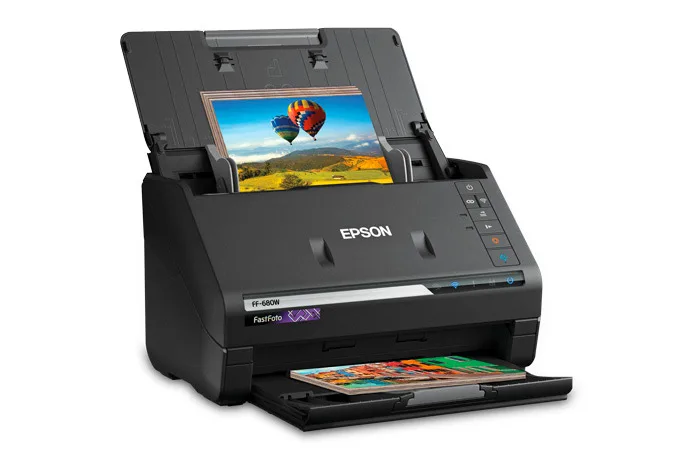
- Buy Epson FastFoto FF-680W A sheet-fed duplex photo scanner that turns stacks of prints into files at up to one photo per second.
- Buy Plustek OpticFilm 8200i SE A dedicated 35mm film and slide scanner with a 7200 dpi CCD and an infrared dust channel.
- It depends Pacific Image PrimeFilm XA Plus A 35mm film scanner that auto-feeds uncut rolls of up to 40 frames, with autofocus and DNG output.
- Skip Magnasonic FS70 Film Scanner A screen-equipped film digitizer whose 25MP headline is interpolated from a 13MP CMOS sensor.
What actually matters
- Media type - Prints, mounted slides, 35mm strips and medium format each need specific holders or feeders. Check the maker's supported media list before anything else.
- Optical resolution - This is what the sensor actually resolves. Footnotes often reveal that a higher headline number is interpolated.
- Sensor type - Dedicated film scanners use CCD line sensors that sweep across the frame. Cheap digitizers photograph the frame with a small CMOS camera sensor.
- Infrared dust and scratch removal - An extra infrared pass maps dust so software can remove it. It is the main reason dedicated film scanners save so much cleanup time.
- Dynamic range - A higher Dmax number means the scanner can pull detail from dense slide shadows. It matters most for slides.
- File formats - TIFF and DNG keep full quality for editing and archiving. JPEG-only devices compress every scan.
- Batch handling - Photo feeders and roll feeders let you walk away between batches. Manual holders mean loading every few frames.
The specs, in plain English
Green flags vs red flags
Green flags
- Optical resolution stated separately from any interpolated figure
- A built-in infrared channel for dust and scratch removal on a film scanner
- TIFF or raw output listed in the spec table
- A clear list of supported film sizes and print sizes
- Duplex capture on a print scanner, so notes on the backs are kept
Red flags
- A megapixel headline that the spec table marks as interpolation
- Fixed focus on a film digitizer
- JPEG listed as the only file format
- A maker FAQ admitting it cannot fix scratches or fading
- No mention of the sensor type or optical resolution at all
Who's who: the brands
- Epson - Makes the FastFoto sheet-fed print scanners and the Perfection flatbeds.
- Plustek - Known for the OpticFilm line of dedicated 35mm CCD film scanners bundled with SilverFast.
- Pacific Image - Makes PrimeFilm and PowerFilm scanners, including auto-feed models for 35mm rolls.
- Magnasonic - Sells budget screen-equipped film digitizers and other consumer electronics.
- LaserSoft Imaging - Makes SilverFast, the scanning software bundled with many film scanners.
How to read a listing without getting fooled
Start at the supported media list, because a perfect scanner for the wrong media is useless. Then find the optical resolution and read every footnote near it; makers often footnote the word interpolated, and Magnasonic puts it in parentheses in the resolution row. Next, look for infrared or a named dust removal feature, the file formats, and the per-frame scan time with the settings it was measured at. Plustek, for example, lists different times for 3600 and 7200 dpi with multi-sampling on. Finally, check computer requirements, because film scanning software can need far more RAM and disk space than you expect.
How much should you spend?
Budget film digitizers with screens sit in the lowest tier and trade image quality for speed and simplicity. Dedicated 35mm CCD scanners with infrared dust removal sit in the mid-range and give the most detail for the money. Auto-feed film scanners and fast sheet-fed print scanners sit in the premium tier, where you pay mainly for time saved on large collections. If your archive is small, a lab scan of the frames that matter can cost less than any scanner.
Questions, answered
Can a flatbed scanner do both prints and film?
Some flatbeds include a transparency unit and film holders, so they can scan both. They are slower than a sheet-fed print scanner and usually resolve less real detail on 35mm than a dedicated film scanner. They are useful when you also have medium format film. Check the optical resolution and film holder sizes the maker lists.
How long will scanning a family archive take?
It depends on the media. A sheet-fed print scanner rated near one photo per second can clear thousands of prints over a few sessions. A manual 35mm film scanner at high resolution can take a minute or more per frame, so film is the slow part of most projects. Scan the most important frames at full quality first.
Should I clean film before scanning?
Yes. A soft brush or blower removes loose dust, which makes the infrared removal work better and leaves fewer defects to fix. Avoid touching the emulsion, and hold film by the edges. Infrared removal is a backup, not a substitute for basic cleaning.
Where should I keep the scanned files?
Keep at least two copies on different devices, such as an external drive and a cloud service, and ideally one copy in another location. Keep the full-quality TIFF or raw files as the archive and make JPEG copies for sharing. Check the drives every so often, because files you never open can fail unnoticed.
Or jump to the head-to-head: Epson FastFoto FF-680W vs Plustek OpticFilm 8200i SE.