Explained
Power Supplies, Explained
After reading this you'll know how to size a power supply, what the ratings and connectors actually mean, and how to tell a quietly excellent unit from a spec-sheet trap.
In this guide
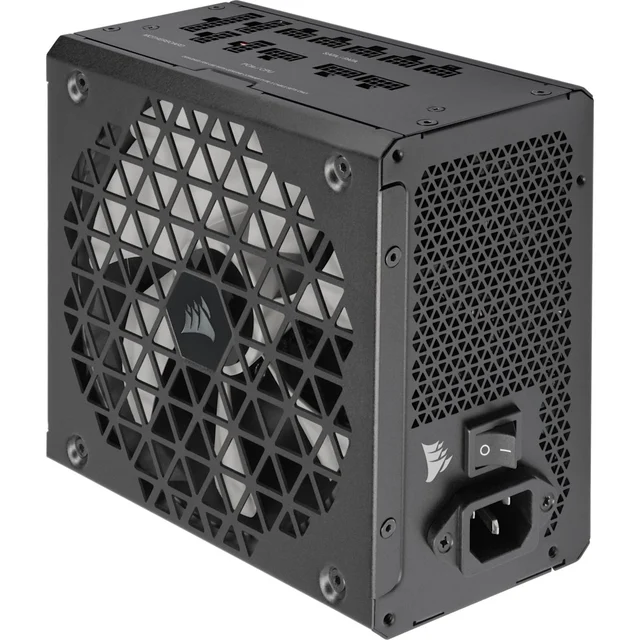
A computer power supply, or PSU, is the box that turns wall power into the clean, steady voltages every other part of your PC depends on. It's the one component you buy once and hope to ignore for a decade, which is exactly why cutting corners here is a bad trade. Most people either overspend on wattage they'll never draw or fixate on a single number while ignoring the things that actually decide whether the unit runs cool, quiet, and safe for years.
The 30-second version
- Enough wattage, not maximum wattage. Size it to your graphics card and processor plus a comfortable cushion for brief power spikes, then stop; buying far more capacity than you'll draw mostly costs money rather than improving anything.
- The 80 PLUS badge is about efficiency, not power. A higher tier wastes less energy as heat, which means a cooler, quieter unit, but the practical sweet spot for most builds sits in the middle of the ladder, not at the top.
- The platform inside matters more than the brand on the box. Many brands sell units built by a handful of contract manufacturers, so voltage stability and build quality vary within a single label; the warranty length is your best public shortcut for how much the maker trusts what's inside.
- A modern GPU wants a native 12V-2x6 cable. If you're pairing it with a current graphics card, a unit with the connector built in is cleaner and seats more reliably than leaning on an adapter.
- Modular cabling and fan behavior decide how the build feels day to day. Detachable cables make for a tidier, better-cooled case, and a fan that idles or fully stops at low load is the difference between a silent machine and a faint constant hum.
The products this guide is about
Our verdict on each, with the full reasoning on the companion review.
- Buy Corsair RM850x SHIFT (ATX 3.1) The best-balanced 850W unit for a modern gaming build, with side-mounted modular ports that make cable routing genuinely tidy.
- Buy be quiet! Pure Power 13 M 850W The value pick: a fully modular, ATX 3.1 Gold unit that runs quietly and undercuts the premium names. Amazon
- It depends Corsair HX1000i (ATX 3.1) A 1000W Platinum flagship with real-time digital monitoring, brilliant if your build actually needs it and overkill if it doesn't. Amazon
- Skip be quiet! System Power 11 750W A cheap, capable office-PC unit that stops making sense the moment a real graphics card enters the picture. Amazon
What actually matters
- Wattage headroom — add up the draw of your graphics card and processor, the two biggest consumers, then leave a cushion so the unit runs in its efficient, quieter middle range and can absorb the brief current spikes modern GPUs produce without tripping.
- 80 PLUS efficiency tier — this rates how much wall power actually reaches your components versus being lost as heat; a more efficient unit runs cooler and quieter, and the middle tiers deliver most of that benefit without the premium.
- ATX 3.1 and the 12V-2x6 connector — the current standard is built to handle the sharp, momentary power spikes of modern graphics cards, and a native GPU cable avoids the melted-connector reports tied to poorly seated adapters.
- Cabling type (modular vs not) — whether you can detach unused cables determines how clean, airflow-friendly, and serviceable your build is, especially in compact or windowed cases.
- The underlying platform and voltage stability — steady, ripple-free voltage under changing load is what protects your other parts; because it comes from the internal design rather than the label, independent testing and warranty length are your proxies for it.
- Fan behavior and noise — a temperature-controlled fan, ideally one that stops entirely at light load, is what makes a PSU effectively silent when you're not gaming.
- Warranty length — a long guarantee is a manufacturer betting its own money that the unit will last, which makes it one of the most honest quality signals a spec sheet offers.
The specs, in plain English
Green flags vs red flags
Green flags
- A long warranty, in the range of a decade, which signals the maker trusts the platform inside to outlast several graphics cards.
- A native 12V-2x6 cable included in the box when you're running a modern GPU, rather than an adapter workaround.
- A middle-tier or better 80 PLUS rating paired with a temperature-controlled fan and, ideally, a zero-RPM idle mode.
- Fully modular or semi-modular cabling so you can keep the build clean and airflow open.
- A clearly listed suite of protections (over-current, over-voltage, over-temperature) and consistent praise in independent testing for steady voltage under load.
- A wattage that comfortably covers your parts with headroom, rather than being maxed out at your system's expected draw.
Red flags
- A rock-bottom price paired with a short warranty and vague or missing efficiency and protection specs, a classic corner-cutting tell.
- A modern high-draw GPU fed only through an adapter because the unit lacks a native connector.
- Wattage picked to exactly match your parts with no cushion for spikes or future upgrades.
- Non-modular fixed cabling in a small or windowed case where the clutter has nowhere to hide.
- A number that sounds impressive on paper (huge wattage, top efficiency badge) attached to an unknown platform with no independent testing behind it.
- No mention of the protection suite or the standard it's built to, which usually means the maker would rather you didn't ask.
Who's who: the brands
- Corsair - Broad mainstream lineup with strong premium units, tidy cable designs, and optional digital monitoring on its flagship models.
- be quiet! - German brand built around low-noise engineering, offering competitive value units alongside quiet premium ones.
- Seasonic - A long-respected contract manufacturer that also sells under its own name; frequently the platform behind other brands' best units.
- Corsair, EVGA, MSI, ASUS - Familiar component names that badge PSUs built on platforms from a handful of specialist makers, so quality tracks the specific model, not just the logo.
- Cooler Master - Wide range from budget to high-end, where checking the specific platform and warranty matters more than the brand alone.
How to read a listing without getting fooled
Start by ignoring the biggest, boldest number and reading the spec sheet from the bottom up. Confirm the wattage genuinely covers your graphics card and processor with room to spare, then check the 80 PLUS tier for efficiency rather than assuming a higher badge means more power. Look for the standard (ATX 3.0 or 3.1) and, if you have a modern GPU, an included native 12V-2x6 cable rather than an adapter. Note whether the cabling is modular and whether the fan has a zero-RPM or semi-passive mode. Then find the warranty length and the listed protections; a long guarantee plus a full protection suite tells you more about real quality than any marketing adjective. Where you can, cross-check the specific model against independent testing, because two units with identical headline specs can hide very different platforms underneath. If a listing shouts about wattage and efficiency but goes quiet on warranty, protections, and who built the platform, treat that silence as the most informative part of the page.
How much should you spend?
Spend where it protects the rest of your machine, and no further. The value sweet spot sits with a mid-tier-efficiency, fully or semi-modular unit sized with sensible headroom for your parts, backed by a long warranty; that combination buys quiet, efficient, reliable power without paying for capabilities you'll never use. Stepping up to the very top efficiency tier or to far more wattage than your build draws is worth it only in specific cases, such as a genuine flagship graphics card, a workstation with heavy sustained load, or a desire for live monitoring and future-proof headroom. Going the other way, chasing the cheapest unit usually means giving up efficiency, modularity, a quiet or stopping fan, and warranty length, and those savings tend to cost more over the life of the build in noise, heat, and risk. Think of a good PSU as insurance for everything plugged into it: buy quality once, size it right, and you won't think about it again for years.
Questions, answered
How many watts do I actually need?
Add up the two biggest power draws, your graphics card and your processor, then leave a comfortable cushion on top for brief spikes and future upgrades. A typical single-GPU gaming PC is well served by a unit with meaningful headroom over its expected draw, which also keeps the PSU running in its cooler, quieter, more efficient middle range. Only step up to very high wattage if you're running a flagship graphics card or a heavy multi-component workstation. Buying far more than you need mostly costs money rather than improving anything.
What is ATX 3.1 and the 12V-2x6 connector, and do I need them?
ATX 3.1 is the current power-supply standard, and 12V-2x6 is the updated single cable that powers a modern graphics card, an improved version of the earlier 12VHPWR connector reshaped to seat more securely and handle the brief power spikes today's GPUs produce. If you're buying a current or recent graphics card, a unit with a native 12V-2x6 cable is the cleaner, safer route than relying on an adapter. If your GPU is older and lower-draw, it's a nice-to-have rather than a requirement.
Is a melting connector something I actually need to worry about?
The early reports of overheated GPU connectors were largely traced to the cable not being fully seated, so the pins carried heavy current across a poor connection. The revised 12V-2x6 design was made specifically to reduce that risk by seating more reliably. In practice, using a native cable rather than a stack of adapters and firmly pushing the connector all the way in until it clicks addresses the vast majority of the concern.
Does the brand on the box tell me how good it is?
Not by itself. Many brands don't build their own units; they badge platforms made by a handful of specialist contract manufacturers, so quality can vary from model to model within the same label. That's why the platform inside, revealed through independent testing and hinted at by a long warranty, tells you more than the logo. Judge the specific model, not just the name.
Is it worth paying for the highest efficiency rating and fully modular cables?
For most builds, the middle efficiency tier captures the bulk of the cooling, noise, and running-cost benefit, and the very top tier is a diminishing-returns luxury. Fully modular cabling, on the other hand, is genuinely worth it in most cases because it makes for a cleaner, better-cooled, easier-to-service build, especially in compact or windowed cases. Semi-modular is a reasonable middle ground if budget is tight.
Or jump to the head-to-head: Corsair RM850x SHIFT (ATX 3.1) vs be quiet! Pure Power 13 M 850W.