Explained
Powerline Adapters, Explained
After reading, you will understand why the AV number on the box is not what you get, and which specs and setup choices actually decide your real speed.
In this guide
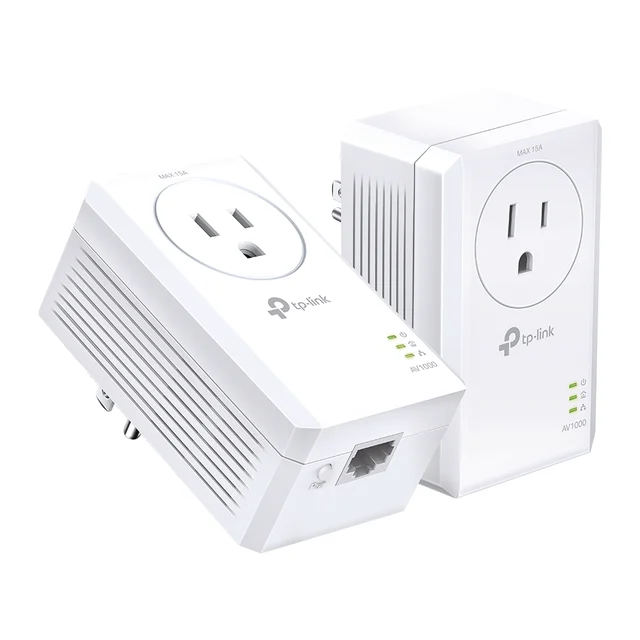
A powerline adapter turns your home's electrical wiring into an Ethernet cable, letting you plug a distant TV, console or PC into your network without running a cable through the walls or fighting for Wi-Fi signal. The number that trips up most first-time buyers is the AV rating printed on the box, a theoretical maximum that almost no home wiring can actually deliver. This guide decodes that number along with passthrough, MIMO and circuit placement so you can judge a listing on what it will really do in your house.
The 30-second version
- The AV number is a theoretical ceiling, not a promise. Your home's wiring, not the adapter, decides how much of it you actually get.
- Check the Ethernet port before the AV rating. A Fast Ethernet (10/100) port caps the connection near 100 Mbps no matter how good the powerline link is.
- Same circuit gives the best results. Both adapters plugged into wiring fed by the same breaker generally pass traffic faster and more reliably than a cross-circuit link.
- Passthrough is a small cost for real convenience. It hands the wall outlet back so the adapter doesn't permanently claim a socket you'd otherwise lose.
- Powerline solves one wired device, not whole-home Wi-Fi. If the real goal is better wireless coverage everywhere, a mesh Wi-Fi system usually serves you better.
The products this guide is about
Our verdict on each, with the full reasoning on the companion review.
- Buy TP-Link AV1000 Gigabit Passthrough Powerline Kit (TL-PA7017P KIT) The sensible default: gigabit port, a passthrough outlet so you don't lose the socket, and enough real-world headroom for almost any home use. Amazon
- Buy TP-Link AV2000 2-Port Gigabit Passthrough Powerline Kit (TL-PA9020P KIT) The performance pick: two gigabit ports and 2x2 MIMO that squeezes more out of tricky wiring and longer runs. Amazon
- It depends NETGEAR PowerLINE 1000 (PL1000) A compact, no-frills gigabit kit that's easy to recommend on price alone, as long as you can spare the whole outlet. Amazon
- Skip TP-Link AV500 Powerline Kit (TL-PA4010P KIT) Its own 10/100 port caps you around 100 Mbps no matter what the powerline manages, which makes it a poor value in 2026. Amazon
What actually matters
- Ethernet port speed on each unit sets a hard ceiling before the powerline link even matters; a Gigabit port outruns a Fast Ethernet one on any decent internet plan.
- Realistic throughput versus the AV rating is the gap between what the box advertises and what independent testing and owner reports show in an actual home.
- Passthrough outlet determines whether plugging in the adapter costs you the wall socket entirely or leaves it usable for something else.
- Circuit and panel placement affects how well the two adapters talk to each other; same-circuit runs are the easy case, cross-circuit runs are the hard one.
- MIMO versus single-channel chips decides how much stability and speed survive a longer or noisier run through the wiring.
- Encryption and pairing method affect setup friction and whether a neighbor's powerline gear could ever see your traffic.
- Whether powerline is even the right tool matters as much as any spec, since it fixes one wired device and does nothing for Wi-Fi coverage.
The specs, in plain English
Green flags vs red flags
Green flags
- A Gigabit Ethernet port on the adapter itself, so the port isn't the bottleneck
- A passthrough outlet if you're installing somewhere sockets are already scarce
- 2x2 MIMO listed for a run that has to cross circuits or cover real distance
- 128-bit AES encryption and simple plug-and-pair setup
- Listing language and reviews that describe real-world speeds honestly instead of restating the AV number as a guarantee
Red flags
- A Fast Ethernet (10/100) port hiding behind a big AV number on the box
- No passthrough on a kit priced close to one that includes it
- Marketing copy that implies the AV rating is what you'll actually see day to day
- Instructions or listings that suggest plugging into a power strip or surge protector, which filters the signal and can wreck the link
- A single-channel, non-MIMO chip sold for a large or old home with multiple circuits and no easy way to test first
Who's who: the brands
- TP-Link - The broadest powerline lineup on the market, spanning budget single-port kits to MIMO two-port models with passthrough.
- NETGEAR - Known for compact, no-frills PowerLINE kits that keep the price down by skipping passthrough.
- devolo - A brand built specifically around powerline networking, with a reputation for higher-end kits and Mesh Wi-Fi hybrid products that combine powerline backhaul with wireless.
- Zyxel - A smaller player offering straightforward HomePlug AV2 kits, often positioned as a budget alternative to the bigger networking brands.
How to read a listing without getting fooled
Start by ignoring the giant AV number on the front of the box; it's a lab-measured theoretical maximum, not a speed you'll see in your house. Instead, find the Ethernet port speed in the fine print, since a Fast Ethernet (10/100) port caps you near 100 Mbps no matter how the powerline link performs, while a Gigabit port removes that ceiling. Check whether the listing mentions passthrough, MIMO or multiple antennas (a sign the adapter is built for longer or tougher runs), and confirm it uses HomePlug AV2 with AES encryption, which is standard on anything current. Owner reviews are more useful than the spec sheet here, since they'll tell you what speed people actually saw and whether the kit struggled crossing circuits.
How much should you spend?
Spend on the Ethernet port and passthrough first, since those decide your real-world ceiling and daily convenience, and only pay up for MIMO if your situation actually needs it. A single-port Gigabit kit with passthrough covers the majority of homes wiring up one distant device and sits at a fair mid-range spend. A two-port MIMO kit costs meaningfully more but earns that premium if you're on a fast internet plan, feeding multiple wired devices from one adapter, or working with a long or cross-circuit run that a basic kit struggles with. The lowest-priced kits built around a Fast Ethernet port are rarely worth it once your internet plan passes roughly 100 Mbps, since the saving is small and the ceiling is permanent. Skipping passthrough to save a little only makes sense if you have outlets to spare where you're installing.
Questions, answered
Why doesn't my AV2000 adapter actually give me 2000 Mbps?
Because the AV number is a theoretical maximum measured on ideal lab wiring, not a promise. Real homes have older cabling, multiple circuits, and electrical noise from appliances, all of which eat into that ceiling. Independent testing and owner reports commonly show real throughput well below the rated figure. Treat AV500, AV1000 and AV2000 as a ranking of potential against each other, not a number you should expect to hit.
Do both powerline adapters need to be on the same electrical circuit?
They don't have to be, but it's the setup that works best. Powerline signal travels most cleanly when both adapters share the same circuit back to the breaker panel. Crossing between circuits, or between phases in the panel, can slow the link down or occasionally prevent the two units from pairing well at all. A MIMO adapter handles cross-circuit runs better than a basic single-channel one, but same-circuit is still the easier, more reliable case.
What does the passthrough outlet actually do?
It's a filtered wall socket built into the front of the adapter, so plugging the adapter in doesn't cost you the outlet. Without passthrough, the adapter occupies the entire socket and you lose it for anything else. With passthrough, you can still run a lamp, TV or charger through the same spot. It's not essential, but if you're installing somewhere with few spare outlets, it's usually worth the small added cost.
What is MIMO and do I need it?
MIMO (multiple-input, multiple-output) is a chip design that uses extra conductors in your home's wiring instead of a single signal path, which helps the connection stay steadier over longer runs or when the two adapters aren't on the same circuit. You need it if your wiring is older, your run is long, or you're crossing circuits or a breaker panel. For a short, same-circuit run in a newer home, a standard non-MIMO chip is usually enough.
Should I buy powerline adapters or a mesh Wi-Fi system instead?
It depends on the problem you're solving. If you need one specific device, a console, a smart TV, a desktop, on a rock-steady wired connection in a room you can't easily run a cable to, powerline is a tidy and inexpensive fix. If your actual goal is better Wi-Fi coverage for phones and laptops across the whole house, a modern mesh Wi-Fi system is the better and more future-proof spend, because powerline does nothing for wireless devices on its own. Many homes end up wanting both: mesh for coverage, and a powerline link just for that one stubborn wired device.
Can I plug a powerline adapter into a power strip or surge protector?
You can, but it's one of the most common ways to wreck performance. Power strips and surge protectors filter electrical noise, and that filtering also blocks or degrades the powerline signal riding the wiring. Plug adapters directly into a wall outlet for the best and most predictable results.
Or jump to the head-to-head: TP-Link AV1000 Gigabit Passthrough Powerline Kit (TL-PA7017P KIT) vs TP-Link AV2000 2-Port Gigabit Passthrough Powerline Kit (TL-PA9020P KIT).