Explained
Smart Glasses, Explained
After reading this you'll understand what today's smart glasses can and can't do, what every spec on the box means, and how to choose a pair that fits your face and your life.
In this guide
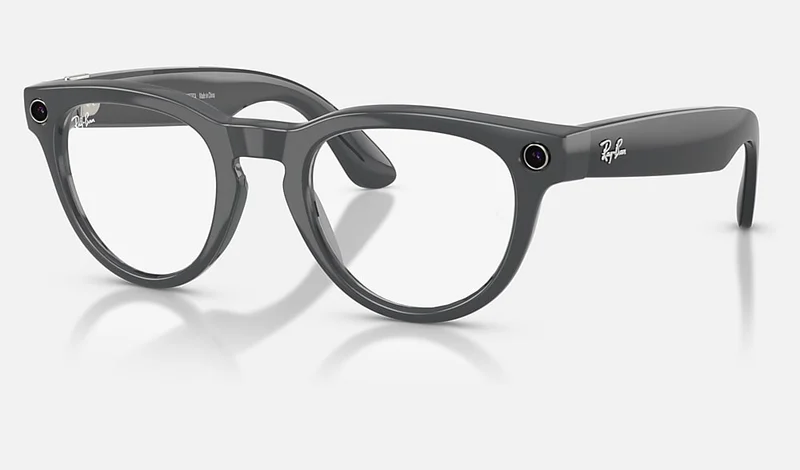
Smart glasses in 2026 mostly mean camera-and-audio frames with a built-in voice assistant: you can snap a photo, take a call, and ask a question without touching your phone. The single thing that trips up first-time buyers is expecting a screen floating in the lens, when the vast majority of buyable glasses have no display at all. Get that distinction straight and the rest of the buying decision gets simple.
The 30-second version
- Most smart glasses have no screen. The popular ones are camera, speaker and microphone plus a voice assistant, with answers and photos landing on your phone, not projected into your vision.
- Wearability beats the spec sheet. The best glasses are the ones that look normal enough that you keep them on your face, so fit and style decide more than a slightly sharper camera.
- The platform matters as much as the hardware. A well-supported app and steady software updates shape the experience over years far more than any single day-one spec.
- Think battery plus charging case, not battery alone. Expect a few hours of active use per charge, topped up through the day by the case, with heavy video recording draining fastest.
- Match durability to how you'll use them. Casual everyday wear is fine with light splash resistance, but sport and outdoor use want a proper dust-and-water rating and a secure, wraparound fit.
The products this guide is about
Our verdict on each, with the full reasoning on the companion review.
- Buy Ray-Ban x Meta Ray-Ban Meta (Gen 2) The best all-round camera-and-AI glasses, in frames you'll actually want to wear. Amazon
- Buy Oakley x Meta Oakley Meta Vanguard The same Meta smarts in a rugged, sweat-proof wrap built for running and riding. Amazon
- It depends Oakley x Meta Oakley Meta HSTN Meta's proven brains in a bold, oversized Oakley lifestyle frame. Amazon
- It depends Rokid AI Glasses Style The lightest camera glasses here, with ChatGPT and Gemini and the widest prescription range, outside Meta's ecosystem.
- It depends HTC VIVE Eagle Gemini or GPT, live translation and privacy safeguards in two frame shapes, with full AI tied to a subscription.
- It depends Mentra Live Open-SDK camera glasses aimed at developers and frontline teams, not at style-first buyers.
- Skip Solos AirGo Vision The tempting non-Meta alternative that still lags on the things that matter.
What actually matters
- Camera quality in real light - almost anything looks fine in bright sun; the differences show up indoors and at dusk, so weigh low-light and video performance, not just the megapixel number.
- Hands-free AI responsiveness - the whole point is not reaching for your phone, so fast, reliable voice triggering matters more than a long list of assistant features.
- Fit and everyday looks - frame shape, size and weight decide whether the glasses live on your face or in a drawer, so treat comfort and normal-looking styling as core specs.
- Audio and call quality - open-ear speakers and a good microphone array determine whether people can hear you on calls and whether you can hear answers in wind and noise.
- Battery and case strategy - look at real all-day use with case top-ups rather than a single headline runtime figure.
- Durability rating - a dust-and-water (IP) rating and a secure fit matter a lot for sport and outdoors, and much less for coffee-shop wear.
- Ecosystem lock-in and updates - check which account and app you're tied to and how actively the maker ships updates, because that determines how the glasses age.
The specs, in plain English
Green flags vs red flags
Green flags
- Frames you'd genuinely wear even if they weren't smart, in a shape and size that suits your face.
- A voice assistant that triggers quickly and reliably in independent testing and owner reports.
- An active app with a steady history of software updates and new features.
- A charging case included, giving you realistic all-day use with quick top-ups.
- A durability rating that matches your use, such as a proper IP rating if you'll sweat or get caught in rain.
- Prescription lens options that cover your vision range, if you wear glasses daily.
Red flags
- Marketing that implies a heads-up display when the product is actually audio-and-camera only.
- Owner reports of slow, inconsistent AI responses or weak call pickup.
- A small or stagnant app ecosystem with infrequent updates.
- Buying purely on a megapixel or resolution number while ignoring low-light performance.
- A bold, oversized frame you like on a spec sheet but would be self-conscious wearing in public.
- No clear capture-light or privacy indicator, or a design that hides that it's recording.
Who's who: the brands
- Ray-Ban x Meta - The mainstream default: classic, wearable frames running Meta's well-regarded hands-free assistant and capture.
- Oakley x Meta - The same Meta platform in bolder, sportier frames, including rugged wraparound designs aimed at athletes.
- Meta - The software and AI engine behind the Ray-Ban and Oakley glasses, and the account and app you're tied into.
- Luxottica - The eyewear maker behind Ray-Ban and Oakley, which is why the Meta-powered frames feel like real, premium glasses.
- Solos - A smaller, non-Meta challenger offering a choice of AI models and swappable frame fronts, but trailing on camera and polish.
How to read a listing without getting fooled
Start by finding the one line that tells you whether there's a display: if the listing talks about camera, audio and a voice assistant but not a heads-up screen, these are capture-and-audio glasses, full stop. Next, treat megapixel and video-resolution figures as a starting point, not a verdict, and look instead for how the glasses perform indoors and at dusk in independent testing and owner reports. Read the battery claim as a best case and mentally pair it with the charging case for real all-day numbers. Check the IP rating against your actual use, confirm which account and app you'll be locked into, and verify prescription support if you need it. Finally, ignore the hype adjectives and judge the frame the way you'd judge any pair of glasses: would you wear this shape and size on your face every day?
How much should you spend?
The biggest price divide is between the polished, name-brand Meta-powered glasses and cheaper challenger brands, and for most people the pricier options currently buy a meaningfully better everyday experience: sharper capture, faster and more reliable AI, better call quality and steadier updates. Spending up is most worth it if you want frames that look normal and software that keeps improving, and the rugged sport models sit at the very top because you're paying extra for durability and secure fit. Going cheaper mainly makes sense if avoiding a particular ecosystem or choosing your own AI model is a firm requirement and you accept the trade-offs. Remember that prescription lenses and a nicer frame add to the total, so budget for the whole package rather than the base glasses alone, and don't pay a premium for a bigger camera number that won't help in the low light where it matters.
Questions, answered
Do smart glasses show a screen in the lens like in sci-fi movies?
Usually not. The popular pairs are camera-and-audio glasses: you take photos, make calls and ask questions by voice, and the answers come through tiny open-ear speakers while photos land on your phone. True display glasses that project a small heads-up screen exist, but they cost more, often need a separate control accessory, and are a different category.
Will people around me know when I'm recording?
Camera-equipped glasses fire a small capture light when they're recording so people nearby can tell. It's a genuine privacy courtesy, but the light is easy to miss, so treat the glasses like any camera and be considerate in private or sensitive spaces.
How long does the battery actually last?
Plan on a few hours of active mixed use from the glasses themselves, with the included charging case topping them up through the day. Heavy video recording drains them fastest, while mostly audio, calls and the occasional photo stretch a charge much further. Think in terms of all-day use with case top-ups rather than one long single-charge session.
Can I get my prescription in smart glasses?
Usually yes. Most major smart glasses offer prescription lens options, though it adds to the cost and the order can take longer, and each model supports only a certain prescription range. If you wear glasses every day, confirm your range is covered before buying.
Are cheaper, non-Meta smart glasses worth it?
They're worth knowing about if you specifically want to avoid a particular ecosystem or choose your own AI model, but owner reports consistently place their camera quality, AI responsiveness, audio and update cadence behind the mainstream options. For most people the better-supported glasses are the safer, more polished buy today.
Or jump to the head-to-head: Ray-Ban x Meta Ray-Ban Meta (Gen 2) vs Oakley x Meta Oakley Meta Vanguard.