

Tech & Gadgets
The Best Pixel Art Displays: 4 Compared (and One to Skip)
Divoom owns this category - so we lined up its whole range: the 64x64 Pixoo frame, the five-screen Times Gate, the Ditoo speaker-computer, and a $50 wearable badge that's one convention too far.
The short version
The Pixoo-64 II is the pixel display to gift: 64x64 canvas, 5GHz WiFi, endless community art at $150. The Times Gate wins for data-watchers who want five screens of info-bar cool. The Ditoo-Pro is the cute pick (speaker included, smaller canvas). Skip the Emodo badge - a $50 pixel name tag.
Our picks at a glance
- Divoom Pixoo-64 II - Buy. 64x64 pixel frame with 5GHz WiFi - the flagship canvas for pixel art.
- Divoom Times Gate - Buy. Five 128x128 LCDs in a retro-futurist tube - the cyberpunk info bar.
- Divoom Ditoo-Pro - It depends. Tiny CRT-styled speaker with a pixel screen and clickable keycaps - half toy, half speaker.
- Divoom Emodo Pixel Badge - Skip. A wearable pixel screen for pins and lanyards - $50 for a badge that broadcasts memes.
The verdict in 30 seconds
What mattered most
- Price (street)
- Display
- Connectivity
- Bonus hardware
- Verdict
Pixel art displays are the rare desk gadget that earns its desk space: a tiny screen cycling custom animations, weather, clocks, or community-made art. Divoom owns the category so thoroughly that honest comparison means ranking within the brand - the question isn't which company, it's which form factor. We lined up all four shapes at $50 to $150.
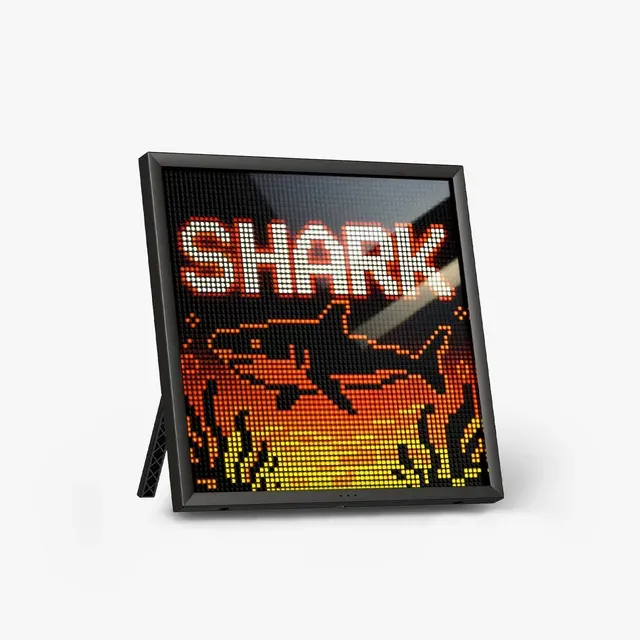
64x64 pixel frame with 5GHz WiFi - the flagship canvas for pixel art.
Best for: Desk setups, streamers' shelves, and anyone who'd frame a sprite.
- 64x64 resolution - 4x the pixels of the classic 16x16 grid; faces and scenes finally readable.
- Dual-band 2.4/5GHz WiFi - updates reliably, unlike the 2.4GHz-only generation.
- Divoom app community shares thousands of free pixel animations; DIY editor built in.
- Data widgets: clock, weather, followers, crypto - plus idle art rotation.
- $149.99 - you can buy a decent smart display for less; you're paying for the aesthetic.
- WiFi setup still runs through the app - expect 10 minutes of pairing dance.
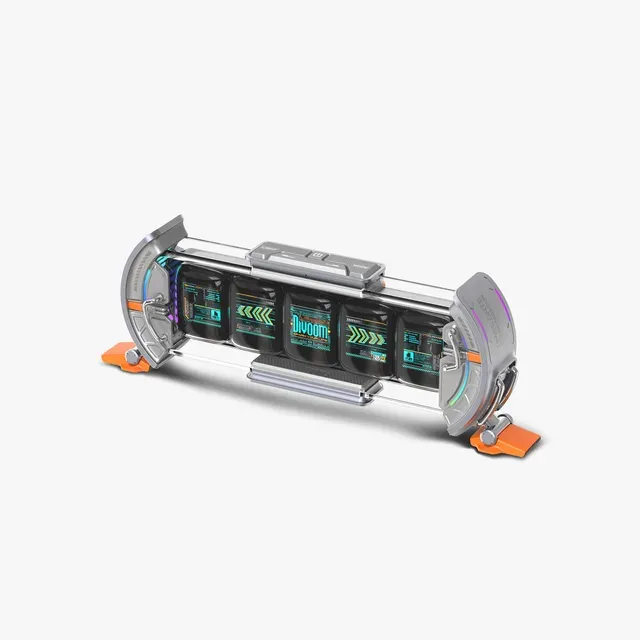
Five 128x128 LCDs in a retro-futurist tube - the cyberpunk info bar.
Best for: Setup maximalists and data-watchers who want their numbers in pixels.
- 5 full-color 128x128 LCD screens in one chassis - each can run a different widget.
- Real info display: clock, weather, stocks, social counts across the bar.
- The aluminum tube housing is genuinely beautiful - the desk-object leader here.
- Pixel animation mode bridges art and data better than a single panel.
- $139.99 for an information bar - a niche buy even in a niche category.
- Five screens = five times the fiddling to get the layout you want.
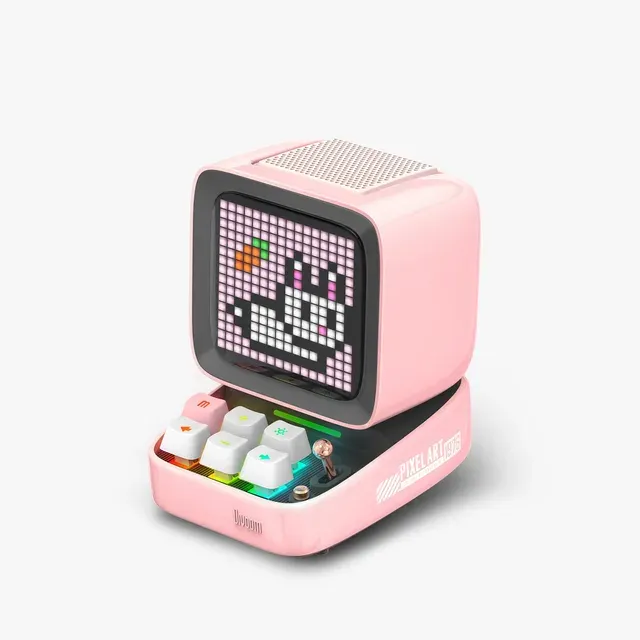
Tiny CRT-styled speaker with a pixel screen and clickable keycaps - half toy, half speaker.
Best for: Kids' desks and gift-givers who want the cuteness factor, not the canvas.
- Retro-computer shell with mechanical keycaps - the most charming object in the lineup.
- Real Bluetooth speaker with 15W-class output - music plus visuals in one box.
- Same pixel ecosystem: animations, alarms, games, notifications.
- $99.99 buys a 16x16 screen - much smaller canvas than Pixoo for the money.
- Speaker is decent, not hi-fi; the screen is the product.

A wearable pixel screen for pins and lanyards - $50 for a badge that broadcasts memes.
Best for: Convention cosplayers only - and even they should look at the Ditoo.
- Clever convention/concert accessory - show an avatar or support message on your bag.
- Same app art library; battery for a day's wear.
- It's a $50 pixel name tag - a joke that wears out within the event.
- Tiny screen means art reads as a blur at conversation distance.
- Every desk display on this page does more for similar money.
| Criteria | Divoom Pixoo-64 II Top pick | Divoom Times Gate | Divoom Ditoo-Pro | Divoom Emodo Pixel Badge |
|---|---|---|---|---|
| Verdict | Buy it | Buy it | It depends | Skip it |
| Best for | Desk setups, streamers' shelves, and anyone who'd frame a sprite. | Setup maximalists and data-watchers who want their numbers in pixels. | Kids' desks and gift-givers who want the cuteness factor, not the canvas. | Convention cosplayers only - and even they should look at the Ditoo. |
| Price tier | $$ · mid-range | $$ · mid-range | $$ · mid-range | $ · budget |
| Price (street) | $149.99 | $139.99 | $99.99 | $49.99 |
| Display | 64x64 LED matrix | 5x 128x128 LCD screens | 16x16 pixel screen | Mini round pixel badge |
| Connectivity | 2.4/5GHz WiFi | WiFi | Bluetooth | App-linked Bluetooth |
| Bonus hardware | None - pure display | 5-screen info bar | Bluetooth speaker + keys | Wearable pin mount |
| Verdict | Buy - the definitive canvas | Buy - the desk-data king | It depends - charm over pixels | Skip - novelty pin |
Which one is right for you?
- Desk setups, streamers' shelves, and anyone who'd frame a sprite. Buy it Divoom Pixoo-64 II
- Setup maximalists and data-watchers who want their numbers in pixels. Buy it Divoom Times Gate
- Kids' desks and gift-givers who want the cuteness factor, not the canvas. It depends Divoom Ditoo-Pro
- Convention cosplayers only - and even they should look at the Ditoo. Skip it Divoom Emodo Pixel Badge
How we judged the field
Pixel art displays are a single-brand market in practice - Divoom makes the only ecosystem with a real art community, so the honest comparison is across its range. We judged screen resolution, connectivity, non-art utility (widgets, speaker), and whether the form factor earns the price.
The Pixoo-64 II is the flagship for a reason: at 64x64, pixel art stops being a suggestion and starts being legible - faces, gradients, full scenes. The second-gen model adds 5GHz WiFi, fixing the flaky 2.4GHz pairing of the original, and Divoom’s app ships with a community art feed that means you never run out of frames. The honest caveat: $150 is smart-display money, and this is deliberately not a smart display. It’s a lightbox for the pixel-art era - buy it for the aesthetic, not the specs.
The Times Gate is the most beautiful object in the lineup: five 128x128 LCD screens inside an aluminum tube that reads like a retro-future instrument cluster. Each screen can run its own widget - clock, weather, stock ticker, social count - or sync into a wide pixel animation. It’s for the data-watcher who wants their desk to feel like a cockpit. At $140 it’s an indulgence, but it’s the only one that looks like a design object from every angle.
The Ditoo is the product that goes viral: a tiny pink (or black) CRT computer with clickable mechanical keycaps and a 16x16 screen, plus a real Bluetooth speaker inside. It’s adorable, and $99.99 for speaker + screen + alarm clock is defensible. But the 16x16 canvas is a fraction of the Pixoo’s resolution - art on it reads as icons, not images. If the giftee wants the cute factor and a speaker they’ll actually use, it lands; pixel-art purists should spend up.
The Emodo is a wearable pixel screen - pin it to a lanyard or bag and it loops your avatar or a message. It’s the kind of thing that’s genuinely fun for exactly one convention weekend. After that it’s a $50 drawer item, and at conversation distance the tiny screen blurs anyway. Divoom’s desk products are all better uses of the money.
Pixoo-64 II vs Times Gate: which should you buy?
Buy the Pixoo-64 II if the giftee will browse the art feed and make their own - it’s the bigger canvas for animation and the classic form factor. Buy the Times Gate if they’re a data person: five screens of clocks, tickers, and weather is a different flex than one big canvas. Same price tier, different personality - art versus instrument panel.
What to look for in a pixel art display
- Resolution is the whole product. 16x16 shows icons; 64x64 shows scenes. Know which experience you’re gifting.
- WiFi vs Bluetooth. WiFi units sync widgets and art unattended; Bluetooth units depend on the paired phone being nearby.
- The app community matters more than the hardware. Divoom’s library of thousands of free animations is why these stay fresh - a no-name pixel screen without that feed is dead in a week.
- Data widgets are the long-term value. The art is the honeymoon; the weather-and-clock rotation is the marriage.
Our final take
The Pixoo-64 II is the definitive gift in this category: big canvas, good WiFi, endless art. The Times Gate is the pick for the desk-pilled data-watcher. The Ditoo-Pro wins hearts at half the resolution. And the Emodo badge belongs at the convention it’s aimed at - and nowhere else.
Questions, answered
What can pixel art displays actually show?
Clock, weather, notifications, stock tickers, and social counts - plus the real draw: looping pixel animations from the app's community library or your own editor. Think desk accessory with information, not a second monitor.
Do they need WiFi?
WiFi models (Pixoo-64, Times Gate) pull live data and sync art in the background. Bluetooth models like the Ditoo work through a paired phone - fine for music and art, less seamless for widgets.
How hard is making your own pixel art for these?
The Divoom app includes a grid editor - draw on your phone, push to the screen. Most users mix their own pieces with downloaded community art; no skill required either way.
Is the Pixoo-64 worth it over the cheaper 16x16 models?
If the screen is the point, yes - 64x64 can render faces, scenes, and multi-color gradients that read at a glance, where 16x16 is impressionistic at best. If you want a speaker with a screen as a bonus, the Ditoo's charm wins regardless of resolution.
Deciding between the top two? See our head-to-head: Divoom Pixoo-64 II vs Divoom Times Gate.
More Tech & Gadgets reviews
 The Best Portable Monitors of 2026: Honest Picks for Travel and Work
  The Power Banks Worth Buying (and the 'Mega-mAh' One to Skip)
  The Best Portable Power Stations: 4 Compared (and One to Skip)
  The Best Portable Projectors: 4 Compared (and One to Skip)
  The Best Portable SSDs: Fast, Rugged, and Which One to Skip
  The Best PC Power Supplies: 4 Compared (and One to Skip)