

Tech & Gadgets
The Best PC Cases: 4 Compared (and One to Skip)
We compared four current PC cases on airflow, motherboard support, GPU and cooler clearance, included fans, and build quality.
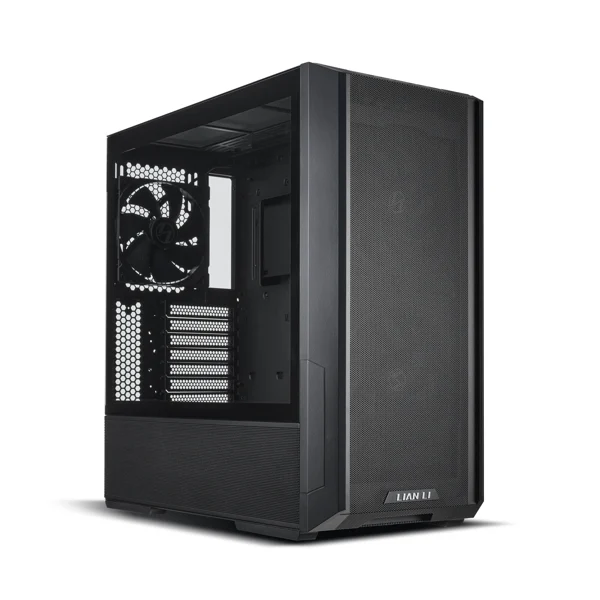
The short version
If you just want the best all-round PC case, buy the Lian Li Lancool 216: it includes three large fans, cools superbly, fits big parts, and costs less than cases that do less. Spend up on the Fractal Design North (mesh version) if you want a case that looks as good as it performs. The Corsair 4000D Airflow is still a dependable, easy first build, but it ships with only two fans and its design is showing its age. Skip the Fractal Design Terra unless you're an experienced small-form-factor builder chasing a showpiece, as it's the priciest option here and the hardest to build in. Best for: most people, the Lancool 216 is the safe, high-value choice.
Our picks at a glance
- Lian Li Lancool 216 - Buy. The value airflow king: two enormous front fans, roomy interior, and a price that shames cases costing far more.
- Fractal Design North - Buy. A genuinely beautiful real-walnut tower that also cools well when you choose the mesh side-panel version.
- Corsair 4000D Airflow - It depends. A rock-solid, easy-to-build classic that still cools well but now feels dated and light on included fans.
- Fractal Design Terra - Skip. A stunning, tiny wood-and-aluminium showpiece that's expensive, cramped, and unforgiving to build in.
The verdict in 30 seconds
What mattered most
- Form factor / board support
- Cooling approach
- Included fans
- Max GPU length
- CPU cooler clearance
- Front USB-C
A good case decides how cool, quiet, and buildable your PC will be for years, yet most of the price gap comes down to looks and materials rather than performance. We lined up a budget airflow champion, a design-led premium tower, a long-serving mainstream favorite, and a jewel-box compact model. Two are easy recommendations, one is a solid pick only for the right buyer, and one is gorgeous but wrong for most people.
The value airflow king: two enormous front fans, roomy interior, and a price that shames cases costing far more.
Best for: Anyone building a mainstream or high-end air- or liquid-cooled PC who wants the best cooling-per-dollar
- Two 160mm front intake fans plus a 140mm rear fan included, moving a lot of air quietly out of the box
- Generous clearance for long graphics cards, tall air coolers, and up to 360mm radiators front and top
- Front USB-C, a proper mesh front, and thoughtful cable management with a PSU shroud
- Fairly large and boxy, so it eats desk or floor space
- The tinted tempered-glass side and plain looks won't win any design awards
Own the Lian Li Lancool 216? Tell us how it held up.
Thanks. Counted, and shown once enough owners have weighed in.
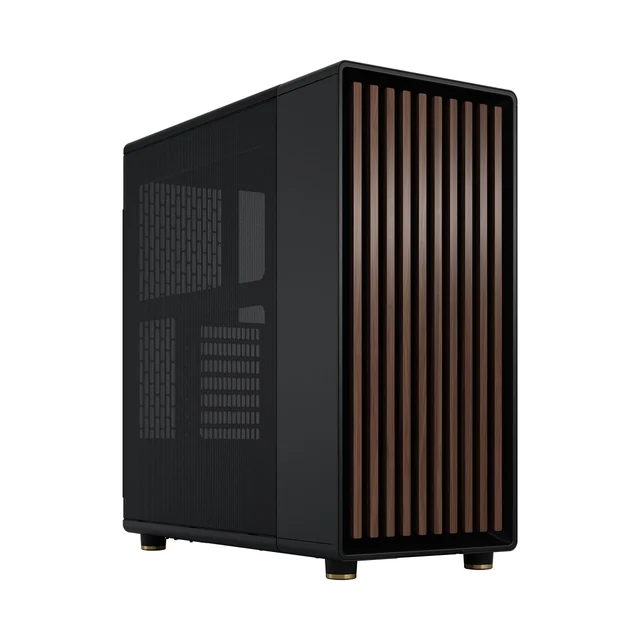
A genuinely beautiful real-walnut tower that also cools well when you choose the mesh side-panel version.
Best for: Builders who want a standout, design-forward ATX tower and will pick the mesh version for airflow
- Real wood front slats and clean lines make it one of the few cases that looks at home in a living room
- Mesh side-panel trim delivers strong airflow; the front takes up to a 360mm radiator
- Excellent fit and finish, front USB-C, and two included 140mm fans
- Costs noticeably more than the airflow leaders for similar cooling
- The wood-slat face is likely slightly more restrictive than a full-mesh front, so pick the mesh side-panel version for airflow
Own the Fractal Design North? Tell us how it held up.
Thanks. Counted, and shown once enough owners have weighed in.
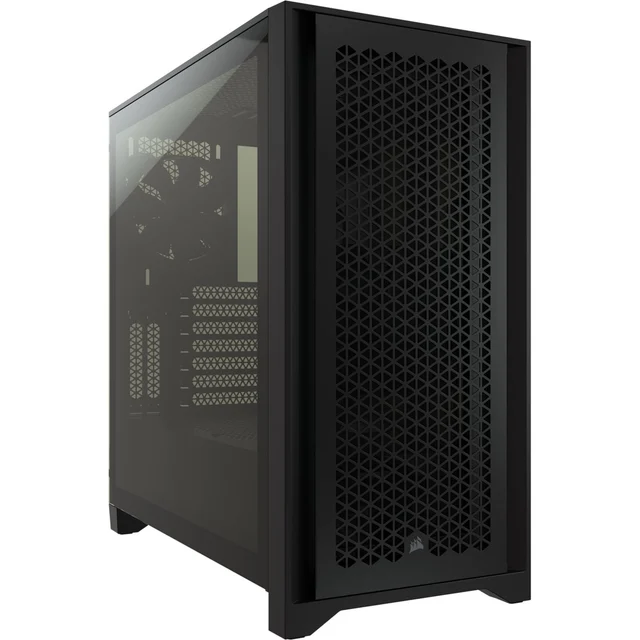
A rock-solid, easy-to-build classic that still cools well but now feels dated and light on included fans.
Best for: First-time builders who value a fuss-free, dependable box and don't mind adding a fan or two
- High-airflow steel mesh front and a clean, beginner-friendly interior with tidy cable routing
- Reliable build quality and front USB-C in a compact, unfussy ATX footprint
- Widely available and a safe, proven choice
- Ships with only two fans, so most builders will want to buy more
- The design has been around for years and newer rivals include more fans or better features for the money
Own the Corsair 4000D Airflow? Tell us how it held up.
Thanks. Counted, and shown once enough owners have weighed in.
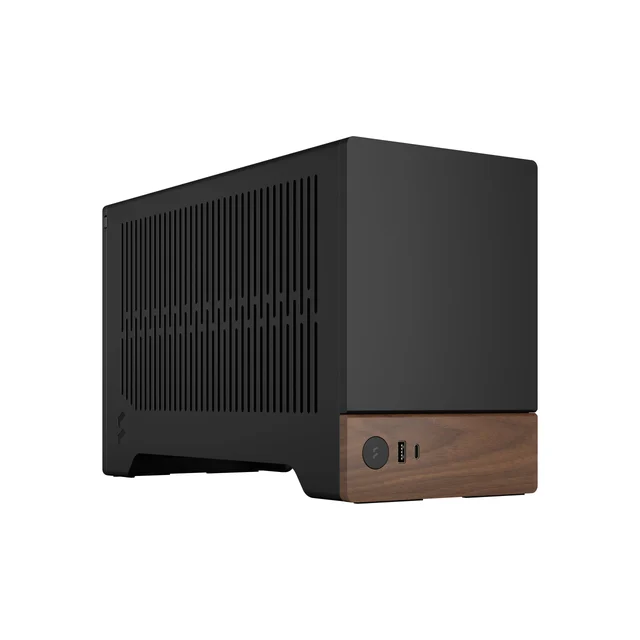
A stunning, tiny wood-and-aluminium showpiece that's expensive, cramped, and unforgiving to build in.
Best for: Experienced small-form-factor enthusiasts who want a showpiece and will plan parts carefully
- Beautiful aluminium body with a real walnut accent and a genuinely small footprint
- Clever adjustable inner divider lets you trade space between a longer GPU and a taller cooler
- Front USB-C and premium materials throughout
- Very tight to build in, with a 48mm cooler height limit, a 322mm graphics-card limit, and SFX or SFX-L power supplies only
- Costs the most here while fitting the least, and requires a pricier small-form-factor power supply
Own the Fractal Design Terra? Tell us how it held up.
Thanks. Counted, and shown once enough owners have weighed in.
| Criteria | Lian Li Lancool 216 Top pick Buy it Buy | Fractal Design North Buy it Buy | Corsair 4000D Airflow It depends Buy | Fractal Design Terra Skip it Buy |
|---|---|---|---|---|
| Best for | Anyone building a mainstream or high-end air- or liquid-cooled PC who wants the best cooling-per-dollar | Builders who want a standout, design-forward ATX tower and will pick the mesh version for airflow | First-time builders who value a fuss-free, dependable box and don't mind adding a fan or two | Experienced small-form-factor enthusiasts who want a showpiece and will plan parts carefully |
| Price tier | $$ · mid-range | $$$ · premium | $$ · mid-range | $$$$ · flagship |
| Form factor / board support | ATX mid-tower (E-ATX, ATX, mATX, ITX) | ATX mid-tower (ATX, mATX, ITX) | ATX mid-tower (E-ATX, ATX, mATX, ITX) | Compact ITX (Mini-ITX only) |
| Cooling approach | Mesh front, high airflow | Wood-slat front; mesh or glass side | Steel mesh front, high airflow | Compact body; airflow limited by size |
| Included fans | Three (two 160mm + one 140mm) | Two 140mm | Two 120mm | None listed |
| Max GPU length | Up to 392mm | Up to 355mm | Up to 360mm | Up to 322mm and 72mm thick |
| CPU cooler clearance | Up to 180mm | Up to 145mm | Up to 170mm | Up to 48mm |
| Front USB-C | Yes | Yes | Yes | Yes |
| Build experience | Roomy and easy | Roomy and refined | Easy and beginner-friendly | Tight and demanding |
| Price tier | $$ · mid-range | $$$ · premium | $$ · mid-range | $$$$ · flagship |
Which one is right for you?
- Anyone building a mainstream or high-end air- or liquid-cooled PC who wants the best cooling-per-dollar Buy it Lian Li Lancool 216
- Builders who want a standout, design-forward ATX tower and will pick the mesh version for airflow Buy it Fractal Design North
- First-time builders who value a fuss-free, dependable box and don't mind adding a fan or two It depends Corsair 4000D Airflow
- Experienced small-form-factor enthusiasts who want a showpiece and will plan parts carefully Skip it Fractal Design Terra
How we judged the field
We don’t run our own thermal lab. Instead, we synthesize independent testing, teardown coverage, and a large volume of owner reports to see where the consensus lands once the launch hype fades. For cases, that consensus is unusually consistent, because the things that matter are physical and measurable: how freely air can reach the components, how many fans you actually get in the box, how much room there is for a graphics card and cooler, and how pleasant the case is to build in and live with.
The criteria we weighted most heavily were airflow (mesh and open fronts beat closed glass), included fans (a case that arrives with three good fans saves you real money over one that ships with two), motherboard and clearance support (ATX versus compact ITX, plus GPU length and cooler height), cable management, and build quality. Price matters too, but only in tiers, because the cheapest capable case is often the smartest buy and the most expensive one is frequently paying for materials and looks rather than cooling.
Lian Li Lancool 216
Buy itThe Lancool 216 is the case we’d hand most people without a second thought. It arrives with three fans, and not small ones: a pair of 160mm intakes behind the mesh front plus a 140mm exhaust at the rear. Those oversized fans move a lot of air at low, quiet speeds, so the whole system runs cool without sounding like a hairdryer. Inside, there’s plenty of room for long graphics cards, tall tower air coolers, and radiators up to 360mm at the front and top. It supports everything from Mini-ITX up to larger boards, has front USB-C, a PSU shroud, and sensible cable channels. It’s big and its plain, boxy looks won’t excite anyone, but on cooling-per-dollar nothing here touches it.
Fractal Design North
Buy itThe North is the rare case that people notice for the right reasons. Its front is made of real walnut (or oak) slats over a ventilated frame, and the fit and finish are excellent, so it looks at home on a desk or in a living room rather than hidden under one. The important detail is which version you buy: the mesh side-panel trim breathes well and keeps temperatures in check, while the tempered-glass version may restrict airflow more. Even in mesh trim, the closed wood face is slightly more restrictive than a full-mesh front, so it trails the pure airflow leaders by a hair. It includes two 140mm fans, has front USB-C, and fits air coolers up to 145mm. You pay a premium over the value picks, but you’re paying for design you’ll actually enjoy, and the cooling is still genuinely good.
Corsair 4000D Airflow
It dependsFor years the 4000D Airflow was the default recommendation, and it’s still a fundamentally good case: a high-airflow steel mesh front, a clean and roomy interior, tidy cable routing, front USB-C, and the kind of build-friendliness that makes a first PC go together without drama. The catch is that it ships with only two fans, so most people will want to add one or two more, and the design has been on sale long enough that newer rivals now undercut it or include more in the box. There’s nothing wrong with it, and if you find it at a good price it’s a safe, dependable choice, but it no longer wins on value the way it once did, which is why it lands as a solid “depends” rather than a clear buy.
Fractal Design Terra
Skip itThe Terra is the most desirable object here and the one we’d steer most people away from. It’s a tiny aluminium case with a walnut accent, and it’s genuinely lovely, with a clever adjustable inner divider that lets you trade room between a longer graphics card and a taller cooler. But that flexibility exists because space is scarce: cooler height, card size, and power-supply choice are all tightly constrained, it needs a pricier small-form-factor power supply, and building inside it takes patience and planning. It also costs the most in this group while fitting the least. If you’re an experienced small-form-factor enthusiast who wants a showpiece and enjoys the puzzle, go for it. For everyone else, it’s a skip.
Sources
Specs in this review come from these pages.
Lian Li Lancool 216 vs Fractal Design North: which should you buy?
This is really a question of priorities. The Lancool 216 wins on substance: it costs less, includes three large fans to the North’s two, has a slightly roomier interior, and its full mesh front breathes a touch more freely than the North’s wood-slat face. If your goal is the coolest, quietest system for the least money, the Lancool is the answer.
The North wins on presence. It’s the case you buy when it will sit somewhere visible and you want it to look like a piece of furniture rather than a gaming appliance. Pick the mesh side-panel version and the thermal gap versus the Lancool shrinks to something most people will never notice in real use. Put simply: default to the Lancool 216, and pay up for the North if design matters to you as much as degrees.
What to look for
- Airflow first: a mesh or well-vented front will almost always run cooler and quieter than a closed glass or solid front.
- Count the fans: check how many fans are included; a case with three good fans can be a better deal than a cheaper one you have to add fans to.
- Clearances: confirm the maximum GPU length and CPU cooler height against your exact parts, especially in compact cases.
- Motherboard support: match the case to your board size (ATX, mATX, or Mini-ITX) and leave room for the radiator or cooler you want.
- Front I/O: front USB-C is worth having on a system you’ll keep for years.
- Build quality and cable management: a PSU shroud, routing channels, and solid panels make the build easier and the result tidier.
Our final take
Buy the Lian Li Lancool 216 if you want the smart default: it cools brilliantly, fits big parts, includes the fans you need, and costs less than cases that do less. Step up to the Fractal Design North, in its mesh version, when you want a case that’s as nice to look at as it is to live with. Treat the Corsair 4000D Airflow as a dependable fallback that’s fine at the right price but no longer the value leader. And leave the Fractal Design Terra to the small-form-factor specialists who know exactly what they’re getting into. For nearly everyone, the Lancool 216 is the case to get.
Questions, answered
Does a mesh (airflow) front really cool better than a glass or solid front?
Yes. A mesh or heavily ventilated front lets cool air reach your fans directly, so components typically run cooler and quieter than in a case with a closed glass or solid front. If you like a glass look, make sure the case still has generous intake vents elsewhere, or expect to run fans a bit faster and louder.
How many case fans do I actually need?
Two or three well-placed fans are enough for most builds: one or two drawing cool air in at the front and one pushing warm air out the back. Cases like the Lancool 216 include enough fans to start, while the Corsair 4000D ships with two, so budget for an extra fan or two if you're running hot, high-end parts.
Will my graphics card and CPU cooler fit?
Always check the case's listed maximum GPU length and CPU cooler height against your specific parts before buying. Roomy mid-towers like the Lancool 216, North, and 4000D take long cards (392mm, 355mm and 360mm respectively), though the North tops out at a 145mm cooler, and compact cases like the Terra have tight limits and may need a smaller cooler or a shorter card.
Is a compact ITX case a good idea for a first build?
Usually not. Small cases look fantastic but leave little room to work, restrict cooling, and often require a more expensive small-form-factor power supply. If it's your first build, a standard mid-tower is far more forgiving; save the compact case for when you're comfortable planning parts around tight clearances.
What does front USB-C on a case get me?
A front USB-C port lets you plug in modern phones, drives, and accessories quickly without reaching behind the PC, provided your motherboard has the matching internal header. All four cases here offer front USB-C, which is worth having on a system you expect to keep for several years.
Deciding between the top two? See our head-to-head: Lian Li Lancool 216 vs Fractal Design North.
More in Tech & Gadgets
PC Cases, Explained Plain-English guide → Lian Li Lancool 216 vs Fractal Design North Head-to-head →  The Best Photo and Film Scanners: 4 Compared (and One to Skip)
  The Best Pixel Art Displays: 4 Compared (and One to Skip)
  The Best Portable Monitors of 2026: Honest Picks for Travel and Work
  The Power Banks Worth Buying (and the 'Mega-mAh' One to Skip)