Explained
PC Cases, Explained
After reading this you'll understand what a PC case's specs really mean and how to choose one that fits your parts, cools well, and is pleasant to build in.
In this guide
A PC case is the box everything else lives in, and it quietly decides how cool, quiet, and buildable your computer will be for years. First-time buyers usually get pulled toward the prettiest option and only later discover it doesn't fit their graphics card, chokes airflow behind a slab of glass, or ships with almost no fans. This guide decodes the jargon so you can match a case to your parts and your priorities before you buy.
The 30-second version
- Airflow beats aesthetics. A mesh or well-vented front almost always runs cooler and quieter than a closed glass or solid front, so favor breathing over bling if temperatures matter.
- Match the size to your motherboard. Cases are built around board sizes (ATX, microATX, Mini-ITX), so confirm the case supports your board before anything else.
- Clearances are pass/fail. Your graphics card length, CPU-cooler height, and radiator size must fit the case's listed limits, or the parts simply won't go in.
- Count the fans you actually get. A case that includes three good fans can be a better deal than a cheaper one you have to add fans to.
- Small and beautiful is the hard mode. Compact cases look stunning but cramp cooling and clearances and are unforgiving to build in, so they're best once you've built before.
The products this guide is about
Our verdict on each, with the full reasoning on the companion review.
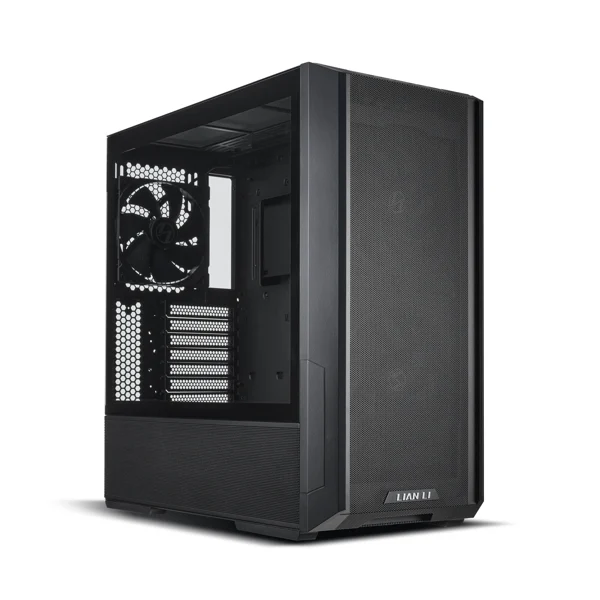
- Buy Lian Li Lancool 216 The value airflow king: two enormous front fans, roomy interior, and a price that shames cases costing far more. Amazon
- Buy Fractal Design North A genuinely beautiful real-walnut tower that also cools well when you choose the mesh side-panel version. Amazon
- It depends Corsair 4000D Airflow A rock-solid, easy-to-build classic that still cools well but now feels dated and light on included fans.
- Skip Fractal Design Terra A stunning, tiny wood-and-aluminium showpiece that's expensive, cramped, and unforgiving to build in. Amazon
What actually matters
- Form factor and board support — the case must physically accept your motherboard size (ATX, microATX, or Mini-ITX); a bigger case fits smaller boards, but not the other way around.
- Airflow design — how freely cool air can reach your components; a mesh or open front lets fans pull air straight in, while a sealed glass or solid front traps heat.
- GPU and cooler clearance — the maximum graphics-card length, CPU-cooler height, and radiator size the case can hold, which decides whether your parts fit at all.
- Included fans — how many fans come in the box and where; more good fans out of the box means less money spent afterward.
- Cable management and layout — a PSU shroud, routing channels, and space behind the tray make the build tidier, cooler, and far less frustrating.
- Front I/O — the ports on the top or front, especially USB-C, that you'll reach for daily without crawling behind the machine.
- Build quality and fit — solid panels, good tolerances, and dust filters that mean the case feels sturdy, seals well, and stays quiet.
The specs, in plain English
Green flags vs red flags
Green flags
- A mesh or heavily ventilated front panel that feeds air straight to the intake fans
- Three or more decent fans already included, so you're ready to build without extra buying
- Clearly listed maximum GPU length, cooler height, and radiator sizes that comfortably fit your parts
- A PSU shroud, cable channels, and space behind the motherboard tray for tidy routing
- Front USB-C plus removable, washable dust filters on the intakes
- Solid panels with good fit and finish that feel sturdy rather than tinny
Red flags
- A fully sealed glass or solid front with no real intake path, so heat has nowhere to go
- Ships with only one fan, or none, without saying so clearly on the listing
- Missing or vague clearance numbers for GPU length and cooler height
- No dust filters, so the interior collects dust quickly and needs frequent cleaning
- Thin, flexy panels or poor tolerances that rattle or don't line up
- A compact case pitched to first-time builders without warning about its tight limits or special power-supply needs
Who's who: the brands
- Lian Li - Known for high-airflow, high-value cases with generous interiors and strong included fans.
- Fractal Design - Scandinavian, design-forward cases with excellent fit and finish, from mainstream towers to premium compact models.
- Corsair - Widely available, beginner-friendly mainstream cases with clean layouts and dependable build quality.
- NZXT - Minimalist, clean-looking cases popular with first-time builders for their simple, tidy interiors.
- be quiet! - Focused on quiet operation, with sound-dampening designs and low-noise fans.
- Cooler Master - A broad range spanning budget airflow boxes to feature-rich enthusiast towers.
How to read a listing without getting fooled
Start with the spec sheet, not the photos. Confirm the motherboard support matches your board size, then find the three clearance numbers that make or break a build: maximum GPU length, maximum CPU-cooler height, and supported radiator sizes. Compare each against your actual parts, not against a vague sense of 'big enough.' Next, read exactly how many fans are included and where, because 'supports up to seven fans' is a mounting count, not a promise that any come in the box. Treat a glossy tempered-glass front as a looks feature and hunt for where the intake air actually enters; if the front is sealed, the case leans on side or bottom vents and may run warmer. Finally, scan for the quality-of-life details that listings bury: a PSU shroud, cable routing, dust filters, and front USB-C. When a listing leads with lighting and glass but goes quiet on airflow and clearances, read that silence as a warning.
How much should you spend?
Case pricing is mostly about materials and looks rather than cooling, which is good news for your wallet. Entry-level cases can be a bit thin and light on fans, but the value sweet spot in the mid-range is where you find a mesh front, several included fans, roomy clearances, and tidy cable management. That tier often out-cools cases costing far more, because paying up usually buys premium materials like aluminium and real wood, a smaller footprint, or a standout look, not lower temperatures. Spending more is worth it when design genuinely matters to you or when you specifically want a compact showpiece, but be aware that small premium cases can also demand a pricier small-form-factor power supply, adding hidden cost. For most people, the smartest money goes to a mid-range airflow case, with anything extra treated as paying for enjoyment rather than performance.
Questions, answered
Does a mesh (airflow) front really cool better than glass?
Yes. A mesh or heavily ventilated front lets cool air reach your fans directly, so components typically run cooler and quieter than in a case with a closed glass or solid front. If you love the glass look, make sure the case still has generous intakes elsewhere, or expect to run fans a bit faster and louder to compensate.
How many case fans do I actually need?
Two or three well-placed fans cover most builds: one or two drawing cool air in at the front and one pushing warm air out the back. Some cases include enough to start, while others ship with just one or two, so check the listing and budget for an extra fan or two if you're running hot, high-end parts.
Will my graphics card and CPU cooler fit?
Check the case's listed maximum GPU length and CPU-cooler height against your specific parts before buying. Roomy mid-towers swallow most long cards and tall air coolers, but compact cases have tight limits and may force a shorter card or a low-profile cooler. These numbers are pass/fail, so don't eyeball it.
Is a compact ITX case a good idea for a first build?
Usually not. Small cases look fantastic but leave little room to work, restrict cooling, and often require a more expensive small-form-factor power supply. For a first build, a standard mid-tower is far more forgiving; save the compact case for when you're comfortable planning parts around tight clearances.
What does front USB-C get me, and will it work?
A front USB-C port lets you plug in modern phones, drives, and accessories quickly without reaching behind the PC. It only works if your motherboard has the matching internal connector (header), so check that your board supports it. On a system you'll keep for years, it's a convenience worth having.
Do I need dust filters?
They help. Removable, washable dust filters on the intakes keep the interior cleaner, which protects airflow and keeps temperatures steady over time. Without them, dust builds up faster and you'll be cleaning the inside more often. It's a small feature that pays off over the life of the machine.
Or jump to the head-to-head: Lian Li Lancool 216 vs Fractal Design North.