

Tech & Gadgets
The Best HDMI Cables: 4 Compared (and One to Skip)
We judged HDMI cables on one thing that can actually be checked: whether the exact length you are buying carries an Ultra High Speed HDMI certification label you can scan. Everything else on the box is marketing.
The short version
The Zeskit MAYA Ultra High Speed HDMI Cable is the pick: it is sold as an Ultra High Speed HDMI cable in eight lengths from 0.5m to 7m, the longer three are CL3 rated for in-wall runs, and the packaging carries the certification label you can scan. The Belkin 8K Ultra High Speed HDMI 2.1 Cable is the one to grab if you want a certified cable from a mainstream retailer with a two year warranty behind it, though it comes in a single 2m length and costs several times as much for the same certification. If your run is longer than roughly 25 feet, the Cable Matters Certified Active Ultra High Speed HDMI Cable puts fiber cores and an active chipset in the middle and reaches 32.8 feet, but it only works one way round and the ends are marked SOURCE and DISPLAY for a reason. Skip the Zeskit MAYA 96Gbps HDMI Cable for now: its own product page lists 96 Gbps and says the cable is engineered to support the next generation HDMI 2.2 standard, but it does not use the official Ultra96 HDMI Cable name and does not state that the cable is certified, so there is no label to scan and no source device on sale that can use the extra headroom. Buy the shortest certified cable that reaches, and scan the label before you throw the packaging away. Best for: anyone who wants 4K120 or 8K60 to work the first time without guessing which cable in the drawer is the good one.
Our picks at a glance
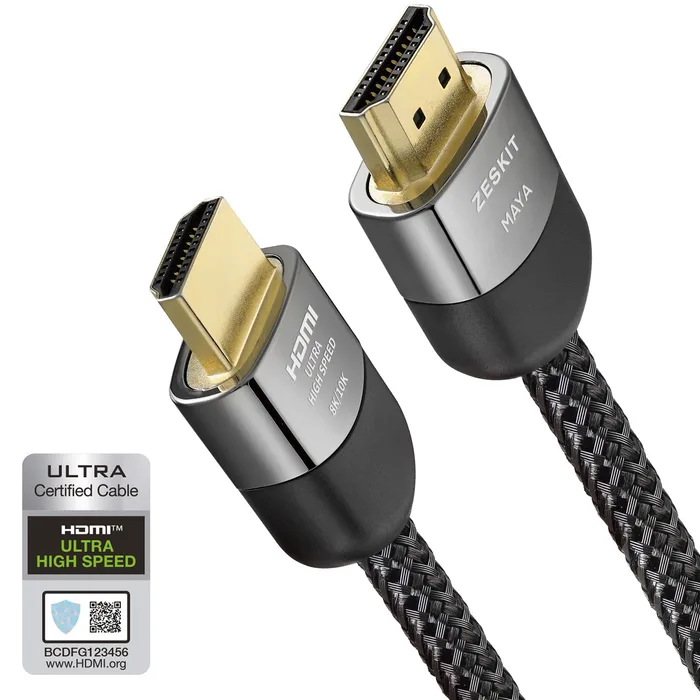
- Zeskit MAYA Ultra High Speed HDMI Cable - Buy. A certified 48 Gbps cable sold in eight lengths, with the certification label printed on the package so you can check it yourself.
- Belkin 8K Ultra High Speed HDMI 2.1 Cable (AV10175) - Buy. The same certification as the budget picks in a single 2m length, bought from a mainstream retailer with a two year warranty attached.
- Cable Matters Certified Active Ultra High Speed HDMI Cable (Fiber Active Optical 8K) - It depends. Fiber cores and an active chipset get 48 Gbps out to 32.8 feet, at the cost of a cable that only works one way round.
- Zeskit MAYA 96Gbps HDMI Cable - Skip. A 96 Gbps cable bought for a future that has not shipped yet, and its own page stops short of claiming the certification that would prove the number.
The verdict in 30 seconds
What mattered most
- Official cable name used
- Certification stated by maker
- Rated bandwidth
- Lengths sold
- In-wall rating
- Construction
HDMI cables are the rare product where the buyer can verify the central claim in about ten seconds, and almost nobody does. HDMI Licensing Administrator runs a mandatory certification programme for 48 Gbps cables in which every single length of every model is tested at an authorised test centre and gets a package label with a hologram, a QR code and a unique ID. That label is the claim. The bandwidth number printed on the jacket, the words HDMI 2.1, and the braided sleeve are not. We looked at four cables people actually buy and asked what each maker's own page says it is certified to do.
A certified 48 Gbps cable sold in eight lengths, with the certification label printed on the package so you can check it yourself.
Best for: Almost everyone connecting a console, a streamer or a PC to a 4K120 or 8K60 display over a run of seven metres or less.
- Sold as an Ultra High Speed HDMI cable in 0.5m, 1m, 1.5m, 2m, 3m, 4m, 5m and 7m, and every length has to be certified separately under the programme.
- The 4m, 5m and 7m versions are CL3 rated, which is the rating you need to run a cable inside a wall.
- Zeskit lists the full HDMI 2.1 feature set the cable carries, including eARC, VRR, ALLM, QMS, QFT and Dynamic HDR.
- The product page does not publish conductor gauge, shielding detail or a bend radius, so you cannot compare the physical build against rivals.
- Seven metres is the end of the range, so a longer run means switching to an optical cable and a different budget.
- The product page does not say whether the cable carries the label on every length, so scan the one you receive.
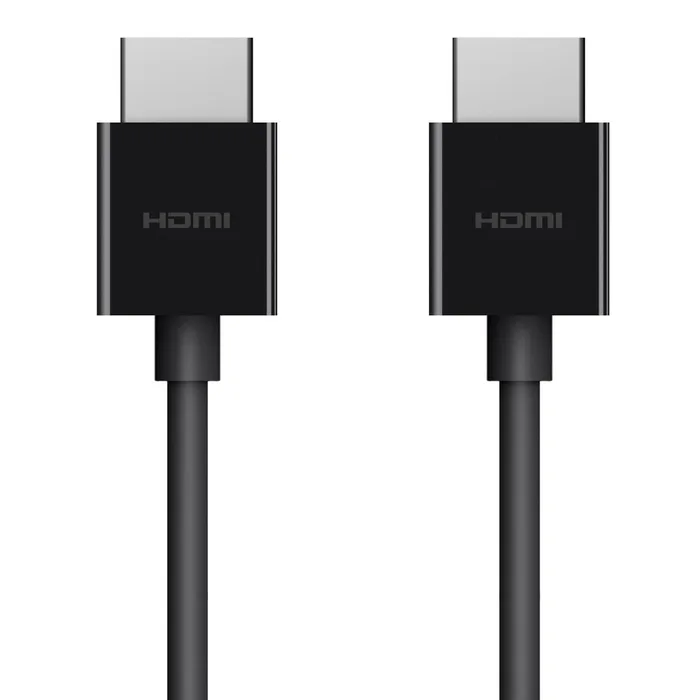
The same certification as the budget picks in a single 2m length, bought from a mainstream retailer with a two year warranty attached.
Best for: Someone who wants a certified cable today, from a shop, with a warranty and a returns counter behind it.
- Belkin states the cable is certified to support 4K and 8K video, HDR, VRR, eARC and the other HDMI 2.1 features, and quotes 8K at 60Hz or 4K at 120Hz.
- A two year warranty is listed on the product page, which is longer than most cable brands bother to publish.
- Sold through Belkin and mainstream retail, so you can have it the same day rather than waiting on a direct order.
- One length only, 2m, so it is no help for a projector, a ceiling run or anything across a room.
- It costs several times what a certified budget cable costs, and the certification is identical.
- The product name leans on HDMI 2.1, and HDMI LA's own guidance says version numbers are not to be used in the labelling, packaging or promotion of any cable product.
- This model number no longer appears on Belkin's site, where the current Ultra High-Speed HDMI cable is a different model sold in 1m, 2m and 3m lengths, so check what you are actually buying.
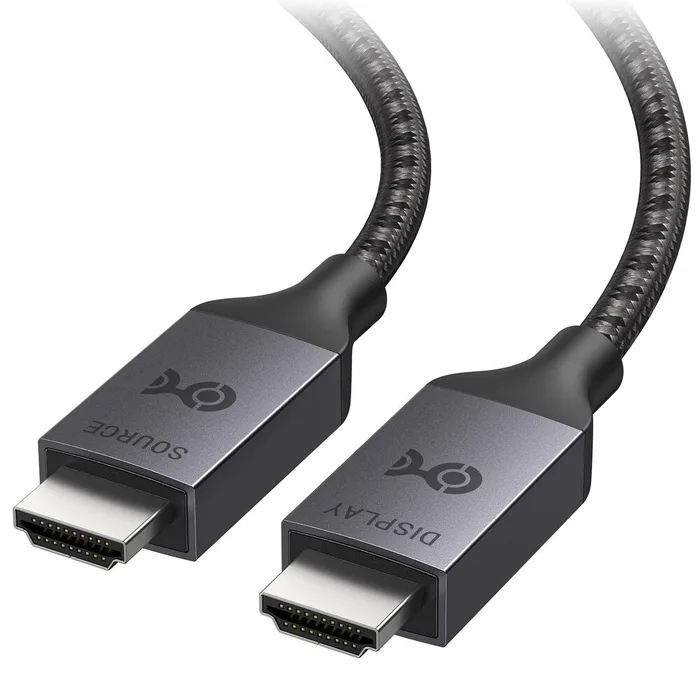
Fiber cores and an active chipset get 48 Gbps out to 32.8 feet, at the cost of a cable that only works one way round.
Best for: Projector owners and anyone with a rack in another room, where the run is longer than a certified copper cable is sold in.
- Cable Matters describes it as a certified Ultra High Speed HDMI cable, so the long lengths were tested rather than assumed.
- Sold at 16.4 feet and 32.8 feet, which is well past where ordinary copper cables stop being offered at this bandwidth.
- The listed feature set covers 8K at 60Hz, 4K at 120Hz, VRR, ALLM, eARC, Dolby Vision and 12 bit colour.
- It is not bidirectional. The ends are marked SOURCE and DISPLAY and connecting it backwards gives you nothing.
- Only two lengths, so if your run is 22 feet you are buying 32.8 feet and coiling the slack.
- The product page does not list an in-wall CL rating or a plenum rating, so check your local rules before it goes in a ceiling.
- Several times the price of a copper cable, which is only worth it once copper genuinely will not reach.
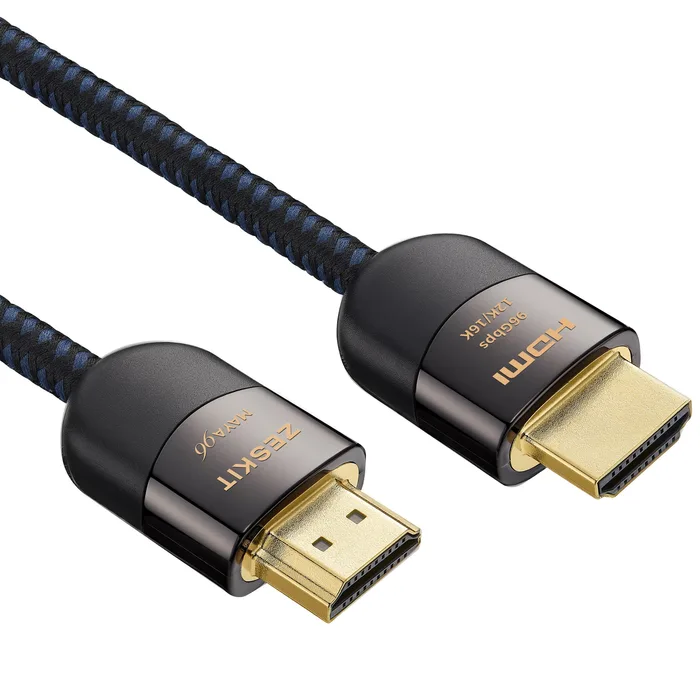
A 96 Gbps cable bought for a future that has not shipped yet, and its own page stops short of claiming the certification that would prove the number.
Best for: Nobody yet. Revisit it when it carries an Ultra96 certification label and you own something that can drive it.
- Cheap enough that the mistake is a small one, and it works as an ordinary cable with HDMI 1.4, 2.0 and 2.1 gear.
- All four lengths, 1m through 3m, are CL3 rated for in-wall use.
- The product page lists 96Gbps bandwidth, so the cable is easy to identify.
- The product page lists 96 Gbps and says the cable is engineered to support the next generation HDMI 2.2 standard. It does not use the official Ultra96 HDMI Cable name and does not state that the cable is certified.
- HDMI LA's programme requires each model length of an Ultra96 cable to be tested, certified and sold with a certification label, so without that label there is nothing for the phone app to scan.
- The extra headroom only does anything when both the source and the display are HDMI 2.2 devices, and the listing does not name any.
- The longest length is 3m, so it does not solve the long run problem that actually makes people spend money on cables.
| Criteria | MAYA Ultra High Speed HDMI Cable Top pick | 8K Ultra High Speed HDMI 2.1 Cable (AV10175) | Certified Active Ultra High Speed HDMI Cable (Fiber Active Optical 8K) | MAYA 96Gbps HDMI Cable |
|---|---|---|---|---|
| Verdict | Buy it | Buy it | It depends | Skip it |
| Best for | Almost everyone connecting a console, a streamer or a PC to a 4K120 or 8K60 display over a run of seven metres or less. | Someone who wants a certified cable today, from a shop, with a warranty and a returns counter behind it. | Projector owners and anyone with a rack in another room, where the run is longer than a certified copper cable is sold in. | Nobody yet. Revisit it when it carries an Ultra96 certification label and you own something that can drive it. |
| Price tier | $ · budget | $$ · mid-range | $$$ · premium | $ · budget |
| Official cable name used | Ultra High Speed HDMI | Ultra High Speed HDMI | Ultra High Speed HDMI, active | None given, listed as 96Gbps |
| Certification stated by maker | Yes | Yes | Yes | Not stated |
| Rated bandwidth | 48 Gbps | 48 Gbps | 48 Gbps | 96 Gbps |
| Lengths sold | 0.5m to 7m, eight options | 2m only | 16.4 ft and 32.8 ft | 1m to 3m, four options |
| In-wall rating | CL3 on 4m, 5m and 7m | Not listed | Not listed | CL3 on all lengths |
| Construction | Passive copper | Passive copper | Fiber optic with active chipset | Passive copper |
| Works either way round | Yes | Yes | No, SOURCE and DISPLAY ends | Yes |
| Who it suits | Most 4K120 and 8K60 hookups | A short run bought in a shop | Runs past about 25 feet | Nothing on sale can use it yet |
Which one is right for you?
- Almost everyone connecting a console, a streamer or a PC to a 4K120 or 8K60 display over a run of seven metres or less. Buy it Zeskit MAYA Ultra High Speed HDMI Cable
- Someone who wants a certified cable today, from a shop, with a warranty and a returns counter behind it. Buy it Belkin 8K Ultra High Speed HDMI 2.1 Cable (AV10175)
- Projector owners and anyone with a rack in another room, where the run is longer than a certified copper cable is sold in. It depends Cable Matters Certified Active Ultra High Speed HDMI Cable (Fiber Active Optical 8K)
- Nobody yet. Revisit it when it carries an Ultra96 certification label and you own something that can drive it. Skip it Zeskit MAYA 96Gbps HDMI Cable
How we judged the field
Five things decide whether an HDMI cable is worth buying, and only one of them is printed honestly on the box. First, the official cable name: Standard, High Speed, Premium High Speed, Ultra High Speed or Ultra96, each tied to a bandwidth tier of its own. Second, whether the specific length you are buying is certified, because HDMI LA requires every length of every model to be tested individually at an authorised test centre and tracked over the product’s life. Third, the certification label itself, a holographic sticker with a QR code and a unique ID that a phone can verify. Fourth, length and construction, because passive copper thins out fast at 48 Gbps and optical cables take over with strings attached. Fifth, the boring physical stuff: CL3 or plenum ratings if the cable goes in a wall, and whether the connectors will survive being unplugged.
The field splits three ways. There is a large, cheap middle of certified 48 Gbps copper cables that are functionally interchangeable, where the only real variables are how many lengths the maker certified and whether the long ones are in-wall rated. There is a small, expensive group of active optical cables for runs that copper does not cover. And there is a new and largely theoretical group of 96 Gbps cables sold against HDMI 2.2, a specification the HDMI Forum released in June 2025. We picked one of each from the first two groups, a mainstream retail alternative, and one from the third group to explain why it is not your problem yet.
Zeskit MAYA Ultra High Speed HDMI Cable
Buy itThe Zeskit MAYA is the cable to buy for the unglamorous reason that Zeskit sells more lengths of it than anyone else here. The page lists 0.5m, 1m, 1.5m, 2m, 3m, 4m, 5m and 7m, and under the certification programme each length has to be tested on its own rather than inheriting a certificate from a shorter version. The three longest are CL3 rated, which is what you want if the cable disappears into a wall behind a mounted TV. The listed feature set is the full HDMI 2.1 spread: eARC, VRR, ALLM, QMS, QFT, Dynamic HDR, HDR10 and Dolby Vision, plus HDCP 2.2 and 2.3. A product photo shows an HDMI LA scan result for a certified 1m cable, which is more transparency than most cable listings manage. What Zeskit does not publish is conductor gauge or shielding detail, so you cannot compare the physical build on paper. For a cable that is going behind a television and staying there, that is a fair trade.
Belkin 8K Ultra High Speed HDMI 2.1 Cable (AV10175)
Buy itBelkin’s 8K Ultra High Speed HDMI 2.1 Cable is the same certification wrapped in a mainstream retail experience. Belkin states plainly that its cables are certified to support 4K and 8K video, HDR, VRR, eARC and the other HDMI 2.1 features, and quotes 8K at 60Hz or 4K at 120Hz. Belkin lists a two year warranty on its product pages, and you can buy it somewhere with a returns counter. The catch is that this model was a single 2m length, so it solves exactly one problem: a console or streamer sitting near the television. Belkin’s current Ultra High-Speed HDMI cable is a different model in 1m, 2m and 3m. It also costs several times what a certified budget cable costs for an identical certification, and the product name leans on HDMI 2.1, a version number that HDMI LA’s own guidance says should not appear in the labelling, packaging or promotion of any cable. Buy it for the availability and the warranty, not because the number is bigger.
Cable Matters Certified Active Ultra High Speed HDMI Cable (Fiber Active Optical 8K)
It dependsThe Cable Matters fiber cable exists because copper stops. It puts optical cores down the middle for the high speed lanes and an active chipset in the connector, and Cable Matters describes it as a certified Ultra High Speed HDMI cable at 16.4 feet and 32.8 feet. The listed capability is the usual 48 Gbps set: 8K at 60Hz, 4K at 120Hz, VRR, ALLM, eARC, Dolby Vision and 12 bit colour. The trade-off is real and it catches people out. The cable is not bidirectional; one end is marked SOURCE and the other DISPLAY, and reversing them gives you a blank screen and a support ticket. There are only two lengths, so a 22 foot run means buying 32.8 feet and hiding the slack. The page also does not list an in-wall CL rating or a plenum rating, which matters if it is going into a ceiling. It is the right answer, but only once copper genuinely will not reach.
Zeskit MAYA 96Gbps HDMI Cable
Skip itThe Zeskit MAYA 96Gbps is the one to leave alone, and the case against it comes entirely from Zeskit’s own page. That page gives the bandwidth as 96 Gbps and says the cable is fully compatible with HDMI 1.4, 2.0 and 2.1 devices and engineered to support the next generation HDMI 2.2 standard. What it does not say is that the cable is an Ultra96 HDMI Cable, and it does not say the cable is certified. Those are not decorative words. HDMI LA describes the Ultra96 HDMI Cable as the cable that supports all HDMI 2.2 applications, and its programme requires each model length to be tested, certified and sold with a certification label. Without one there is nothing to scan and nothing to verify. Then there is the practical problem: 96 Gbps only does anything when the source and the display are both HDMI 2.2 devices, and the listing names none. At three metres maximum it does not even help with long runs.
Sources
Specs in this review come from these pages.
- HDMI Licensing Administrator: HDMI Cables and Cable Types (hdmi.org)
- HDMI Licensing Administrator: Ultra High Speed HDMI Cable (hdmi.org)
- HDMI Licensing Administrator: Ultra High Speed HDMI Cable Certification Program overview (hdmi.org)
- HDMI Licensing Administrator: notice to manufacturers and resellers of HDMI cables (hdmi.org)
- HDMI Licensing Administrator: what it means when gear is marketed as an HDMI 2.1 product (hdmi.org)
- HDMI Forum: release of version 2.2 of the HDMI Specification (hdmiforum.org)
Zeskit MAYA Ultra High Speed HDMI Cable vs Belkin 8K Ultra High Speed HDMI 2.1 Cable (AV10175): which should you buy?
Zeskit and Belkin are selling the same underlying thing: a passive copper cable certified to carry 48 Gbps. Neither will give you a better picture than the other, because there is no better picture to give. The difference is coverage and convenience. Zeskit sells eight lengths from half a metre to seven metres and CL3 rates the top three, which means one brand covers a desk cable, a console cable and an in-wall run to a mounted television. Belkin’s AV10175 was a single 2m length, and it costs several times as much.
So the choice is really about your run. If you know the distance and it is anything other than roughly two metres, Zeskit is the only one of the two that sells that size, and buying the shortest one that reaches is always the right move. If you need a cable this afternoon, or you want a two year warranty and a shop you can walk back into, the Belkin is a perfectly honest purchase and you are paying for the retail channel rather than for performance. What you should not do is buy the Belkin because it says HDMI 2.1 on it. On a cable, that phrase carries no information at all.
What to look for
- Find the cable name, not the version: the only descriptors HDMI LA permits on a cable are Standard, High Speed, Premium High Speed, Ultra High Speed and Ultra96, and each maps to a bandwidth tier.
- Check the length you are buying, not the family: every length of every model has to be certified separately because different lengths behave differently, so a certified 2m version tells you nothing about the 5m.
- Look for the certification label on the package: it combines a hologram, a QR code and a unique ID, and it is required on every package or wrapped around the cable where there is no box.
- Scan it before the packaging goes in the bin: the scan result names the brand, the model number and the length, so a mismatch is visible immediately.
- Treat in-wall and plenum ratings as separate questions: CL2, CL3 and CMP come from electrical code, not from HDMI, and a certified cable is not automatically legal to bury in a wall.
- Go optical only when copper stops: passive certified cables are widely sold up to roughly five to seven and a half metres, and active optical cables cost more and usually only work in one direction.
Our final take
Buy the shortest Ultra High Speed HDMI cable that reaches, from a maker who certified that exact length, and scan the label before you throw the box away. That single habit removes almost every HDMI problem people spend evenings troubleshooting. The Zeskit MAYA does it across the widest range of lengths for the least money, the Belkin does the same job in one length with a warranty and a shop behind it, and the Cable Matters fiber cable takes over when the distance beats copper. Leave the 96 Gbps cables alone until they carry an Ultra96 certification label and you own something that can drive them. A cable cannot make a picture better than the one your source sent. It can only fail to deliver it.
Questions, answered
Does a more expensive HDMI cable give a better picture?
Not in the way audio cable marketing implies. HDMI carries a digital signal, so either the link holds and you get the picture the source sent, or it does not and you get sparkles, dropouts or a black screen. What money buys you is margin: better shielding, better connectors and, above all, a cable whose exact length was tested at an HDMI Forum authorised test centre. The certification programme also tests for low electromagnetic emissions, which is about not interfering with your Wi-Fi rather than about image quality. Past the point where a cable is certified for the bandwidth you need at the length you need, extra spend buys build quality and warranty, not pixels.
How do I actually check that a cable is certified?
Look for the certification label on the package. Under the programme every Ultra High Speed HDMI cable must ship with one, and where there is no consumer box it has to be wrapped around the cable or stuck to the polybag. The label combines a holographic element, a QR code and a unique label ID. Scanning it takes you to a result page tied to that specific cable, and HDMI LA also publishes a phone app that reads both the QR code and the hologram. A genuine scan result names the brand, the model number and the length. If the seller cannot show you a label, you are trusting a printed number instead of a test.
My cable says HDMI 2.1. Is that good enough?
It tells you very little, and on a cable it should not be there at all. HDMI LA's guidance to manufacturers is explicit that version numbers are not to be used in the labelling, packaging or promotion of any cable product; the permitted descriptors are the cable names, which are Standard, High Speed, Premium High Speed, Ultra High Speed and now Ultra96. On devices the version number is allowed but almost as weak, because support for each HDMI 2.1 feature is optional and a manufacturer must list the specific features supported alongside the claim. That is how a TV or a soundbar can be genuinely HDMI 2.1 compliant while topping out at 18 Gbps. Read the feature list, not the number.
How long can an HDMI cable be at 48 Gbps?
There is no published maximum, and that is the point of the programme. Rather than setting a length limit, HDMI LA requires every length of every model to be tested and certified individually, on the grounds that different lengths have different electrical characteristics and one certificate should not cover several. In practice the passive copper cables on sale from the makers in this review run out at about seven metres. Past that, active optical cables take over. Buy the length that is itself certified rather than assuming the family is.
Does an HDMI cable need to support DSC?
No, because the cable is not doing the compressing. Display Stream Compression is a VESA codec, and both the encoder and the decoder sit in the equipment: the source compresses, the display decompresses. What travels down the cable is still just a link running at a negotiated rate, which is why a cable is never described by its DSC support. The practical effect is that DSC lets a source and display agree a mode that would otherwise need more bandwidth than the link has. If a maker sells you a cable on its DSC support, they are selling you something the cable does not decide.
Deciding between the top two? See our head-to-head: Zeskit MAYA Ultra High Speed HDMI Cable vs Belkin 8K Ultra High Speed HDMI 2.1 Cable (AV10175).
More Tech & Gadgets reviews
 The Best Home NAS Devices: 4 Compared (and One to Skip)
  The Best Home Theater Projectors: 4 Compared (and One to Skip)
  The Best Instant Print Cameras: 4 Compared (and One to Skip)
  The Best Internal NVMe SSDs: 4 Compared (and One to Skip)
  The Best IP KVM Devices: 4 Compared (and One to Skip)
  The Best Label Makers: 4 Compared (and One to Skip)