

Tech & Gadgets
The Best IP KVM Devices: 4 Compared (and One to Skip)
We compared four KVM-over-IP units on video capture, latency, virtual media, power control, firmware openness, and how you reach them remotely.
The short version
A KVM-over-IP box gives you BIOS-level remote control of a headless machine, including reinstalling the OS and power-cycling a dead server. JetKVM is the standout for most buyers — a responsive interface, open-source firmware, and a budget price — provided you install the latest firmware first. The GL.iNet Comet is the easiest way to reach a machine across the internet thanks to native Tailscale. The PiKVM V4 Mini is the most capable and fully open option, but its premium price and hands-on setup only pay off if you'll use its depth. We'd skip the Sipeed NanoKVM: it's the cheapest, but its security history makes it hard to trust outside an isolated test bench. Best for: home-lab users and IT pros who need dependable out-of-band access without a rack-mount server's built-in management.
Our picks at a glance
- JetKVM - Buy. A very responsive, good-value IP KVM, with open-source software and momentum to match.
- GL.iNet Comet (GL-RM1) - Buy. The easiest way to reach a machine over the open internet, thanks to built-in Tailscale and no subscription.
- PiKVM V4 Mini - It depends. The most capable and fully open unit here — worth it if you'll use the depth and don't mind self-hosting.
- Sipeed NanoKVM - Skip. Real IP-KVM ability for the lowest price, undercut by a security history you should read before buying.
The verdict in 30 seconds
What mattered most
- Max video capture
- Latency (reported)
- Virtual media & ATX power
- Firmware
- Remote access model
- Setup difficulty
A KVM-over-IP device gives you BIOS-level keyboard, video, and mouse control of a headless PC or server from anywhere on the network — the digital equivalent of walking up to the machine with a crash cart. This is a different category from a desk KVM switch: here the whole point is remote, out-of-band access, virtual media to reinstall an OS, and ATX power control when the box is frozen or off. We looked at the strongest small units you can actually buy in 2026, and the verdict is two easy recommendations, one that depends on how much you want to self-host, and one we'd steer most people away from.
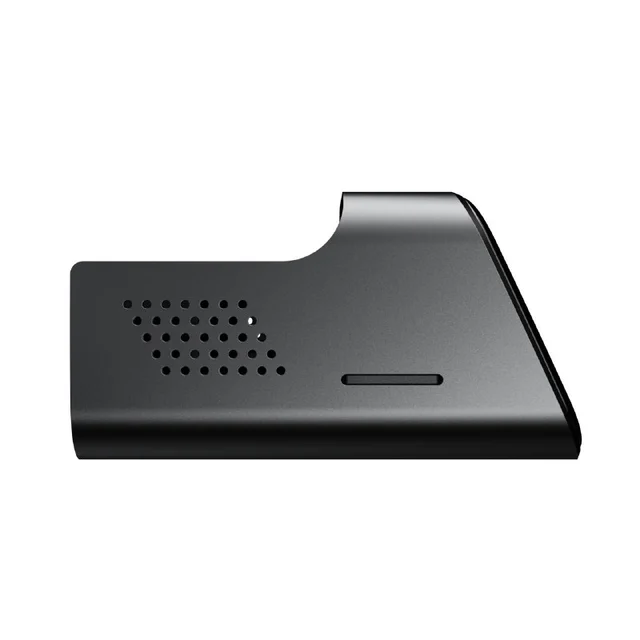
A very responsive, good-value IP KVM, with open-source software and momentum to match.
Best for: Home-lab users and tinkerers who want a fast, easy remote console without paying prosumer prices.
- 1080p60 capture over a custom low-latency WebRTC engine, which the maker rates at 30 to 60 ms latency
- Open-source firmware with fast-moving updates, plus optional ATX and DC power-control extension boards
- Genuinely plug-and-play: owners report it 'just works' out of the box with a clean web UI
- Early firmware reportedly had security flaws, so buyers should update to the latest firmware immediately
- Single-target device with no built-in fleet manager for large deployments
Own the JetKVM? Tell us how it held up.
Thanks. Counted, and shown once enough owners have weighed in.
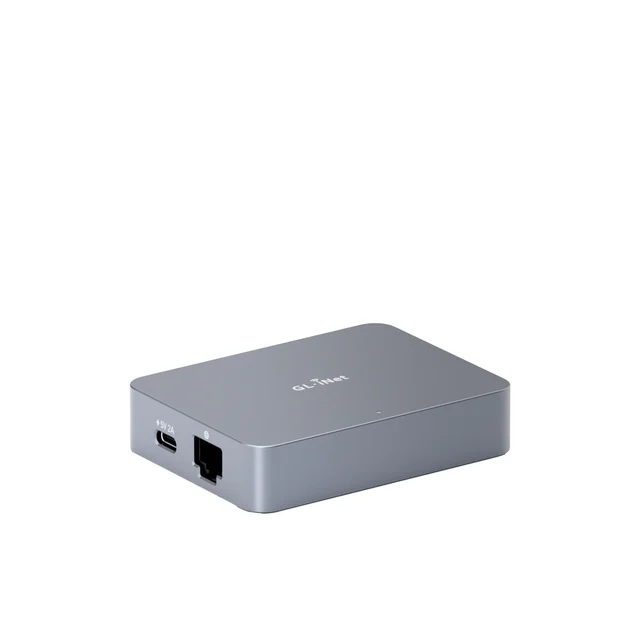
The easiest way to reach a machine over the open internet, thanks to built-in Tailscale and no subscription.
Best for: People who need reliable remote access to a machine at another location without wrestling with networking.
- 4K@30fps HDMI capture with BIOS-level access for full OS reinstalls and boot-error fixes
- Native Tailscale integration lets you connect securely from anywhere in minutes with no port forwarding or firewall surgery
- No mandatory cloud account or subscription; pairs with an optional ATX board or Fingerbot for remote power control
- Firmware is closed-source, so it lacks the auditability of the fully open options
- 4K capture is capped at 30fps, and richer control leans on GL.iNet's own app ecosystem
Own the GL.iNet Comet (GL-RM1)? Tell us how it held up.
Thanks. Counted, and shown once enough owners have weighed in.
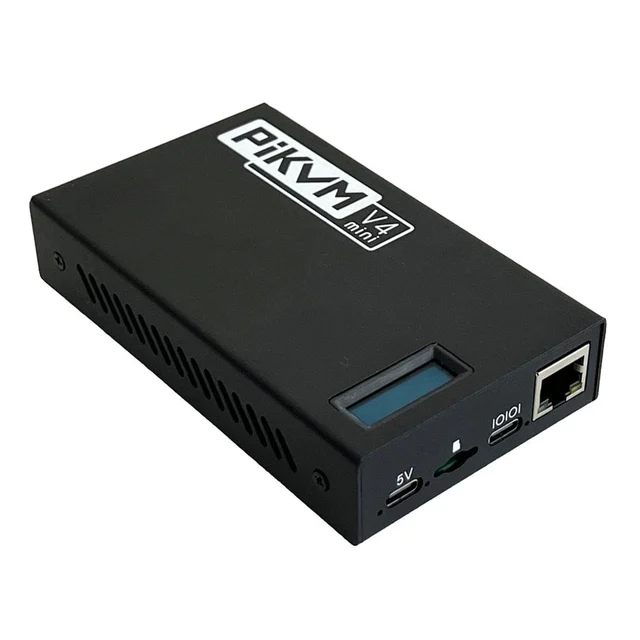
The most capable and fully open unit here — worth it if you'll use the depth and don't mind self-hosting.
Best for: Home-lab enthusiasts and IT pros who want a fully open, self-hosted console with IPMI-style automation.
- Fully open GPLv3 stack with a deep feature set, including IPMI and Redfish emulation for scripting and automation
- Fully open, auditable software, which makes its security easier to inspect than closed units
- Mature, self-hosted design with reliable HDMI capture, virtual media, and ATX power control
- Premium price well above the budget units, aimed at people who need its depth
- More setup and Linux familiarity expected than the plug-and-play options
Own the PiKVM V4 Mini? Tell us how it held up.
Thanks. Counted, and shown once enough owners have weighed in.
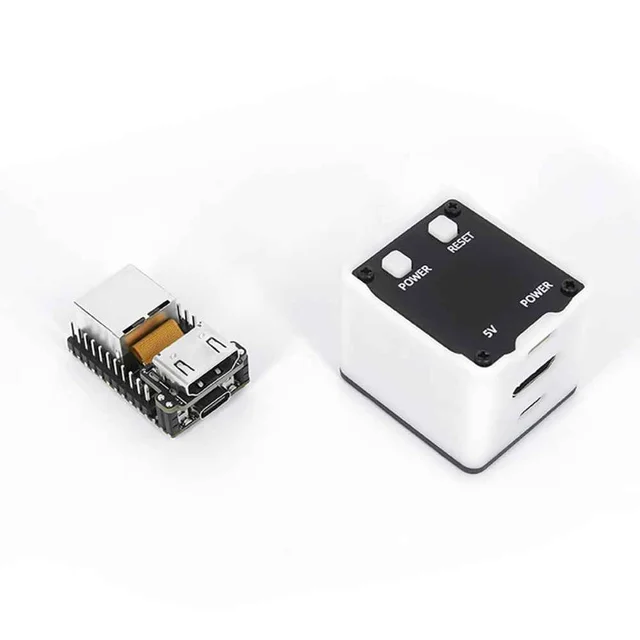
Real IP-KVM ability for the lowest price, undercut by a security history you should read before buying.
Best for: Experimenters on isolated networks who understand and accept the security trade-offs.
- Among the cheaper ways to get genuine BIOS-level remote control, in a tiny RISC-V package
- Active open-source project with a keen hobbyist following
- Reported security flaws, plus reports of it routing DNS through overseas servers and phoning home by default
- Update mechanism and default behaviors that make it hard to recommend for professional or production use
Own the Sipeed NanoKVM? Tell us how it held up.
Thanks. Counted, and shown once enough owners have weighed in.
| Criteria | JetKVM Top pick Buy it Buy | GL.iNet Comet (GL-RM1) Buy it Buy | PiKVM V4 Mini It depends Buy | Sipeed NanoKVM Skip it Buy |
|---|---|---|---|---|
| Best for | Home-lab users and tinkerers who want a fast, easy remote console without paying prosumer prices. | People who need reliable remote access to a machine at another location without wrestling with networking. | Home-lab enthusiasts and IT pros who want a fully open, self-hosted console with IPMI-style automation. | Experimenters on isolated networks who understand and accept the security trade-offs. |
| Price tier | $ · budget | $$ · mid-range | $$$ · premium | $ · budget |
| Max video capture | 1080p at 60fps | 4K at 30fps | 1080p (HDMI capture) | 1080p |
| Latency (reported) | Very low (30 to 60 ms per maker) | Ultra-low | Low | Low, but varies |
| Virtual media & ATX power | Yes, via extension boards | Yes, via ATX board/Fingerbot | Yes, built-in support | Yes |
| Firmware | Open source | Closed source | Fully open (GPLv3) | Open source |
| Remote access model | Self-hosted / browser | Native Tailscale + app | Self-hosted / browser | Self-hosted / browser |
| Setup difficulty | Very easy | Very easy | Moderate (more hands-on) | Moderate |
| Security reputation | Good after firmware updates | Good | Open and auditable | Concerning — read first |
| Price tier | $ · budget | $$ · mid-range | $$$ · premium | $ · budget |
Which one is right for you?
- Home-lab users and tinkerers who want a fast, easy remote console without paying prosumer prices. Buy it JetKVM
- People who need reliable remote access to a machine at another location without wrestling with networking. Buy it GL.iNet Comet (GL-RM1)
- Home-lab enthusiasts and IT pros who want a fully open, self-hosted console with IPMI-style automation. It depends PiKVM V4 Mini
- Experimenters on isolated networks who understand and accept the security trade-offs. Skip it Sipeed NanoKVM
How we judged the field
We don’t run our own hardware lab. Instead, we work from maker specs and aggregated owner reports, then weigh them against the things that actually matter when a server goes dark at 2 a.m. For IP KVM, that means video capture resolution and how well it passes through to your browser, real-world latency (typing lag is the difference between usable and infuriating), virtual media and ATX power control for hands-off recovery, whether the firmware is open or closed, how you reach the device remotely (self-hosted versus a bundled tunnel or cloud), setup difficulty, and price tier. Security reputation carried extra weight here: any device that can see a machine’s screen and inject keystrokes is a serious trust decision, so we paid close attention to disclosed flaws, patch history, and default network behavior.
JetKVM
Buy itJetKVM has become a community favorite for good reason. It captures 1080p at 60fps over a custom WebRTC engine the maker rates at 30 to 60 milliseconds of latency, and the interface feels immediate — The firmware is open source, and you can add ATX or DC power-control extension boards for full remote power cycling. One caveat: early firmware reportedly had security flaws, so update it before you trust it. It’s also a single-target device with no fleet manager. For the overwhelming majority of home-lab users, though, it’s an easy ‘it just works’ box at a budget price.
GL.iNet Comet (GL-RM1)
Buy itThe Comet’s pitch is remote access without the networking headache. It captures 4K at 30fps, offers proper BIOS-level control for OS reinstalls and boot fixes, and — the standout feature — bundles Tailscale so you can reach the device securely from anywhere in a few minutes, with no port forwarding or firewall rules. There’s no mandatory cloud account and no subscription, and you can add an ATX board or a Fingerbot for remote power control. The trade-offs are that the firmware is closed source, so you can’t audit it the way you can the open options, and its 4K mode is capped at 30fps with deeper control routed through GL.iNet’s own app. If your machine lives somewhere else and you value a painless, secure connection over open-source purity, it’s an easy recommendation.
PiKVM V4 Mini
It dependsThe PiKVM V4 Mini is the most capable and most open device here. Its fully open GPLv3 stack includes IPMI and Redfish emulation, which lets it slot into scripted and automated workflows the way enterprise server management does, and its fully open code is easy to audit. It handles HDMI capture, virtual media, and ATX power control with the maturity of a project that’s been iterated on for years. So why ‘it depends’? Price and effort. It costs well above the budget units, and it expects more setup and Linux comfort than the plug-and-play boxes. If you’ll genuinely use its depth — automation, emulation, a fully auditable stack — it’s worth every bit. If you just need to see a BIOS screen occasionally, you’re paying for headroom you won’t touch.
Sipeed NanoKVM
Skip itWe wanted to like the NanoKVM. It delivers real BIOS-level remote control in a tiny RISC-V package for the lowest price in this roundup, and it has an active open-source project behind it. But the security story is hard to ignore: reports describe security flaws, along with behavior like routing DNS through overseas servers and phoning home by default, plus an update mechanism that raised eyebrows. For a device that can watch your screen and type on your behalf, those defaults are exactly the wrong ones. On a fully isolated test network, in the hands of someone who understands the risks, it can be a fun cheap experiment. For anyone deploying to a machine that matters, it’s a skip.
Sources
Specs in this review come from these pages.
JetKVM vs GL.iNet Comet (GL-RM1): which should you buy?
These are the two easiest recommendations, and they win at slightly different things. JetKVM is the better pure device: low-latency video, open-source firmware you can inspect, and a lower price. If the machine you’re managing is on your own network — a home-lab server, a NAS, a spare PC in the next room — JetKVM is the one to get, and the money you save can go toward its power-control extension.
The Comet earns its higher price the moment distance and networking enter the picture. Its bundled Tailscale integration means you can be controlling a BIOS screen at a relative’s house or a remote office within minutes of unboxing, without touching a router. You give up open-source firmware and pay a bit more, but you gain the least frustrating remote-access experience in the group. Short version: JetKVM for the machine down the hall, Comet for the machine across the country.
What to look for
- Capture and latency: 1080p60 is plenty for a console; prioritize low, consistent latency over headline resolution — typing lag ruins the experience.
- Virtual media and ATX power: confirm the device can mount ISOs and, ideally, cycle power via an add-on board, so you can recover a dead machine without a site visit.
- How you’ll reach it remotely: a bundled mesh-VPN like Tailscale is far friendlier and safer than opening ports to the internet.
- Open vs closed firmware: open firmware is auditable and tends to get faster security fixes; if you pick a closed unit, check its update and default-network behavior.
- Setup effort: budget plug-and-play boxes get you running in minutes; the deeper self-hosted units reward Linux comfort with far more capability.
- Security defaults: avoid any device that phones home or routes traffic to unexpected places out of the box.
Our final take
IP KVM has quietly become affordable enough that every home lab can have crash-cart-in-a-box convenience. For most buyers, JetKVM is the right first purchase: it’s cheap, it’s open, it feels very responsive, and it works with almost no fuss — just update the firmware before you rely on it. If your target machine sits at another location, the GL.iNet Comet’s built-in Tailscale makes remote access effortless and justifies its modest premium. Power users who want a fully open, automation-ready, self-hosted console should stretch to the PiKVM V4 Mini and will be rewarded for it. And while the Sipeed NanoKVM is the cheapest ticket into the category, its security history keeps it off our recommended list for anything that matters. Best for: home-lab users and IT pros who want dependable out-of-band control without a rack server’s built-in management.
Questions, answered
How is a KVM-over-IP device different from a KVM switch?
A desktop KVM switch lets one keyboard, monitor, and mouse toggle between several computers sitting on your desk — it's about local switching. A KVM-over-IP device does the opposite job: it plugs into a single headless machine and streams its screen, keyboard, and mouse to you over the network so you can control it from another room or another country, right down to the BIOS. If you want remote, out-of-band access, you want KVM-over-IP, not a switch.
Can I use one of these to reinstall an operating system remotely?
Yes — that's one of the main reasons to own one. These devices support virtual media, which lets you mount an ISO image over the network so the remote machine boots from it as if you'd plugged in a USB drive. Combined with BIOS-level video, you can reinstall or repair an OS on a machine you can't physically touch. Pairing the device with an ATX power board also lets you power the machine on or off remotely.
Do I need to open ports on my router or use a cloud service?
It depends on the device and how you set it up. Self-hosted units are typically reached over your LAN or through a VPN or tunneling tool you configure yourself. The GL.iNet Comet stands out here because it bundles Tailscale, which creates an encrypted connection without port forwarding. If you'd rather not expose anything to the internet directly, a mesh-VPN approach like that is generally safer than opening ports.
Why does firmware being open-source matter for an IP KVM?
This device sees everything on the connected machine's screen and can send any keystroke, so trust matters. Open-source firmware can be inspected by the community, which tends to surface and fix security issues faster and lets you verify what the device is doing on your network. That's a big part of why security-conscious owners gravitate toward the fully open options, and why default 'phone-home' behavior on any unit is worth checking before you deploy it.
Which one should a first-time buyer get?
For most people, JetKVM: it's inexpensive, feels very responsive, and works with almost no configuration — just update the firmware before you rely on it. If the target machine is at a remote site and easy internet access matters more than saving a little money, the GL.iNet Comet is the friendlier choice. Step up to the PiKVM V4 Mini only if you specifically want a fully open, self-hosted system with IPMI-style automation.
Deciding between the top two? See our head-to-head: JetKVM vs GL.iNet Comet (GL-RM1).
More in Tech & Gadgets
IP KVMs, Explained Plain-English guide → JetKVM vs GL.iNet Comet (GL-RM1) Head-to-head →  The Best Label Makers: 4 Compared (and One to Skip)
  Which Laptop Sleeve Should You Buy? 6 Compared
  The Best Smart LED Strip Lights: 4 Compared (and One to Skip)
  The Best Logic Analyzers: 4 Compared (and One to Skip)