Explained
HDMI Cables, Explained
After reading, you'll understand which words on an HDMI cable box are backed by a test and which are just typography.
In this guide
HDMI cable listings are often misleading, not because the makers lie outright but because the most prominent numbers are the least meaningful ones. Buyers reach for the biggest figure on the package, which is usually a bandwidth rating or a version number, and neither is verified by anything. Meanwhile the one claim that is backed by a laboratory test, a hologram and a phone app sits in small print on a sticker. Knowing which is which turns cable buying from a guess into a ten second check.
The 30-second version
- The cable name is the spec, and Standard, High Speed, Premium High Speed, Ultra High Speed and Ultra96 each map to a defined bandwidth tier.
- A version number on a cable means nothing, and HDMI LA's own guidance says it should not be printed on cable packaging at all.
- Certification is per length, so a brand certifying its 2m cable tells you nothing about its 5m cable.
- The label is the proof, because it carries a hologram, a QR code and a unique ID that a phone app can check against a database.
- Compression happens in the boxes, not the wire, so a cable does not support DSC in any meaningful sense; the source encodes and the display decodes.
The products this guide is about
Our verdict on each, with the full reasoning on the companion review.
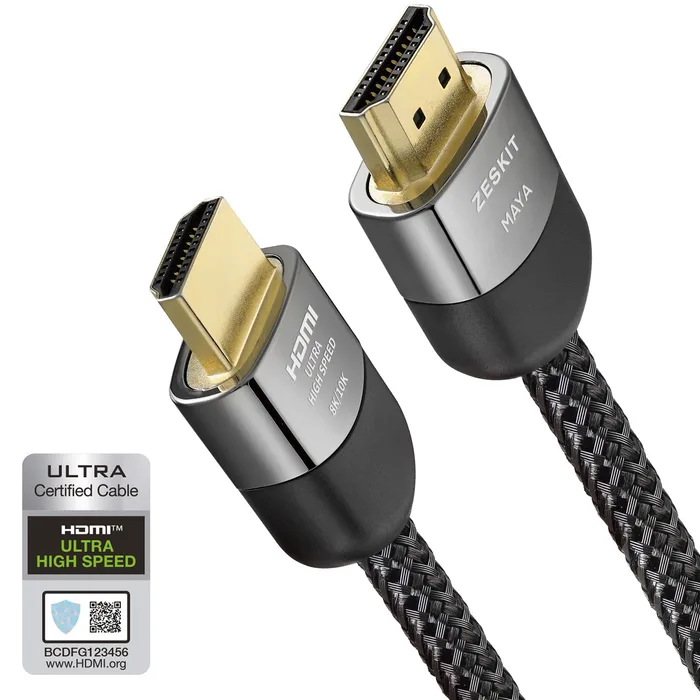
- Buy Zeskit MAYA Ultra High Speed HDMI Cable A certified 48 Gbps cable sold in eight lengths, with the certification label printed on the package so you can check it yourself. Amazon
- Buy Belkin 8K Ultra High Speed HDMI 2.1 Cable (AV10175) The same certification as the budget picks in a single 2m length, bought from a mainstream retailer with a two year warranty attached.
- It depends Cable Matters Certified Active Ultra High Speed HDMI Cable (Fiber Active Optical 8K) Fiber cores and an active chipset get 48 Gbps out to 32.8 feet, at the cost of a cable that only works one way round. Amazon
- Skip Zeskit MAYA 96Gbps HDMI Cable A 96 Gbps cable bought for a future that has not shipped yet, and its own page stops short of claiming the certification that would prove the number. Amazon
What actually matters
- Certification label - This is the only claim on an HDMI cable package that has a test behind it. Every certified Ultra High Speed or Ultra96 cable must ship with one, and it can be scanned to confirm brand, model and length.
- Cable name - The official names are the bandwidth tiers, and using them is mandatory on the jacket and the packaging. If a listing avoids the official name and leads with a raw Gbps figure, that omission is informative.
- Certified length - Different lengths have different electrical characteristics, so the programme requires each one to be tested individually. Buying the shortest cable that reaches is the cheapest reliability upgrade available.
- Bandwidth tier - High Speed is 10.2 Gbps, Premium High Speed is 18 Gbps, Ultra High Speed is 48 Gbps and Ultra96 is 96 Gbps. Match the tier to the highest video mode your source and display can both actually do.
- Passive versus active - Passive copper is simple and reversible but runs out of reach at 48 Gbps. Active and optical cables go much further and usually only work with the marked end on the source.
- In-wall and plenum rating - CL2, CL3 and CMP come from electrical code rather than from HDMI, and they govern where a cable may legally be installed. An HDMI certification says nothing about fire safety.
- Feature support on your gear - Support for each HDMI 2.1 feature is optional for devices, so eARC, VRR and 4K120 may or may not be present. A certified cable cannot add a feature your television does not have.
The specs, in plain English
Green flags vs red flags
Green flags
- The listing uses the official cable name, such as Ultra High Speed HDMI Cable, rather than only a raw bandwidth figure.
- The certification label is visible in the product photography, with its QR code and hologram.
- Every length in the range is described as certified, not just the shortest one.
- Long lengths carry a CL2, CL3 or plenum rating if they are sold for installation.
- The feature list is specific, naming eARC, VRR, ALLM and the rest rather than saying supports all HDMI 2.1 features.
Red flags
- A version number is the headline claim on the cable itself, which HDMI LA's guidance says should not appear on cable packaging.
- A big bandwidth figure appears with no cable name and no statement of certification anywhere on the page.
- The word certified appears in the marketing copy but no label, QR code or certificate is shown or referenced.
- The same certification claim is applied across a range of lengths with no indication that each length was tested.
- A very long passive copper cable is offered at the top bandwidth tier without any mention of active or optical construction.
Who's who: the brands
- Zeskit - A cable specialist that sells its Ultra High Speed cable in a wide range of lengths and shows a certification scan result in its own product photography.
- Cable Matters - A high volume accessory brand with both certified copper cables and certified active optical cables for long runs.
- Belkin - The mainstream retail option, certified and warrantied, priced well above the specialist brands for the same certification.
- Club 3D - A Dutch connectivity brand that sells HDMI cables alongside other connectivity products.
- Monoprice - A long standing value brand with a broad HDMI cable range.
How to read a listing without getting fooled
Start at the bottom of the listing, not the top. Find the official cable name and the stated certification, then find the length you actually need and check that the certification claim is attached to that length rather than to the range. Next look for a photograph or mention of the certification label, because a maker who is certified has no reason to hide it. Then read the feature list and ask which of those features your television, receiver and source actually have, since almost all of them are optional for devices. Only then look at the headline bandwidth number, and treat it as a claim rather than a fact until the label backs it up. If the cable is going into a wall or a ceiling, treat the CL or plenum rating as a separate requirement entirely.
How much should you spend?
This is a category where the budget tier does the job. A certified 48 Gbps copper cable in a normal domestic length sits comfortably in the budget bracket, and paying mid-range money for the same certification buys you retail availability, a longer published warranty and a nicer jacket rather than any performance. Premium pricing is only genuinely justified when the physics changes: active optical cables for runs beyond what certified copper is sold in, and specialist installation cables with plenum ratings. The one purchase to resist is paying a premium for a bandwidth tier that nothing you own can use, which today means 96 Gbps cables. If a cable is expensive and cannot show you a certification label, the price is doing the work the test should be doing.
Questions, answered
Will an Ultra High Speed cable make my old television better?
No. The cable can only carry what the source sends and the display accepts, and both ends negotiate the highest mode they can both do. Plugging a 48 Gbps cable into a television that maxes out at 4K60 gets you 4K60. Where a better cable helps is when your gear is capable and the old cable was the bottleneck, which shows up as dropouts, sparkles or a mode that will not engage.
Can HDMI certification labels be faked?
The programme is built on the assumption that people will try. That is why the label combines a holographic element with a QR code and a label ID unique to each package, and why HDMI LA publishes an app that reads both the code and the hologram rather than the code alone. Labels are also tracked through the supply chain from factory to reseller. A generic QR sticker with no hologram, or a scan that returns the wrong brand, model or length, is the tell.
What is the difference between certified and compliant?
Compliant is a claim a manufacturer makes about itself. Certified means the specific cable was tested at an HDMI Forum authorised test centre, the results were verified by the Forum's compliance programme manager, and the manufacturer was then allowed to order labels. Certified cables are also subject to ongoing audit testing during the product's life, and a cable that fails is removed from the label ordering system. The gap between the two words is the whole point.
Do I need to worry about HDMI 2.2 yet?
Not for most setups. The HDMI Forum released version 2.2 in June 2025 and the Ultra96 cable tier came with it, but the bandwidth only matters when both the source and the display are HDMI 2.2 devices. Buying an uncertified 96 Gbps cable today buys you a number rather than a capability. When you do come to need one, look for the official Ultra96 HDMI Cable name and a certification label, exactly as you would at 48 Gbps.
Or jump to the head-to-head: Zeskit MAYA Ultra High Speed HDMI Cable vs Belkin 8K Ultra High Speed HDMI 2.1 Cable (AV10175).