Explained
Home Theater Projectors, Explained
After reading this, you'll be able to look at any home theater projector listing and know which numbers matter, which are marketing, and what your room actually needs.
In this guide
A home theater projector is the cheapest route to a genuinely huge picture - 100 inches and up for less than a big TV. But the spec sheets are a minefield: brightness numbers measured in modes you'd never use, '4K' claims that mean different things, and contrast figures that are pure fiction. The good news is that only a handful of specs really determine whether movie night looks cinematic, and once you understand them, the market gets much easier to read.
The 30-second version
- Contrast beats brightness for movie watching - a projector with deep blacks and mid-tier lumens looks far more cinematic than a bright one with gray, washed-out dark scenes.
- Pick your throw type first: long-throw projectors (mounted or shelf-placed) give the best picture per dollar, while ultra-short-throw models sit inches from the wall like furniture but cost more for equal quality.
- Spec-sheet brightness is measured in modes you won't use; what matters is how bright the projector is in its accurate, calibrated picture modes - often well below the headline number.
- The light source (lamp, LED, or laser) is a convenience choice, not a quality choice - lamps need periodic replacement but can still produce the best image at a given price.
- Budget for the whole setup: a screen, mounting or furniture, and audio are part of the real cost, and for ultra-short-throw models a special ALR screen is close to mandatory.
The products this guide is about
Our verdict on each, with the full reasoning on the companion review.
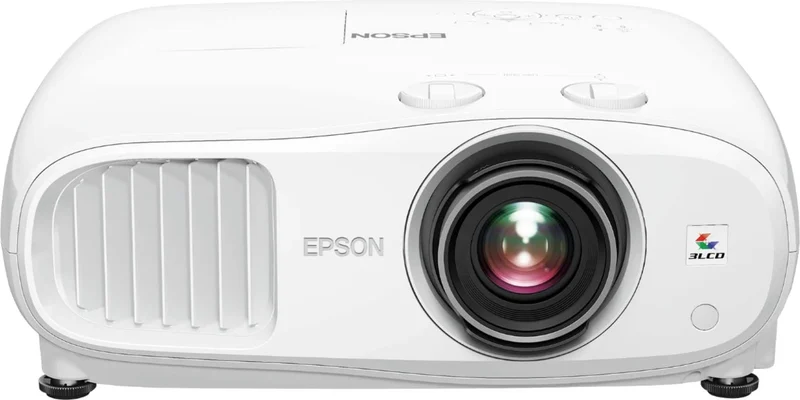
- Buy Epson Home Cinema 3800 The long-running value king of living-room projection: bright, punchy, rainbow-free, and easier to place than almost anything else. Amazon
- Buy BenQ HT4550i The colorist's choice: a factory-calibrated 4K LED projector that covers the full digital-cinema color gamut with no lamp to replace.
- It depends Hisense PX3-Pro Laser Cinema A brilliant triple-laser ultra-short-throw that replaces a TV - if you also budget for the screen it deserves. Amazon
- Skip Optoma UHZ55 A capable laser projector on paper, but gray blacks and stiff competition make it hard to justify at this price.
What actually matters
- Native contrast - the difference between the darkest and brightest parts of the image the optics can actually produce. This is what makes night scenes look like night instead of gray fog, and it's the single biggest picture-quality separator between projectors at the same price.
- Real-world brightness - enough light output, in an accurate picture mode, for your room and screen size. Dim rooms need less; any ambient light or a screen over 120 inches demands more.
- Throw type and placement flexibility - whether the projector can physically put a correctly shaped image on your wall from where you can actually place it. Zoom range and lens shift do this optically; keystone correction fakes it digitally and softens the picture.
- Color performance - how much of the cinema color range the projector covers and how accurate it is out of the box. Wide, accurate color is the difference between 'looks like a projector' and 'looks like a movie theater'.
- Imaging technology - 3-chip LCD designs avoid the rainbow artifacts some viewers see on single-chip DLP projectors, while DLP models are often sharper and more compact. Neither is universally better, but the trade-off is worth knowing before you buy.
- Light source lifespan and upkeep - laser and LED engines run maintenance-free for the life of the projector; lamp models need a replacement bulb every few years of regular use.
- Input lag and HDMI bandwidth - if you game, look for a low measured input lag and full-bandwidth HDMI so consoles can run at their best.
The specs, in plain English
Green flags vs red flags
Green flags
- Independent testing reports strong native contrast and good brightness in accurate picture modes - not just a big spec-sheet lumen number
- Optical zoom plus vertical and horizontal lens shift, giving you real placement flexibility without digital correction
- A factory calibration report or well-reviewed out-of-box color accuracy
- Full-bandwidth HDMI ports and low measured input lag if gaming is on the menu
- Laser or LED light source with a lifespan rating covering many years of nightly viewing
- A clearly published throw chart so you can verify it fits your room before buying
Red flags
- Contrast quoted only as a 'dynamic' ratio in the hundreds of thousands or millions - a sign the native contrast is unremarkable
- Brightness advertised without an ANSI/ISO lumen qualifier, or reviews noting accurate modes are far dimmer than the spec
- Placement flexibility that's all digital: heavy reliance on keystone correction and 'auto-fit' features instead of optical zoom and shift
- Owner reports of loud fan noise in HDR or bright modes - a constant whir can ruin quiet scenes
- An ultra-short-throw model marketed as working great on any wall - without an ALR screen budget, you're buying disappointment in a bright room
- Mixed or poor after-sales support reports for the brand's projector line, since projectors are harder to service than TVs
Who's who: the brands
- Epson - The 3LCD stalwart - long-running value leaders known for bright, high-contrast, rainbow-free images and flexible placement, mostly lamp-based in the mid-range.
- BenQ - DLP specialist with a reputation for color accuracy - many models ship individually factory-calibrated, spanning budget gaming units to premium home cinema.
- Hisense - A driving force in ultra-short-throw 'laser TV' setups - triple-laser color, built-in smart TV platforms and sound, aimed at TV-replacement living rooms.
- Optoma - High-volume DLP maker with strong gaming-focused and bright-room options; picture quality for dark-room movie use varies model to model.
- Sony and JVC - The high-end reference brands - native 4K and class-leading contrast for dedicated theater rooms, at prices well above mainstream living-room models.
- XGIMI and similar newcomers - Style-forward smart projectors with slick software and auto-setup tricks; convenient, but accurate-mode brightness and contrast often trail the established home-theater names.
How to read a listing without getting fooled
Start by ignoring the two biggest numbers on the box. The lumen figure is almost always measured in the projector's brightest, ugliest mode, and any contrast ratio with 'dynamic' next to it (or six-plus zeros) is marketing. Instead, work through a listing in this order: first, the throw ratio and zoom range - can it physically fill your screen from where it must sit in your room? Second, look for independent measurements of brightness in accurate modes and of native contrast, since these decide real picture quality. Third, check what kind of chip and light source it uses - single-chip DLP vs. 3LCD tells you about rainbow risk and color brightness; lamp vs. laser/LED tells you about upkeep. Finally, read the fine print on features: 'supports 4K' can mean pixel-shifting (fine) or mere 4K input downscaled to HD (not fine), 'smart TV built in' ranges from excellent to unusable, and built-in speakers are usually an emergency backup, not a sound system.
How much should you spend?
Projector pricing splits into clear tiers, and the value sweet spot for most people sits in the middle. Entry-level models get you a big image but compromise on the things that make it cinematic - contrast, color accuracy, and placement flexibility - so they suit casual backyard-movie duty more than a primary setup. The mid-range is where dedicated home theater projectors live, and it's where each additional outlay still buys visible picture improvements; a well-reviewed mid-range long-throw is the smart default for a first serious projector. The premium tier buys refinement - factory-calibrated color, maintenance-free light engines, better optics - and is worth it mainly for viewers with a light-controlled room who will notice the difference. Flagship ultra-short-throw laser models cost the most and carry a hidden extra: the dedicated ALR screen they genuinely need, which adds meaningfully to the total. Whatever tier you choose, reserve part of the budget for a screen and audio - a mid-tier projector on a proper screen with decent sound beats a top-tier projector aimed at a bare wall through built-in speakers.
Questions, answered
How many lumens do I actually need?
It depends on your room and screen size more than any universal number. For a dim or darkened room with a screen up to about 120 inches, mainstream home theater projectors have plenty of light in their accurate modes. If you watch with lights on or have big windows, prioritize models that independent testing confirms stay bright in calibrated modes - and consider an ALR screen. No projector defeats direct daylight the way a TV does, so if daytime viewing in a sunlit room is your main use case, temper expectations.
Can I just project onto a white wall?
For casual use with a long-throw projector, yes - a smooth, matte white wall is serviceable. But a proper screen is flatter, more reflective, and color-neutral, which visibly improves sharpness, brightness, and contrast. For ultra-short-throw projectors the answer is effectively no: their steep projection angle exaggerates every wall imperfection, and owners consistently report you need a rigid, UST-specific ALR screen for the picture the reviews rave about.
Is an ultra-short-throw projector better than a normal one?
It's better at being furniture, not necessarily at making pictures. A UST sits inches from the wall - no ceiling mount, no cables across the room, no shadows when someone walks by - which makes it the natural TV replacement for a shared living room. But dollar for dollar, a traditional long-throw projector usually delivers better picture quality, and USTs are fussier about screen flatness and alignment. Choose based on your room and lifestyle first.
Do I need a laser projector, or is a lamp fine?
A lamp is fine - and sometimes the smarter buy. Laser and LED engines are more convenient: instant on/off, no bulb changes, brightness that holds up for tens of thousands of hours. But the light source doesn't determine picture quality, and some lamp-based projectors outperform similarly priced laser rivals on contrast and color. Weigh the convenience against what the same spend gets you in image quality.
What's the rainbow effect, and will it bother me?
Single-chip DLP projectors display colors sequentially, and a minority of viewers perceive brief red-green-blue flashes - 'rainbows' - around bright objects on dark backgrounds. Most people never see them; sensitive viewers find them genuinely distracting. If you've never watched a DLP projector, try to view one before committing, or default to a 3-chip LCD design, which is immune.
Are projectors good for gaming?
Many are, and a giant screen makes games spectacular. The specs that matter are measured input lag (lower is better - the best home theater projectors now rival gaming monitors' responsiveness at their refresh rates) and full-bandwidth HDMI so modern consoles can output their highest-quality signals. Check independent lag measurements rather than the marketing 'game mode' badge, and note that some projectors get noticeably louder in their fastest or brightest modes.
Or jump to the head-to-head: Epson Home Cinema 3800 vs BenQ HT4550i.