

Tech & Gadgets
The Best Gaming Mice in 2026: Four Flagships Tested, One to Skip
We compared four current gaming mice on weight, shape, sensor and switches to find which flagships earn their premium and the one you can comfortably skip.
The short version
The Razer Viper V3 Pro is the overall pick: about 54 grams, a current-generation sensor, optical switches, and a symmetrical shape that suits most competitive grips. The Logitech G Pro X Superlight 2 is a close runner-up and the better buy if its rounder shape fits your hand. The DeathAdder V3 Pro covers ergonomic palm grips at low weight, while the heavy, feature-loaded G502 X Plus is the one most gaming buyers should skip.
Our picks at a glance
- Razer Viper V3 Pro - Buy. The competitive default: about 54 grams, a current sensor, and a symmetrical shape most grips get along with.
- Logitech G Pro X Superlight 2 - Buy. The safest all-rounder, with a widely comfortable shape and long battery, if the silhouette fits your hand.
- Razer DeathAdder V3 Pro - It depends. An ergonomic palm shape at an unusually low weight, for players a flat symmetrical mouse cramps.
- Logitech G502 X Plus - Skip. A heavy, button-loaded mouse that shines for macros and scrolling but lags lighter rivals for pure play.
The verdict in 30 seconds
What mattered most
- Weight
- Shape
- Sensor
- Switches
- Max wireless polling
- Extra buttons / RGB
The gaming mouse market has quietly settled in 2026: the models that top real-world rankings are light, wireless, and built around a handful of proven sensors and switches. That makes the choice less about chasing specs and more about matching shape and weight to your hand. We compared four current models - three we would recommend and one popular option we would not - to show where the money is worth spending.
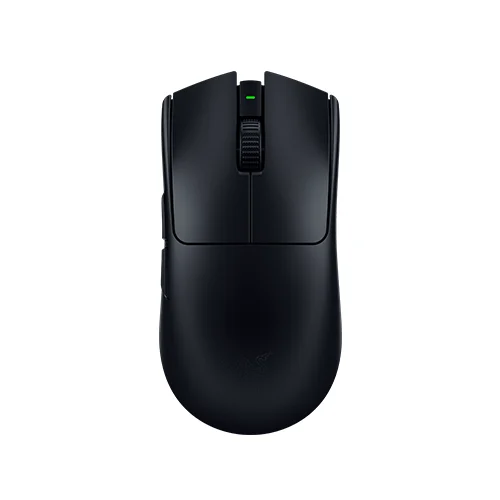
The competitive default: about 54 grams, a current sensor, and a symmetrical shape most grips get along with.
Best for: Competitive FPS players who want the lowest weight and newest sensor in a symmetrical shell.
- Around 54 g with a solid, non-perforated shell
- Focus Pro 35K Gen-2 sensor with Gen-3 optical switches
- Full 8000 Hz wireless polling needs a separate dongle
- No RGB, weight tuning, or left-side buttons
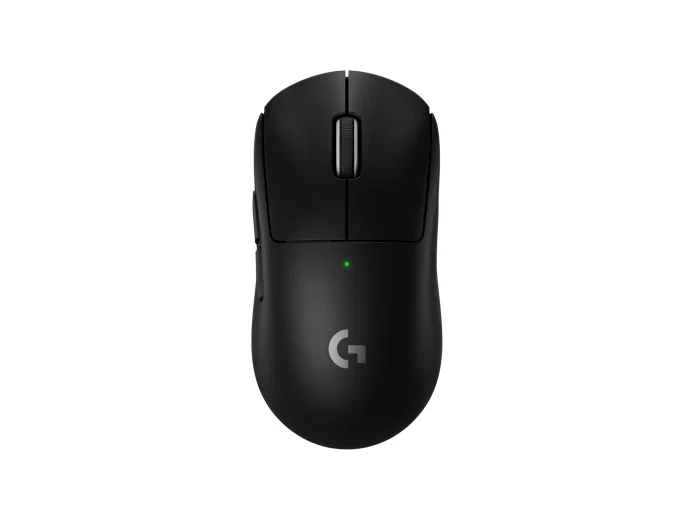
The safest all-rounder, with a widely comfortable shape and long battery, if the silhouette fits your hand.
Best for: Players who want one comfortable, well-built wireless mouse and would rather not fuss with add-ons.
- Neutral egg shape fits the widest range of hands
- 8000 Hz via firmware, USB-C charging, quiet Lightforce hybrid switches
- Single size runs large for small hands
- Pushing polling to 8000 Hz roughly halves battery life
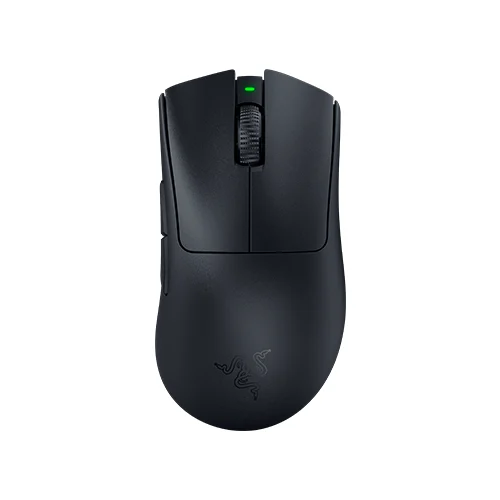
An ergonomic palm shape at an unusually low weight, for players a flat symmetrical mouse cramps.
Best for: Palm-grip and larger-handed players who want ergonomic comfort without the usual weight penalty.
- About 63 g in a contoured palm shape
- Focus Pro 30K sensor with reliable optical switches
- Right-handed only
- Full 8000 Hz polling gated behind a separate dongle
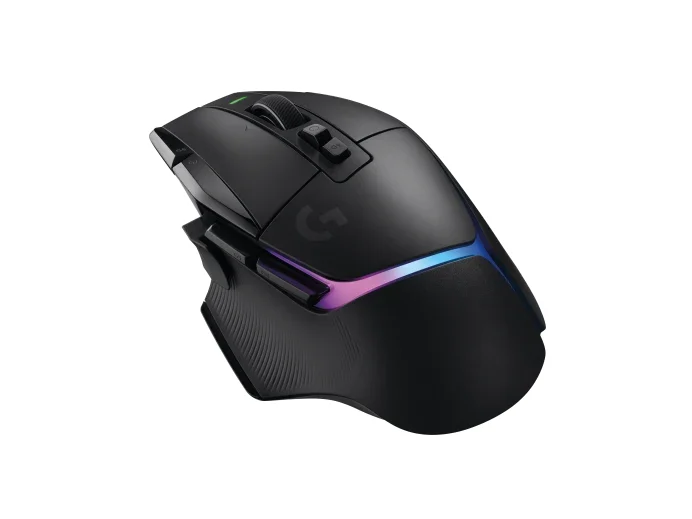
A heavy, button-loaded mouse that shines for macros and scrolling but lags lighter rivals for pure play.
Best for: MMO-lite players and heavy multitaskers who specifically want many buttons and a free-spin scroll wheel.
- Dual-mode HyperScroll wheel free-spins or ratchets on demand
- 13 programmable controls for macros and productivity
- Heavy at about 106 g for fast, flick-heavy play
- Hero 25K sensor and 1000 Hz wireless trail the flagships
| Criteria | Razer Viper V3 Pro Top pick | Logitech G Pro X Superlight 2 | Razer DeathAdder V3 Pro | Logitech G502 X Plus |
|---|---|---|---|---|
| Verdict | Buy it | Buy it | It depends | Skip it |
| Best for | Competitive FPS players who want the lowest weight and newest sensor in a symmetrical shell. | Players who want one comfortable, well-built wireless mouse and would rather not fuss with add-ons. | Palm-grip and larger-handed players who want ergonomic comfort without the usual weight penalty. | MMO-lite players and heavy multitaskers who specifically want many buttons and a free-spin scroll wheel. |
| Price tier | $$$ · premium | $$$ · premium | $$ · mid-range | $$$ · premium |
| Weight | ~54 g | ~58 g | ~63 g | ~106 g |
| Shape | Symmetrical | Symmetrical | Ergonomic (right-hand) | Ergonomic (right-hand) |
| Sensor | Focus Pro 35K Gen-2 | Hero 2 (32K) | Focus Pro 30K | Hero 25K |
| Switches | Optical (Gen-3) | Lightforce hybrid | Optical | Lightforce hybrid |
| Max wireless polling | 8000 Hz (dongle) | 8000 Hz (firmware) | 8000 Hz (dongle) | 1000 Hz |
| Extra buttons / RGB | 2 side · none | 2 side · none | 2 side · none | 10+ programmable · RGB |
Which one is right for you?
- Competitive FPS players who want the lowest weight and newest sensor in a symmetrical shell. Buy it Razer Viper V3 Pro
- Players who want one comfortable, well-built wireless mouse and would rather not fuss with add-ons. Buy it Logitech G Pro X Superlight 2
- Palm-grip and larger-handed players who want ergonomic comfort without the usual weight penalty. It depends Razer DeathAdder V3 Pro
- MMO-lite players and heavy multitaskers who specifically want many buttons and a free-spin scroll wheel. Skip it Logitech G502 X Plus
How we judged the field
Real Buyer Experiences does not run its own latency benches or sensor rigs. Instead, we read across independent expert testing and long-term owner reports, then weigh the points where those two groups agree. For gaming mice in 2026, the consensus has narrowed: weight, shape, sensor consistency, switch feel, and wireless polling matter far more than raw DPI numbers no one games at. We limited this comparison to models that are still in production and widely stocked, and we deliberately included one popular mouse we think most players should pass on. Every pick below is judged on how it performs for actual play, not on spec-sheet bragging rights.
Razer Viper V3 Pro
Buy itThe Viper V3 Pro is the mouse the largest share of competitive players have converged on, and the reasons are practical rather than showy. At roughly 54 grams with a solid, non-perforated shell, it feels lighter than its size suggests, and the symmetrical shape suits fingertip and claw grips without forcing a particular hand position. The Focus Pro 35K Gen-2 sensor tracks cleanly across cloth and hard pads, and the third-generation optical switches remove the debounce delay that causes double-click complaints on mechanical switches over time.
What owners like more: the combination of low weight and a full shell that does not feel fragile or collect grime. What they like less: getting the full 8000 Hz wireless polling depends on a separate dongle, and the mouse is stripped to essentials - no RGB, no onboard weight tuning, and only two thumb buttons. For a play-focused mouse that is the point, but buyers expecting extras will notice the omissions.
Logitech G Pro X Superlight 2
Buy itThe Superlight 2 is the safest recommendation here because its neutral egg shape fits the widest range of hands, and Logitech’s build quality and glide remain a reference point. It runs a touch heavier than the Viper at around 58 grams, uses the Hero 2 sensor, and now reaches 8000 Hz wireless polling through firmware rather than a paid add-on. The move to USB-C charging and the quieter Lightforce hybrid switches fixed the two most common complaints about the previous generation.
Owners consistently praise the shape and the long battery life at standard polling. The knocks are familiar: it is expensive, it ships in a single size that is a little large for small hands, and pushing polling to 8000 Hz roughly halves runtime. It is the default pick if the Superlight silhouette fits you and you would rather not think about accessories.
Razer DeathAdder V3 Pro
It dependsIf a flat symmetrical shell makes your hand cramp, the DeathAdder V3 Pro is the ergonomic answer that does not punish you with weight. At about 63 grams it is remarkably light for a contoured, right-handed palm shape, and the raised hump supports relaxed palm and hybrid grips through long sessions better than either symmetrical mouse above. The Focus Pro 30K sensor and optical switches keep it competitive, even if the sensor is nominally a half-step behind the Viper’s newer unit - a gap no player will feel in a match.
We rate it depends rather than a flat buy because it is strictly right-handed, it also gates full 8000 Hz polling behind a separate dongle, and it now sits alongside newer flagships. It frequently sells below its launch tier, which makes it the value-minded ergonomic choice as much as the premium one. Owners who want comfort over the last gram should shortlist it first.
Logitech G502 X Plus
Skip itThe G502 X Plus is a well-built, feature-dense mouse, and it is also the one we would steer most gaming buyers away from in 2026. The issue is weight: at around 106 grams it is nearly double the Viper, and both testers and owners report that heft tiring during fast, flick-heavy play and long sessions. Its Hero 25K sensor is a generation behind the flagships, its RGB drains the battery quickly, and its wireless connection tops out at 1000 Hz rather than the 8000 Hz its rivals reach.
To be fair about what it does well: the dual-mode scroll wheel that free-spins or ratchets on demand is genuinely useful, and the roughly thirteen programmable controls make it a capable productivity and MMO-lite mouse. If those buttons and that wheel are the specific reason you are buying, it earns its place. For anyone prioritizing gaming feel, comfort over hours, or up-to-date wireless performance, lighter options do the core job better.
Razer Viper V3 Pro vs Logitech G Pro X Superlight 2: which should you buy?
This is the decision most readers actually face, and it comes down to shape and priorities rather than a clear winner. Choose the Viper V3 Pro if you want the lowest weight, the newest sensor, and a mouse tuned purely for competitive play; its solid shell and optical switches are the more forward-looking package. Choose the Superlight 2 if its rounder, fuller shape fits your hand better, if you value the longer battery at standard polling, or if you simply trust Logitech’s build and glide. Neither will hold you back in a ranked match. If your hand fits both, weight tips it toward the Viper; comfort over a long day tips it toward the Superlight.
What to look for
Start with grip and hand size, because a mouse that fits wrong stays wrong no matter how good its sensor is. Symmetrical shells like the Viper and Superlight suit claw and fingertip grips; a contoured shape like the DeathAdder suits palm grips and larger hands. Next, treat weight as a real variable rather than a bragging number - anything under about 65 grams feels effortless to move, while triple-digit mice like the G502 X Plus ask more of your wrist. Prioritize a modern optical or hybrid switch to avoid double-click problems down the line, and only chase 8000 Hz polling if you run a high-refresh monitor and accept the battery cost. Extra buttons and RGB are conveniences, not performance features; do not let them override fit and weight.
Our final take
For most players, the Razer Viper V3 Pro is the mouse to beat: it is light, comfortable for the common grips, and built around current sensor and switch technology. The Logitech G Pro X Superlight 2 is the equally sensible runner-up and the better choice if its shape fits you. Keep the DeathAdder V3 Pro on your list if you need an ergonomic shape without the weight penalty, and skip the G502 X Plus unless its scroll wheel and button bank are the exact features you came for.
Questions, answered
Does gaming mouse weight really matter?
Yes, more than most specs. Below roughly 65 grams, quick aim adjustments and long sessions feel noticeably easier on your wrist. Triple-digit mice like the G502 X Plus add control for some players but tire the hand during fast, flick-heavy games. Fit and grip still come first.
Is a symmetrical or ergonomic shape better?
Neither is better outright; it depends on your grip. Symmetrical shells like the Viper and Superlight suit claw and fingertip grips and smaller hands. Contoured shapes like the DeathAdder support relaxed palm grips and larger hands. Match the shape to how you actually hold a mouse.
Is 8000 Hz polling worth it?
Only in specific cases. On a high-refresh monitor, 8000 Hz can slightly smooth cursor motion, but the difference is subtle and it roughly halves wireless battery life. At 1000 Hz these mice already feel instant. Chase it if your hardware supports it; otherwise leave it off.
Are optical switches better than mechanical ones?
For longevity, generally yes. Optical and hybrid switches actuate without a physical contact that can wear out, which sidesteps the double-click failures that affect some older mechanical switches over time. Click feel is personal taste, but reliability is the practical reason to prefer them.
Are wired gaming mice still worth buying in 2026?
They can be, but the gap has closed. Modern wireless mice like these match wired latency in real play while removing cable drag, and their battery lasts weeks at standard polling. Wired still saves money, yet most players will prefer a good lightweight wireless mouse.
Deciding between the top two? See our head-to-head: Razer Viper V3 Pro vs Logitech G Pro X Superlight 2.
More Tech & Gadgets reviews
 The Best Graphics Cards: 4 Compared (and One to Skip)
  The Best Graphics Tablets: 4 Compared (and One to Skip)
  The Best Handheld Gaming Consoles: 4 Compared (and One to Skip)
  The Best HDMI Cables: 4 Compared (and One to Skip)
  The Best Home NAS Devices: 4 Compared (and One to Skip)
  The Best Home Theater Projectors: 4 Compared (and One to Skip)