Explained
Studio Monitors, Explained
After reading this you'll understand what makes a studio monitor 'accurate,' how to read a spec sheet, and how to avoid the speakers that lie to you.
In this guide
Studio monitors are speakers built for one job: telling you the truth about your recording, not making it sound nice. That's the opposite of what most consumer speakers do, and it's exactly why the flashiest, most 'exciting' monitor is often the wrong one. First-time buyers get tripped up chasing big bass and a fun sound, when what they actually need is a flat, revealing, unflattering speaker they can trust.
The 30-second version
- Accuracy beats excitement. A monitor's whole purpose is to reveal flaws in your mix, so a flat, uncolored sound matters far more than a punchy or pleasing one.
- Buy a matched pair. You can't judge stereo balance, panning, or imaging with a single speaker, so budget for two identical monitors from the start.
- Match woofer size to your room and genre. A 5-inch woofer suits small rooms and general work, while 6.5-inch or larger gives real low-end for bass-heavy music if you have space.
- Placement can matter as much as the speaker. Stands at ear height, distance from walls, and basic room treatment often make a bigger difference than upgrading the monitor itself.
- Don't pay for DSP and looks. Onboard room presets and premium styling are nice extras, not substitutes for a speaker that is inherently accurate.
The products this guide is about
Our verdict on each, with the full reasoning on the companion review.
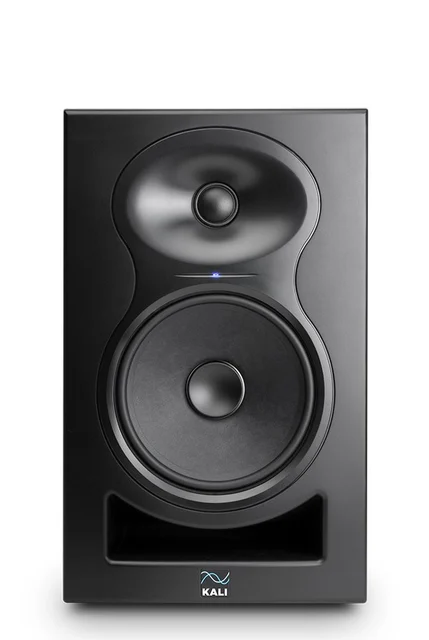
- Buy Kali Audio LP-6 V2 The value benchmark: near-reference flatness and real low-end for a budget price. Amazon
- Buy Yamaha HS5 The honest industry reference - it shows you exactly what your mix is doing, warts and all. Amazon
- It depends Adam Audio T5V A U-ART ribbon tweeter brings airy, low-fatigue highs - if you can live with the trade-offs. Amazon
- Skip KRK Rokit 5 G5 Fun, punchy, and popular, but its colored voicings work against accurate mixing. Amazon
What actually matters
- Tonal accuracy (flatness) - how evenly the speaker reproduces every frequency without boosting bass or treble. This is the single most important trait, because a colored monitor makes you mix against a lie.
- Bass extension and control - how deep the low end reaches and how tight it stays. You want to hear the bottom octave honestly, not have it exaggerated or muddy.
- High-frequency character and fatigue - harsh, hyped treble tires your ears over long sessions and leads to bad decisions. Smooth, clean highs let you work longer and judge detail accurately.
- Stereo imaging and sweet spot - how precisely the pair places sounds left-to-right and how forgiving it is if you move your head. Good imaging makes panning and depth decisions reliable.
- Room and placement flexibility - boundary or trim switches that compensate for a desk or wall behind the speaker. Helpful, since almost no home room is acoustically ideal.
- Build quality and self-noise - a quiet speaker that doesn't hiss at idle keeps quiet passages clean, and a solid cabinet resists resonance that smears the sound.
The specs, in plain English
Green flags vs red flags
Green flags
- Independent testing describes the frequency response as flat, neutral, or uncolored
- Balanced inputs (XLR or TRS) and boundary/trim switches for room adjustment
- Owners report it stays quiet at idle with a low noise floor
- Sold as singles so you can build a matched pair, with a woofer size that fits your room
- A voicing reviewers call 'honest' or 'revealing' rather than 'fun' or 'exciting'
Red flags
- Marketing leans on words like 'punchy,' 'exciting,' or 'scooped' - signs of a hyped, colored sound
- A default V-shaped voicing that pushes bass and dips the mids
- A rear-firing port on a speaker you'll have to place tight against a wall
- Reviews warn that mixes made on it translate poorly to other systems
- You're paying mostly for styling and DSP features rather than raw accuracy
Who's who: the brands
- Kali Audio - Value-focused brand widely praised for delivering near-reference flatness at budget prices.
- Yamaha - Maker of the HS line, one of the closest things the industry has to a flat reference standard.
- Adam Audio - German brand known for its distinctive ribbon-style tweeters and airy, low-fatigue highs.
- KRK - Hugely popular for its iconic yellow-cone Rokit line, whose current generation adds a flat Mix mode alongside more colored voicings.
- Genelec - Premium Finnish maker considered a professional benchmark for accuracy and build in serious studios.
- Focal - French brand spanning affordable to high-end monitors, respected for detailed, refined voicing.
How to read a listing without getting fooled
When you scan a monitor's spec sheet, start with the frequency response and any independent flatness measurements - that tells you more than any marketing adjective. Treat words like 'punchy,' 'exciting,' or 'enhanced bass' as warnings, not features; a monitor should be neutral. Note the woofer size and match it to your room rather than buying the biggest one you can. Check whether the port fires forward or backward, because a rear port limits how close to a wall you can place it. Look for balanced XLR or TRS inputs and for boundary or trim switches that let you adapt to your desk. Finally, be skeptical of long lists of DSP modes and room presets - they're a bonus on top of a good speaker, never a replacement for one.
How much should you spend?
You reach 'good enough to trust' surprisingly early with studio monitors - the budget tier already includes genuinely flat, usable options, so the biggest mistake is overspending before you've treated your room. Spend up mainly when you need deeper, more controlled bass, a bigger room filled with sound, or the last few percent of accuracy that pro mixing demands. Remember you're buying two of everything, so factor the pair, plus stands or isolation pads and a little acoustic treatment, into your budget from the start - that money often improves your monitoring more than a pricier speaker would. Paying a premium purely for styling, extra DSP modes, or brand cachet rarely buys you a more honest speaker.
Questions, answered
Do I really need studio monitors, or can I mix on headphones or regular speakers?
You can start on good headphones, and many people do, but monitors and headphones reveal different things - monitors show you how a mix sits in a room and how the stereo field behaves. Consumer speakers and Bluetooth speakers are the wrong tool because they're voiced to sound pleasing, which hides the flaws you need to catch. If you're serious about mixing, a flat pair of monitors plus a reference set of headphones is the ideal combination.
Why shouldn't I just buy the most popular monitor?
Popularity often tracks fun sound and marketing more than accuracy. A best-seller with a punchy, scooped voicing sounds impressive in a store demo, but that same coloration is exactly what makes your mixes translate poorly to other systems. For monitoring, boring and flat is the goal, so let measured accuracy guide you rather than the crowd.
What size woofer should I get?
For small rooms and nearfield desk setups, a 5-inch woofer is usually plenty and easier to place. If you mix bass-heavy genres like hip-hop or EDM and have room to breathe, a 6.5-inch or larger model gives you more low-end extension so you're not mixing blind in the bottom octave. Match the size to your room first; an oversized woofer in a tiny, untreated room can create more problems than it solves.
Will room treatment matter more than which monitor I pick?
Often, yes. Even the flattest monitor will lie to you in an untreated room with strong reflections and bass buildup. Get your speakers off the desk and onto stands or isolation pads at ear height, pull them away from walls, and add some basic acoustic treatment. Boundary and room-EQ switches help, but they're no substitute for good placement.
Do the onboard DSP room-correction features actually help?
They can help, within limits. Switches and presets mostly attenuate specific problem frequencies caused by wall or desk placement - useful, but coarse. They won't fix serious room acoustics or replace measuring your space. Treat them as a helpful nudge, not a cure.
Or jump to the head-to-head: Kali Audio LP-6 V2 vs Yamaha HS5.