Explained
Pet Cameras, Explained
After reading this, you will know which pet-camera features actually help you watch a pet at home and which ones are just marketing.
In this guide
A pet camera lets you check on a dog or cat from your phone while you are out, and some can even fling a treat or let you talk to your pet. The trouble is that the category is crowded with lookalike specs, monthly subscriptions that unlock the useful features, and a handful of brands with a worrying habit of leaking customers' video feeds. This guide decodes the terms so you can tell a genuinely capable camera from a sharp-sounding one that will nickel-and-dime you.
The 30-second version
- Decide watch vs. interact first. A plain monitor with pan-and-tilt covers a whole room, while a treat-dispensing camera lets you reward your pet but usually sits in one fixed spot.
- Storage model matters more than resolution. A camera that records to a local microSD card costs nothing per month, whereas many cameras hide saved clips and smart alerts behind a subscription.
- Pan-and-tilt with tracking beats a fixed lens for a pet that roams, because a fixed camera only ever shows one angle no matter where the animal goes.
- A brand's privacy record is part of the spec. An indoor camera lives in your home, so a documented history of exposing feeds should weigh as heavily as image quality.
- Night vision and Wi-Fi band are easy to overlook. Pets are active at dawn and dusk, and some cameras only join 2.4GHz networks, so confirm both before you commit.
The products this guide is about
Our verdict on each, with the full reasoning on the companion review.
- Buy Petcube Bites 2 Lite The best-value treat tosser: a big hopper, reliable flings, and treat scheduling that works without a subscription. Amazon
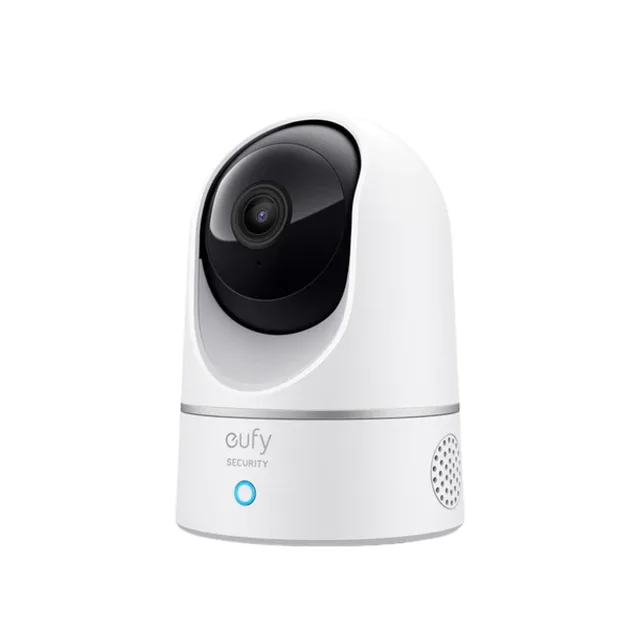
- Buy eufy Indoor Cam E220 Sharp 2K pan-and-tilt with on-device pet detection and free local storage - the best all-round value here. Amazon
- It depends TP-Link Tapo C225 A budget 2K pan/tilt cam with a physical privacy shutter - superb specs, if you don't mind managing your own microSD. Amazon
- Skip Wyze Cam v4 Cheap and sharp on paper, but a repeated history of exposing customers' feeds makes it hard to trust inside your home. Amazon
What actually matters
- Coverage (pan, tilt, and tracking) - decides whether the camera can follow a moving pet or only stares at one fixed spot; for a roamer this is the single most important feature.
- Storage model (local vs. cloud subscription) - determines your true long-term cost, since local microSD recording is free forever while cloud plans bill monthly to keep your clips.
- Video resolution and clarity - governs how much detail you actually see, though a high pixel count on the box does not guarantee accurate color or a sharp daytime picture.
- Night vision quality - matters because pets are most active in low light; a color starlight sensor or strong low-light detail beats a grainy infrared image.
- Two-way audio and interaction - lets you talk to a pet or, on treat cameras, dispense a reward, which helps with engagement and separation anxiety.
- Privacy and security - covers on-device encryption, a physical lens shutter, and the maker's track record, all of which reduce the risk of your feed being exposed.
- Detection accuracy (person vs. pet AI) - controls how useful your alerts are; good on-device detection cuts false alarms, but the smartest alerts are often paywalled.
The specs, in plain English
Green flags vs red flags
Green flags
- Records to a local microSD card so core features work with no monthly fee
- Pan-and-tilt with reliable auto-tracking that keeps a moving pet in frame
- On-device encryption, HomeKit support, or a physical lens shutter for privacy
- A clean security history with no pattern of exposing customers' feeds
- Color night vision or strong low-light detail for a pet that is active after dark
- Person-and-pet detection that runs on the camera itself to cut false alerts
Red flags
- The genuinely useful alerts or saved clips are locked behind a required subscription
- The brand has a repeated, documented history of exposing users' video feeds
- A fixed lens with no pan or tilt, marketed for watching a pet that roams
- Impressive resolution claims paired with washed-out or soft real-world footage
- No local storage option, forcing all recordings onto a paid cloud plan
- Vague or missing detail about encryption and where your video is stored
Who's who: the brands
- eufy - Value-focused smart-home cameras known for free local recording and on-device AI, though a past cloud-thumbnail lapse dented its privacy reputation.
- Petcube - Pet-first brand built around interactive treat-tossing cameras designed for engaging and rewarding a pet remotely.
- TP-Link (Tapo) - Networking maker whose Tapo line offers well-specified, low-cost pan-and-tilt security cameras, often with a physical privacy shutter.
- Wyze - Budget camera brand with sharp specs for the money, but weighed down by repeated security incidents involving exposed feeds.
- Ring - Amazon-owned brand widely used for home security; capable hardware that leans heavily on cloud subscriptions for saved video.
How to read a listing without getting fooled
Start by ignoring the headline resolution and reading the storage line: if it says local microSD, core recording is free; if it only mentions a cloud or care plan, budget for a monthly bill on top of the sticker price. Next, separate 'pan and tilt' from 'auto-tracking' - a listing may boast a motor that you steer manually while quietly lacking the tracking that follows a pet on its own. Treat AI detection claims skeptically and check which alerts are free versus subscription-gated, because 'smart alerts' in big type often means 'smart alerts, with a plan.' Finally, read the privacy fine print for words like on-device encryption or a physical shutter, and search the brand name plus 'breach' before you trust it inside your home.
How much should you spend?
Pet cameras span a wide range, and spending more does not automatically buy a better pet experience. The best value tends to sit in the middle of the plain-monitor market, where a capable pan-and-tilt camera with local storage costs little and never asks for a monthly fee. Interactive treat-tossing cameras command a premium for the hardware that flings food, so pay it only if remote rewarding genuinely matters to you. Be wary of a cheap sticker price that depends on a subscription to be useful, because the recurring cost can quietly exceed a pricier camera that records for free to a memory card. The real money question is not the upfront figure but the total over a year or two once any cloud plan is included.
Questions, answered
Do I really need a treat-dispensing camera?
Only if interacting with your pet matters to you. A treat camera lets you call a dog over and reward it from your phone, which helps with boredom and separation anxiety. If you mainly want to watch and follow a pet around a room, a pan-and-tilt monitor is more useful and usually cheaper.
Can a pet camera work without a monthly subscription?
Yes. Cameras that record to a local microSD card save footage with no recurring fee. Many cameras still work as live viewers for free, but they lock saved clip history and the smartest alerts behind a paid plan, so check the storage model before you buy.
Are cheap pet cameras safe to have inside my home?
Often, but the brand matters more than the price. Look for on-device encryption, a physical lens shutter, or Apple HomeKit support, and search the maker's history for feed-exposure incidents. A camera lives in your home, so a clean security record should count as much as image quality.
Will the camera follow my pet as it moves around?
Only if it has pan-and-tilt with auto-tracking. Those cameras rotate to keep a moving pet in frame. A fixed-lens camera, however sharp, shows just one angle, so a pet that wanders can walk out of view and stay there.
Is higher resolution always better?
Not by itself. A 2K or higher number helps, but accurate color and strong low-light performance often matter more in practice. A camera with a big pixel count can still look washed out in daylight or grainy at night, so weigh clarity alongside the headline spec.
Or jump to the head-to-head: eufy Indoor Cam E220 vs Petcube Bites 2 Lite.