Explained
OLED Gaming Monitors, Explained
After reading this you will be able to look at any OLED gaming monitor listing and know which numbers matter, which are marketing, and which trade-offs actually affect your desk.
In this guide
OLED gaming monitors moved from novelty to mainstream fast, and the spec sheets moved with them: refresh rates that sound impossible, brightness numbers that need context, and a burn-in conversation that is more nuanced than the panic suggests. Most buyers get tripped up comparing a headline refresh rate or brightness figure across monitors without understanding what is actually being measured.
The 30-second version
- Response time matters more than the refresh number. OLED's near-instant pixel response is what makes fast motion look clean, and it's a bigger practical upgrade over LCD than the refresh rate alone.
- Burn-in is a managed risk, not a coin flip. Pixel shifting, logo dimming, and brightness limiters run automatically on modern panels, and many serious models add a multi-year burn-in warranty.
- HDR brightness numbers describe small highlights, not the whole screen. A big peak-brightness figure applies to a sliver of the image; full-screen brightness is always much lower and is the number that matters in a bright room.
- Panel type shapes color and coating more than brand does. QD-OLED and WOLED render color differently and often carry different glare characteristics, so panel type tells you more than the logo on the box.
- Text clarity is a real trade-off, not a myth. OLED's non-standard subpixel layout can soften small fonts, and pixel density is the main lever that fixes it.
The products this guide is about
Our verdict on each, with the full reasoning on the companion review.
- Buy ASUS ROG Swift OLED PG27AQDP A 27-inch 1440p OLED that pushes 480Hz and stays sharp enough for daily desktop work. Amazon
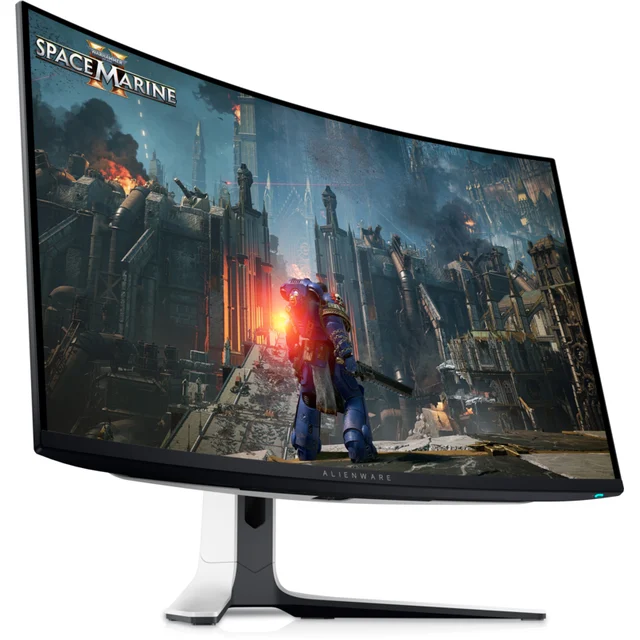
- Buy Dell Alienware AW3225QF A 32-inch 4K QD-OLED that balances speed, HDR impact, and the sharpest text of the group. Amazon
- It depends LG UltraGear OLED 45GS95QE A wildly immersive 45-inch curved ultrawide OLED that only makes sense on a very deep desk. Amazon
- Skip Samsung Odyssey OLED G6 G60SD A fast 27-inch QD-OLED held back by a cluttered smart interface and stiffer competition. Amazon
What actually matters
- Refresh rate sets the ceiling on how many frames per second the screen can display, but it only matters if your graphics card can actually generate that many frames.
- Response time is how fast a pixel changes color; OLED's near-instant response is what eliminates the smearing and ghosting you see trailing behind fast-moving objects on slower panels.
- Panel type (QD-OLED vs WOLED) determines color volume, brightness behavior, and how much the screen reflects ambient light, independent of brand.
- Peak HDR brightness is a small-highlight number, not a full-screen one; look for how a monitor handles sustained bright scenes, not just the peak spec.
- Burn-in safeguards are the built-in features, pixel shifting, logo dimming, automatic brightness limiting, and panel refresh cycles, that keep static content from etching into the panel over time.
- VRR compatibility (G-Sync/FreeSync) determines whether the monitor can sync its refresh rate to your GPU's frame output to eliminate tearing and stutter.
- Curve and size change how immersive a screen feels and how much desk depth it demands, and they trade off against pixel density and desktop usability.
The specs, in plain English
Green flags vs red flags
Green flags
- A stated multi-year warranty that explicitly names burn-in as covered, not just general panel defects
- Listed pixel-shift, logo-dimming, and auto brightness limiter features, not just a vague "burn-in protection" claim
- Both G-Sync and FreeSync certification, so it works well regardless of GPU brand
- A sustained or full-field brightness figure given alongside the peak brightness number
- Pixel density appropriate to your use: higher PPI if you'll use it for desktop work, lower is fine for gaming-only setups
Red flags
- Only a peak brightness number quoted with no context on how it's measured or how long it holds
- No mention of burn-in warranty terms, or a warranty that carves out burn-in as an explicit exclusion
- Marketing that implies the panel is fully immune to burn-in with no maintenance features listed
- A curved ultrawide recommended without any note on minimum desk depth
- Refresh rate promoted heavily with no mention of the GPU horsepower needed to actually reach it
Who's who: the brands
- ASUS (ROG Swift) - Known for pushing refresh rates aggressively on OLED gaming panels, often the first to market with the fastest option in a given size.
- Alienware (Dell) - Focuses on well-rounded QD-OLED monitors that balance gaming speed with color accuracy and factory calibration for mixed use.
- LG - A major OLED panel manufacturer in its own right, with a lineup that includes large curved ultrawide gaming monitors built for immersion.
- Samsung - Makes QD-OLED gaming monitors with vivid color and often bundles smart-TV-style interfaces directly into the display.
How to read a listing without getting fooled
Start with response time and refresh rate together, not either alone; a high refresh number paired with slow response defeats the purpose. Treat any peak brightness figure as a small-highlight spec unless the listing also states a full-field or sustained number, since that gap is where marketing and reality diverge most. Look past a generic "burn-in protection" bullet for the actual named features, pixel shifting, logo dimming, brightness limiting, and check whether the warranty explicitly covers burn-in rather than just general defects. Finally, match panel type and curve to how you'll actually use the screen: QD-OLED for punchy color, WOLED for more neutral tone, flat for productivity, curved for immersion, and pixel density high enough that you won't notice the text softness OLED can introduce.
How much should you spend?
Cost on OLED gaming monitors scales mainly with three things: panel size and resolution together, peak refresh rate, and how complete the burn-in warranty coverage is. Entry-level OLED gaming panels get you the core experience, perfect blacks and instant response, at a size and refresh rate that suits mainstream gaming. Spending more buys you either significantly higher refresh rates for competitive play, higher resolution and pixel density for sharper text and single-player detail, or larger curved formats for immersion, rarely all three at once. The sweet spot for most buyers sits at a size and refresh rate matched to their GPU and desk, since paying for refresh rates or brightness headroom you can't use is the most common way people overspend in this category. Smart-feature-laden models can look like a bargain but often add cost or friction, bloated interfaces, ads in menus, without improving the panel itself.
Questions, answered
Is OLED burn-in something I actually need to worry about?
It's a real phenomenon but a manageable one on current-generation gaming monitors. The built-in safeguards, pixel shifting, logo dimming, automatic brightness limiting on static bright content, and periodic refresh cycles, meaningfully reduce risk under normal mixed use. It becomes a real concern mainly with hours of unmoving, high-contrast static content at high brightness day after day. Keeping those protections enabled, varying what's on screen, and hiding a static taskbar goes a long way.
What's the actual difference between QD-OLED and WOLED?
Both are OLED technologies with per-pixel lighting and true blacks, but they generate color differently. QD-OLED uses quantum dots and tends to produce more saturated, vivid color with a wider color volume. WOLED uses a white subpixel plus color filters and often measures more neutral and accurate out of the box. Neither is universally better; it comes down to whether you prefer punchier or more accurate color, and QD-OLED panels often have glossier coatings that show more reflections.
Do I need G-Sync or FreeSync, and do they matter if I have the 'wrong' brand GPU?
Variable refresh rate support prevents screen tearing by syncing the monitor's refresh to your GPU's frame output, and it makes a noticeable difference in smoothness. Many current OLED gaming monitors are certified for both G-Sync and FreeSync, so compatibility with either Nvidia or AMD GPUs is often not an issue, but confirm both are listed before buying.
Why does small text sometimes look fuzzy on an OLED monitor?
OLED panels often use a subpixel arrangement that differs from the standard RGB stripe most software expects for text rendering, which can add faint color fringing to thin fonts. Higher pixel density largely hides the effect, so a smaller, higher-resolution panel will generally show cleaner text than a larger panel running the same resolution. Enabling your operating system's text-smoothing settings helps further.
Are OLED gaming monitors bright enough for a room with lots of natural light?
OLED excels at contrast and small bright highlights but full-screen brightness still trails high-end LCD, so direct sunlight on the screen can wash out the image. Glossy and semi-gloss coatings look punchier in controlled lighting but reflect more; matte finishes diffuse glare at the cost of a slightly grainier look in bright scenes. If your setup faces a bright window, factor that into panel choice or plan to control the light.
How much refresh rate do I actually need?
It depends on what you play and what your GPU can push. The jump from 60 or 144Hz to 240Hz is a dramatic, easily felt improvement. Beyond 240Hz, the gains get progressively smaller and mostly benefit dedicated competitive players with GPUs capable of sustaining those frame rates. For most people, a monitor in the 240Hz range already feels extremely smooth, and that budget might be better spent on resolution or panel size instead.
Or jump to the head-to-head: Dell Alienware AW3225QF vs ASUS ROG Swift OLED PG27AQDP.