Explained
Karaoke Machines, Explained
After reading this, you'll know exactly which karaoke machine features matter for your home, which specs are marketing noise, and how to spot a machine that will actually get used.
In this guide
A karaoke machine looks like a simple purchase - a speaker with microphones - but the category hides three very different products: true all-in-one systems with screens and song apps, bring-your-own-lyrics speakers, and effects boxes that need your phone for everything. Buyers most often get tripped up by the lyrics question (where do the words actually appear?), by peak-wattage numbers that mean little, and by song catalogs that quietly sit behind a monthly subscription.
The 30-second version
- Solve the lyrics problem first. How the words get in front of the singer - built-in screen, TV casting, or a propped-up phone - matters more than any audio spec, because it decides whether the machine gets used at all.
- Two microphones is the real minimum. Karaoke is social; a bundle with one mic means an extra purchase before your first duet.
- Peak wattage is mostly noise. An 80W-peak machine fills a living room fine; big wattage numbers matter only for large rooms or outdoor parties, and they say nothing about how good a voice sounds through it.
- Budget for the song catalog, not just the hardware. Screen-equipped machines usually gate their best karaoke libraries behind a subscription - a bring-your-own-music box avoids the fee but puts lyrics duty on your TV or tablet.
- Feedback suppression separates fun from screeching. Owner reports consistently flag microphone howl as the top complaint about cheap machines; DSP or anti-feedback processing is worth prioritizing in small rooms.
The products this guide is about
Our verdict on each, with the full reasoning on the companion review.
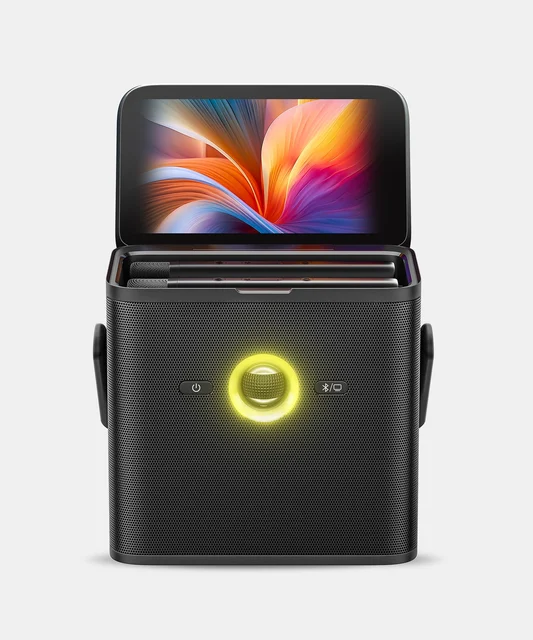
- Buy Ikarao Shell S3 A genuinely all-in-one karaoke machine - screen, songs, and mics in a single portable box.
- Buy JYX 66BT Karaoke Machine The budget default: two wireless mics, warm sound, and simple knobs that just work.
- It depends Singing Machine Ultimate WiFi Karaoke Party (ISM9025) The biggest screen here and the most effects, on a short warranty and with no published speaker power.
- Skip Rockville ROCK PARTY 9 Party Speaker Karaoke Bundle with 2 Microphones A loud party speaker with two wired mics in the box, sold as a karaoke bundle. Amazon
What actually matters
- Lyrics display - the single biggest usability divide. Built-in touchscreens mean anyone can pick a song and sing in seconds; screenless machines work fine but require you to cast to a TV or prop up a tablet every session.
- Microphone count and type - you want at least two mics in the box, ideally pre-paired wireless ones, so duets and mic-passing work without cables snaking through the room.
- Vocal processing - echo is the bare minimum; better machines add feedback suppression, key/pitch control, vocal removal from regular songs, and multiple voice effects that flatter amateur singers.
- Song source - how music reaches the machine: built-in WiFi karaoke apps, Bluetooth from your phone, USB sticks, or aux cables. Check what's free versus what needs a subscription.
- Power and portability - battery-powered machines follow the party to the deck or a friend's house; mains-powered pedestal systems sound bigger but live permanently in one room.
- Software reliability - for WiFi and app-driven machines, owner reports of freezes, reboots, and setup headaches matter as much as the spec sheet; flaky software kills a party faster than a weak speaker.
- Loudness ceiling - enough output for your actual space. Living rooms need far less power than marketing wattage suggests; backyards and big gatherings are where higher output earns its keep.
The specs, in plain English
Green flags vs red flags
Green flags
- Two pre-paired wireless microphones included in the box, with spare wired mic ports for group singing
- Explicit mention of feedback suppression or DSP, not just an echo knob
- Clear, upfront disclosure of what the song catalog costs after any free trial
- Physical knobs for mic volume, echo, bass, and treble - anyone can operate it without a manual
- Battery life quoted in hours of realistic use, with a carry handle or strap
- Recent, active app updates for screen-equipped machines - a sign the software platform is maintained
Red flags
- Only one microphone included at a mid-range or premium price - duets immediately cost extra
- A big peak-wattage number as the headline spec with little said about mics or vocal processing
- No lyrics solution at all - just a shelf or clip to hold your phone - on an expensive machine
- Recurring owner reports of app freezes, mid-song glitches, or reboot loops on WiFi models
- The song catalog only works through a proprietary paid subscription with no Bluetooth fallback
- A years-old platform still sold at flagship price while newer rivals bundle screens and wireless mics for less
Who's who: the brands
- Ikarao - Newer brand focused on all-in-one karaoke machines with built-in touchscreens, WiFi song apps, and vocal removal - the zero-setup end of the market.
- Singing Machine - A long-running US home-karaoke name; spans kids' machines to WiFi touchscreen systems running Android music and karaoke apps, with a 90-day warranty on its WiFi models.
- JYX - Value brand known for budget portable machines that bundle two wireless mics and simple knob controls - you supply the lyrics via phone or TV.
- Rockville - Sells powered party speakers and PA gear, including karaoke bundles that pair a speaker with wired or wireless microphones.
- JBL - Party-speaker giant whose PartyBox line adds mic inputs and karaoke modes - great loudness and music playback, but singing features are secondary to the speaker.
- Bonaok / generic mic-speakers - The all-in-one handheld karaoke mic category - a mic with a tiny speaker inside. Fun for kids and car rides, but not a substitute for a machine at a party.
How to read a listing without getting fooled
Start a listing by answering one question: where do the lyrics appear? If the machine has a built-in screen, immediately check whether the song apps require a subscription and what the free tier includes. If it has no screen, picture your actual setup - casting to a TV or propping a tablet - and decide honestly whether your household will bother. Next, count microphones and check the type: 'two pre-paired UHF wireless mics included' is the phrase you want; 'supports two microphones' often means one is in the box. Treat peak wattage as room-size guidance, not quality - and look instead for woofer size and any mention of DSP or feedback suppression, which predict how voices actually sound. Finally, for any WiFi or app-driven machine, skim recent owner reports specifically for software complaints: freezes, forced updates, and 2.4GHz-only WiFi setup pain show up in long-term feedback far more than in launch reviews.
How much should you spend?
Spending in this category buys convenience more than sound. At the budget end you get a capable speaker, two wireless mics, and knob controls - genuinely enough for casual family singalongs, provided your TV or tablet shows the lyrics. Moving up to the mid-range mostly buys size and theater: bigger speakers, light shows, and sometimes a built-in screen, though software quality varies more than price suggests at this level. The premium tier is where the all-in-one promise gets real - touchscreen, song apps, vocal removal, wireless mics, and battery in one box - and it's the right spend for households that will sing often and value zero setup. Beware the top of the market: a flagship price should mean more hardware and a modern platform, not a famous name on aging equipment. Also factor in the ongoing cost - screen-equipped machines usually want a monthly subscription for their best catalogs, which over a couple of years can rival the hardware itself.
Questions, answered
Do I really need a karaoke machine with a built-in screen?
No - but be honest about your patience. Screenless machines cost far less and sound just as good, but every session starts with casting lyrics to a TV or propping up a tablet and keeping the audio synced. Built-in screens remove that friction entirely, which is why they matter most for parties, kids, and anyone who wants singing to start in seconds. If your TV already runs a karaoke app you like, a screenless machine covers most of the experience for much less.
What's the difference between a karaoke machine and a party speaker with a mic input?
A party speaker is built for music playback and treats the mic as an accessory: usually no lyrics support, minimal vocal processing, and often just one mic jack. A purpose-built karaoke machine adds what singers actually need - a lyrics path, feedback suppression, echo and vocal effects, often vocal removal, and two microphones for duets. If singing is the point of the purchase, buy a karaoke system; if music is the point and singing is occasional, a party speaker may serve you better.
Are the song subscriptions required?
Usually not required, but often required for the best experience. Machines with screens stream from karaoke apps whose fullest catalogs sit behind a monthly fee, though most also play free content and anything you send over Bluetooth. Bring-your-own-music machines have no subscription at all - you sing along to free lyric videos on your TV or phone. Before buying, check what the machine can do with zero subscriptions and decide if that's enough for you.
Are wireless microphones better than wired for home karaoke?
For most homes, yes. Wireless mics let singers move, dance, and pass the mic through a crowded room without anyone tripping on a cable, and modern pre-paired UHF mics are reliable at normal room distances with no audible delay. Wired mics are fine for a fixed setup and never need charging, but a bundle with only one wired mic is a real limitation the first time two people want to sing.
How many watts do I actually need?
Less than the marketing suggests. Moderate peak power - the kind found on portable battery machines - comfortably fills a living room or patio. High-wattage pedestal systems earn their output in big rooms, basements, and gatherings where the music competes with a crowd. For voice quality, woofer size and DSP matter more than the wattage figure, so don't pay a premium for watts you'll never use in an apartment.
Will a karaoke machine work for adults, or are they mostly toys for kids?
Modern home machines are built for all ages. The meaningful differences are loudness, catalog access, and vocal processing - full-size systems offer real DSP, current-hits catalogs, and mics adults enjoy using, while true kids' machines are smaller, simpler, and cheaper. If adults will sing regularly, prioritize feedback suppression, two good mics, and a song source you'll actually keep using; a machine that sounds flattering gets used far more than one that just plays loud.
Or jump to the head-to-head: Ikarao Shell S3 vs JYX 66BT Karaoke Machine.