Explained
Gaming Mice, Explained
After reading, you will understand what every gaming mouse spec actually means, and know which ones affect your play versus which are just marketing.
In this guide
A modern gaming mouse listing throws a wall of numbers at you: DPI in the tens of thousands, polling rates, sensor model names, and switch types. The truth is that most buyers are swayed by the specs that matter least, chiefly DPI, while ignoring the two things that decide whether a mouse feels great: how it fits your hand and how much it weighs. This guide translates the jargon so you can shortlist by fit and skip the bragging-rights numbers.
The 30-second version
- Fit beats specs. Grip style and hand size decide comfort more than any sensor or DPI number, so start there before comparing anything else.
- Lighter is easier. Anything under roughly 65 grams makes quick aim and long sessions feel effortless, while triple-digit mice tire the wrist.
- DPI is a distraction. The five-digit DPI figures on the box are marketing; almost nobody games above a small fraction of them.
- Wireless has caught up. Good wireless mice now match wired latency in real play, so a cable is a budget choice rather than a performance one.
- Switches decide longevity. Optical and hybrid switches sidestep the double-click failures that eventually plague older mechanical designs.
The products this guide is about
Our verdict on each, with the full reasoning on the companion review.
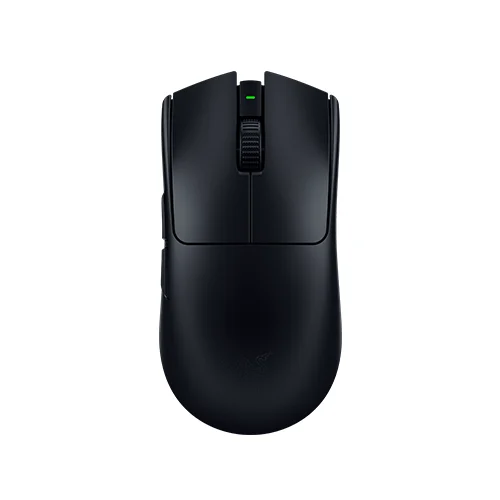
- Buy Razer Viper V3 Pro The competitive default: about 54 grams, a current sensor, and a symmetrical shape most grips get along with. Amazon
- Buy Logitech G Pro X Superlight 2 The safest all-rounder, with a widely comfortable shape and long battery, if the silhouette fits your hand. Amazon
- It depends Razer DeathAdder V3 Pro An ergonomic palm shape at an unusually low weight, for players a flat symmetrical mouse cramps. Amazon
- Skip Logitech G502 X Plus A heavy, button-loaded mouse that shines for macros and scrolling but lags lighter rivals for pure play. Amazon
What actually matters
- Shape and grip fit - a mouse that suits your grip (palm, claw, or fingertip) and hand size stays comfortable for hours; one that does not never gets better, no matter how good its sensor is.
- Weight - under about 65 grams feels effortless for fast, flick-heavy play and long sessions, while heavier mice add control for some but tire the hand.
- Sensor quality - a current-generation sensor tracks accurately and consistently across mouse pads; small differences between top sensors are invisible in actual play.
- Switch type - modern optical or hybrid switches avoid the double-click problems that develop in older mechanical switches over time.
- Wireless performance - a stable low-latency wireless connection removes cable drag; battery life at standard settings matters more than headline polling numbers.
- Build quality - a solid shell that does not flex, creak, or collect grime holds up better than a lighter but fragile perforated design.
- Button layout - extra programmable buttons help macros and productivity but are conveniences, not performance features, so they should never override fit and weight.
The specs, in plain English
Green flags vs red flags
Green flags
- A shape and size that genuinely match your grip, confirmed by owner reports from people with similar hands
- Weight in the low-to-mid 60-gram range or lighter without a flimsy, hole-riddled shell
- A current-generation sensor and optical or hybrid switches
- Solid build quality with no reported flex, creak, or rattle
- Stable wireless with battery life measured in weeks at standard polling
Red flags
- Marketing that leads with a huge DPI number instead of shape, weight, and fit
- A triple-digit weight sold as a pure gaming mouse rather than a productivity or MMO device
- An older sensor or plain mechanical switches on a flagship-priced model
- Top polling rate locked behind an accessory you must buy separately, if that matters to you
- RGB lighting that noticeably drains battery, or a shell that reviewers report as fragile or grime-prone
Who's who: the brands
- Razer - Makes the competitive-default Viper line and ergonomic DeathAdder; known for low weights, current sensors, and optical switches.
- Logitech - Maker of the widely comfortable G Pro X Superlight and feature-loaded G502 lines; a reference point for build quality and glide.
- Glorious - Popularized ultra-light perforated shells and enthusiast-friendly pricing among the lightweight-mouse crowd.
- Pulsar - An enthusiast brand offering low-weight symmetrical and ergonomic shapes that competes closely with the flagships.
- Corsair - Broad peripheral maker with gaming mice spanning lightweight competitive models and heavier MMO-style designs.
How to read a listing without getting fooled
Read a gaming mouse listing from the body outward, not from the headline number in. Ignore the giant DPI figure first; it is the least useful spec on the page. Find the weight in grams and the shape (symmetrical or ergonomic, and whether it is right-hand-only), because those decide fit. Check that the sensor is a current model and that the switches are optical or hybrid rather than plain mechanical. Then look at how the mouse reaches its top polling rate: through a firmware update or a separate dongle you must attach. Treat button count and RGB as extras. If a listing spends more words on lighting and DPI than on shape and weight, that tells you where the product's priorities are.
How much should you spend?
Spending more mainly buys lower weight, a newer sensor, better switches, and refined wireless, and the returns flatten quickly near the top. The value sweet spot sits just below the flagship tier, where last-season models and strong enthusiast brands deliver the same in-match feel for noticeably less, since a half-step-older sensor is something no player actually senses. Paying flagship money is worth it when a specific shape only exists at that level or when you want the lightest possible weight with a solid shell. It is not worth it if you are paying chiefly for RGB, extra buttons you will not map, or a five-digit DPI ceiling. Ergonomic mice in particular often drop below their launch tier over time, making comfort-first choices some of the best value in the category.
Questions, answered
Does gaming mouse weight really matter?
Yes, more than most specs. Below roughly 65 grams, quick aim adjustments and long sessions feel noticeably easier on your wrist. Heavier, triple-digit mice add control for some players but tire the hand during fast, flick-heavy games. Fit and grip still come first.
Is a higher DPI actually better?
No. DPI only sets how far the cursor moves per inch of hand movement, and almost everyone games in the low thousands. The five-digit numbers on the box are marketing headroom you will never use, so ignore them and focus on shape, weight, and sensor consistency.
Should I get a symmetrical or ergonomic shape?
Neither is better outright; it depends on your grip. Symmetrical shells suit claw and fingertip grips and smaller hands. Contoured, ergonomic shapes support relaxed palm grips and larger hands but are usually right-handed only. Match the shape to how you actually hold a mouse.
Is 8000 Hz polling worth it?
Only in specific cases. On a high-refresh monitor, 8000 Hz can slightly smooth cursor motion, but the difference is subtle and it roughly halves wireless battery life. At 1000 Hz a good mouse already feels instant. Chase it if your hardware supports it; otherwise leave it off.
Are wired gaming mice still worth buying?
They can be, but the gap has closed. Modern wireless mice match wired latency in real play while removing cable drag, and their batteries last weeks at standard polling. Wired still saves money, yet most players will prefer a good lightweight wireless mouse.
Are optical switches better than mechanical ones?
For longevity, generally yes. Optical and hybrid switches actuate without a physical contact that can wear out, which sidesteps the double-click failures that affect some older mechanical switches over time. Click feel is personal taste, but reliability is the practical reason to prefer them.
Or jump to the head-to-head: Razer Viper V3 Pro vs Logitech G Pro X Superlight 2.