Explained
Gaming Laptops, Explained
After reading this, you'll know why two laptops with the same GPU sticker can perform very differently - and how to spot the one that's actually the better machine.
In this guide
A gaming laptop is a desktop-class graphics card squeezed into a portable body, and everything about buying one flows from that tension: power versus heat versus size. The spec sheet trap that catches most first-time buyers is assuming the GPU name tells the whole story - in reality, the same chip can run dramatically faster or slower depending on how much power and cooling the laptop gives it. This guide decodes the jargon so you can read any listing and know what you're really getting.
The 30-second version
- The GPU name is only half the story. The same graphics chip runs at very different power levels in different laptops, and that gap shows up directly in frame rates - always check the power limit, not just the model number.
- Cooling is performance. A laptop that can't shed heat quietly will slow itself down mid-game, so a thicker machine with good fans often beats a sleeker one with identical parts.
- The display is where budgets are quietly cut. Entry-level machines pair a fast GPU with a dim, washed-out screen; a good panel - bright, fast-refreshing, ideally OLED at mid-range and up - changes the whole experience.
- Battery life is a bonus, not a feature. Most gaming laptops throttle hard on battery; plan to game plugged in, and judge battery only for the desk-work and browsing you'll do away from an outlet.
- Upgradability extends the laptop's life. Accessible RAM slots and a spare storage slot mean you can add memory and space in a couple of years instead of replacing the machine - soldered RAM means buying your final configuration on day one.
The products this guide is about
Our verdict on each, with the full reasoning on the companion review.
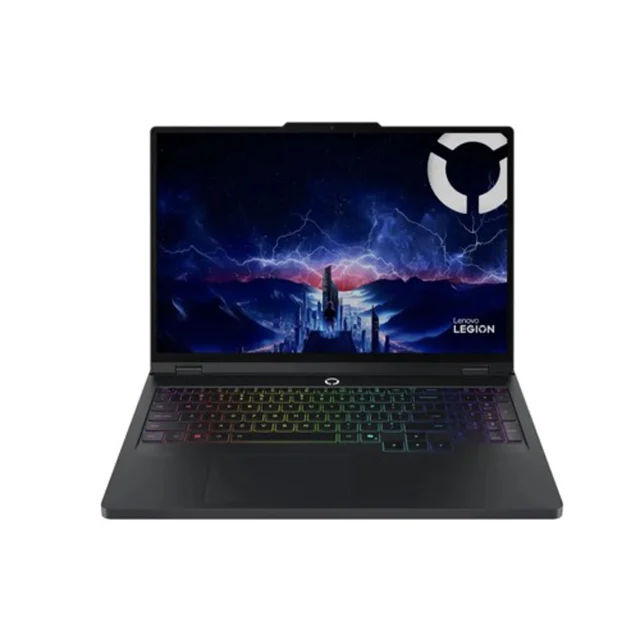
- Buy Lenovo Legion Pro 5i Gen 10 The performance-per-dollar king: full-power RTX 50-series graphics, a stunning 240Hz OLED, and cooling that actually keeps up. Amazon
- Buy Acer Nitro V 16 AI The budget pick that gets the priorities right: current-generation RTX 5060 graphics first, luxuries second. Amazon
- It depends ASUS ROG Zephyrus G14 (2025) The most beautiful gaming laptop you can buy - as long as you accept that portability costs you frames. Amazon
- Skip MSI Katana 15 HX A current GPU wrapped in last-generation everything else - the same money simply buys a better laptop elsewhere. Amazon
What actually matters
- GPU power limit (TGP) - the wattage the laptop actually feeds its graphics chip. This, more than the GPU's name, determines your frame rates; testing coverage often finds sizable performance gaps between thin and thick laptops with the same GPU.
- Cooling and sustained performance - a gaming laptop is only as fast as it stays after twenty minutes of play. Good cooling holds speed with tolerable fan noise; bad cooling means throttling, jet-engine fans, or both.
- Display quality - resolution, refresh rate, brightness, and panel type together. A smooth high-refresh screen with decent brightness matters more to how games feel than a small step up in GPU tier.
- CPU generation - a current-generation processor runs cooler and sips less power than an older high-wattage chip. Discounted laptops pairing a new GPU with a previous-generation CPU are a common trap: loud fans, short battery, little gaming benefit.
- Build and portability trade-off - thick plastic machines are cheaper and often cool better; thin metal machines look and travel better but usually give up performance to fit. Decide which trade you're making before you compare prices.
- Upgradable RAM and storage - machines you can open and expand stay useful for years longer. Check whether RAM is slotted or soldered and whether there's a spare M.2 storage slot.
- Owner-reported reliability - fan behavior after months, hinge and chassis durability, and support experiences show up in long-term owner reports, not launch-day spec sheets.
The specs, in plain English
Green flags vs red flags
Green flags
- The maker publishes the GPU's power limit openly, and independent testing confirms sustained performance close to its peak
- Owner reports describe fans as tolerable under load and performance holding steady in long sessions
- A high-refresh display (165Hz or better) with good measured brightness, even at the budget tier
- Slotted RAM plus a spare M.2 slot, with a bottom panel owners say is easy to open
- A current-generation CPU paired with the current-generation GPU - the platform is coherent, not a parts-bin mix
- The screen's resolution matches the GPU's realistic capability rather than outrunning it
Red flags
- A current GPU paired with a previous-generation high-wattage CPU - a classic sign of a cost-cut refresh that runs hot and loud
- The listing shouts the GPU name but nowhere states its power limit
- Owner reports repeatedly mention a dim or washed-out display next to same-price rivals
- Consistent complaints about fan noise, throttling after minutes of play, or a chassis too hot to touch
- Soldered RAM in a machine positioned as a value or mid-range buy
- A spec sheet that leads with RAM size and storage numbers while staying vague about the display panel and cooling
Who's who: the brands
- Lenovo (Legion) - Legion machines are often praised for running GPUs at high power with strong cooling, making them a common performance-per-dollar benchmark in the mid-range.
- ASUS (ROG / TUF) - Broadest range, from budget TUF machines to the premium thin-and-light Zephyrus line known for superb OLED displays and design.
- Acer (Nitro / Predator) - The budget stalwart - Nitro machines put money into current GPUs and smooth screens while cutting cost on chassis materials.
- MSI - Long-running gaming brand with strong high-end models, but its budget and mid-range lines are uneven - check each model's reviews individually.
- HP (Omen) and Dell (Alienware / G-series) - Mainstream giants with capable gaming lines; quality varies by model year, so lean on independent testing rather than brand reputation.
- Razer - The premium design house - MacBook-like builds and displays at correspondingly high prices, aimed at buyers who want the nicest object rather than maximum frames per dollar.
How to read a listing without getting fooled
Start with the GPU line, then immediately look for its power limit - if the listing doesn't state a wattage, assume it's on the low side, because makers brag about high numbers and bury low ones. Next, read the display line as a package: resolution, refresh rate, panel type, and brightness together, since 'QHD gaming display' can hide a dim panel that owners will complain about. Check the CPU's actual generation rather than trusting words like 'high-performance' - a model number search takes ten seconds and exposes parts-bin refreshes. Then look for what the listing doesn't say: no mention of RAM slots usually means soldered, no mention of a second storage slot usually means there isn't one, and no cooling claims at all is telling. Finally, weigh long-term owner reports about fan noise, throttling, and build quality more heavily than launch-week impressions - the spec sheet describes the laptop's first day, owners describe its second year.
How much should you spend?
What drives cost in a gaming laptop is, in order: the GPU tier and its power limit, the display quality, the chassis materials, and the CPU. The value sweet spot for most buyers sits in the mid-range - a current mid-tier GPU running at or near full power, a high-refresh screen (OLED if available), and a cooling system that lets the parts actually perform. Spending more than that mainly buys either portability (thin metal builds that trade frames for travel weight) or top-tier GPUs whose benefits show up only with maxed ray tracing or external high-resolution monitors. Spending less is genuinely viable now - budget machines with current-generation graphics play modern titles smoothly - as long as the cuts land on the chassis and speakers rather than the GPU, screen smoothness, or cooling. The money mistake to avoid is the middle trap: paying mid-range prices for a machine with budget foundations, like an old CPU or a dim display, when the same spend buys a coherent machine elsewhere.
Questions, answered
Why does the same GPU perform differently in different laptops?
Because laptops feed the same chip different amounts of power depending on what their cooling can handle. A thin 14-inch machine can run a GPU at a noticeably lower wattage than a thick 16-inch one, and that can mean a meaningful difference in frame rates. This is why comparing laptops by GPU name alone is the single most common buying mistake - always compare power limits too.
Is OLED worth it on a gaming laptop?
Generally yes, once you're past the budget tier. OLED delivers per-pixel contrast, near-instant response times, and far richer color than typical budget screens, and its main trade-offs - slightly higher power draw and a small long-term burn-in risk - matter less on a machine that mostly displays moving game content. At the budget tier, a bright, fast IPS panel is a perfectly good way to save money; a dim IPS panel is the thing to avoid.
How much does battery life matter?
Less than you'd hope. Most gaming laptops throttle their GPU on battery and drain quickly in games, so real gaming happens plugged in regardless of what you buy. Judge battery life only for the other things you'll do - browsing, documents, video. Thin premium machines with efficient current-generation CPUs last meaningfully longer at those tasks; big performance-first machines manage a few hours; older-CPU machines trail everyone.
Should I buy a thin-and-light gaming laptop or a big thick one?
Decide where the laptop will live. If it sits on a desk and travels occasionally, a thicker machine gives you more performance, better cooling, and easier upgrades for the same money. If it rides in a bag daily, a thin metal machine is genuinely nicer to live with - just go in knowing you're paying more for fewer frames, and that RAM is often soldered in slim designs, so buy the memory you'll want up front.
How much RAM and storage do I actually need?
For current games, a mid-sized RAM configuration is comfortable and the common baseline; heavy multitaskers and streamers benefit from stepping up. Storage disappears fast - modern titles are enormous - so the practical answer is less about the size you buy and more about whether the laptop has a spare M.2 slot to add a second drive later. If the RAM is soldered, size it for the machine's whole life on day one.
Will a mid-range gaming laptop stay good for several years?
Yes, if you pick one with coherent foundations. A current-generation mid-tier GPU with a full power limit, proper cooling, and modern upscaling support will handle new releases at sensible settings for years, and slotted RAM plus a spare storage slot lets the machine grow with you. What ages a laptop fastest isn't the GPU tier - it's weak cooling that throttles, an old CPU, and sealed hardware you can't expand.
Or jump to the head-to-head: Lenovo Legion Pro 5i Gen 10 vs Acer Nitro V 16 AI.