Explained
Gaming Keyboards, Explained
After reading this, you'll understand what every gaming keyboard spec means, which ones actually affect your gameplay, and how to avoid overpaying for features you won't feel.
In this guide
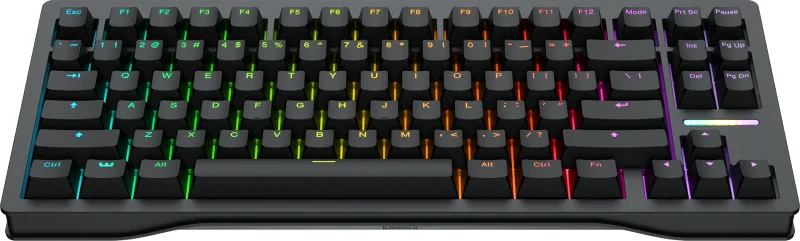
Gaming keyboards have quietly turned into precision instruments, and the spec sheets now read like a physics exam: Hall-effect switches, adjustable actuation, rapid trigger, 8,000 Hz polling. Most of it is real technology that genuinely helps competitive players, but the marketing makes it hard to tell what changes your gameplay from what's just a bullet point. This guide decodes the vocabulary so you can shop by what matters to you.
The 30-second version
- Switch type is the whole ballgame. Analog Hall-effect (magnetic) and analog optical switches are what unlock the modern gaming features; ordinary mechanical switches can't do them.
- Adjustable actuation and rapid trigger are the features you'll actually feel. They let you tune how far a key travels before it fires and reset it the instant you lift, which is what makes competitive boards feel fast.
- High polling rates are real but nearly invisible. 8,000 Hz is now common on high-end boards, so treat it as a checkbox rather than a reason to spend more.
- The software you live with matters as much as the hardware. A lighter, more open app that stores settings onboard ages far better than a heavy proprietary suite.
- Build quality is a long-term value question. Aluminum frames and PBT keycaps outlast budget plastic and cheap keycaps, and you feel the difference every day.
The products this guide is about
Our verdict on each, with the full reasoning on the companion review.
- Buy Wooting 80HE The analog Hall-effect benchmark almost every competitor is now measured against.
- Buy SteelSeries Apex Pro TKL Gen 3 A premium, well-built magnetic board with the friendliest onboard tuning and an optional wireless model. Amazon
- It depends Razer Huntsman V3 Pro TKL Blisteringly fast analog optical switches, held back by a proprietary ecosystem and flagship pricing. Amazon
- Skip Corsair K70 PRO TKL A capable Hall-effect board undercut by rivals with more refined switches at a similar price. Amazon
What actually matters
- Switch technology - Hall-effect (magnetic) or analog optical switches are what enable adjustable actuation and rapid trigger. If competitive play is your goal, this is the single most important line on the spec sheet.
- Adjustable actuation - the ability to set how far you press before a key registers. A wide range lets you use a shallow, fast trigger for gaming and a deeper one for typing to avoid typos.
- Rapid trigger - the key resets the moment you begin lifting your finger, so repeated presses fire faster. This is the feature most players describe as making a keyboard feel quicker.
- Polling rate - how often the keyboard reports to your PC. 8,000 Hz is now common at the high end; it's a genuine but tiny latency win, so don't pay a premium for it alone.
- Build and keycaps - aluminum frames and PBT keycaps last longer and feel better than plastic bodies and thin ABS keycaps that go shiny over time.
- Software and ecosystem lock-in - heavy background apps and proprietary switches are a real long-term cost; onboard storage and open software are less hassle year after year.
- Form factor - tenkeyless (TKL) and smaller layouts free up desk space for mouse movement, which many competitive players prefer, but cost you the number pad.
The specs, in plain English
Green flags vs red flags
Green flags
- Analog Hall-effect or optical switches with a clearly stated adjustable actuation range
- Rapid trigger listed as a supported feature, not just 'gaming switches'
- Settings and profiles that store onboard so you aren't tethered to a background app
- Aluminum construction and PBT keycaps at the price point
- A software suite reviewers describe as light and stable rather than bloated
Red flags
- Marketing that leans on RGB lighting and 'gaming' branding but is vague about switch type
- First-generation switches that independent testing and owners describe as stiff or unrefined
- Proprietary switches you can't replace, locking you into one brand's ecosystem
- A heavy background app required just to change basic settings
- A premium price with no adjustable actuation or rapid trigger to justify it
Who's who: the brands
- Wooting - The specialist that popularized analog magnetic boards; widely treated as the reference for rapid trigger and tuning.
- SteelSeries - Premium all-rounders known for well-built magnetic boards with OLED displays and friendly onboard tuning.
- Razer - Esports-focused brand with fast analog optical switches and Snap Tap, tied to its own Synapse software.
- Corsair - Mainstream maker with a broad lineup; capable magnetic boards, though its iCUE software runs heavier than rivals.
How to read a listing without getting fooled
Start by finding the switch technology, usually buried below the flashy lighting and 'esports' claims. If it says Hall-effect, magnetic, or analog optical, the board can do the modern gaming tricks; if it just says 'mechanical' with no mention of adjustable actuation, it can't. Next confirm the actuation range and whether rapid trigger is explicitly supported, since those are the features you'll actually feel. Treat 8,000 Hz polling as a checkbox that many high-end boards now tick rather than a differentiator. Finally, read past the hardware to the software: look for words like 'onboard' and check whether owners describe the companion app as light or bloated, because that's what you'll live with every day. Beware listings that spend all their words on lighting effects and switch color names while staying vague about the actual switch technology.
How much should you spend?
The value sweet spot sits with a current-generation analog board from a maker whose rapid trigger is well regarded, rather than the absolute flagship. Spending up buys you premium materials, an OLED display, a wireless option, or a marginally faster switch, and those are worth it if you specifically want them, not because they win matches. Spending down often means older, stiffer first-generation switches or ordinary mechanical switches that can't do adjustable actuation at all, which is a false economy for a competitive player. The biggest wasted money is paying a flagship premium for polling-rate numbers and lighting when a mid-premium board delivers the same competitive features; the money is better spent on refined switches and lighter software. If you don't play competitively, you can comfortably shop the lower tiers, since the flagship features are aimed squarely at people chasing every millisecond.
Questions, answered
Do I actually need a Hall-effect keyboard, or is it hype?
It depends on how you play. For competitive shooters, adjustable actuation and rapid trigger are genuine advantages that owners and reviewers consistently notice, and those need magnetic or analog optical switches. For casual gaming, browsing, and office work, a good ordinary mechanical keyboard is perfectly fine and cheaper. Buy the analog tech if you're chasing an edge; skip it if you just want a nice keyboard.
Is a higher polling rate worth paying extra for?
Not on its own. 8,000 Hz polling is a real, measurable reduction in input lag, but the difference from 1,000 Hz is a fraction of a millisecond that most players never consciously feel. It's now common on high-end boards, so you'll likely get it anyway on a competitive model. Don't let it be the reason you jump to a pricier board.
What is rapid trigger and why does everyone mention it?
Rapid trigger means a key resets the instant you start lifting your finger, instead of waiting until it springs most of the way back up. That lets you re-press or spam a key faster, which helps with movement and shooting in competitive games. It's one of the few specs that translates directly into a feel you'll notice, which is why it dominates the marketing.
Are Snap Tap and similar features allowed in competitive games?
Sometimes, and the rules change. Features like Snap Tap and rapid tap register the most recently pressed of two opposing keys to make counter-strafing instant, and some competitive titles have restricted them. A setting that's legal today can be banned in a future patch, so check the current rules for the specific games you play before relying on one.
Should I get a tenkeyless (TKL) or full-size keyboard?
TKL and smaller layouts drop the number pad, which frees up desk space and lets you angle the board for wider mouse sweeps, so many competitive players prefer them. If you use the number pad for spreadsheets or data entry, a full-size board is a reasonable trade-off. Neither is faster in-game; it's about desk space and your workflow.
Can a gaming keyboard also be good for typing and office work?
Yes. Good gaming boards use quality keycaps and sturdy frames, and adjustable actuation is actually a nice typing perk: you can set a deeper press point for daily work to reduce accidental keystrokes, then switch to a shallow, fast profile for gaming. Some boards are even tuned for a pleasant, muted typing sound.
Or jump to the head-to-head: Wooting 80HE vs SteelSeries Apex Pro TKL Gen 3.