

Gaming
The Best Gaming Mechanical Keyboards: 4 Compared (and One to Skip)
We compared four current 2026 gaming keyboards on switch tech, rapid trigger, latency, build, and software to find the honest winners.
The short version
Gaming keyboards in 2026 are defined by analog Hall-effect switches, adjustable actuation, and rapid trigger. The Wooting 80HE is the benchmark for raw competitive control, while the SteelSeries Apex Pro TKL Gen 3 wraps similar tech in premium materials with an OLED and a wireless option. The Razer Huntsman V3 Pro TKL is blazing fast with Snap Tap but costs the most and locks you into Razer's ecosystem. The Corsair K70 PRO TKL is competent but its first-gen switches feel less refined than rivals at the price, so wait for a discount. Best for: competitive PC gamers who want low latency and per-key actuation tuning, with the Wooting 80HE as the default pick.
Our picks at a glance
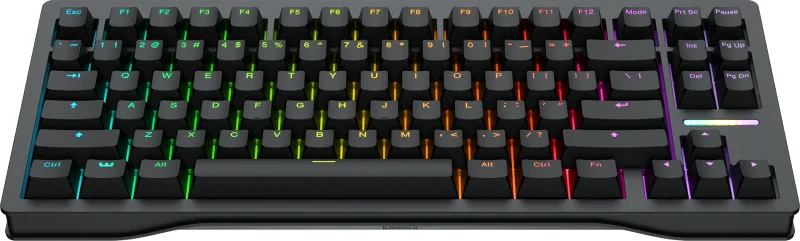
- Wooting 80HE - Buy. The analog Hall-effect benchmark almost every competitor is now measured against.
- SteelSeries Apex Pro TKL Gen 3 - Buy. A premium, well-built magnetic board with the friendliest onboard tuning and an optional wireless model.
- Razer Huntsman V3 Pro TKL - It depends. Blisteringly fast analog optical switches, held back by a proprietary ecosystem and flagship pricing.
- Corsair K70 PRO TKL - Skip. A capable Hall-effect board undercut by rivals with more refined switches at a similar price.
The verdict in 30 seconds
What mattered most
- Switch technology
- Adjustable actuation & rapid trigger
- Polling rate
- Build & form factor
- Connectivity
- Software & ecosystem
Competitive gaming keyboards have quietly split into two camps: analog Hall-effect decks with adjustable actuation and rapid trigger, and everything else. We weighed four current 2026 models on the things that actually move the needle in a match. Two earn a clear buy, one is a case-by-case pick, and one is easy to pass over now that better-value rivals exist.
The analog Hall-effect benchmark almost every competitor is now measured against.
Best for: Competitive FPS players who want the proven analog standard and maximum tuning control.
- Lekker V2 magnetic switches with the most refined rapid trigger and per-key analog actuation reviewers have tested
- 8,000 Hz polling drops theoretical input lag to a fraction of a standard 1,000 Hz board
- Wootility software is powerful yet approachable, and much of it runs onboard without a background app
- Wired-only, and the standard case is plastic (PCR ABS) that owners feel is plain for the price, though Wooting also sells a zinc alloy case
- Stock can be limited, so check availability before ordering
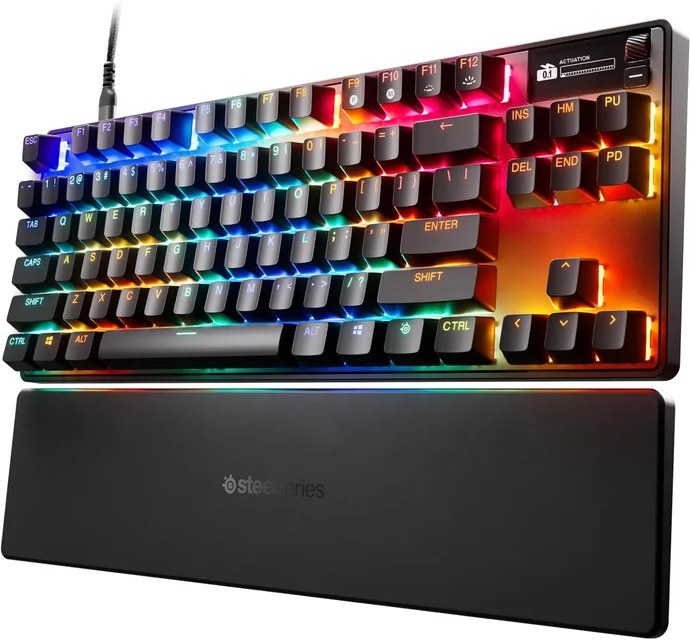
A premium, well-built magnetic board with the friendliest onboard tuning and an optional wireless model.
Best for: Players who want analog performance with premium materials, an OLED, and an optional wireless option.
- OmniPoint 3.0 Hall-effect switches offer 0.1-4.0 mm adjustable actuation plus rapid trigger and rapid tap
- OLED smart display and quickset presets make per-game tuning fast without diving into an app
- Sturdy aluminum-topped build, PBT keycaps, and a wireless variant reviewers rate highly
- Priced at the premium end, especially the wireless version
- The maker's page publishes no polling rate, so raw latency is harder to compare with the 8,000 Hz boards here
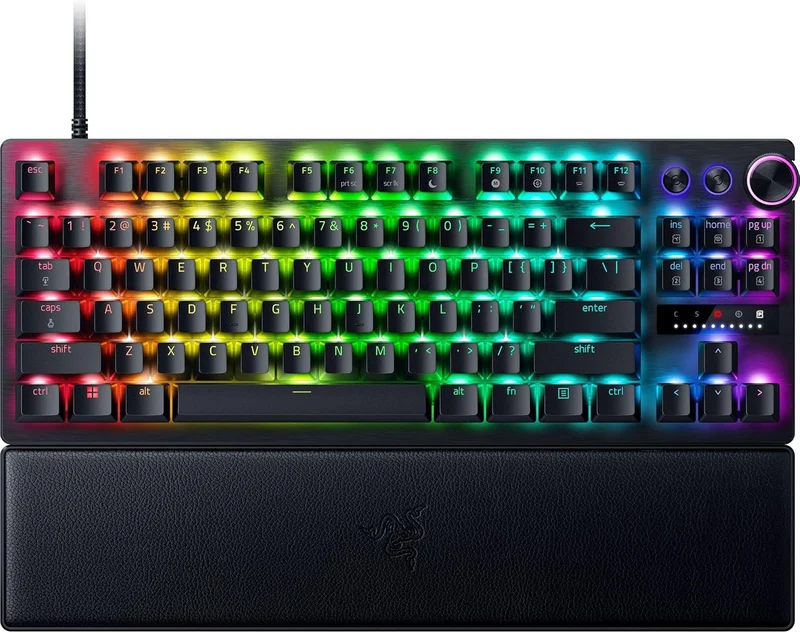
Blisteringly fast analog optical switches, held back by a proprietary ecosystem and flagship pricing.
Best for: Esports-focused players already invested in Razer who want Snap Tap and top-tier speed and will pay for it.
- Gen-2 analog optical switches with adjustable actuation, rapid trigger, and Snap Tap for instant counter-strafing
- 8,000 Hz polling plus rapid trigger and Snap Tap make it one of the fastest-responding boards in this group
- Doubleshot PBT keycaps, a media dial, and an included wrist rest give it a polished, complete feel
- Sits at the top of the price range among these four
- Analog optical switches and Synapse software lock you into Razer's ecosystem, and owners note Synapse can be heavy
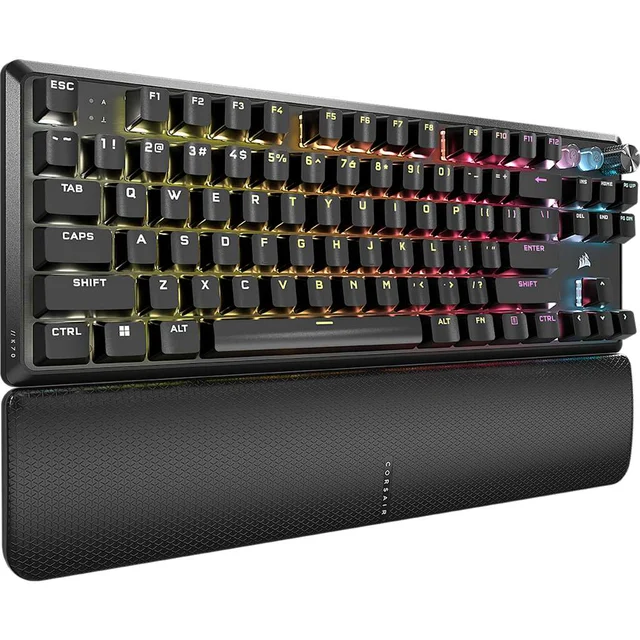
A capable Hall-effect board undercut by rivals with more refined switches at a similar price.
Best for: Existing Corsair and iCUE users who want a magnetic board and catch it on a strong discount.
- First-generation MGX Hyperdrive magnetic switches with 0.4-3.6 mm adjustable actuation and rapid trigger
- 8,000 Hz polling and simultaneous SOCD handling cover the competitive checkboxes
- Sound dampening and an aluminum frame give a muted typing sound
- Owners describe the first-gen MGX switches as stiffer and less refined than newer rivals
- iCUE software is heavier than competitors, and the value case weakens against sharper analog boards
| Criteria | Wooting 80HE Top pick Buy it Buy | SteelSeries Apex Pro TKL Gen 3 Buy it Buy | Razer Huntsman V3 Pro TKL It depends Buy | Corsair K70 PRO TKL Skip it Buy |
|---|---|---|---|---|
| Best for | Competitive FPS players who want the proven analog standard and maximum tuning control. | Players who want analog performance with premium materials, an OLED, and an optional wireless option. | Esports-focused players already invested in Razer who want Snap Tap and top-tier speed and will pay for it. | Existing Corsair and iCUE users who want a magnetic board and catch it on a strong discount. |
| Price tier | $$$ · premium | $$$ · premium | $$$$ · flagship | $$ · mid-range |
| Switch technology | Lekker V2 magnetic Hall-effect (analog) | OmniPoint 3.0 magnetic Hall-effect (analog) | Gen-2 analog optical | MGX Hyperdrive magnetic Hall-effect (analog) |
| Adjustable actuation & rapid trigger | Yes, 0.1-4.0 mm, class-leading rapid trigger | Yes, 0.1-4.0 mm, rapid trigger + rapid tap | Yes, 0.1-4.0 mm, rapid trigger + Snap Tap | Yes, 0.4-3.6 mm, rapid trigger + SOCD |
| Polling rate | 8,000 Hz | Not published on maker page | 8,000 Hz | 8,000 Hz |
| Build & form factor | 80% layout, PCR ABS case (zinc optional), wired | TKL aluminum-topped, PBT keycaps, OLED | TKL aluminum, PBT keycaps, media dial | TKL aluminum, sound dampening |
| Connectivity | Wired only | Wired or wireless variant | Wired only | Wired only |
| Software & ecosystem | Wootility, much of it onboard | SteelSeries GG, strong onboard presets | Razer Synapse, proprietary | Corsair iCUE, heavier footprint |
| Best use case | Tuning-focused competitive FPS | Premium all-rounder with OLED | Razer-ecosystem esports speed | Discounted iCUE household pick |
| Price tier | $$$ · premium | $$$ · premium | $$$$ · flagship | $$ · mid-range |
Which one is right for you?
- Competitive FPS players who want the proven analog standard and maximum tuning control. Buy it Wooting 80HE
- Players who want analog performance with premium materials, an OLED, and an optional wireless option. Buy it SteelSeries Apex Pro TKL Gen 3
- Esports-focused players already invested in Razer who want Snap Tap and top-tier speed and will pay for it. It depends Razer Huntsman V3 Pro TKL
- Existing Corsair and iCUE users who want a magnetic board and catch it on a strong discount. Skip it Corsair K70 PRO TKL
How we judged the field
We do not run our own lab. Instead we synthesize independent testing, expert reviews, and aggregated owner reports into a single, honest verdict. For gaming keyboards in 2026 that means weighting the criteria that actually change outcomes: switch technology and whether it supports adjustable actuation and rapid trigger, measured latency and polling rate, build quality and layout, software depth, and long-term value.
The biggest shift is that analog Hall-effect (magnetic) switches have gone from enthusiast curiosity to the competitive default. Every board here offers adjustable actuation and rapid trigger, so we focused on how refined each implementation feels in practice, how much tuning happens onboard versus in software, and whether the price matches what you get. We also flagged proprietary lock-in, because the software you live with every day matters as much as the switches under your fingers.
Wooting 80HE
Buy itThe Wooting 80HE is the board most rivals are now benchmarked against. Its Lekker V2 magnetic switches deliver what reviewers describe as the most refined rapid trigger and analog input available, with actuation adjustable from a feather-light 0.1 mm to a full 4.0 mm per key. Paired with 8,000 Hz polling, it gives competitive players the granular control that matters when a single reset timing decides a duel. Wootility is genuinely capable, and much of your configuration lives onboard rather than in a background app.
The caveats are real but narrow: it is wired-only, the standard case is plastic (a zinc alloy case is optional), and owners expecting premium materials at this price say so. Stock can also be limited. None of that undermines the core case. For raw, tunable competitive performance, it is the safest recommendation in the category.
SteelSeries Apex Pro TKL Gen 3
Buy itIf the Wooting is the specialist, the Apex Pro TKL Gen 3 is the premium all-rounder. Its OmniPoint 3.0 Hall-effect switches match the 0.1-4.0 mm actuation range and add rapid trigger and rapid tap, while an OLED smart display and quickset presets make per-game tuning unusually painless. Independent reviews praise the aluminum-topped build and PBT keycaps, and unlike most rivals here it offers a wireless variant that testers rate well.
It sits at the premium end, especially the wireless model, and the maker’s page publishes no polling rate. But as a keyboard you tune quickly, type on happily, and can take wireless if you want, it earns its place.
Razer Huntsman V3 Pro TKL
It dependsThe Huntsman V3 Pro TKL is genuinely one of the fastest boards reviewers have benchmarked. Its Gen-2 analog optical switches support adjustable actuation and rapid trigger, and Snap Tap makes counter-strafing feel instant. Doubleshot PBT keycaps, a media dial, and an included wrist rest round out a polished package.
So why not a straight buy? It carries the highest price of this group, and it commits you to Razer’s ecosystem: analog optical switches you cannot swap and Synapse software that owners note can be heavy. If you already run Razer gear and want Snap Tap and top-tier speed, it is excellent. If you are starting fresh, the analog magnetic boards offer comparable performance with fewer strings attached.
Corsair K70 PRO TKL
Skip itThe K70 PRO TKL checks the competitive boxes: MGX Hyperdrive magnetic switches with 0.4-3.6 mm adjustable actuation, rapid trigger, simultaneous SOCD handling, and 8,000 Hz polling. Sound dampening gives it a muted typing sound, and the aluminum frame feels solid.
The problem is context. Independent testing and owner reports describe the first-generation MGX switches as stiffer and less refined than newer rivals, and iCUE is a heavier software footprint than the competition. At its typical price it is squeezed from both sides by boards that either tune better or cost less. It is not a bad keyboard, but at full price there is little reason to choose it over the alternatives. Wait for a real discount, ideally if you already live in iCUE.
Wooting 80HE vs SteelSeries Apex Pro TKL Gen 3: which should you buy?
These two are the strongest of the group and suit different buyers. The Wooting 80HE wins on pure competitive control: reviewers consider its rapid trigger and analog tuning the reference, and much of that tuning runs onboard. The trade-offs are a plastic standard case, a wired-only body and occasionally limited stock.
The Apex Pro TKL Gen 3 answers with premium materials, an OLED display for at-a-glance tuning, PBT keycaps, and a wireless variant the Wooting cannot match. It is the better everyday keyboard and the friendlier one to configure, at a somewhat higher price and without a published polling rate.
Choose the Wooting 80HE if the match is all that matters and you want the proven analog standard. Choose the Apex Pro TKL Gen 3 if you want that performance in a nicer, more versatile package, or if wireless is a requirement.
What to look for
- Analog Hall-effect or optical switches: these unlock adjustable actuation and rapid trigger, the features that most improve competitive feel.
- Adjustable actuation range: a wide range (roughly 0.1-4.0 mm) lets you set a shallow, fast point for gaming and a deeper one for typing.
- Onboard tuning: boards that store profiles and let you adjust settings without a background app are less hassle day to day.
- Polling rate: 8,000 Hz is common at the high end, so it should not command a big premium.
- Build and keycaps: aluminum frames and PBT keycaps last longer and feel better than budget plastic and ABS.
- Software footprint and lock-in: heavier suites and proprietary ecosystems are a real long-term cost; lighter, more open software ages better.
- Feature legality: confirm rapid-tap features like Snap Tap are permitted in the specific games you play, since rules change.
Our final take
The analog era of gaming keyboards has a clear leader and a clear runner-up. The Wooting 80HE is the default pick for competitive players who want the most refined tuning and rapid trigger, accepting a plain standard build and limited stock at times. The SteelSeries Apex Pro TKL Gen 3 is the better choice if premium materials, an OLED, or wireless matter to you. The Razer Huntsman V3 Pro TKL is a superb, blisteringly fast board that only makes sense at its flagship price if you are already committed to Razer. The Corsair K70 PRO TKL is competent but outclassed at full price, so treat it as a discount-only option. Buy for the switches and the software you will live with, not the marketing, and any of the top two will serve you for years.
Questions, answered
What is a Hall-effect (magnetic) switch and why does it matter for gaming?
Hall-effect switches use a magnet and sensor to measure exactly how far a key is pressed, rather than a single mechanical contact point. That lets you set a custom actuation depth and enables rapid trigger, where the key resets the instant you begin lifting your finger. Reviewers and owners consistently report this feels faster and more precise in shooters, which is why three of our four picks use magnetic switches and the fourth uses analog optical switches that behave similarly.
Is an 8,000 Hz polling rate actually noticeable?
At 8,000 Hz polling the reporting interval drops from 1 ms to 0.125 ms. In practice most players will not consciously feel the difference, but it is a genuine, measurable reduction and is common on high-end competitive boards.
Do I need a tenkeyless (TKL) or smaller board for gaming?
Not strictly, but many competitive players prefer TKL or smaller layouts because dropping the number pad frees up desk space and lets you angle the keyboard for wider mouse sweeps. Three of our picks are TKL and the Wooting 80HE is an 80% layout. If you rely on a number pad for work, a full-size board is still a reasonable trade-off.
What is Snap Tap or rapid tap, and is it allowed in games?
Snap Tap (Razer) and rapid tap (SteelSeries) register the most recently pressed of two opposing keys, which makes counter-strafing effectively instant. Enforcement varies by title and changes over time, and some competitive games have restricted these features. Check the current rules for the games you play before relying on them, since a setting that is legal today may be disallowed in a future patch.
Are these keyboards good for typing and office work too?
Yes. All four use quality keycaps and sturdy frames, and the SteelSeries board in particular adds sound-dampening foam for a muted typing sound. Adjustable actuation lets you set a deeper press point for daily typing to reduce accidental keystrokes, then switch to a shallow, fast profile for gaming.
Deciding between the top two? See our head-to-head: Wooting 80HE vs SteelSeries Apex Pro TKL Gen 3.
More in Gaming
Gaming Keyboards, Explained Plain-English guide → Wooting 80HE vs SteelSeries Apex Pro TKL Gen 3 Head-to-head →  The Best Gaming Laptops: 4 Compared (and One to Skip)
  The Best Gaming Mice in 2026: Four Flagships Tested, One to Skip
  The Best Handheld Gaming Consoles: 4 Compared (and One to Skip)
  The Best Prebuilt Gaming PCs: 4 Compared (and One to Skip)