Explained
Fight Sticks, Explained
After reading, you'll understand the main types of fight sticks, the parts that matter, and how to avoid a stick that will not work with your console.
In this guide
Fight stick listings are full of arcade jargon, from Sanwa and JLF to Vewlix and SOCD. First-time buyers often focus on looks and parts and miss the most important line: which consoles the stick supports. Leverless controllers add another set of terms. A few definitions make the choice much easier.
The 30-second version
- Check console support first, because sticks are usually licensed for one console family.
- Leverless is precise but different, so expect a learning period if you are used to a lever or pad.
- Parts can be upgraded, which makes easy case access more important than the stock lever brand.
- SOCD settings matter on leverless, since events and games can have rules about them.
- Wireless is rare on sticks, and it adds battery management in exchange for convenience.
The products this guide is about
Our verdict on each, with the full reasoning on the companion review.
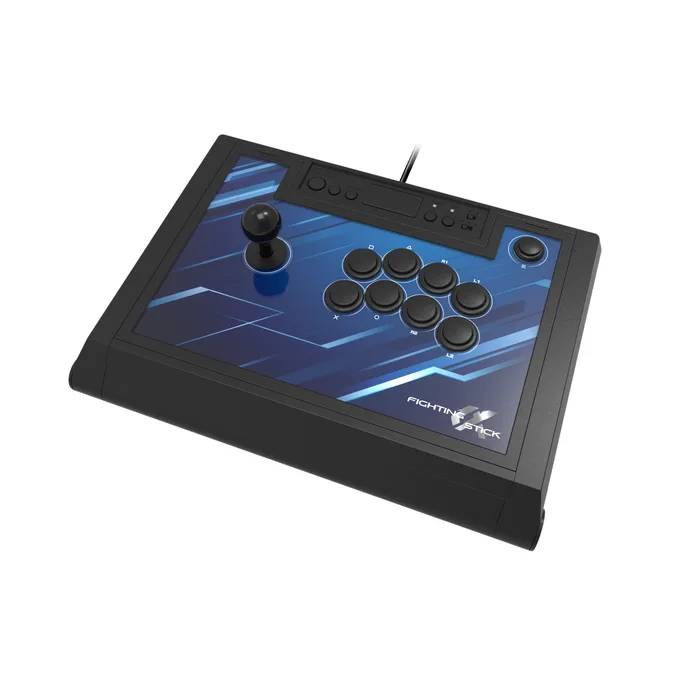
- Buy HORI Fighting Stick α (PS5, PS4, Windows) A full-size, officially licensed lever stick with HORI's HAYABUSA parts, an opening case and swappable art. Amazon
- Buy 8BitDo Arcade Stick A low-cost wireless lever stick for Switch and PC, with Bluetooth, a 2.4G adapter, wired USB-C and long battery life. Amazon
- It depends Junkfood Custom Arcades Snack Box MICRO Leverless Controller A half-inch-thick, 12-button leverless controller in the Hit Box layout, cheap for what it is, with PS5 and Xbox as a paid upgrade.
- It depends Razer Kitsune A slim, all-button optical controller for PS5 and PC with a tournament lock, four SOCD modes and a removable aluminum top.
- It depends Qanba Obsidian 2 A licensed PS5, PS4 and PC stick built around genuine Sanwa JLF and OBSF parts, with a tournament lock and tool-free side access. Amazon
- Skip Mad Catz EGO Arcade Stick A well-built Sanwa-equipped stick whose maker lists PS4, Xbox One, Switch and PC support, and not PS5 or Xbox Series X|S.
What actually matters
- Console support - Most sticks are licensed for PlayStation or Xbox, sometimes with PC and Switch. A stick that stops at the last generation may not suit a new console.
- Layout - A lever stick uses a joystick for movement; a leverless controller uses four buttons. Leverless is very precise but takes time to learn.
- Lever - The lever's feel comes from its spring, gate and switches. Sanwa JLF and HORI HAYABUSA are common examples.
- Buttons or switches - Arcade buttons and low-profile keyboard-style switches feel very different. Hot-swap switches make changes easy.
- Case access - Sticks that open easily let you fix or upgrade parts. Look for thumb screws or a hinged or removable top.
- Tournament features - A lock switch disables buttons like Home or Options that could pause a match. Leverless controllers also need SOCD modes.
- Size and weight - Full-size sticks are stable on a lap but bulky to carry. Slim leverless controllers travel more easily.
The specs, in plain English
Green flags vs red flags
Green flags
- Your exact console listed by the maker, ideally with an official license.
- Named lever and button or switch parts.
- An easy-open case or hot-swap switches.
- A tournament lock switch.
- On leverless controllers, several selectable SOCD modes.
Red flags
- A compatibility list that stops at the previous console generation.
- No named parts anywhere on the maker page.
- A sealed case with no stated way to open it.
- Console support that requires paid upgrades not obvious from the listing.
- A very short warranty on an expensive controller.
Who's who: the brands
- HORI - A Japanese accessory maker with officially licensed sticks and its own HAYABUSA arcade parts.
- 8BitDo - Known for retro-styled controllers with strong software and wireless options at low prices.
- Junkfood Custom Arcades - Makes the Snack Box line of compact leverless controllers.
- Razer - A large gaming brand whose Kitsune brought optical switches to leverless controllers.
- Qanba - A fight stick specialist with models from budget sticks to Sanwa-equipped premium sticks.
How to read a listing without getting fooled
Start with the platform list and make sure your console is named, not just its predecessor. Next, check whether the controller is a lever stick or leverless, then find the named parts: lever, buttons or switches. Look for how the case opens and whether parts are hot-swappable or need tools. Check for a tournament lock and, on leverless controllers, the SOCD modes. Finally, read the warranty and whether console support needs an extra upgrade. A page that lists lights and artwork but not parts or platforms is telling you what it prioritized.
How much should you spend?
Budget sticks and leverless controllers can be very good, but check platforms and parts closely, since some save money by limiting console support or using unnamed components. The mid-range tier is where licensed, full-size lever sticks with good parts and easy access sit. Premium options add stock Sanwa parts, optical switches, metal plates and tournament features. Spending more mostly buys feel and polish rather than a competitive edge.
Questions, answered
Can I use a fight stick on my lap?
Yes, full-size sticks are designed for it, and weight helps them stay put. The 8BitDo Arcade Stick weighs 2100 g, for example. Slim leverless controllers are usually more comfortable on a desk.
Can I upgrade the parts in a fight stick?
Usually. Sticks with opening cases, like the HORI α and Qanba Obsidian 2, are designed for it. Check that the replacement lever or buttons fit the case before ordering.
Is leverless allowed in tournaments?
Leverless controllers appear widely in competition, but rules can restrict SOCD behavior. Check the event's rules and set the matching mode on your controller.
Why are fight sticks console specific?
Console makers license controllers separately for their systems. Some controllers add support through extra hardware, such as the Brook board option on the Snack Box MICRO, but that can cost extra.
Or jump to the head-to-head: HORI Fighting Stick α (PS5, PS4, Windows) vs 8BitDo Arcade Stick.