Explained
Flight Sticks, Explained
After reading, you'll understand how flight sticks differ, which specs matter for your games, and how to plan a setup you can grow.
In this guide
Flight stick listings mix aviation terms with gaming jargon, and the most important details are easy to miss. First-time buyers often compare button counts and ignore the sensors and platform support that decide how long a stick stays accurate and where it works. Many also do not realize that some sticks expect a separate throttle. A few definitions make the choice much simpler.
The 30-second version
- Check platform support first, since most flight sticks are PC only.
- Contactless sensors last longer, because nothing rubs inside to wear and cause drift.
- Decide on throttle early, as some sticks include levers and others expect a separate throttle.
- Adjustability matters over time, so look for tension settings, springs or adjustable rests.
- Force feedback is a premium extra, and it only helps in games that support it.
The products this guide is about
Our verdict on each, with the full reasoning on the companion review.
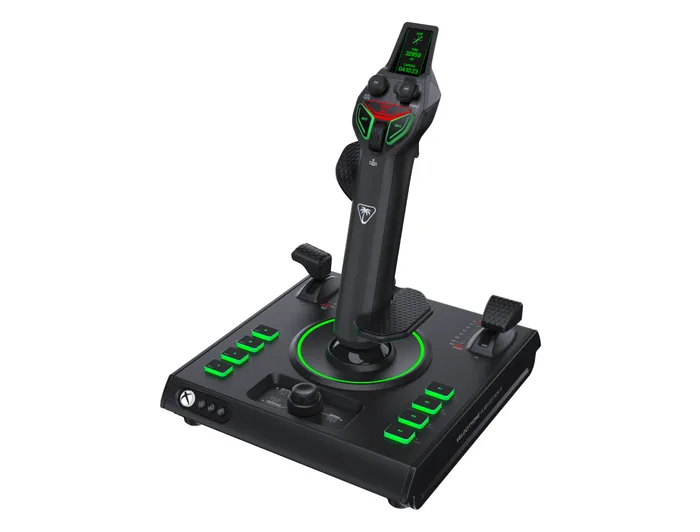
- Buy Turtle Beach VelocityOne Flightstick II An all-in-one Xbox and PC flight stick with 16-bit Hall-effect main axes, built-in levers, a color display and 38 programmable inputs. Amazon
- Buy Thrustmaster T.16000M FCS A budget PC stick with Hall-effect pitch and roll, an ambidextrous design and a path into Thrustmaster's throttle and pedal ecosystem. Amazon
- Buy VKB Gladiator NXT EVO Space Combat Edition An enthusiast-grade PC stick with contactless MaRS sensors, swappable springs, a dry clutch and a steel baseplate.
- It depends HORI ACE COMBAT 8: WINGS OF THEVE Flight Stick A licensed PS5, PS4 and PC stick with Hall-effect sensors, built-in throttle and brake levers and a High-G button, tuned for ACE COMBAT. Amazon
- It depends MOZA Racing MOZA AB6 Flight Simulator A force feedback flight base with dual servo motors and the MHG stick, for PC simmers who want the stick to push back. Amazon
- Skip Logitech G Extreme 3D Pro Joystick A very cheap, familiar stick whose maker page lists no sensor type and system requirements that stop at Windows 8.
What actually matters
- Platform - Most sticks are PC devices, and console sticks are licensed for Xbox or PlayStation. A stick without your platform listed is a gamble.
- Sensors - Hall-effect and other contactless sensors read position with magnets. They resist the wear and drift common in older potentiometer sticks.
- Rudder - Many sticks twist to control yaw. A lock lets you disable it if you add rudder pedals.
- Throttle - Some sticks include levers or wheels, while others expect a separate throttle. This decides whether one device is enough.
- Inputs - Buttons, hats and mini sticks reduce trips to the keyboard. Complex sims use far more inputs than arcade games.
- Adjustability - Spring tension, grip rests and handedness change how the stick feels. Enthusiast sticks let you tune them.
- Expansion - Throttles, pedals and dual-stick support let a setup grow. Check what the maker offers before you buy.
The specs, in plain English
Green flags vs red flags
Green flags
- Your platform named by the maker.
- Contactless sensors such as Hall-effect stated for the main axes.
- A lockable twist rudder.
- Adjustable tension, springs or grip rests.
- Compatible throttles, pedals or dual-stick support.
Red flags
- No sensor type stated anywhere on the product page.
- System requirements that stop at old operating systems.
- Very few buttons for the sims you play.
- No way to lock the twist if you plan to add pedals.
- A known issue on the product page with no fix described.
Who's who: the brands
- Thrustmaster - A long-running flight peripheral maker with budget sticks, throttles, pedals and the T.A.R.G.E.T programming software.
- Turtle Beach - Its VelocityOne line covers Xbox and PC flight sticks, yokes and rudder pedals.
- VKB - An enthusiast brand known for its Gladiator sticks with contactless sensors and tunable gimbals.
- HORI - A Japanese accessory maker with licensed console flight sticks.
- MOZA - Known for direct drive racing wheels, it now makes force feedback flight bases and sticks.
How to read a listing without getting fooled
Start with the platform list and make sure your console or PC is named. Next, find the sensor type for the main axes and whether the twist uses the same sensors. Then check inputs and throttle control: count buttons and hats, and note whether there are levers or a throttle wheel. Look for adjustability such as springs or tension settings, and for the upgrade path through compatible throttles and pedals. If a page leaves out sensors or lists only old operating systems, take that as the answer.
How much should you spend?
Budget sticks can be very good if they name contactless sensors, but some cheap sticks have spec sheets that have not changed in years. Mid-range sticks add Hall-effect axes on every axis, more inputs, built-in levers or tunable gimbals. Premium options are mostly force feedback bases or high-end modular systems. For most players, a well-specified mid-range stick is the sweet spot, with a throttle and pedals added later.
Questions, answered
Do I need rudder pedals?
Not at first. Twist rudders handle yaw well enough for most games. Pedals help in study-level sims and for taxiing and crosswind landings, and a lockable twist makes adding them easy.
Are left-handed flight sticks available?
Yes. The Thrustmaster T.16000M FCS converts between right- and left-handed use, the HORI ACE COMBAT 8 stick is symmetrical, and VKB sells left-hand versions of the Gladiator.
Can I use two flight sticks at once?
In games that support it, yes. Thrustmaster says two T.16000M sticks can be used together, and HORI's stick links to a second unit for twin-stick control. This is popular in space games.
Do flight sticks need software?
They usually work as plug-in devices, but software unlocks profiles and mapping. Thrustmaster offers T.A.R.G.E.T, Turtle Beach the Flight Hangar app, and MOZA its Cockpit software for force feedback tuning.
Or jump to the head-to-head: Turtle Beach VelocityOne Flightstick II vs Thrustmaster T.16000M FCS.