

Gaming
The Best Fight Sticks: 6 Compared (and One to Skip)
We compared six fight sticks and leverless controllers on parts, platform support, layout, tournament features and modding.
The short version
The HORI Fighting Stick α is the best fight stick for most players: officially licensed for PS5 and PS4, PC compatible, fitted with HAYABUSA parts and easy to open for mods. The 8BitDo Arcade Stick is the value pick for Switch and PC, with wireless play and up to 40 hours of battery. The Snack Box MICRO suits players who want to try leverless cheaply, and the Razer Kitsune suits committed leverless players on PS5 or PC. The Qanba Obsidian 2 suits PlayStation players who want stock Sanwa parts. Skip the Mad Catz EGO for a current console: its maker lists PS4, Xbox One, Switch and PC, not PS5 or Xbox Series X|S. Best for: PlayStation and PC (HORI α), Switch and PC on a budget (8BitDo), trying leverless (Snack Box MICRO).
Our picks at a glance
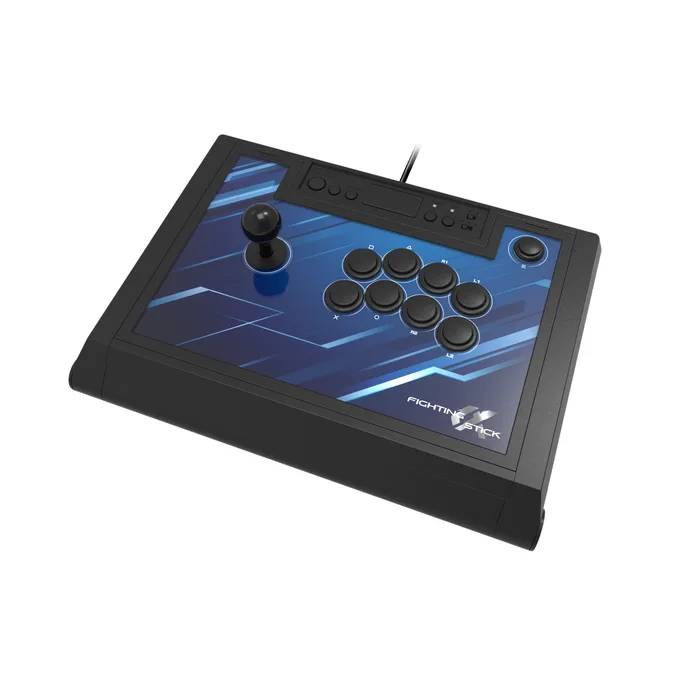
- HORI Fighting Stick α (PS5, PS4, Windows) - Buy. A full-size, officially licensed lever stick with HORI's HAYABUSA parts, an opening case and swappable art.
- 8BitDo Arcade Stick - Buy. A low-cost wireless lever stick for Switch and PC, with Bluetooth, a 2.4G adapter, wired USB-C and long battery life.
- Junkfood Custom Arcades Snack Box MICRO Leverless Controller - It depends. A half-inch-thick, 12-button leverless controller in the Hit Box layout, cheap for what it is, with PS5 and Xbox as a paid upgrade.
- Razer Kitsune - It depends. A slim, all-button optical controller for PS5 and PC with a tournament lock, four SOCD modes and a removable aluminum top.
- Qanba Obsidian 2 - It depends. A licensed PS5, PS4 and PC stick built around genuine Sanwa JLF and OBSF parts, with a tournament lock and tool-free side access.
- Mad Catz EGO Arcade Stick - Skip. A well-built Sanwa-equipped stick whose maker lists PS4, Xbox One, Switch and PC support, and not PS5 or Xbox Series X|S.
The verdict in 30 seconds
What mattered most
- Type
- Platforms (maker stated)
- Lever / switches
- Buttons
- Connection
- Tournament features
Fight sticks now come in two shapes: the traditional lever-and-buttons arcade stick and the all-button leverless controller that has taken over many tournament finals. Both beat a standard pad for motion inputs once you learn them, but platform support varies more than buyers expect. We compared three lever sticks and two leverless controllers that suit different budgets, plus a well-known stick whose maker's compatibility list has not kept up. Every spec below comes from the maker's own product page.
A full-size, officially licensed lever stick with HORI's HAYABUSA parts, an opening case and swappable art.
Best for: PlayStation or PC players who want a traditional lever stick that is ready for tournaments and easy to mod.
- HORI fits its HAYABUSA lever and matte HAYABUSA buttons, and the case opens for maintenance and part swaps.
- It is officially licensed by Sony for PS5 and PS4 and also works on Windows 11/10, and HORI sells a separate Xbox version.
- Four custom profiles through the companion app, a Profile button, a 3.5 mm audio jack and on-board audio and mic controls.
- The HAYABUSA lever and buttons are HORI's own parts, so players set on Sanwa feel will want to swap them.
- The PlayStation version does not work on Xbox, and the Xbox version is a separate purchase.
- It is a full-size stick, so it takes real lap or desk space and is not the easiest to carry.
- HORI's product page lists few physical specs, such as weight or cable length.
Own the HORI Fighting Stick α (PS5, PS4, Windows)? Tell us how it held up.
Thanks. Counted, and shown once enough owners have weighed in.
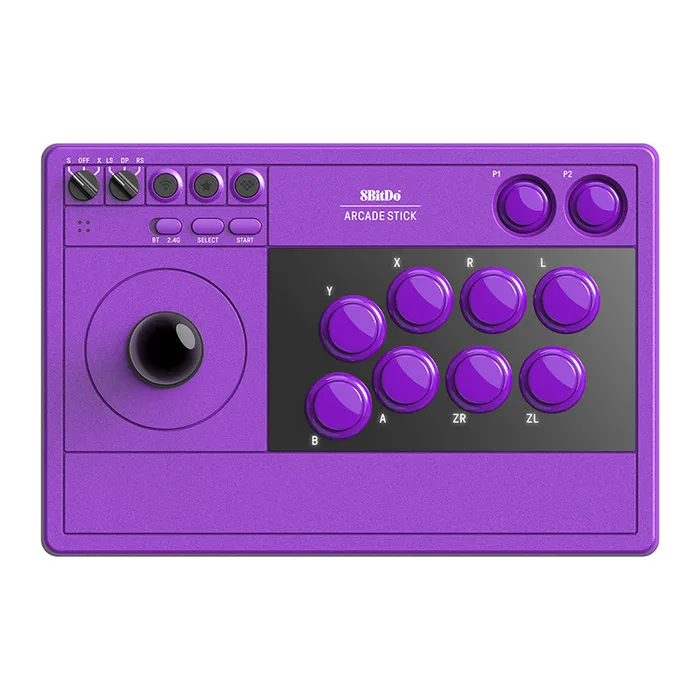
A low-cost wireless lever stick for Switch and PC, with Bluetooth, a 2.4G adapter, wired USB-C and long battery life.
Best for: Switch and PC players who want a real lever stick on a small budget, especially couch players who prefer wireless.
- Three connection modes: Bluetooth, 2.4G with an included adapter that stores inside the stick, and wired USB-C.
- 8BitDo lists 40 hours of play on 2.4G and 30 on Bluetooth from a 1000 mAh rechargeable battery.
- Ultimate Software handles button mapping, macros for the two dedicated P1/P2 buttons and profiles, and the 2100 g body stays put.
- It supports Switch and Windows only, with no PlayStation or Xbox support on this model.
- 8BitDo does not name the lever or button maker on its product page.
- Wireless play adds battery management that a wired stick never needs.
- 8BitDo sells a separate Arcade Stick for Xbox, so check which model you are buying.
Own the 8BitDo Arcade Stick? Tell us how it held up.
Thanks. Counted, and shown once enough owners have weighed in.
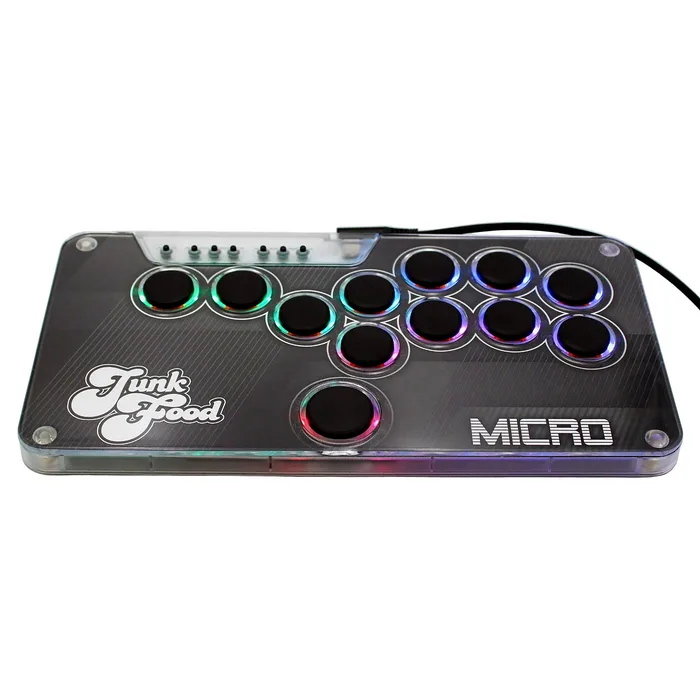
A half-inch-thick, 12-button leverless controller in the Hit Box layout, cheap for what it is, with PS5 and Xbox as a paid upgrade.
Best for: Players who want to try leverless without a premium spend, especially on PC, Switch or Steam Deck.
- Junkfood describes it as half an inch thick with twelve buttons in the Hit Box layout, licensed with Hit Box, LLC.
- Hot-swappable low-profile switches, an RGB LED ring on every button, USB-C and four SOCD modes (Classic, Neutral, Last Input and None).
- It works on Switch 1 and 2, PC and Steam Deck out of the box, and mapping and SOCD are set in a web configurator.
- PS5 and Xbox Series X|S need the paid PS5 + Xbox upgrade, which installs a Brook board before shipping.
- Leverless layouts take real practice if you learned on a stick or pad.
- The warranty is 90 days, the shortest stated here.
- Low-profile switches feel very different from full-size arcade buttons.
Own the Junkfood Custom Arcades Snack Box MICRO Leverless Controller? Tell us how it held up.
Thanks. Counted, and shown once enough owners have weighed in.
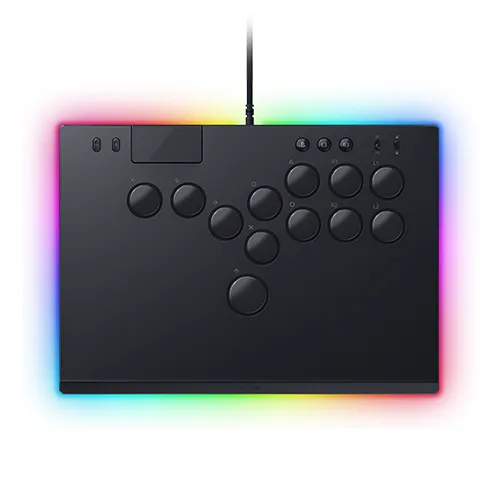
A slim, all-button optical controller for PS5 and PC with a tournament lock, four SOCD modes and a removable aluminum top.
Best for: PS5 and PC players committed to leverless who want a polished, tournament-ready build.
- Razer low-profile linear optical switches and a four-button movement layout replace the lever.
- A cable security clasp and a tournament lock switch that disables non-essential buttons suit competition.
- Four SOCD cleaning modes are set by hotkeys with no software, and the aluminum top plate unscrews for custom art.
- It works with PS5 and PC only.
- It costs much more than the Snack Box MICRO, which also offers four SOCD modes.
- Like any leverless controller, it demands relearning motion inputs.
- RGB lighting adds cost without helping play.
Own the Razer Kitsune? Tell us how it held up.
Thanks. Counted, and shown once enough owners have weighed in.
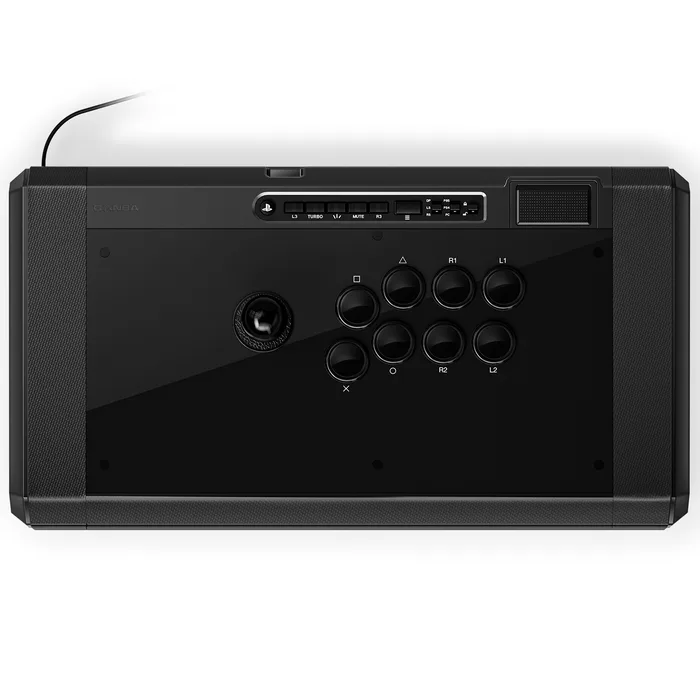
A licensed PS5, PS4 and PC stick built around genuine Sanwa JLF and OBSF parts, with a tournament lock and tool-free side access.
Best for: PlayStation players who specifically want stock Sanwa parts without modding.
- Qanba fits a Sanwa JLF lever with ball and bat tops included, plus Sanwa 30 mm OBSF buttons.
- It is a Sony officially licensed product with PS5, PS4 and PC compatibility.
- Thumb screws open both side panels, and a tournament lock switch prevents accidental presses.
- It is the priciest lever stick here, for parts that are also sold as upgrades for cheaper sticks.
- There is no Xbox or Switch support listed.
- Qanba's product page lists few specs beyond parts and compatibility.
- For most players, the HORI α offers a similar tournament feature set for less.
Own the Qanba Obsidian 2? Tell us how it held up.
Thanks. Counted, and shown once enough owners have weighed in.
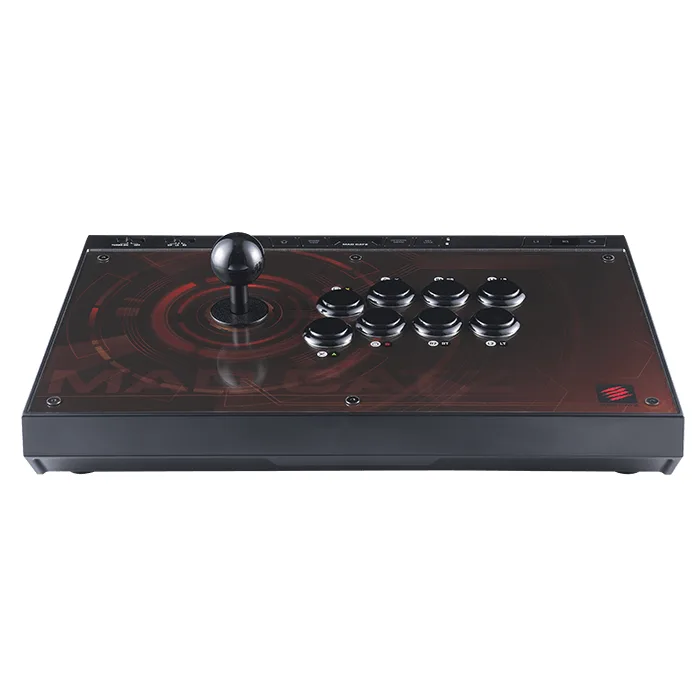
A well-built Sanwa-equipped stick whose maker lists PS4, Xbox One, Switch and PC support, and not PS5 or Xbox Series X|S.
Best for: Only PC players, or owners of PS4, Xbox One or Switch, who confirm compatibility for their setup first.
- Genuine Sanwa Denshi lever and buttons in a Vewlix-style layout, as Mad Catz states.
- A key lock, turbo, two programmable extra buttons and a stick mode switch for D-pad or analog output.
- A mod-friendly case with a strong metal base and non-slip foam.
- Mad Catz lists compatibility with PS4, Xbox One, Switch and PC; PS5 and Xbox Series X|S are not on that list.
- Buyers on current consoles would be paying for a stick its maker does not promote for their system.
- The HORI α and Qanba Obsidian 2 are both officially licensed for PS5.
- Its multi-format appeal rests on older consoles.
Own the Mad Catz EGO Arcade Stick? Tell us how it held up.
Thanks. Counted, and shown once enough owners have weighed in.
| Criteria | HORI Fighting Stick α (PS5, PS4, Windows) Top pick Buy it Buy | 8BitDo Arcade Stick Buy it Buy | Snack Box MICRO Leverless Controller It depends Buy | Razer Kitsune It depends Buy | Qanba Obsidian 2 It depends Buy | Mad Catz EGO Arcade Stick Skip it Buy |
|---|---|---|---|---|---|---|
| Best for | PlayStation or PC players who want a traditional lever stick that is ready for tournaments and easy to mod. | Switch and PC players who want a real lever stick on a small budget, especially couch players who prefer wireless. | Players who want to try leverless without a premium spend, especially on PC, Switch or Steam Deck. | PS5 and PC players committed to leverless who want a polished, tournament-ready build. | PlayStation players who specifically want stock Sanwa parts without modding. | Only PC players, or owners of PS4, Xbox One or Switch, who confirm compatibility for their setup first. |
| Price tier | $$ · mid-range | $ · budget | $ · budget | $$$ · premium | $$$ · premium | $$ · mid-range |
| Type | Lever stick | Lever stick | Leverless | Leverless | Lever stick | Lever stick |
| Platforms (maker stated) | PS5, PS4, Windows (separate Xbox model) | Switch 1/2, Windows | Switch 1/2, PC, Steam Deck; PS5/Xbox with paid upgrade | PS5, PC | PS5, PS4, PC | PS4, Xbox One, Switch, PC |
| Lever / switches | HORI HAYABUSA lever | Not named by maker | Low-profile hot-swap switches | Razer low-profile linear optical | Sanwa JLF | Sanwa Denshi |
| Buttons | HORI HAYABUSA, matte | Not named by maker | 12 in Hit Box layout, RGB rings | All-button layout, 4 movement buttons | Sanwa 30 mm OBSF | Sanwa Denshi, Vewlix-style layout |
| Connection | Wired | Bluetooth, 2.4G, wired USB-C | Wired USB-C | Wired, detachable USB-C | Wired | Wired |
| Tournament features | Profiles, Profile button | Turbo, button swap | 4 SOCD modes | Tournament lock, cable clasp, 4 SOCD modes | Tournament lock switch | Key lock |
| Modding access | Case opens, replaceable art | Not stated | Hot-swap switches, removable art lid | Removable aluminum top plate | Thumb-screw side panels | Mod-friendly, swappable panel |
| Price tier | $$ · mid-range | $ · budget | $ · budget | $$$ · premium | $$$ · premium | $$ · mid-range |
Which one is right for you?
- PlayStation or PC players who want a traditional lever stick that is ready for tournaments and easy to mod. Buy it HORI Fighting Stick α (PS5, PS4, Windows)
- Switch and PC players who want a real lever stick on a small budget, especially couch players who prefer wireless. Buy it 8BitDo Arcade Stick
- Players who want to try leverless without a premium spend, especially on PC, Switch or Steam Deck. It depends Junkfood Custom Arcades Snack Box MICRO Leverless Controller
- PS5 and PC players committed to leverless who want a polished, tournament-ready build. It depends Razer Kitsune
- PlayStation players who specifically want stock Sanwa parts without modding. It depends Qanba Obsidian 2
- Only PC players, or owners of PS4, Xbox One or Switch, who confirm compatibility for their setup first. Skip it Mad Catz EGO Arcade Stick
How we judged the field
Five things decide whether a fight stick is a good buy. Platform support comes first, because most sticks are licensed for one console family and an older stick may not list current consoles. Layout comes second: a traditional lever or an all-button leverless design. Third is the parts, meaning the lever, buttons or switches and whether you can swap them. Fourth is tournament features, such as a lock switch and, on leverless controllers, SOCD modes. Fifth is build and modding access, since many players change parts or art over time.
The field splits into full-size lever sticks from established brands, leverless controllers that range from budget to premium, and older multi-format sticks. We picked the most complete mid-range lever stick, a budget wireless stick, a cheap and a premium leverless controller, a Sanwa-equipped premium stick, and a well-known stick that falls short on current consoles.
HORI Fighting Stick α (PS5, PS4, Windows)
Buy itThe HORI Fighting Stick α is the best fight stick for most players because it covers the important points at a mid-range price. It is officially licensed by Sony for PS5 and PS4 and also works on Windows 11/10, and HORI sells a separate Xbox version. HORI fits its HAYABUSA lever and matte HAYABUSA buttons, which many players like out of the box. The case opens for maintenance and part swaps, and the top-panel artwork is replaceable, with a template on HORI’s site. The companion app stores four custom profiles that you switch with a Profile button, and there is a 3.5 mm audio jack with on-board audio and mic controls. The trade-offs are modest. Players who learned on Sanwa parts may want to swap the lever and buttons, the PlayStation and Xbox versions are separate products, and HORI’s page lists little about weight or cable length. For PlayStation or PC players who want a traditional, tournament-ready lever stick, this is the one to buy.
8BitDo Arcade Stick
Buy itThe 8BitDo Arcade Stick is the value pick, and the only wireless stick here. It connects three ways: Bluetooth, a 2.4G adapter that stores in a hidden compartment in the stick, and wired USB-C. 8BitDo lists 40 hours of play on 2.4G and 30 hours on Bluetooth from a 1000 mAh rechargeable battery, with a 4-hour charge. At 2100 g it is heavy enough to stay put on a lap. Ultimate Software handles button mapping, profiles and macros for two dedicated P1 and P2 buttons, and the layout changes when you switch between Switch and PC modes. The limits are platform and parts. This model supports Switch and Windows only; 8BitDo sells a separate Xbox model, and there is no PlayStation version. The product page also does not name the lever or button maker. For Switch and PC players who want a real lever stick for little money, especially from the couch, it is an easy recommendation.
Junkfood Custom Arcades Snack Box MICRO Leverless Controller
It dependsThe Snack Box MICRO Leverless Controller is the cheapest way here to find out whether leverless suits you. Junkfood Custom Arcades describes it as half an inch thick, with twelve buttons in the Hit Box layout under a clear, removable lid for your own art, and it is licensed with Hit Box, LLC. The low-profile switches are hot-swappable, each button has an RGB ring, and it offers four SOCD modes, set along with button mapping in a web configurator. It works on Switch 1 and 2, PC and Steam Deck out of the box. The catch for console players is that PS5 and Xbox Series X|S support needs the paid PS5 + Xbox upgrade, which installs a Brook board before shipping. The warranty is 90 days, the shortest stated here, and low-profile switches feel nothing like full-size arcade buttons. Leverless also takes weeks to learn. For PC, Switch or Steam Deck players curious about leverless, it is an inexpensive experiment.
Razer Kitsune
It dependsThe Razer Kitsune is the polished, premium take on leverless for PS5 and PC. Razer replaces the lever with four movement buttons and uses its low-profile linear optical switches, which it says have a shorter actuation height for faster response. It is built for events: a cable security clasp keeps the detachable USB-C cable in place, and a tournament lock switch disables non-essential buttons. Four SOCD cleaning modes are selected with hotkeys and need no software. The aluminum top plate unscrews for custom art, and Razer Chroma RGB lighting is built in. The downsides are price and scope. It works with PS5 and PC only, and it costs several times as much as the Snack Box MICRO, which also offers four SOCD modes. The leverless learning curve applies here too. If you already know you want leverless and play on PS5 or PC, the Kitsune is the more refined, tournament-ready option.
Qanba Obsidian 2
It dependsThe Qanba Obsidian 2 is for PlayStation players who want stock Sanwa parts without modding anything. Qanba fits a Sanwa JLF lever, with both ball and bat tops in the box, and Sanwa 30 mm OBSF buttons. It is a Sony officially licensed product that works on PS5, PS4 and PC. Thumb screws open both side panels without tools, and a tournament lock switch stops accidental presses mid-match. The trade-offs are price and documentation. It is the most expensive lever stick here, and Sanwa parts are also a common upgrade for cheaper sticks with opening cases. Qanba’s product page lists little beyond the parts and platforms, and there is no Xbox or Switch support. For most PlayStation players, the HORI α covers similar ground for less. Choose the Obsidian 2 if you specifically want the Sanwa feel from day one and are happy to pay for it.
Mad Catz EGO Arcade Stick
Skip itThe Mad Catz EGO Arcade Stick is a solidly built stick with a real pedigree, and the one to skip if you play on a current console. Mad Catz uses genuine Sanwa Denshi lever and buttons in a Vewlix-style layout, adds a key lock, turbo, two programmable extra buttons and a stick mode switch, and builds it on a metal base with non-slip foam. The case is designed for easy modding. The problem is the compatibility list: Mad Catz lists PS4, Xbox One, Switch and PC, and PS5 and Xbox Series X|S do not appear. If you bought a stick today for a current console, that is the system you most need covered, and the HORI α and Qanba Obsidian 2 are both licensed for PS5. The EGO can still make sense for a PC player or someone sticking with an older console, but confirm support for your exact setup with Mad Catz before you buy.
Sources
Specs in this review come from these pages.
HORI Fighting Stick α (PS5, PS4, Windows) vs 8BitDo Arcade Stick: which should you buy?
The HORI Fighting Stick α and the 8BitDo Arcade Stick are both lever sticks, but they serve different players, and platform makes most of the decision. The HORI α is licensed for PS5 and PS4 and works on Windows, with a separate Xbox model. The 8BitDo supports Switch and Windows. If you play on PlayStation, the HORI is the choice; on Switch, the 8BitDo.
On PC, where both work, the HORI is the better tournament stick: named HAYABUSA parts, an opening case for swaps and profiles you can change on the fly. The 8BitDo costs much less, adds Bluetooth and 2.4G wireless with up to 40 hours of battery, and has macro buttons and software mapping. Pick the HORI if you plan to compete or modify parts; pick the 8BitDo if you want a relaxed, wireless setup for less.
Who should buy which
- PlayStation players who want a traditional stick: the HORI Fighting Stick α (PS5, PS4, Windows). It is licensed for PS5 and PS4, uses HAYABUSA parts and opens easily for mods.
- Switch and PC players on a budget: the 8BitDo Arcade Stick. It is a wireless lever stick with up to 40 hours of battery at a budget price.
- Curious about leverless: the Junkfood Custom Arcades Snack Box MICRO Leverless Controller. It is the cheapest way to try a 12-button Hit Box layout with four SOCD modes.
- Committed leverless players on PS5 or PC: the Razer Kitsune. Its optical switches, tournament lock and cable clasp are built for competition.
- Sanwa loyalists on PlayStation: the Qanba Obsidian 2. It ships with a Sanwa JLF lever and OBSF buttons, so there is nothing to swap.
What to look for
- Your console on the box: Buy a stick whose maker lists your exact console, since older sticks may stop at the previous generation.
- Lever or leverless: Leverless is precise but takes time to learn, while a lever is more familiar to most players.
- Named parts: Sanwa, HAYABUSA or a named switch tells you what you are getting; unnamed parts are harder to judge.
- Easy access: An opening case, thumb screws or hot-swap switches make repairs and upgrades simple.
- Tournament lock: A lock switch that disables non-essential buttons prevents accidental pauses.
- SOCD modes on leverless: Check that the controller offers the SOCD behavior your game and events allow.
Our final take
For most players, the HORI Fighting Stick α is the fight stick to buy: licensed for PS5 and PS4, PC compatible, fitted with good parts and easy to open. Switch and PC players on a budget should get the 8BitDo Arcade Stick. If leverless interests you, start with the Snack Box MICRO and move up to the Razer Kitsune if you stick with it. The Qanba Obsidian 2 is worth it only if you want Sanwa parts from day one. Skip the Mad Catz EGO for a current console, because its maker does not list PS5 or Xbox Series X|S support.
Questions, answered
Lever stick or leverless: which should I buy?
Leverless controllers replace the stick with four movement buttons, which makes inputs like dashes and charge moves very precise. They also take weeks to learn if you grew up on a stick or pad. A lever stick feels like an arcade cabinet and is easier to pick up for many players. If you are curious about leverless, the Snack Box MICRO is a low-cost way to try it before spending on something like the Razer Kitsune.
What is SOCD, and why do leverless controllers have SOCD modes?
SOCD stands for simultaneous opposing cardinal directions, such as pressing left and right at the same time. On a lever this cannot happen, but on a leverless controller it can, so the controller has to decide what to send. Razer describes modes such as Neutral, where left plus right reads as no input, and Last Input Priority. Tournaments and games can have rules about which mode is allowed, so check the rules for your game and event.
Will a PS4 fight stick work on PS5?
Do not assume it will. The sticks here that are licensed for PS5, the HORI α and the Qanba Obsidian 2, say so on their pages. Mad Catz lists the EGO for PS4, Xbox One, Switch and PC, without PS5 or Xbox Series X|S. If you play on a current console, buy a stick whose maker lists that console.
Do I need Sanwa parts?
No. Sanwa is the most familiar arcade parts maker, and the Qanba Obsidian 2 and Mad Catz EGO use Sanwa levers and buttons. HORI uses its own HAYABUSA parts, which many players like. Parts can usually be swapped later, which is why an easy-open case matters more than the brand of the stock lever.
Is a fight stick better than a controller for fighting games?
Not automatically. Many top players use pads, and a good controller from our gaming controllers comparison is a fine way to start. A stick or leverless controller helps most with consistent motion inputs and comfort over long sessions. If you are unsure, start with an affordable option like the 8BitDo Arcade Stick or the Snack Box MICRO.
Deciding between the top two? See our head-to-head: HORI Fighting Stick α (PS5, PS4, Windows) vs 8BitDo Arcade Stick.
More in Gaming
Fight Sticks, Explained Plain-English guide → HORI Fighting Stick α (PS5, PS4, Windows) vs 8BitDo Arcade Stick Head-to-head →  Flight Sticks: Which to Buy and Which to Skip
  The Best Gaming Chairs: 4 Compared (and One to Skip)
  The Best Gaming Controllers: 4 Compared (and One to Skip)
  Which Gaming Desk Is Worth Buying, and Which Should You Skip?