Explained
GPS Bike Computers, Explained
After reading, you'll know which bike computer specs actually change your ride and which are marketing noise.
In this guide
A GPS bike computer (or 'head unit') is the small screen that mounts on your handlebars to show speed, maps, and ride data. The category is full of overlapping specs and eye-catching features, and it's easy to overpay for capability you'll never use. This guide decodes the jargon so you can match a unit to how you actually ride.
The 30-second version
- Navigation and real-world battery are what you feel on every ride, so weight them far more heavily than headline feature counts.
- Touchscreen versus physical buttons is a genuine preference, not a quality gap: touch is faster for maps, buttons are more reliable in gloves and rain.
- The most expensive, most feature-packed unit is rarely the right one for most riders; a simpler navigator often delivers a better daily experience for less.
- Sensor compatibility is mostly a solved problem since nearly everything supports ANT+ and Bluetooth, so don't let it dominate your decision unless you run a specific electronic drivetrain.
- Screen readability in direct sun matters more than raw resolution, because a gorgeous panel you can't read at noon undermines every other feature.
The products this guide is about
Our verdict on each, with the full reasoning on the companion review.
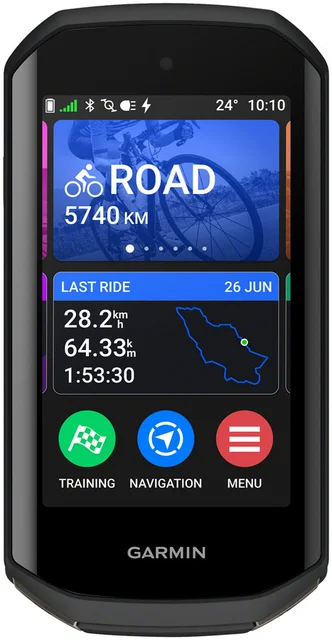
- Buy Garmin Edge 1050 The most capable do-everything head unit, if your budget and cockpit can take it. Amazon
- Buy Wahoo ELEMNT ROAM 3 The no-drama navigator: dependable maps, long battery and a simple app-led setup. Amazon
- It depends Hammerhead Karoo The best-looking screen in the game, with a few compromises you should go in knowing. Amazon
- Skip Wahoo ELEMNT ACE A big, pricey flagship whose headline wind sensor doesn't earn its size for most riders. Amazon
What actually matters
- Sunlight readability - a screen that washes out in bright light makes maps and data hard to use exactly when you need them most, so it beats raw pixel counts.
- Real-world battery life - match a unit's honest all-day endurance to your longest rides, not the optimistic marketing number, especially for touring, gravel, or ultra-distance.
- Maps and rerouting - confirm the unit has full on-device maps and reroutes quickly when you go off course, rather than just breadcrumb lines.
- Buttons vs touch - decide based on your conditions: touch is quicker for panning maps, buttons never mis-tap in gloves, rain, or on rough terrain.
- Sensor and drivetrain compatibility - check ANT+ and Bluetooth support for your power meter and heart-rate strap, plus any special integration you need for an electronic drivetrain.
- Ease of setup and daily use - an app-led setup and an interface you don't have to fight makes you more likely to actually use the features you paid for.
- Size and mounting footprint - make sure the unit fits your cockpit and mount without crowding a light, bell, or your line of sight.
The specs, in plain English
Green flags vs red flags
Green flags
- Full on-device maps with fast, reliable rerouting, not just a breadcrumb line.
- A screen owners describe as readable in direct sunlight, not only bright indoors.
- Honest, real-world battery life that comfortably covers your longest typical ride.
- Broad ANT+ and Bluetooth sensor support so your existing gear pairs without drama.
- A setup process, usually app-led, that owners consistently call simple to live with.
- A mounting footprint that fits your cockpit without crowding lights or your view.
Red flags
- A stunning screen paired with notably short real-world battery life you'll fight on long rides.
- Reports of occasional slowdowns, reboots, or laggy maps mid-ride.
- A big, heavy unit whose size is justified mainly by one novelty feature.
- Early or buggy firmware and a pattern of reliability complaints from owners.
- A price premium driven by features you personally will never use.
- Periodic stock gaps or a shaky support picture after an ownership or brand change.
Who's who: the brands
- Garmin - The category heavyweight, known for the deepest maps, training analytics, and the broadest, most mature ecosystem.
- Wahoo - Known for simple, app-led setup and dependable navigation, with touchscreen ROAM 3 and ELEMNT ACE models alongside the BOLT 3, which has no touchscreen.
- Hammerhead - Maker of the Karoo, which pairs a smartphone-quality Gorilla Glass touchscreen with physical buttons and tight SRAM AXS integration; now sold through SRAM.
How to read a listing without getting fooled
When you scan a bike computer's listing, look past the feature bullet count and find the answers to a few practical questions. First, does it have full on-device maps with turn-by-turn navigation and rerouting, or just a breadcrumb line? That single distinction separates a real navigator from a basic tracker. Second, treat the battery number with healthy skepticism: the headline figure usually assumes a dimmed screen and light use, so look for owner reports of real-world, all-day endurance instead. Third, check the sensor line for 'ANT+ and Bluetooth', which means your existing power meter and heart-rate strap will almost certainly pair. Finally, be wary of a listing that leans hard on one headline gimmick, an unusual sensor or a flashy screen, while staying quiet about the fundamentals; that emphasis often signals where the compromises hide.
How much should you spend?
Spending more mostly buys you a sharper screen, deeper training analytics, and a broader ecosystem, none of which every rider needs. The value sweet spot sits with a mid-to-upper unit that nails reliable maps, honest battery life, and easy setup, because those fundamentals shape every ride while exotic extras rarely do. Stepping up to the flagship tier is worth it only if you genuinely want maximum capability, the sharpest display, and the deepest data, and you'll actually use that depth. Going up in price for a single novelty feature, or for a bigger, heavier body, is usually a poor trade. Just as important, the cheapest option isn't automatically a bargain if it skimps on real maps or washes out in the sun. Buy for how you ride most, and let that, not the top of the range, set your budget.
Questions, answered
Is a dedicated bike computer really better than just using my phone?
For serious or regular riding, yes. A dedicated head unit gives you a sunlight-readable screen, far longer battery life, glove-friendly controls, and a secure handlebar mount that a phone can't match, plus cycling-specific maps and rerouting. Your phone can work for occasional rides with a good mount, but it drains fast, is hard to read in bright sun, and is more exposed to rain and drops.
Do I need a touchscreen, or are buttons better?
It's a genuine preference, not a quality gap. Touchscreens are faster for panning maps and scrolling menus. Physical buttons are more reliable with full-finger gloves, in the rain, or on rough terrain where a bouncing thumb can mis-tap. If you ride a lot in cold or wet conditions, buttons are the safer bet; if you mostly ride in fair weather and value quick map interaction, touch is pleasant.
How much battery life do I actually need?
It depends entirely on your rides. For daily commutes and one-to-two-hour spins, essentially every current unit has plenty of headroom. For all-day gravel, touring, or ultra-distance events, prioritize a unit with strong real-world endurance or a good battery-saver mode, and plan for a top-up or external battery pack on the very longest days.
Will a new computer work with the sensors and drivetrain I already have?
Almost certainly. Nearly all modern head units support standard ANT+ and Bluetooth sensors, so your power meter, heart-rate strap, and speed or cadence sensors should pair with any of them. If you run an electronic drivetrain, check that your chosen unit displays its data; some brands integrate more tightly than others, but most can at least show gear and battery info.
Are novelty features like an integrated wind sensor worth paying for?
For most riders, no. Clever, unusual sensors can be genuinely innovative, but the data is something many riders will rarely act on, and you can end up paying for it with a larger, heavier, more expensive unit. Unless that specific data is central to your training, your money usually goes further on a unit that simply does the core job, maps, battery, and reliability, better.
Or jump to the head-to-head: Garmin Edge 1050 vs Wahoo ELEMNT ROAM 3.