

Tech & Gadgets
The Best SSD Enclosures: 4 Compared (and One to Skip)
We compared four M.2 NVMe enclosures on published transfer speeds, interface bandwidth, controller chip, cooling, supported drive sizes and warranty.
The short version
The Sabrent USB4 M.2 PCIe NVMe SSD Enclosure is the one to buy: up to 40Gbps over USB4 with transfer speeds published at 3,900 MB/s on USB4, 2,700 MB/s on Thunderbolt and 1,000 MB/s on USB 3.2, backward compatibility spelled out, support for 2230, 2242, 2260 and 2280 drives, an aluminium casing with an integrated cooling fan, and bus-powered tool-free installation. The Acasis 40Gbps enclosure is the runner-up and the only one that names its controller, an Intel JHL7440, with a built-in fan that Acasis says holds the drive below 35 degrees Celsius, S.M.A.R.T. support, capacity to 8TB and an explicit warning that drives with pre-fitted heatsinks will not fit. The Satechi USB4 NVMe SSD Pro Enclosure carries the only warranty here at 2 years, includes a thermal pad and a clear polycarbonate case, and publishes no transfer speeds at all. The Plugable USB 3.1 Gen 2 Tool-free NVMe Enclosure is the one to skip for a modern drive, because it tops out at 10Gbps and Plugable says plainly that NVMe SSDs exceed that internally. Best for: anyone with a spare M.2 drive, or anyone whose external backup takes all evening.
Our picks at a glance
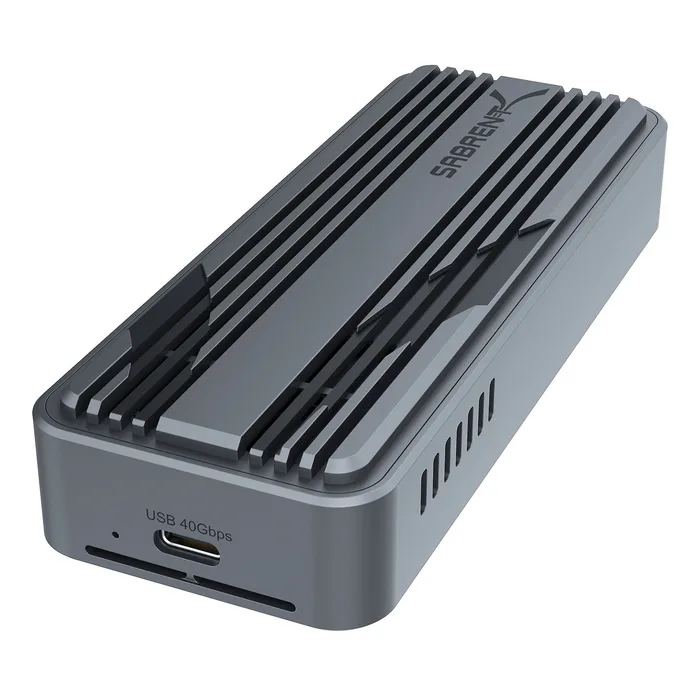
- Sabrent USB4 M.2 PCIe NVMe SSD Enclosure - Buy. Three published transfer rates for three protocols, plus a fan and every drive size.
- Acasis 40Gbps M.2 NVMe SSD Enclosure with Cooling Fan - Buy. The only one that names its controller, states a temperature target and takes 8TB.
- Satechi USB4 NVMe SSD Pro Enclosure - It depends. The only warranty in the group, and not a single transfer figure.
- Plugable USB 3.1 Gen 2 Tool-free NVMe Enclosure - Skip. Honest, well made, and capped at a quarter of the bandwidth your drive can use.
The verdict in 30 seconds
What mattered most
- Interface bandwidth
- Transfer speed published
- Controller named
- Cooling
- Drive sizes
- Maximum capacity
An NVMe drive inside a laptop reads at several thousand megabytes per second. Put the same drive in the wrong enclosure and it reads at one thousand, because the bottleneck moves from the drive to the cable. That is the whole decision here, and it is decided by one number: whether the enclosure runs at 10Gbps or 40Gbps. After that come the things that stop a fast enclosure slowing itself down, which means cooling, because an NVMe drive in a sealed aluminium box will throttle long before it fills up.
Three published transfer rates for three protocols, plus a fan and every drive size.
Best for: Anyone who wants to know what the enclosure will actually do on the port they own.
- Transfer speeds published for each connection: up to 3,900 MB/s on USB4, 2,700 MB/s on Thunderbolt and 1,000 MB/s on USB 3.2, which no other maker here does.
- Up to 40Gbps with backward compatibility spelled out for USB 3.2 Gen 2x1 at 10Gbps and Gen 1x1 at 5Gbps, so you know what you get on an older machine.
- Accepts 2230, 2242, 2260 and 2280 drives, in an aluminium casing built for maximum heat dissipation with an integrated cooling fan, plug and play, bus-powered and tool-free.
- Sabrent does not name the controller chip, where Acasis does.
- No dimensions or weight are published.
- No warranty terms appear on the product page.
- The integrated fan is a moving part in a device that would otherwise have none, and it makes noise.
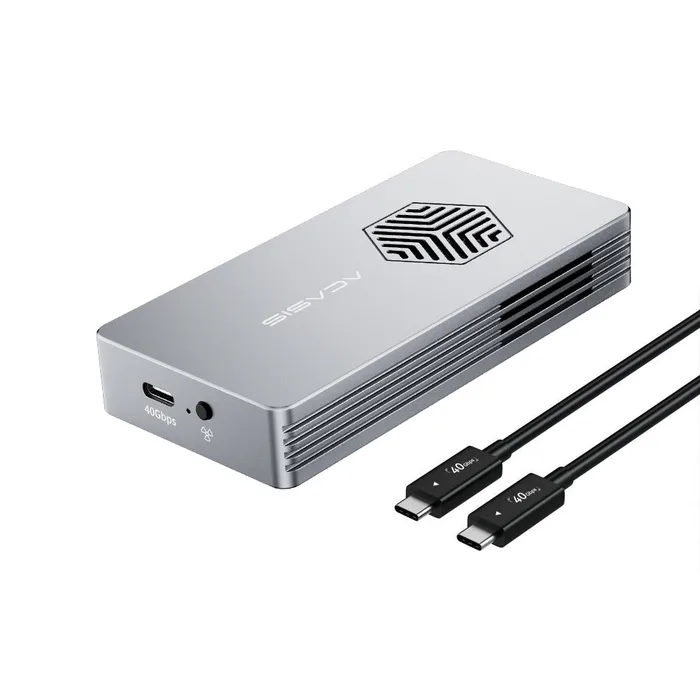
The only one that names its controller, states a temperature target and takes 8TB.
Best for: Large drives and long transfers, where thermal throttling is the thing that actually costs you time.
- Built on a named Intel JHL7440 40Gbps controller, which is the only chip identified by any maker in this comparison and the thing that actually determines compatibility and speed.
- A built-in cooling fan, side heat dissipation slots and a thermal pad, which Acasis says keep the drive below 35 degrees Celsius even during extended use, plus S.M.A.R.T. support for drive health reporting.
- Supports up to 8TB across 2280, 2260, 2242 and 2230 in both M-key and B+M key, and states clearly that a drive with a pre-fitted heatsink will not fit because of thickness.
- The published speed test data comes from Acasis's own laboratory, and Acasis notes that real speeds vary with the SSD, file format and operating system.
- No transfer rate in MB/s is given for anything other than its own test conditions.
- No dimensions, weight or warranty terms are published.
- A fan means noise and a component that can fail.
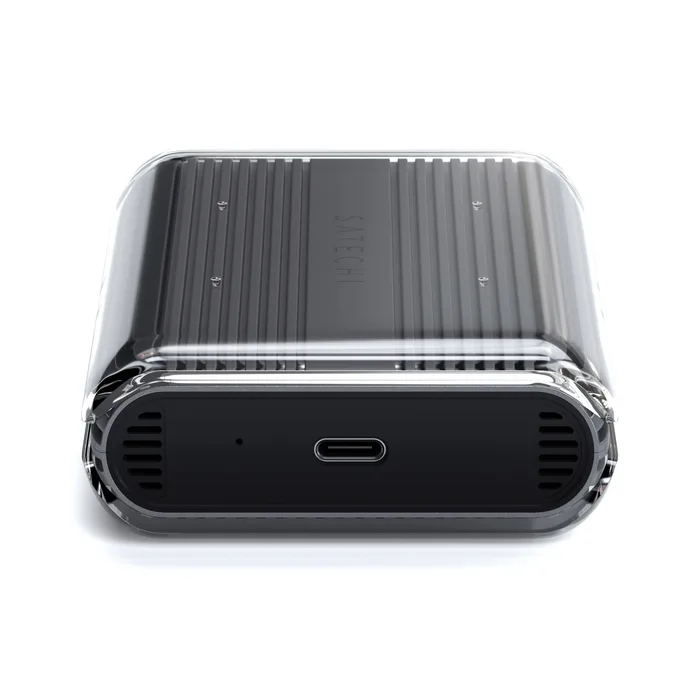
The only warranty in the group, and not a single transfer figure.
Best for: Someone who wants the warranty and passive cooling rather than a fan, with a drive on Satechi's compatibility list.
- A 2-year warranty, which is the only warranty published by any maker in this comparison.
- Premium aluminium construction for durability and passive heat dissipation, with a thermal pad and a clear polycarbonate case included in the box.
- Satechi publishes a list of specific SSD models it has confirmed compatible, which is more practical help than a generic compatibility claim.
- No transfer speed in MB/s is published anywhere, so the 40Gbps interface figure is all you get.
- Supported sizes are 2242, 2260 and 2280 only, with no 2230 support, unlike both competitors.
- Not compatible with double-sided drives or drives with heatsinks, which rules out a number of high-capacity models.
- No controller is named, and Satechi notes that on some connections speeds are limited to 10Gbps.
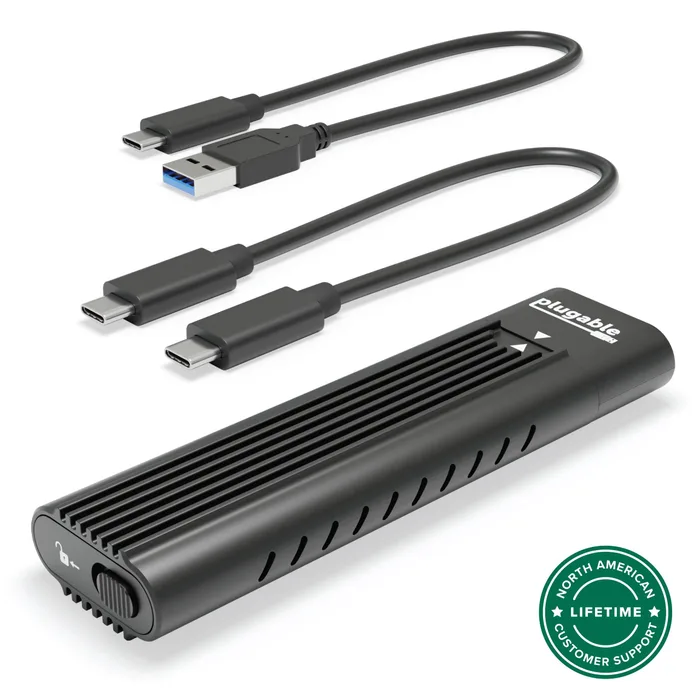
Honest, well made, and capped at a quarter of the bandwidth your drive can use.
Best for: Data recovery, drive migration and occasional access, where convenience matters more than throughput.
- Plugable is unusually straight about the limitation, stating that NVMe SSDs can exceed 10Gbps internally and that actual performance depends on your drive and host system.
- Connects over USB-C, USB4, Thunderbolt 3 or Thunderbolt 4, so it works with essentially any modern machine.
- Tool-free installation in a sleek enclosure aimed at professionals and IT technicians, backed by Plugable's badged North American lifetime customer support.
- Up to 10Gbps via USB 3.1 Gen 2, which is a quarter of the interface bandwidth of the other three here.
- There is no cooling fan, and sustained transfers are where a bare aluminium box lets an NVMe drive heat up.
- No controller chip is named and no MB/s figure is published.
- For a modern NVMe drive, the enclosure becomes the bottleneck rather than the drive, and no warranty term is published alongside the support commitment.
| Criteria | USB4 M.2 PCIe NVMe SSD Enclosure Top pick | 40Gbps M.2 NVMe SSD Enclosure with Cooling Fan | USB4 NVMe SSD Pro Enclosure | USB 3.1 Gen 2 Tool-free NVMe Enclosure |
|---|---|---|---|---|
| Verdict | Buy it | Buy it | It depends | Skip it |
| Best for | Anyone who wants to know what the enclosure will actually do on the port they own. | Large drives and long transfers, where thermal throttling is the thing that actually costs you time. | Someone who wants the warranty and passive cooling rather than a fan, with a drive on Satechi's compatibility list. | Data recovery, drive migration and occasional access, where convenience matters more than throughput. |
| Price tier | $$ · mid-range | $$ · mid-range | $$$ · premium | $ · budget |
| Interface bandwidth | 40 Gbps USB4 | 40 Gbps USB4 | 40 Gbps USB4 | 10 Gbps USB 3.1 Gen 2 |
| Transfer speed published | 3,900 / 2,700 / 1,000 MB/s | Own lab test data only | None | None |
| Controller named | No | Intel JHL7440 | No | No |
| Cooling | Aluminium plus integrated fan | Fan, vents and thermal pad, under 35 °C claimed | Aluminium, thermal pad, polycarbonate case | Aluminium, no fan |
| Drive sizes | 2230, 2242, 2260, 2280 | 2230, 2242, 2260, 2280, M and B+M key | 2242, 2260, 2280 | Not published |
| Maximum capacity | Not published | 8 TB | Not published | Not published |
| Double-sided drives | Not published | Not published | Not supported | Not published |
| Drives with heatsinks | Not published | Will not fit, stated | Not supported | Not published |
| Warranty | Not published | Not published | 2 years | Not published |
Which one is right for you?
- Anyone who wants to know what the enclosure will actually do on the port they own. Buy it Sabrent USB4 M.2 PCIe NVMe SSD Enclosure
- Large drives and long transfers, where thermal throttling is the thing that actually costs you time. Buy it Acasis 40Gbps M.2 NVMe SSD Enclosure with Cooling Fan
- Someone who wants the warranty and passive cooling rather than a fan, with a drive on Satechi's compatibility list. It depends Satechi USB4 NVMe SSD Pro Enclosure
- Data recovery, drive migration and occasional access, where convenience matters more than throughput. Skip it Plugable USB 3.1 Gen 2 Tool-free NVMe Enclosure
How we judged the field
The first number is the interface, because it sets a hard ceiling that no drive can exceed. A 10Gbps enclosure delivers around 1,000 MB/s no matter what you put in it; a 40Gbps USB4 enclosure allows around four times that. Three of these four are 40Gbps and one is not, and that single fact does most of the sorting.
The second thing we looked for is an actual transfer rate in megabytes per second rather than the interface figure in gigabits, because those are different claims and only one maker here publishes the former. Gbps describes the pipe; MB/s describes what comes out of it, and the gap between them is protocol overhead plus whatever the controller manages. Third, cooling, which is what stops a fast enclosure becoming a slow one halfway through a large copy: a fan, vents, a thermal pad, or a stated temperature target. Fourth, compatibility, which is unglamorous and is where purchases actually go wrong, covering drive lengths, key types, capacity limits, double-sided boards and pre-fitted heatsinks. And finally warranty, which exactly one of these four publishes.
The Sabrent USB4 enclosure is the only product in this comparison that answers the question you are actually asking. Rather than quoting an interface speed and leaving you to guess, Sabrent publishes what the enclosure delivers on each connection it supports: up to 3,900 MB/s over USB4, 2,700 MB/s over Thunderbolt, and 1,000 MB/s over USB 3.2. That last figure matters most, because it tells you exactly what you lose on an older machine, and Sabrent spells out the backward compatibility explicitly for USB 3.2 Gen 2x1 at 10Gbps and Gen 1x1 at 5Gbps. The enclosure accepts every common M.2 length, 2230, 2242, 2260 and 2280, which no other product here manages, and it is built for maximum heat dissipation with an aluminium casing and an integrated cooling fan. Installation is tool-free, it is bus-powered so there is no adapter to carry, and it is plug and play. What it does not tell you is which controller is inside, which is the one specification Acasis leads with, and there are no dimensions, no weight and no warranty terms.
The Acasis 40Gbps enclosure leads with the thing most makers hide. It is built on an Intel JHL7440, a named 40Gbps controller, and that matters because the controller determines compatibility, sustained speed and how the enclosure behaves on a given host far more than the aluminium around it does. Cooling is treated as a design problem rather than an afterthought: there is a built-in fan, heat dissipation slots along the sides and a thermal pad, and Acasis commits to a figure, saying the arrangement keeps the drive below 35 degrees Celsius even during extended use. S.M.A.R.T. is supported, so drive health reporting passes through rather than disappearing behind the bridge. Capacity goes to 8TB across 2280, 2260, 2242 and 2230 in both M-key and B+M key, which is the broadest compatibility statement here, and Acasis warns plainly that a drive bought with a heatsink already fitted will not fit because of thickness. The caveats are about evidence rather than design: the speed figures come from Acasis’s own lab, the company says so, and there are no dimensions, no weight and no warranty.
The Satechi USB4 NVMe SSD Pro is the premium option and the one whose page reads like marketing. It is a 40Gbps USB4 enclosure in premium aluminium chosen for durability and heat dissipation, with a thermal pad and a clear polycarbonate case in the box, and Satechi describes a high-performance controller without saying which one. It has two genuine advantages. The first is a 2-year warranty, the only warranty published by anyone in this comparison, which on a device holding your data is worth real money. The second is that Satechi publishes a list of specific SSD models it has confirmed work, which is more useful to a buyer than a generic claim. Against that, there is no transfer rate in MB/s anywhere on the page, so the only performance number is the interface speed. Supported lengths are 2242, 2260 and 2280 with no 2230, and Satechi states that double-sided drives and drives with heatsinks are not compatible, which between them rule out a meaningful share of high-capacity SSDs. There is also a note that on some connections speeds fall back to 10Gbps.
The Plugable enclosure is a good product in the wrong decade, and Plugable is honest enough to tell you so. It connects over USB-C, USB4, Thunderbolt 3 or Thunderbolt 4, which is broad compatibility, and it is tool-free, well built and aimed squarely at professionals and IT technicians doing migrations, backups and recoveries. The problem is the ceiling. It runs at USB 3.1 Gen 2, which is 10Gbps, and Plugable states directly that while NVMe SSDs can exceed 10Gbps internally, performance is bounded by the interface, and that actual speeds depend on your drive and host. That is more candour than most of this category offers, and it is also the reason not to buy it for a modern drive: you are putting a component capable of several thousand megabytes per second behind a pipe that will deliver about a thousand. There is no cooling fan either, which matters less at 10Gbps because the drive is never pushed hard enough to get hot. For pulling files off a laptop drive, it is entirely adequate. For a working external SSD, the money is better spent on 40Gbps.
Sabrent USB4 M.2 PCIe NVMe SSD Enclosure vs Acasis 40Gbps M.2 NVMe SSD Enclosure with Cooling Fan: which should you buy?
Sabrent against Acasis is a close contest between two enclosures that make the same choices and publish different halves of the story. Sabrent gives you real throughput figures for all three protocols, which is what you need to predict how it will behave on your machine, plus support for every common drive length including 2230, in an aluminium body with an active fan. If you want to know what you are buying, that page tells you.
Acasis gives you the engineering instead. It names the Intel JHL7440 controller, commits to a thermal target of under 35 degrees Celsius, supports drives up to 8TB in both key types, passes S.M.A.R.T. data through, and warns you about the heatsink problem before you order rather than after. Where Sabrent describes results, Acasis describes causes, and for sustained work the thermal design is what determines whether you see those results for the whole transfer or only the first minute. Buy the Sabrent if you want published numbers and the widest drive compatibility. Buy the Acasis if you run large drives hard and want to know what is doing the work.
What to look for
- Interface bandwidth first: 10Gbps caps you near 1,000 MB/s no matter what drive you fit, and 40Gbps USB4 gives roughly four times the headroom.
- A transfer rate in MB/s, not just Gbps: the first describes what you get, the second describes the pipe, and only one maker here publishes both.
- A named controller: Intel JHL-series and similar chips determine compatibility and sustained speed, and naming one is a sign of confidence.
- Active or passive cooling, with a stated target: sustained transfers throttle, and a fan or a temperature figure tells you the maker thought about it.
- Every drive length you might use: 2230, 2242, 2260 and 2280, plus key type, since a shorter drive will not fit a longer-only enclosure.
- Explicit warnings about thickness: double-sided drives and drives with pre-fitted heatsinks do not fit many enclosures, and good pages say so.
Our final take
SSD enclosures are decided by a pipe and a heat problem. The Sabrent USB4 M.2 PCIe NVMe Enclosure is the one to buy: three published transfer rates covering every protocol you might plug it into, support for all four common drive lengths, and an aluminium body with an integrated fan. The Acasis 40Gbps is the better-engineered product and the one to choose for sustained work, because it names its Intel JHL7440 controller, commits to keeping the drive under 35 degrees and handles drives up to 8TB. The Satechi is the only one with a warranty and the only one that will not tell you how fast it is, which is a strange combination at premium money. And a 10Gbps enclosure on a modern NVMe drive throws away three quarters of what you paid for, which Plugable, to its credit, says out loud.
Questions, answered
Does 40Gbps actually make a difference?
Four times the ceiling, and in practice a great deal less than four times the speed, but still a large difference. A 10Gbps enclosure delivers roughly 1,000 MB/s in real use, which Sabrent publishes directly as its USB 3.2 figure. The same enclosure over USB4 delivers up to 3,900 MB/s. On a 100GB transfer that is the difference between about two minutes and well under one. If the drive is for occasional file access, 10Gbps is fine. If you edit video off it or back up nightly, the faster interface pays for itself in the first week.
Why do enclosures need cooling?
Because an NVMe drive doing a sustained transfer produces real heat, and inside a sealed aluminium box that heat has nowhere to go. When the controller reaches its thermal limit it throttles, which means a transfer that starts at 3,000 MB/s can drop to a fraction of that partway through a large copy. That is why two of these four have fans, why Acasis quotes a target of under 35 degrees Celsius, and why thermal pads are included. For short transfers it does not matter; for anything sustained it is the difference between the advertised speed and the average one.
What is 2230, 2242, 2260 and 2280?
The physical length of the M.2 drive in millimetres, with the width fixed at 22mm. A 2280 drive is 80mm long and is what most desktops and laptops use; 2230 is the short 30mm format used in handhelds and some ultrabooks. An enclosure that supports all four takes anything you are likely to have; one that supports only 2242 through 2280, as the Satechi does, cannot take a 2230 drive pulled from a handheld. Check the length of your drive before buying, because it is not adjustable.
Will my drive definitely fit?
Not necessarily, and two things catch people out. A double-sided drive has chips on both faces and is physically thicker, and Satechi states outright that those are not compatible. A drive that came with a heatsink attached is thicker still, and both Satechi and Acasis say those will not fit. Neither is an unusual configuration on a high-capacity drive. If your drive has a metal heatsink on it, expect to remove it, and if it has chips on both sides, check the enclosure's clearance before ordering.
Do I need Thunderbolt or is USB4 enough?
USB4 is enough, and in one respect it is better. Sabrent's own figures make the point: it quotes 3,900 MB/s over USB4 against 2,700 MB/s over Thunderbolt, because the protocols allocate bandwidth differently for storage. USB4 is also more widely available, since it appears on machines without Thunderbolt certification. What matters is the port on your computer, not the badge: check whether it is USB4, Thunderbolt 3 or 4, or plain USB 3.2, because that is what sets your ceiling regardless of the enclosure.
Deciding between the top two? See our head-to-head: Sabrent USB4 M.2 PCIe NVMe SSD Enclosure vs Acasis 40Gbps M.2 NVMe SSD Enclosure with Cooling Fan.
More Tech & Gadgets reviews
 The Best Step Ladders: 4 Compared (and One to Skip)
  The Best Stream Decks: 4 Compared (and One to Skip)
  The Best Stud Finders: 4 Compared (and One to Skip)
  The Best Surge Protectors: 4 Compared (and One to Skip)
  The Best Table Saws: 4 Compared (and One to Skip)
  The Best Tape Measures: 4 Compared (and One to Skip)