

Automotive
The Best OBD2 Scanners: 4 Compared (and One to Skip)
We compared four buyable OBD2 scanners - two Bluetooth dongles and two handhelds - on system coverage, repair guidance, live data, and value for DIY diagnostics.
The short version
For most DIYers the OBDLink MX+ is the smart buy - a fast, secure Bluetooth dongle that reaches beyond generic codes through free OEM data add-ons and pairs with a huge range of apps. Beginners who want plain-English "here's the likely fix" guidance should get the BlueDriver Bluetooth Pro instead, thanks to its no-subscription Repair Reports. Step up to the Innova 5610 CarScan Pro only if you want a standalone, phone-free handheld with all-system and bidirectional coverage and are fine paying premium money for it. Skip the Autel AutoLink AL329: it's reliable but reads only engine codes, so it can't diagnose the ABS or airbag lights people usually buy a scanner for, and you'll quickly need something better. Best for: everyday DIY diagnostics on a 1996-or-newer vehicle, matched to how much system coverage and hand-holding you actually want.
Our picks at a glance
- OBDLink MX+ - Buy. The most capable phone-paired dongle: a genuine, secure chip that reads far more than generic codes.
- BlueDriver Bluetooth Pro OBDII Scan Tool - Buy. The friendliest way to go from trouble code to "here's what's probably wrong and how to fix it."
- Innova 5610 CarScan Pro - It depends. A self-contained, no-subscription handheld that does nearly everything - if you're willing to pay for it.
- Autel AutoLink AL329 - Skip. A well-built little reader that does too little - you'll outgrow it before the light comes back on.
The verdict in 30 seconds
What mattered most
- Form factor
- System coverage
- Repair guidance
- Live data & logging
- App & subscription
- Compatibility
An OBD2 scanner turns a mysterious check-engine light into an actual starting point - a trouble code you can look up, live data you can watch, and (on the better tools) a plain-English list of likely fixes. The catch is that the category runs from disposable clones to near-professional handhelds, and the price on the box tells you almost nothing about what it can actually read. We lined up two phone-paired Bluetooth dongles and two standalone handhelds, synthesizing independent testing and a large pool of owner reports. Two are easy recommendations, one is a genuinely great tool that most people don't need, and one is a spend-trap we'd steer you away from.
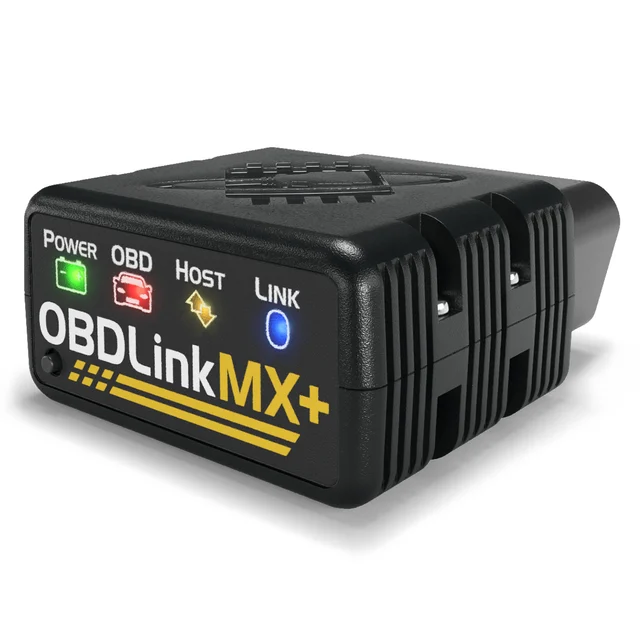
The most capable phone-paired dongle: a genuine, secure chip that reads far more than generic codes.
Best for: DIYers and enthusiasts who want the most data and OEM-level access for the money and don't mind using their phone.
- Goes beyond generic engine codes, with free OEM-specific data add-ons in the OBDLink app and support for advanced Ford and GM networks (MS-CAN and SW-CAN)
- Fast, reliable hardware that plays nicely with the free OBDLink app plus a huge range of third-party apps (FORScan Lite, BimmerCode, Car Scanner and others)
- Low-power BatterySaver mode (2 mA), automatic sleep, encrypted Bluetooth and a physical pairing button, so it can be left plugged in
- Needs a phone, tablet or laptop plus an app - there's no built-in screen
- Some third-party apps charge for their coding and advanced features, even though the OBDLink app itself is free
Own the OBDLink MX+? Tell us how it held up.
Thanks. Counted, and shown once enough owners have weighed in.
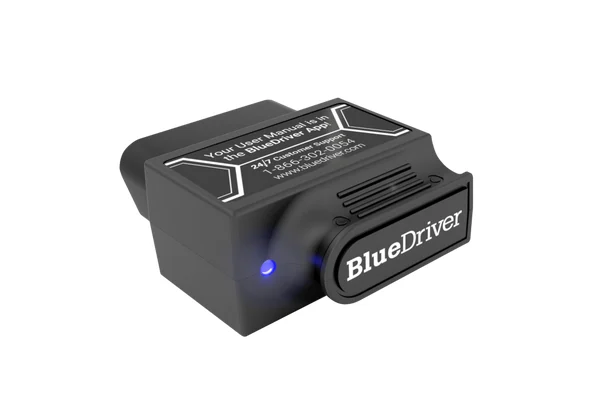
The friendliest way to go from trouble code to "here's what's probably wrong and how to fix it."
Best for: First-time DIYers who want clear repair guidance rather than a wall of raw data.
- Guided Repair Reports that pair your code and vehicle with reported fixes and possible causes in plain English, with no subscription
- Handles enhanced diagnostics on many makes (ABS, airbag/SRS, transmission) plus smog/emissions readiness, freeze frame and mode 6
- Genuinely beginner-proof app and a solidly built dongle owners report lasting for years
- Built around BlueDriver's own app; the maker does not advertise third-party app support the way OBDLink does
- Live-data logging and advanced tinkering are shallower than a power user's toolkit; enhanced coverage varies by make
Own the BlueDriver Bluetooth Pro OBDII Scan Tool? Tell us how it held up.
Thanks. Counted, and shown once enough owners have weighed in.
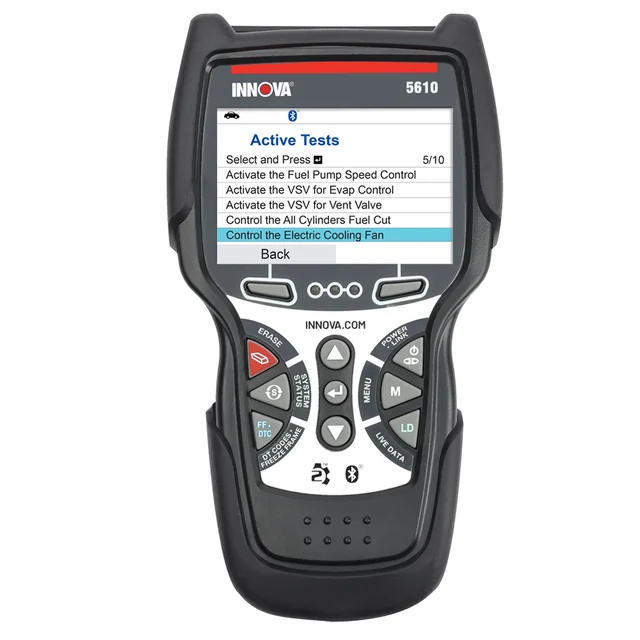
A self-contained, no-subscription handheld that does nearly everything - if you're willing to pay for it.
Best for: Serious DIYers who work across multiple vehicle systems and want a standalone tool instead of relying on a phone.
- All-system diagnostics (ABS, SRS/airbag, engine, transmission) with bidirectional active tests and advanced resets (oil, battery, DPF, TPMS)
- Works entirely on its own screen with no phone required, and updates plus the optional companion app are free, with no subscription
- Live data from both generic OBD2 and OEM parameters, useful for chasing intermittent faults
- Premium price that's hard to justify if you only ever read a check-engine light
- Bigger and less pocketable than a dongle, and menu depth and coverage can be uneven from one make to the next
Own the Innova 5610 CarScan Pro? Tell us how it held up.
Thanks. Counted, and shown once enough owners have weighed in.
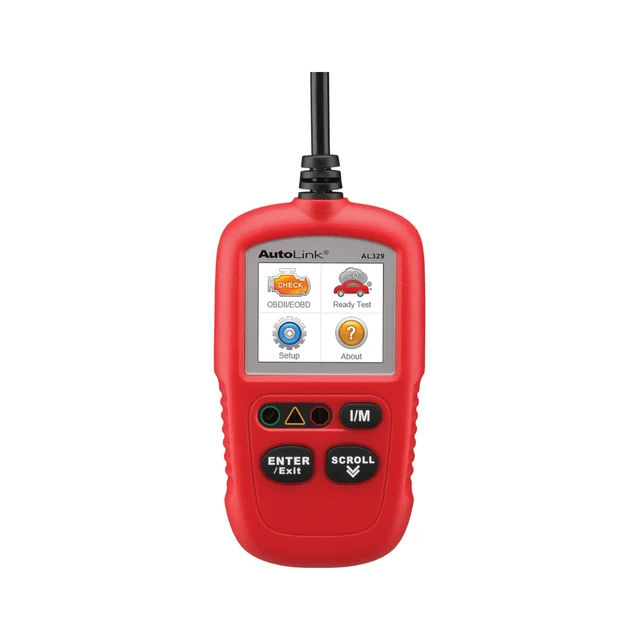
A well-built little reader that does too little - you'll outgrow it before the light comes back on.
Best for: Only the narrowest case - someone who wants the absolute simplest way to clear an engine light with no phone and nothing more.
- Cheap, reliable and dead-simple: plug in, read or clear a generic code, check I/M readiness for a smog test
- Standalone TFT color screen, freeze frame data and no phone or app to fuss with
- Sturdy build from a reputable brand
- Engine codes only, with manufacturer codes shown only when its AutoVIN function finds them (its spec table does not list manufacturer-specific codes); no ABS and no airbag/SRS, so it can't touch most of the warning lights people actually buy a scanner for
- No bidirectional tests, and its live data comes only through the basic OBDII test modes, with no save or playback
Own the Autel AutoLink AL329? Tell us how it held up.
Thanks. Counted, and shown once enough owners have weighed in.
| Criteria | OBDLink MX+ Top pick Buy it Buy | BlueDriver Bluetooth Pro OBDII Scan Tool Buy it Buy | Innova 5610 CarScan Pro It depends Buy | Autel AutoLink AL329 Skip it Buy |
|---|---|---|---|---|
| Best for | DIYers and enthusiasts who want the most data and OEM-level access for the money and don't mind using their phone. | First-time DIYers who want clear repair guidance rather than a wall of raw data. | Serious DIYers who work across multiple vehicle systems and want a standalone tool instead of relying on a phone. | Only the narrowest case - someone who wants the absolute simplest way to clear an engine light with no phone and nothing more. |
| Price tier | $$ · mid-range | $$ · mid-range | $$$ · premium | $ · budget |
| Form factor | Bluetooth dongle (needs phone) | Bluetooth dongle (needs phone) | Standalone handheld | Handheld, plugs into OBD2 port |
| System coverage | Engine + OEM data add-ons (varies by make and app) | Engine + enhanced (ABS/SRS/trans on many makes) | All systems + bidirectional active tests | Engine codes only (manufacturer codes only via AutoVIN) |
| Repair guidance | Via free app + third-party apps | Best-in-class guided Repair Reports | RepairSolutions2 app + on-device | None (code readout only) |
| Live data & logging | Excellent (with app) | Good | Good (on-device, OBD2 + OEM) | Basic live data, no save or playback |
| App & subscription | Free app; some third-party features are paid add-ons | Free app, no subscription | Free app, free updates, no subscription | None, no app |
| Compatibility | iOS, Android & Windows; many third-party apps | iOS & Android; own app only | Standalone + optional app | Standalone only |
| Beginner friendliness | Moderate | Very easy | Moderate | Very easy |
| Price tier | $$ · mid-range | $$ · mid-range | $$$ · premium | $ · budget |
Which one is right for you?
- DIYers and enthusiasts who want the most data and OEM-level access for the money and don't mind using their phone. Buy it OBDLink MX+
- First-time DIYers who want clear repair guidance rather than a wall of raw data. Buy it BlueDriver Bluetooth Pro OBDII Scan Tool
- Serious DIYers who work across multiple vehicle systems and want a standalone tool instead of relying on a phone. It depends Innova 5610 CarScan Pro
- Only the narrowest case - someone who wants the absolute simplest way to clear an engine light with no phone and nothing more. Skip it Autel AutoLink AL329
How we judged the field
We don’t run our own lab. Instead we synthesize independent bench testing, expert teardowns and a large pool of long-term owner reports, then weigh the things that actually decide whether a scanner earns its place in your glovebox. The big one is system coverage: a cheap reader only sees generic engine codes, while the better tools also read ABS, airbag/SRS, transmission and TPMS - the systems behind most of the warning lights people are actually chasing. We looked hard at repair guidance (does it just spit out a P0301, or tell you what usually causes it?), live data and logging for diagnosing intermittent faults, hardware quality and security (genuine chips that don’t drop the connection or drain your battery), app and subscription fine print, and plain old value at each price. Two Bluetooth dongles and two handhelds made the shortlist because the dongle-versus-handheld choice is the first real fork in the road for a DIYer.
OBDLink MX+
Buy itThis is the dongle we’d hand a friend who wants one tool to keep. The reason it beats the pile of look-alike clones is the hardware: a genuine, fast chip that holds its connection, has a 2 mA BatterySaver mode with automatic sleep, and only pairs after a physical button press, so you can leave it plugged in. Beyond generic engine codes, it supports advanced Ford and GM networks and free OEM-specific data add-ons in the OBDLink app. It works with OBDLink’s own free app and, crucially, with a broad ecosystem of third-party apps, so it grows with you from “read my check-engine light” to make-specific coding. The honest trade-off: there’s no screen, so you’re committed to using a phone or laptop, and some third-party apps charge for their deeper features. For flexibility per dollar, nothing here beats it.
BlueDriver Bluetooth Pro OBDII Scan Tool
Buy itWhere the OBDLink rewards tinkerers, the BlueDriver rewards people who just want their car fixed. Its standout feature is the guided Repair Reports: feed it a code and your vehicle, and it returns reported fixes and possible causes written in plain English - and it does this with no subscription. It still covers the serious stuff (enhanced diagnostics on many makes, smog/emissions readiness, freeze frame, mode 6), and owners routinely praise how hard it is to get confused using it. The catch that keeps it from the top spot is that it is built around BlueDriver’s own app, with no advertised third-party app support, and its live-data logging is shallower than a power user would like. If “tell me what’s probably wrong and how to fix it” is what you want, this is the one.
Innova 5610 CarScan Pro
It dependsThis is the most capable tool on the list and, for most readers, the one to think twice about. As a standalone handheld it needs no phone: everything runs on its own screen, updates are free, and there’s no subscription. It reaches into all systems (ABS, SRS/airbag, engine, transmission), runs bidirectional active tests, and performs advanced resets like oil, battery, DPF and TPMS - genuinely close to entry-level shop capability. So why “it depends”? Because it’s premium-priced, and if your realistic use is reading the occasional engine light, you’re paying a lot for headroom you’ll never touch. Coverage and menu depth can also vary make to make. For someone who works across systems and wants a self-contained tool, it’s worth every penny; for everyone else it’s more scanner than the job needs.
Autel AutoLink AL329
Skip itNothing here is broken - the AL329 is a sturdy, dependable little reader from a respected brand, and if all you ever do is clear an engine light before a smog test it will do that on its own screen with no phone. The problem is what it can’t do. It reads engine codes only (generic codes, plus manufacturer codes only when its AutoVIN function finds them): no ABS, no airbag/SRS, no bidirectional tests, and only basic live data with no save or playback. That matters because the warning lights people most often buy a scanner to diagnose - ABS, airbag - are exactly the ones it can’t see. You either discover that limitation the hard way and buy again, or you realize a similarly priced Bluetooth dongle plus a free app gives you deeper live data and logging than the AL329 offers. It’s a fine object and the wrong purchase.
Sources
Specs in this review come from these pages.
OBDLink MX+ vs BlueDriver Bluetooth Pro: which should you buy?
These two sit at the same price and are the heart of the decision. Both are quality Bluetooth dongles that read well beyond generic codes, and either will serve you for years - so pick based on temperament. The OBDLink MX+ is the choice if you like data and flexibility: it pairs with a huge range of apps, exposes more raw parameters, and is the better base for make-specific coding down the line, at the cost of a slightly steeper learning curve and some paid third-party add-ons. The BlueDriver is the choice if you want to be guided: its no-subscription Repair Reports turn a cryptic code into a list of reported fixes, which is exactly what a nervous first-timer needs, though you’re locked into its single app. Rule of thumb - if you enjoy figuring things out, get the OBDLink; if you just want the car fixed with minimal fuss, get the BlueDriver.
What to look for
- System coverage beyond engine codes. Confirm the tool reads ABS and airbag/SRS on your make if those lights matter to you - many cheap readers see only generic engine codes.
- A genuine, secure adapter. Reputable dongles hold their connection, offer a low-power standby mode, and can lock out unauthorized access; check that a cheap clone states the same.
- Repair guidance vs raw data. Decide whether you want plain-English likely-fix reports (BlueDriver) or maximum data and app choice (OBDLink).
- Dongle or standalone. A dongle is cheaper and more capable per dollar but needs a phone; a handheld works on its own with nothing to charge or install.
- The subscription fine print. Note which enhanced features, updates or apps cost extra so the sticker price matches the feature set you actually need.
- Live data and logging if you’re chasing an intermittent problem rather than a steady fault.
Our final take
Most people should buy the OBDLink MX+: it’s the most capable and flexible tool for the money, and it won’t box you in as your skills grow. Beginners who’d rather be told the likely fix than handed a data dump should get the BlueDriver Bluetooth Pro, whose subscription-free Repair Reports are the best hand-holding in the group. Step up to the Innova 5610 CarScan Pro only if you specifically want a phone-free, all-system handheld and accept the premium price. And skip the Autel AutoLink AL329 - it’s reliable but reads only engine codes, which means it can’t diagnose the very warning lights most buyers are after. Whichever you choose, remember what an OBD2 scanner is: a diagnostic guide for any 1996-or-newer vehicle, not a guarantee that clearing a code has fixed the car.
Questions, answered
Will one of these work on my car?
If your vehicle was sold in the United States as a 1996 or newer car or light truck, it uses the standardized OBD2 port and all four of these will plug in and communicate. Outside North America, check regional support first, since Innova says the 5610 works only on vehicles sold in the US and Canada. Anything older than 1996 in the US predates OBD2 and won't work with these tools.
If I clear the code, is the problem fixed?
No. Reading and clearing a trouble code is a diagnostic starting point, not a repair guarantee. The code points you toward the system or component at fault, but if the underlying issue is still there the light will come back - sometimes within minutes. Use the scanner to find where to look, then fix the actual root cause. Clearing codes to pass a smog check without repairing the fault will also reset the readiness monitors, which can fail the test on its own.
Do I have to pay a subscription?
It depends on the tool. BlueDriver's Repair Reports and Innova's software updates are free with no subscription, and OBDLink's own app is free. The catch is that some third-party apps the OBDLink MX+ can pair with charge for advanced functions. Check exactly which features you need are included before you buy, because the dongle price and the full-feature price aren't always the same thing.
Bluetooth dongle or handheld - which should I choose?
Choose a dongle (like the OBDLink MX+ or BlueDriver) if you're comfortable using your phone; you'll get more data, better repair databases and more flexibility for less money. Choose a handheld (like the Innova 5610) if you want a self-contained tool that works with no phone, no app account and no battery to keep charged - handy in a busy garage or as a shared shop tool.
Can a cheap scanner do dealer-level diagnostics and turn off every warning light?
Not reliably. A basic reader only handles engine (powertrain) codes; the ability to read ABS, airbag/SRS, transmission and other modules - and to run bidirectional tests - varies a lot by tool and by vehicle make and model. None of these consumer tools replace a dealer's factory scan tool for module programming or coding. If a specific warning light matters to you, confirm that the tool explicitly covers that system on your make before buying.
Deciding between the top two? See our head-to-head: OBDLink MX+ vs BlueDriver Bluetooth Pro OBDII Scan Tool.
More in Automotive
OBD2 Scanners, Explained Plain-English guide → OBDLink MX+ vs BlueDriver Bluetooth Pro OBDII Scan Tool Head-to-head →  The Best Oil Drain Pans: 4 Compared (and One to Skip)
  The Best Paint Sealants: 4 Compared (and One to Skip)
  The Best Polishing Compounds: 4 Compared (and One to Skip)
  The Best Polishing Pads: 4 Compared (and One to Skip)