Explained
Ethernet Patch Panels, Explained
After reading, you'll understand why the back of a patch panel matters more than the front, and be able to tell a panel that terminates your cabling from one that just adds another plug to it.
In this guide
Patch panel listings are unusually bad at explaining the one thing that separates products: how your cable attaches. Two panels can both say 24-port, Cat6, 1U, 19 inch and be completely different objects, because one punches your solid in-wall cable onto contacts and one just gives you a socket to plug a patch lead into. First-time buyers also tend to expect a performance gain and get confused when nothing gets faster. It does not. The gain is that your permanent cabling stops being handled, which is a durability story, not a speed one.
The 30-second version
- The back of the panel is the product, since punch-down, keystone and feed-through look nearly identical from the front and behave completely differently behind.
- A patch panel does not speed anything up, it adds connection points, and the payoff is that your solid in-wall runs get terminated once and left alone.
- Keystone panels cost more per port, and buy you mixed media in one frame plus the ability to replace a single dead jack.
- Both wiring schemes work equally well, so long as you use the same one at both ends of every single run.
- Half an inch is the untwist limit, and going an eighth of an inch past it has been shown to turn a passing Cat6 link into a failing one.
The products this guide is about
Our verdict on each, with the full reasoning on the companion review.
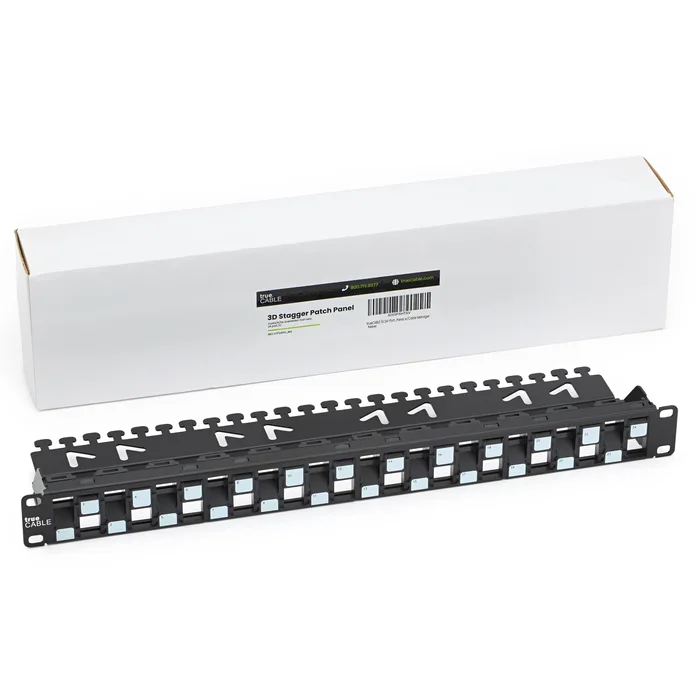
- Buy trueCABLE Unshielded Patch Panel, 24 Port, 1U, Staggered Blank Modular An empty 1U frame with 24 keystone bays, so you decide what each port becomes. Amazon
- Buy Monoprice 24-port Cat6 Unshielded UL Listed Patch Panel, 1U, 110/Dual IDC, with Wire Support Bar One part, 24 fixed Cat6 ports, dual IDC headers labelled for both wiring schemes, and nothing else to buy. Amazon
- It depends Leviton Flat QuickPort Patch Panel, 24-Port, 1RU, Black (49255-H24) A well-finished blank 1RU panel built around Leviton's own QuickPort module range rather than a generic bay. Amazon
- Skip Cable Matters 1U 24-Port UTP Cat 6 Ethernet Patch Panel with Inline Keystone A feed-through coupler panel that takes a patch lead on both sides, which is exactly why it should not be your permanent infrastructure. Amazon
What actually matters
- Termination method - whether the panel accepts your solid horizontal cable on an IDC contact or only accepts a patch lead. This single fact decides whether the panel is part of your permanent cabling or just an extra pair of connectors sitting in the middle of it.
- Modularity - fixed ports are one cheaper part, blank keystone bays are more parts and more freedom. Modularity is what lets you put a shielded jack, a coupler, or a fibre adapter in one bay of an otherwise ordinary panel.
- Rear cable management bar - the bar the incoming bundle is tied to so the cable weight is not hanging on 24 sets of IDC contacts. Panels that leave it out are saving a few cents at the expense of the terminations you just spent an evening making.
- Category rating - Cat6 and Cat6A panels are rated for different frequencies and different 10G distances. On a blank keystone panel the rating comes mostly from the jacks you fit, though panel geometry matters too at Cat6A.
- Shielding and bonding - a shielded metal panel gives cable shields a drain path, but only if it is actually bonded to a rack bus bar or an equivalent ground. Unbonded, the shielding is decorative.
- Port numbering and labelling - silk-screened numbers and write-on label strips are what let you find a drop years later. This is the feature people dismiss when buying and miss constantly afterwards.
- Physical fit - 19 inch width and 1U height are standard, but panel depth with the management bar fitted varies enough to matter in a shallow wall-mount enclosure. Measure the enclosure, not just the rack.
The specs, in plain English
Green flags vs red flags
Green flags
- The listing states clearly whether ports are punch-down, keystone bays, or feed-through couplers, rather than leaving you to guess from a photo.
- A rear cable management bar is included and shown in the product images.
- The IDC header is printed with both T568A and T568B colour codes.
- Port numbers are silk-screened onto the panel and there is somewhere to write a label.
- The manufacturer publishes the panel's depth, not just its width and rack units.
Red flags
- A feed-through or coupler panel sold as a full-performance permanent cabling solution rather than a temporary convenience.
- A category rating quoted for a blank keystone panel without saying anything about the jacks it needs.
- No mention of a rear support or management bar anywhere in the listing or images.
- A shielded panel described without any reference to bonding or a ground path.
- Speed claims about the panel making a network faster, which is not what a patch panel does.
Who's who: the brands
- trueCABLE - A cabling specialist that publishes unusually detailed technical guidance, and sells blank keystone panels in rack and wall-mount, shielded and unshielded versions.
- Monoprice - A budget-oriented brand that sells fixed punch-down panels, among other panel types.
- Leviton - A long-established electrical and structured cabling brand whose panels are built around its own QuickPort modular connector family.
- TRENDnet - Networking brand that sells Cat6 punch-down patch panels.
- Cable Matters - Accessory brand whose patch panels include inline-coupler feed-through panels that are convenient but not permanent-cabling parts.
How to read a listing without getting fooled
Read a patch panel listing back to front. Find the termination method first, because 24-port Cat6 1U tells you nothing that distinguishes one panel from another: look for the words punch-down, 110, dual IDC, blank, unloaded, keystone, feed-through or inline coupler, and if none of them appear, look at a photo of the rear. If it is a blank panel, remember the price you are looking at does not include 24 jacks, and the jacks are usually the larger half of the bill. Then check for a rear cable management or support bar in the images. Then check shielding, and if it says shielded, look for any mention of a bond wire or ground lug. Finally check the physical numbers that are not standard: overall depth matters for wall enclosures, and staggered or angled bay layouts change how the front sits. Treat category claims on a blank panel as a claim about geometry, not about performance you will get without the right jacks.
How much should you spend?
Budget tier gets you a competent fixed punch-down panel with a wire support bar from the value brands, and that is genuinely all you need for a settled all-copper install. Mid-range covers most blank keystone panels, staggered layouts, and shielded versions, but the sticker is for an empty frame: budget separately for 24 jacks, which will often cost more than the panel did. Premium is where the established structured cabling brands sit, and what you are paying for is finish, labelling, documentation and a coherent module family that matches your wall plates, rather than measurable extra throughput. Feed-through coupler panels are often priced in the mid-range despite being the least capable option for permanent work, which is worth noticing. Spend your money on good jacks and careful terminations before you spend it on the frame that holds them.
Questions, answered
How many ports should I buy?
Count your drops, then buy the next size up. A 24-port panel is the common home size because it fits one rack unit and covers a house with room to spare. Unused bays on a blank keystone panel take cheap blank inserts, so an over-sized keystone panel costs almost nothing to leave half empty. On a fixed punch-down panel the unused ports are simply idle, which is also fine.
Can I mount a patch panel on a wall instead of in a rack?
Yes, and manufacturers sell panels specifically for it, usually in 12-port sizes with hinged or bracketed bodies. You can also put a standard 19 inch 1U panel into a wall-mount bracket or a shallow enclosure. The thing to check is depth, since a rack panel that measures close to three inches deep with its cable bar fitted may not let a shallow enclosure door close. Bonding is the other wall-mount catch: a shielded panel with no rack bus bar nearby needs a deliberate ground path.
Do I need to punch down with a proper tool?
For a punch-down panel or a punch-down keystone jack, yes. A 110 punch-down tool seats the conductor into the IDC contact and trims the excess in one action, and the trim is part of why the termination measures well. Some keystone jacks are toolless designs that close over the conductors instead, which is slower to learn but needs no tool. What matters either way is keeping the untwist short and the last twist close to the contact.
Should I buy Cat6 or Cat6A hardware?
If you are wiring something you do not want to revisit, Cat6A hardware is the more future-proof choice, and it is the rating to look for if 10G over longer runs is on your list. Cat6 hardware is cheaper and entirely adequate for gigabit and for short 10G runs. On a blank keystone panel the answer is partly about the jacks and partly about the panel, since unshielded Cat6A at 10G is where panel geometry like staggered bays starts to matter for alien crosstalk.
Or jump to the head-to-head: trueCABLE Unshielded Patch Panel, 24 Port, 1U, Staggered Blank Modular vs Monoprice 24-port Cat6 Unshielded UL Listed Patch Panel, 1U, 110/Dual IDC, with Wire Support Bar.