Explained
Embroidery Machines, Explained
After reading, you'll understand embroidery area, hoops, file formats and speed well enough to read any maker's page and spot what it leaves out.
In this guide
First-time buyers are often confused by two numbers that look alike: the embroidery area and the hoop size. They are also unsure whether they need a combo machine or an embroidery-only one, and what a file format has to do with anything. Pages from different makers list different details, and some leave out basics like which formats the machine reads. A few minutes with the terms below makes those pages much easier to compare.
The 30-second version
- Embroidery area decides design size, so pick it for the largest design you expect to stitch without re-hooping.
- Combo machines sew and embroider, while embroidery-only machines do not sew at all.
- File formats matter, because a machine that cannot read a design file needs it converted first.
- Stitches per minute set the pace, and embroidery speed is usually lower than sewing speed on the same machine.
- Hoops in the box vary, so check how many come with the machine before budgeting for accessories.
The products this guide is about
Our verdict on each, with the full reasoning on the companion review.
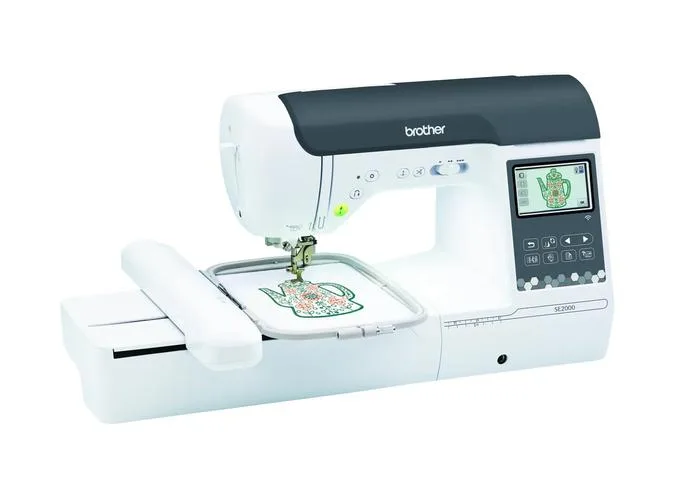
- Buy Brother SE2000 A sewing and embroidery combo with a 5 inch by 7 inch area, 193 built-in designs and wireless connectivity. Amazon
- Buy bernette b70 DECO An embroidery-only machine with a 260 by 160 mm area, 208 designs and three hoops included.
- Buy Janome Memory Craft 500E An embroidery machine with a 7.9 inch by 11 inch area, 160 designs and four hoops in the box. Amazon
- It depends Ricoma EM-1010 A ten-needle embroidery machine with a 12.2 inch by 8.3 inch area and 1,000 stitches per minute.
- It depends Melco BRAVO A single-head, 16-needle embroidery machine at 1,000 stitches per minute, sold for people moving past a hobby.
- Skip Singer SE9180 A budget sewing and embroidery combo with a 170 by 100 mm field that is held back by a small field and an inconsistent page.
What actually matters
- Embroidery area - The biggest design the machine can stitch in one hooping. It is usually listed in inches or millimeters.
- Hoop - The frame that holds fabric and stabilizer taut while the machine stitches. Larger hoops allow larger designs, and the machine often detects which one is attached.
- Built-in designs - Designs stored in the machine. They let you start stitching with no computer, but most buyers also add their own files.
- Embroidery speed - Stitches per minute while embroidering. A faster machine finishes dense designs sooner, but fabric and stabilizer still need to be right.
- File format - The file type of a design, such as PES, DST or VP3. A machine reads only the formats its maker supports.
- Needle count - Single-needle machines hold one thread at a time, while a ten-needle machine holds ten colors, so fewer stops during a multi-color design.
- Design transfer - How files get onto the machine, by USB flash drive, wireless LAN, an app or Ethernet.
The specs, in plain English
Green flags vs red flags
Green flags
- The maker lists the embroidery area in inches or millimeters.
- The page names the file formats the machine reads.
- The number of hoops in the box is stated.
- Embroidery speed is listed separately from sewing speed.
- Specifications and FAQ pages agree with each other.
Red flags
- A page that lists Wi-Fi in its specs and says no Wi-Fi in its FAQ.
- Only hoop sizes listed, with no embroidery area.
- Design counts that differ between sections of the same page.
- No stated file formats.
- A listing that does not say whether it is a combo or embroidery only.
Who's who: the brands
- Brother - A large maker of home sewing and embroidery machines, including the SE2000 combo.
- bernette - The sewing line from the Swiss maker BERNINA, with an embroidery-only 70 DECO model.
- Janome - Known for home sewing and embroidery machines such as the Memory Craft 500E.
- Melco - A commercial embroidery maker whose BRAVO is a 16-needle machine.
- Ricoma - Known for multi-needle machines such as the EM-1010, aimed at hobbyists and small businesses.
How to read a listing without getting fooled
Start with the embroidery area, not the hoop list, since that is the stitchable design size. Then check whether the page names file formats, the number of hoops included and the embroidery speed, which is often listed apart from the sewing speed. Compare the specifications with any FAQ section, because a page can disagree with itself, and treat anything the page does not state as unknown. If the page lists two counts for designs or stitches, ask a dealer which is correct.
How much should you spend?
Embroidery machines span a wide range of tiers. Budget combos such as the Singer SE9180 sit at the low end, the Brother SE2000 and bernette b70 DECO are mid-range, and the Ricoma EM-1010 sits in the premium tier. The Melco BRAVO sits at the flagship tier and the Janome Memory Craft 500E is mid-range. Spend more only when a bigger embroidery area or more needles is something you will actually use, and remember stabilizer, thread and extra hoops are separate costs.
Questions, answered
Can I embroider on any fabric?
Most machines handle common cottons and similar fabrics with the right stabilizer. Stretchy, thin or very thick fabrics need a different stabilizer or needle, and makers publish guidance for their machines. Check your machine's manual before using unusual materials.
Do I need special software?
Not to start, since built-in designs work with no computer. Software helps if you want to edit or make your own designs, and some makers supply free software or an app. Check which operating systems it supports.
What is a thread cutter on an embroidery machine?
It trims the thread automatically between color changes or jumps. The bernette b70 DECO page says threads are cut automatically while embroidering, and the Singer SE9180 page lists a built-in cutter that trims top and bobbin threads.
Is a bigger embroidery area always better?
No. A bigger area helps only if you stitch large designs, and larger machines are heavier and cost more. A 5 inch by 7 inch area covers many common projects.
Or jump to the head-to-head: Brother SE2000 vs bernette b70 DECO.