

Tools & DIY
Laser Engravers: Which to Buy and Which to Skip
Six home and hobby laser engravers compared on laser type, power, work area, enclosure and the safety details each maker publishes.
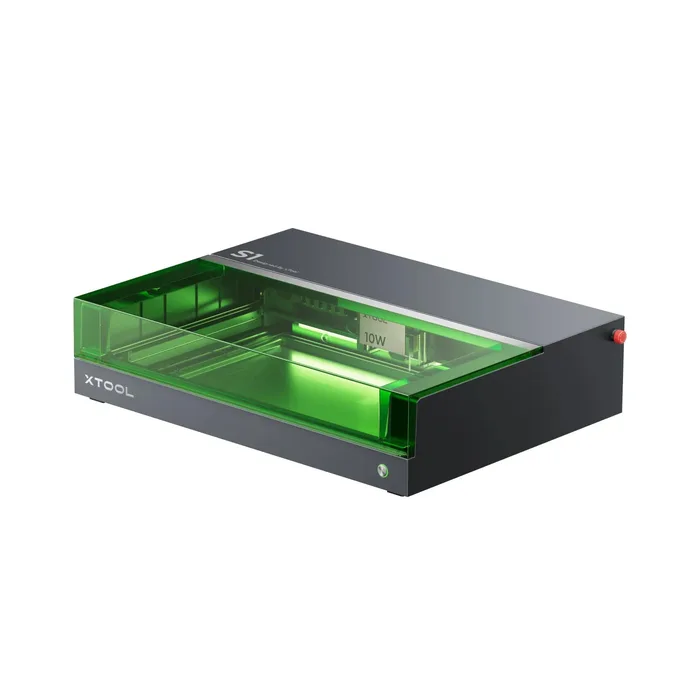
The short version
The xTool S1 is the pick for most buyers: an enclosed 40W diode laser with a large bed and a long listed safety feature set. The AtomStack A20 Pro V2 is the value pick, with 20W of diode power and a 400 x 365 mm bed, although the base machine is an open frame. The Creality Falcon A1 Pro is the compact enclosed option with a camera and built-in smoke filter. The Glowforge Aura suits beginners who value easy software over power, and the SCULPFUN S30 Ultra suits people who need a very large bed. The OMTech K40+ is the skip for a first machine because of its tube life, water cooling and software setup. Always follow each maker's manual on eye protection and ventilation. Best for: most hobbyists who want a machine they will not outgrow.
Our picks at a glance
- xTool S1 - Buy. An enclosed 40W diode machine with a big bed and the most complete safety feature list in this group.
- AtomStack A20 Pro V2 - Buy. A 20W open-frame diode laser with a large bed at a fraction of the enclosed-machine cost.
- Creality Falcon A1 Pro - Buy. A compact enclosed machine with a camera, touchscreen and built-in smoke filter, aimed at plug-and-play use.
- Glowforge Aura - It depends. A 6W diode craft laser built around easy software and Proofgrade materials, with a small work area.
- SCULPFUN S30 Ultra 22W - It depends. A very large open-frame bed for sign makers and panel cutters, with up to 22W of diode power.
- OMTech K40+ 45W - Skip. A compact desktop CO2 laser whose tube, water cooling and software make it the most demanding machine to own here.
The verdict in 30 seconds
What mattered most
- Laser type and power
- Work area
- Enclosure
- Laser class as stated by maker
- Listed safety features
- Cooling and smoke handling
Home laser engravers now range from enclosed 6W craft machines to open-frame diode lasers and desktop CO2 tubes. Power, bed size and enclosure change what you can make and how much setup you take on. We compared six machines sold in the US using only what each maker publishes, and we kept safety claims to the makers' own wording. For vinyl and cardstock cutters instead, see our craft cutting machines review.
An enclosed 40W diode machine with a big bed and the most complete safety feature list in this group.
Best for: Hobbyists who want one enclosed machine to grow into rather than outgrow.
- The 40W bundle lists a 19.6 x 12.5 in (498 x 319 mm) working area, 600 mm/s working speed and a 0.08 x 0.10 mm spot size.
- Enclosed build: the maker lists Class 1 safety, 5-direction flame detection, an emergency stop, a lid-open safety stop and a laser key lock.
- Switchable modules (40W, 20W, 10W diode, plus a separate 1064nm IR kit for metal) and a conveyor-feeder option for long projects up to 118 in.
- It is the most expensive of the three machines most buyers will cross-shop.
- The maker lists separate Class 1 and Class 4 riser bases, so check which riser you are adding.
- At 20 kg and 30.12 x 22.09 in, it needs a dedicated bench or table.
- The desktop smoke purifier is a separate accessory, so plan for ventilation.
Own the xTool S1? Tell us how it held up.
Thanks. Counted, and shown once enough owners have weighed in.
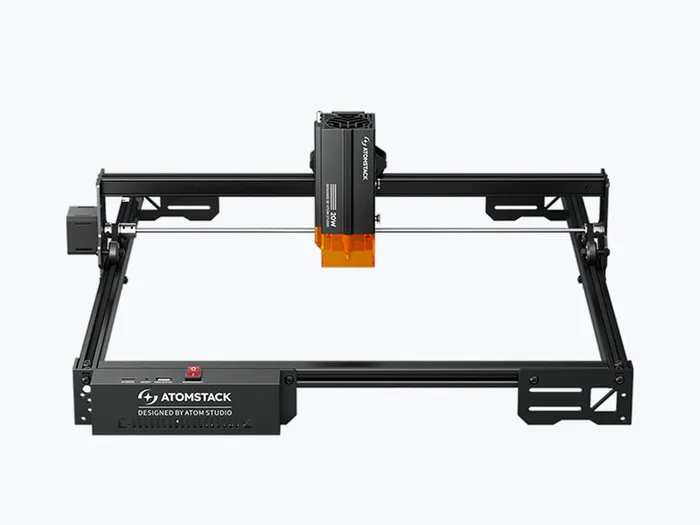
A 20W open-frame diode laser with a large bed at a fraction of the enclosed-machine cost.
Best for: Budget-minded buyers with a garage or workshop who want real cutting power.
- 20W diode laser at 455 nm with a 0.08 x 0.10 mm spot and a 400 x 365 mm (15.75 x 15.4 in) engraving area.
- Maker lists USB and 2.4G Wi-Fi, LightBurn and LaserGRBL support, and a tip-over alarm that sounds above a 15 degree tilt.
- Quality certifications listed by the maker: IEC 60825, CE, FCC, RoHS, FDA, PSE and UKCA, and the machine can be bought alone or in bundles that include an enclosure.
- The machine-only listing is an open frame, so the lid, eye protection and smoke handling are on you or the enclosure bundle.
- Focus is manual, and speed tops out at 400 mm/s.
- Flame detection is listed as requiring the Z2 Z-axis slider.
- No built-in screen or camera on the listing.
Own the AtomStack A20 Pro V2? Tell us how it held up.
Thanks. Counted, and shown once enough owners have weighed in.
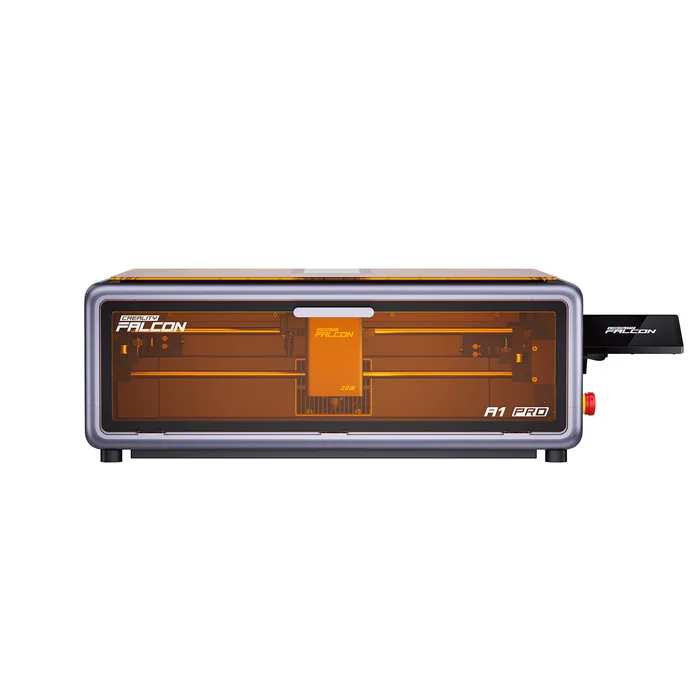
A compact enclosed machine with a camera, touchscreen and built-in smoke filter, aimed at plug-and-play use.
Best for: Home users who want an enclosed, camera-guided machine that is ready to run.
- Enclosed design listed by the maker as Class 1 (FDA), with a lid-open stop, an emergency stop and flame detection.
- 20W diode at 455 nm with a 268 x 358 mm engraving area, 600 mm/s speed and a camera for auto focus and live preview.
- Built-in smoke exhaust filter, touchscreen, and compatibility with Falcon Design Space, LightBurn and LaserGRBL.
- The 268 x 358 mm bed is smaller than the xTool S1's.
- The spec sheet lists a 2W IR laser alongside the 20W diode, so confirm which module is in the bundle you buy.
- Operating temperature is listed as 5 to 35 C.
- Software support is Windows and macOS only.
Own the Creality Falcon A1 Pro? Tell us how it held up.
Thanks. Counted, and shown once enough owners have weighed in.
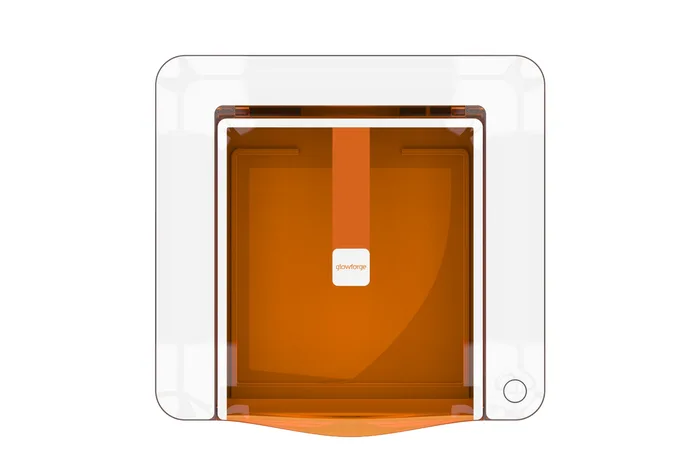
A 6W diode craft laser built around easy software and Proofgrade materials, with a small work area.
Best for: Crafters who value approachable software and paper, leather and thin wood over raw cutting power.
- Maker states it is certified as a Class 1 laser product containing an embedded Class 4 laser, with UL-standard safety certification.
- 12 x 12 in work area, cuts material up to 1/4 in thick, with a passthrough slot for material up to 3/8 in high and 12 in long.
- Preview Mode, an internal camera and free design software aimed at beginners.
- The tech spec page lists 6W laser power, far below the 20W and 40W diode machines here.
- Wi-Fi is required to operate it.
- It needs ventilation through the Glowforge filter or an openable window within 8 feet, per the maker.
- Designs and projects beyond the free tools are optional in-app purchases.
Own the Glowforge Aura? Tell us how it held up.
Thanks. Counted, and shown once enough owners have weighed in.
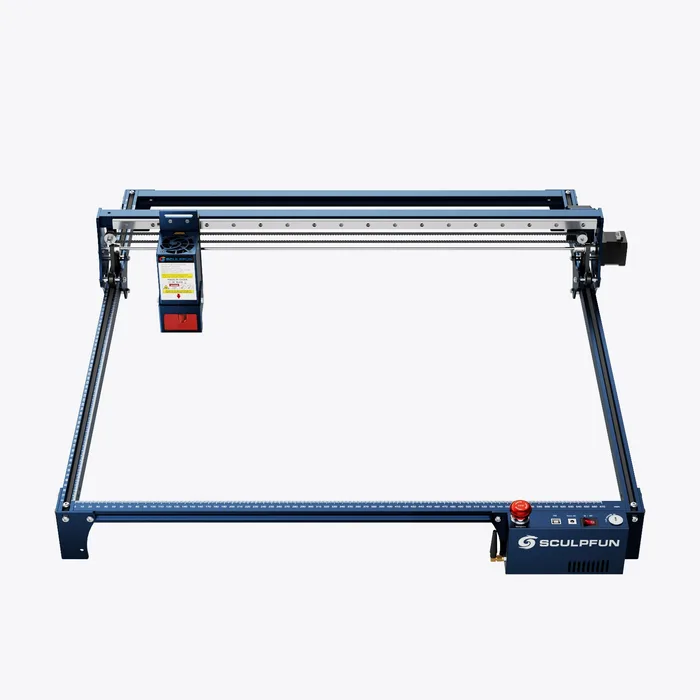
A very large open-frame bed for sign makers and panel cutters, with up to 22W of diode power.
Best for: Makers who need a large bed for big boards or multi-panel jobs.
- Maker lists a 590 x 595 mm engraving area, expandable to 935 x 905 mm with an extension kit.
- Emergency stop, key lock, a detachable eye shield, laser goggles and an air-assist pump with automatic control are listed.
- CE, FCC, RoHS and FDA certifications are listed, with Bluetooth connection.
- An open-frame machine with a footprint of about 800 x 840 mm, so it needs real bench space.
- Assembly is required (the packing list includes frame profiles and an installation package).
- No enclosure is included in the listing.
- The page does not publish a laser class.
Own the SCULPFUN S30 Ultra 22W? Tell us how it held up.
Thanks. Counted, and shown once enough owners have weighed in.
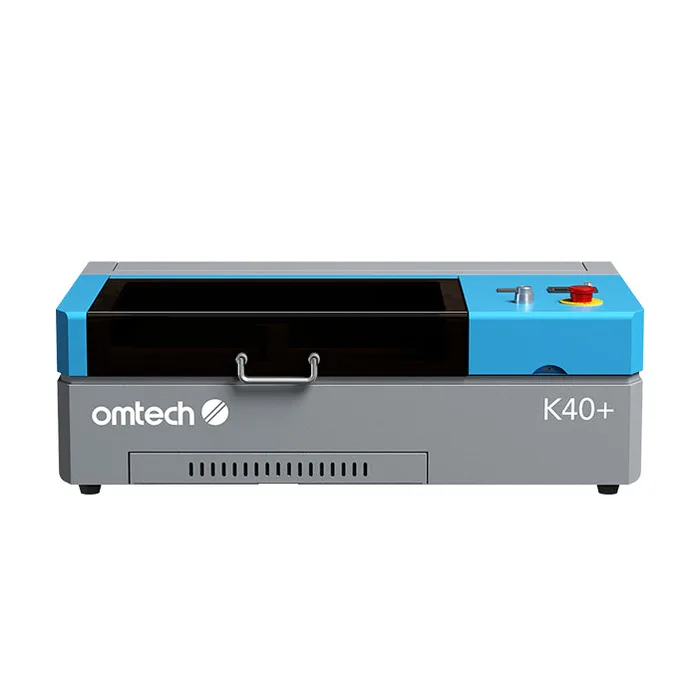
A compact desktop CO2 laser whose tube, water cooling and software make it the most demanding machine to own here.
Best for: Experienced makers who want a CO2 tube and are comfortable maintaining it.
- CO2 tube: the maker lists glass and acrylic among engraving materials.
- Includes a water pump, red-dot pointer, emergency stop, built-in ventilation fan and air compressor.
- 2-year parts warranty, 6-month warranty on tubes and power supplies, and an included virtual tech support session.
- The tube is rated for up to 2,000 hours, and the maker says high power use cuts that to 400 to 600 hours.
- It needs water cooling with distilled water kept at 60 to 70 F, and the chiller is a separate package.
- The standard package ships with LaserDRW and does not include LightBurn.
- The working area is 8 x 12 in, and removing the board for 2 in of extra depth shrinks it to 8 x 5 in.
Own the OMTech K40+ 45W? Tell us how it held up.
Thanks. Counted, and shown once enough owners have weighed in.
| Criteria | xTool S1 Top pick Buy it Buy | AtomStack A20 Pro V2 Buy it Buy | Creality Falcon A1 Pro Buy it Buy | Glowforge Aura It depends Buy | SCULPFUN S30 Ultra 22W It depends Buy | OMTech K40+ 45W Skip it Buy |
|---|---|---|---|---|---|---|
| Best for | Hobbyists who want one enclosed machine to grow into rather than outgrow. | Budget-minded buyers with a garage or workshop who want real cutting power. | Home users who want an enclosed, camera-guided machine that is ready to run. | Crafters who value approachable software and paper, leather and thin wood over raw cutting power. | Makers who need a large bed for big boards or multi-panel jobs. | Experienced makers who want a CO2 tube and are comfortable maintaining it. |
| Price tier | $$$ · premium | $$ · mid-range | $$$ · premium | $$$ · premium | $$ · mid-range | $$ · mid-range |
| Laser type and power | Diode, 40W module (20W/10W optional) | Diode, 20W | Diode, 20W (2W IR also listed) | Diode, 6W | Diode, up to 22W | CO2 glass tube, 45W |
| Work area | 19.6 x 12.5 in | 15.75 x 15.4 in | 268 x 358 mm | 12 x 12 in | 590 x 595 mm | 8 x 12 in |
| Enclosure | Enclosed with lid | Open frame (enclosure bundle sold) | Enclosed with lid | Enclosed | Open frame, detachable eye shield | Enclosed desktop body with lid |
| Laser class as stated by maker | Class 1 safety listed | Not published on listing (IEC 60825 certification listed) | Class 1 (FDA) | Class 1 containing embedded Class 4 | Not published | Not published (FDA compliant listed) |
| Listed safety features | Flame detection, e-stop, lid-open stop, key lock | Tip-over alarm, flame detection (needs Z2 slider) | Flame detection, lid-open stop, e-stop | Safety sensors, UL-standard certification | E-stop, key lock, eye shield, goggles in box | E-stop |
| Cooling and smoke handling | Exhaust fans, purifier sold separately | Open frame, air assist listed | Built-in smoke filter, air assist | Ventilation filter or window within 8 ft | Air-assist pump with auto control | Distilled-water cooling, exhaust duct, built-in fan |
| Connectivity and software | USB, Wi-Fi, xTool Creative Space, LightBurn | USB, 2.4G Wi-Fi, LightBurn, LaserGRBL | Falcon Design Space, LightBurn, LaserGRBL | Wi-Fi required, Glowforge software | Bluetooth, USB | USB, LaserDRW (LightBurn not in base package) |
| Best for | Growing hobbyists | Value seekers | Plug-and-play home use | Craft beginners | Large-format jobs | Experienced CO2 owners |
Which one is right for you?
- Hobbyists who want one enclosed machine to grow into rather than outgrow. Buy it xTool S1
- Budget-minded buyers with a garage or workshop who want real cutting power. Buy it AtomStack A20 Pro V2
- Home users who want an enclosed, camera-guided machine that is ready to run. Buy it Creality Falcon A1 Pro
- Crafters who value approachable software and paper, leather and thin wood over raw cutting power. It depends Glowforge Aura
- Makers who need a large bed for big boards or multi-panel jobs. It depends SCULPFUN S30 Ultra 22W
- Experienced makers who want a CO2 tube and are comfortable maintaining it. Skip it OMTech K40+ 45W
How we judged the field
Five things matter most in a home laser: laser type and power, work area, enclosure and safety features, ventilation, and software. Power decides what you can cut in one pass. Bed size decides project size. An enclosure and the maker’s safety listing decide how much protection you build yourself. Ventilation is non-negotiable because lasers produce smoke and fumes. Software decides how fast you get from idea to a finished piece. We relied only on makers’ published pages, and we repeated safety wording as stated.
The field splits into enclosed diode machines, open-frame diode machines, a craft laser and a CO2 tube. We picked one from each lane across six different brands: xTool and Creality for enclosed power, AtomStack and SCULPFUN for open-frame value and size, Glowforge for software ease, and OMTech for a CO2 contrast. Machines already covered by our craft cutting machines review, such as xTool’s M2, were left out.
xTool S1
Buy itThe xTool S1 is the machine to buy if you want one setup that covers wood, leather, acrylic and engraving on many surfaces without needing to add a box around it. The 40W bundle lists a 19.6 x 12.5 in working area, 600 mm/s working speed and a 0.08 x 0.10 mm spot. The maker’s one-pass table gives 18 mm cherry wood and 15 mm basswood plywood at 40W. Safety is where it stands out: Class 1 safety, five-direction flame detection, an emergency stop, a lid-open stop and a key lock are all listed, and the cover is described as filtering light so you can watch without goggles. Follow the maker’s manual for eye protection and ventilation, since the smoke purifier is a separate accessory. Modules swap between 40W, 20W and 10W diode, and a 1064nm IR kit is sold for metal. The trade-off is money and size: this is the premium pick and it weighs 20 kg. It suits anyone who expects to keep using a laser for years.
AtomStack A20 Pro V2
Buy itThe AtomStack A20 Pro V2 is the value pick because it gives you 20W of diode power and a 400 x 365 mm bed without the enclosed-machine markup. The maker lists a 0.08 x 0.10 mm spot, speeds up to 400 mm/s, USB and 2.4G Wi-Fi, and support for LightBurn and LaserGRBL. Safety features listed include a tip-over alarm above 15 degrees and resume engraving, with flame detection requiring the Z2 Z-axis slider, plus IEC 60825, CE, FCC, RoHS, FDA, PSE and UKCA certifications. The base machine is an open frame with manual focus, so you handle eye protection, ventilation and fire precautions yourself exactly as the manual directs, or step up to the enclosure bundle. There is no camera or screen on the listing. If you have a workshop, a garage bench and a little patience, this is the best money-to-capability ratio in the group.
Creality Falcon A1 Pro
Buy itThe Creality Falcon A1 Pro is the enclosed machine for people who want to press start and watch. It pairs a 20W diode laser at 455 nm with a 268 x 358 mm engraving area and a listed 600 mm/s speed. The maker lists a Class 1 (FDA) safety class, an enclosure that blocks laser light, a lid-open stop, an emergency stop and flame detection, plus a built-in smoke exhaust filter and a camera for focus and live preview. It also supports Falcon Design Space, LightBurn and LaserGRBL. At 567 x 468 x 211 mm and 16.8 kg it is more compact than the xTool S1, but the bed is smaller. The spec sheet also lists a 2W IR source, so check the exact bundle before ordering. Choose it for a living room or classroom style setup where an enclosed, camera-guided machine matters more than maximum bed size.
Glowforge Aura
It dependsThe Glowforge Aura is the right buy only if software ease and brand support matter more than power. Its tech specs list a 6W diode laser, a 12 x 12 in work area, cutting up to 1/4 in thick and a passthrough slot for material up to 3/8 in high and 12 in long. The maker states it is certified as a Class 1 laser product containing an embedded Class 4 laser, comes with safety training materials and carries a 12-month warranty. Preview Mode and the internal camera show your design on the material before cutting. It requires Wi-Fi and ventilation through a Glowforge filter or an openable window within 8 feet. Extra designs are optional in-app purchases. Next to the 20W machines here it is far less powerful. It fits crafters making cards, leather goods and thin wood pieces who want the smoothest on-ramp. For vinyl and cardstock work, our craft cutting machines review covers that class.
SCULPFUN S30 Ultra 22W
It dependsThe SCULPFUN S30 Ultra 22W depends on whether you need size. Its listed engraving area is 590 x 595 mm, and an extension kit takes it to 935 x 905 mm, which is far beyond the other machines. The maker lists up to 22W, an air-assist pump with automatic control, Bluetooth, an emergency stop, a key lock, a detachable eye shield, laser goggles in the box and CE, FCC, RoHS and FDA certifications. The page does not state a laser class. This is an open frame at roughly 800 x 840 mm external size, assembled from profiles and a 9.9 kg package, so you need bench space and a plan for fumes and eye protection that follows the manual. It makes sense for sign makers and anyone cutting big plywood panels. For small gifts and tumblers, a smaller enclosed machine is a better fit.
OMTech K40+ 45W
Skip itThe OMTech K40+ 45W is a real CO2 laser at a mid-range price, but it asks the most of its owner, which is why it is the skip for a first home machine. The maker lists a 45W CO2 tube rated for up to 2,000 hours, with 400 to 600 hours at 70 to 100 percent power. It requires water cooling with distilled water kept between 60 and 70 F; a pump is included, and a chiller is sold as a separate package. The standard package ships with LaserDRW and does not include LightBurn, and the working area is 8 x 12 in. Built-in ventilation, an air compressor, a red-dot pointer and an emergency stop are included. The maker warns some PVC-based acrylics can create toxic fumes when lasered. It suits experienced makers who want a CO2 tube and enjoy maintaining it; for most home buyers, an enclosed diode machine is simpler.
Sources
Specs in this review come from these pages.
- xTool S1 product page (xtool.com)
- Creality Falcon A1 Pro product page (store.creality.com)
- AtomStack A20 Pro V2 product page (atomstack3d.com)
- Glowforge Aura product page (shop.glowforge.com)
- Glowforge tech specs (glowforge.com)
- SCULPFUN S30 Ultra product page (sculpfun.com)
- OMTech K40+ product page (omtech.com)
xTool S1 vs AtomStack A20 Pro V2: which should you buy?
The xTool S1 and the AtomStack A20 Pro V2 split on enclosure and price. The S1 gives a 19.6 x 12.5 in bed, a 40W module option and an enclosed body with a lid-open stop, flame detection and a key lock. The A20 Pro V2 gives 20W and a 400 x 365 mm bed, and its base listing is an open frame with manual focus.
Choose the S1 if the machine will sit in a living space or you plan to expand with modules and a conveyor feeder. Choose the A20 Pro V2 if you have workshop space, want to spend less and can build your own safety setup exactly as its manual describes. Both list LightBurn support.
Who should buy which
- Most hobbyists: the xTool S1. Enclosed, 40W, a large bed and a full list of safety features.
- Budget-focused buyers with a workshop: the AtomStack A20 Pro V2. 20W and a 400 x 365 mm bed for much less than an enclosed machine.
- Home or classroom users: the Creality Falcon A1 Pro. Compact enclosed body with a camera and a built-in smoke filter.
- Beginner crafters: the Glowforge Aura. Easy software and Proofgrade materials suit paper, leather and thin wood.
- Sign makers and large panel work: the SCULPFUN S30 Ultra 22W. A 590 x 595 mm bed that can expand to 935 x 905 mm.
What to look for
- Laser type and power: Diodes dominate home machines, from 6W to 40W here, while CO2 tubes such as the OMTech K40+ add cooling and tube-life considerations.
- Work area: Compare the stated bed, not the machine footprint, because the two can differ a lot.
- Enclosure: An enclosed machine like the xTool S1 or Creality Falcon A1 Pro includes a lid, while open-frame machines leave that to you.
- Laser class and certifications: Read the exact wording on the maker page, such as Class 1 versus Class 1 containing an embedded Class 4 laser.
- Ventilation: Every maker here describes some form of exhaust or filter; set it up per the manual.
- Software: Check for LightBurn or LaserGRBL support if you want flexibility, and note which operating systems the software runs on.
Our final take
For most buyers the xTool S1 is the machine to get, with an enclosed body, a 40W module option and the most thorough safety list on the page. The AtomStack A20 Pro V2 is the sensible value buy if you have a workshop and will set up fumes and eye protection yourself, following its manual. The Creality Falcon A1 Pro suits tighter spaces, the Glowforge Aura suits easy-start crafters, and the SCULPFUN S30 Ultra suits big boards. Skip the OMTech K40+ unless you want a CO2 tube and enjoy maintaining it. Whatever you pick, follow the maker’s instructions for eye protection and ventilation.
Questions, answered
Do I need laser safety glasses?
Follow the manual for the exact machine. The xTool S1 maker describes a light-filtering lid and says you can watch without goggles. The Creality Falcon A1 Pro maker says its enclosure blocks harmful laser light. Open-frame machines such as the AtomStack A20 Pro V2 and SCULPFUN S30 Ultra do not include a full lid on the base listing, and SCULPFUN includes goggles and a detachable eye shield with the S30 Ultra. Never run any machine in a way its maker's instructions do not describe.
Do these machines need ventilation?
Yes, makers state it. Glowforge says the Aura needs ventilation through its filter or an openable window within 8 feet. OMTech lists an exhaust duct and built-in fan for the K40+ and warns that some PVC-based acrylics can create toxic fumes when lasered. xTool sells a desktop smoke purifier as an accessory, and Creality lists a built-in smoke exhaust filter on the A1 Pro. Read the manual for your machine and set up ventilation exactly as it directs.
What is the difference between a diode and a CO2 laser?
Diode lasers are compact and used in most of these machines, from 6W to 40W here. The OMTech K40+ uses a 45W CO2 glass tube, which the maker rates for up to 2,000 hours and which needs water cooling. xTool notes its diode modules cut opaque acrylic and engrave dark glass, while the maker lists glass and acrylic among engraving materials for the K40+. Diode machines are simpler to own. CO2 tubes are a maintenance item.
How big a work area do I need?
Match the bed to your biggest regular project. The Glowforge Aura offers 12 x 12 in, the OMTech K40+ 8 x 12 in, the xTool S1 19.6 x 12.5 in, and the SCULPFUN S30 Ultra 590 x 595 mm. The xTool S1 also lists a conveyor feeder for projects up to 118 in with an extra rail. Bigger beds need more bench space, so check the external dimensions too.
Can these machines engrave metal?
It depends on the laser. The xTool S1 maker sells a separate 1064nm IR module that it says engraves all metals and plastics, and the Creality Falcon A1 Pro spec sheet lists a 2W IR source. OMTech states that a 40W CO2 laser cannot cut or deeply etch raw bare metals and only marks anodized or treated metal. The AtomStack lists non-reflective electroplated and painted metal for engraving. Check the exact material list for your model.
Deciding between the top two? See our head-to-head: xTool S1 vs AtomStack A20 Pro V2.
More in Tools & DIY
Laser Engravers, Explained Plain-English guide → xTool S1 vs AtomStack A20 Pro V2 Head-to-head →  The Best Laser Levels: 4 Compared (and One to Skip)
 The Best Locking Pliers: 4 Compared (and One to Skip)
 The Best Log Splitters: 4 Compared (and One to Skip)
 The Best Miter Saws: 4 Compared (and One to Skip)