

Tech & Gadgets
The Best External Hard Drives: 4 Compared (and One to Skip)
We compared four current spinning-disk external drives on cost per terabyte, speed, durability, software, and connector to find the best backup value.
The short version
For a portable drive that does everything most people need, buy the WD My Passport: it is pocketable, reasonably priced, and includes hardware encryption plus backup software. For maximum capacity per dollar on a desk, the Seagate Expansion Desktop is the value pick, though it needs mains power and lacks encryption. The LaCie Rugged Mini is worth its premium only if you genuinely put a drive through drops and rough travel. Skip the Toshiba Canvio Flex unless price is the only factor, because it lists no encryption or backup software and relies on a Micro-B port. All spinning drives here are far cheaper per terabyte than SSDs but much slower. Best for: anyone backing up or archiving large files who wants the most storage per dollar without moving to flash.
Our picks at a glance
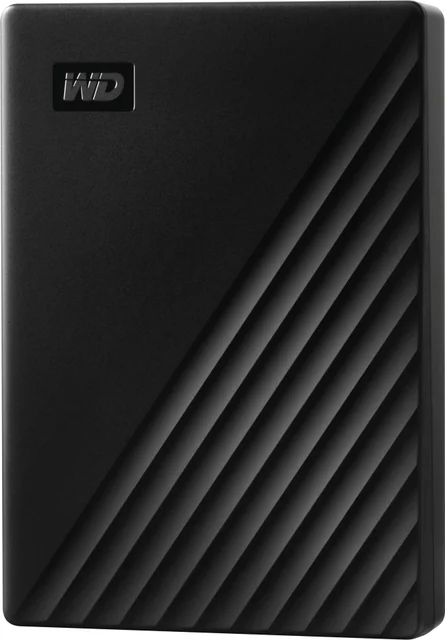
- Western Digital WD My Passport (USB-C) - Buy. The best all-round portable hard drive, pairing pocketable capacity with genuinely useful encryption and backup software.
- Seagate Expansion Desktop - Buy. The value champion for bulk storage, delivering the lowest cost per terabyte and desktop-class speeds.
- LaCie Rugged Mini - It depends. A genuinely tough field drive whose durability premium only pays off if you actually work in the field.
- Toshiba Canvio Flex - Skip. Cheap and cross-platform, but it cuts the software and connector corners that make the alternatives worth owning.
The verdict in 30 seconds
What mattered most
- Form factor
- Best use
- Relative speed
- Encryption / software
- Durability
- Connector
When you need to store or back up terabytes of photos, video, and archives without paying flash prices, a traditional spinning-disk external hard drive is still the cheapest route in 2026. We compared four widely sold models across portable and desktop form factors, weighing cost per terabyte, real-world transfer speed, bundled backup and encryption software, durability, and how each one connects to modern USB-C machines. Two earn a clear recommendation, one is a specialist worth its premium only for the right buyer, and one is best skipped by most people.
The best all-round portable hard drive, pairing pocketable capacity with genuinely useful encryption and backup software.
Best for: Anyone who wants a single pocket drive for backups and file transfer and values built-in encryption.
- 256-bit AES hardware encryption with password protection is built in (WD's software for it is listed as Windows only)
- Bundled backup software makes automated, scheduled backups painless
- Compact and light enough to live in a jacket pocket or laptop bag
- Bundled cable plus adapter covers both USB-C and USB-A machines
- Sequential speeds are typical 2.5-inch HDD territory, well short of any SSD
- WD lists no shock or water rating, so it is not meant for rough field use
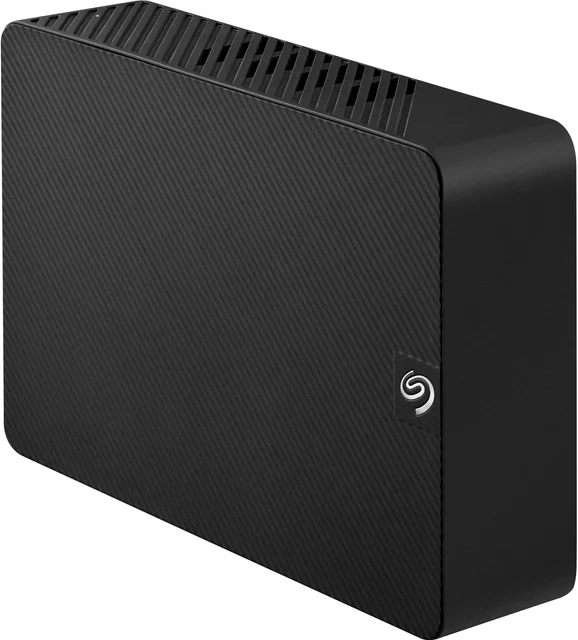
The value champion for bulk storage, delivering the lowest cost per terabyte and desktop-class speeds.
Best for: Home and office users backing up or archiving large libraries where capacity per dollar matters most.
- Lowest cost per terabyte of any drive here, with capacities scaling far beyond portable models
- 3.5-inch mechanism sustains noticeably faster sequential transfers than pocket drives
- Simple drag-and-drop setup that any operating system recognizes quickly
- Rescue data-recovery service is included (Seagate notes it is not available in all countries)
- Needs a mains power adapter, so it is a desk fixture rather than a travel companion
- No hardware encryption; USB-A only means an adapter for USB-C-only laptops
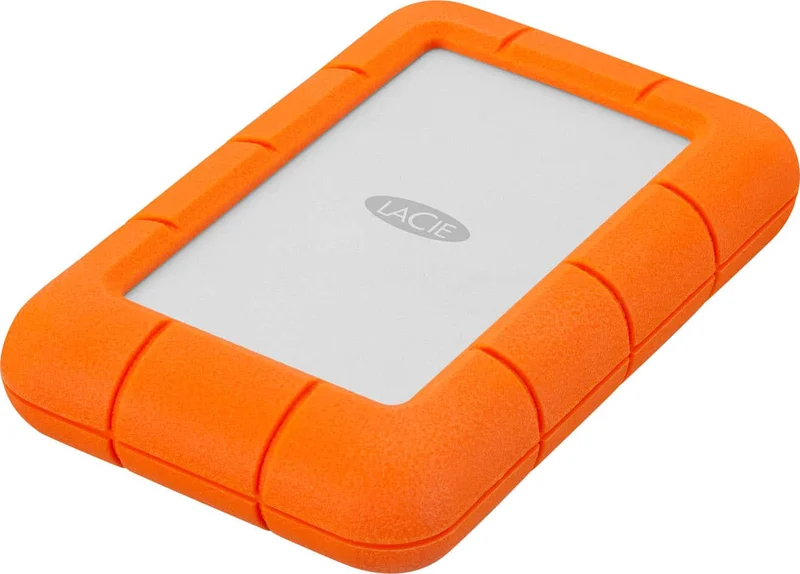
A genuinely tough field drive whose durability premium only pays off if you actually work in the field.
Best for: Photographers, videographers, and travelers who move a drive through bags, sets, and rough conditions.
- Signature rubber bumper built for a rugged, travel-ready design
- Includes a data-recovery service, valuable for irreplaceable footage
- Bus-powered and compact enough to travel with a camera kit
- Costs meaningfully more per terabyte than mainstream portable drives
- Underlying speed is the same class as cheaper HDDs, so you pay for the armor, not performance
- Some owners report occasional enclosure quirks despite the rugged shell
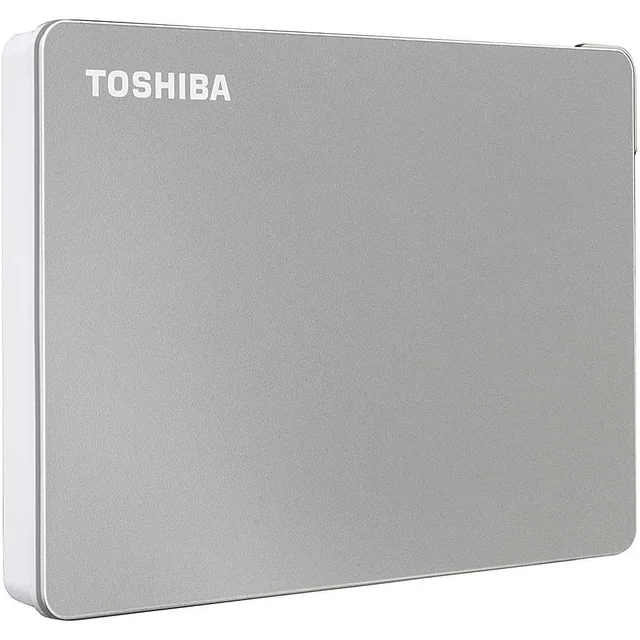
Cheap and cross-platform, but it cuts the software and connector corners that make the alternatives worth owning.
Best for: Budget buyers who only need bare drag-and-drop storage and will supply their own backup routine.
- Among the lowest entry prices for a portable HDD
- Ships with both USB-C and USB-A cables and works across PC, Mac, and tablets out of the box
- Slim metallic-finish casing looks tidier than its price suggests
- Toshiba's page lists no bundled backup software and no hardware encryption
- Uses a Micro-B port on the drive rather than a native USB-C socket
- Owner reports on long-term reliability are more mixed than the category leaders
| Criteria | WD My Passport (USB-C) Top pick Buy it Buy | Seagate Expansion Desktop Buy it Buy | LaCie Rugged Mini It depends Buy | Toshiba Canvio Flex Skip it Buy |
|---|---|---|---|---|
| Best for | Anyone who wants a single pocket drive for backups and file transfer and values built-in encryption. | Home and office users backing up or archiving large libraries where capacity per dollar matters most. | Photographers, videographers, and travelers who move a drive through bags, sets, and rough conditions. | Budget buyers who only need bare drag-and-drop storage and will supply their own backup routine. |
| Price tier | $$ · mid-range | $$ · mid-range | $$$ · premium | $ · budget |
| Form factor | Portable 2.5-inch | Desktop 3.5-inch | Portable 2.5-inch (rugged) | Portable 2.5-inch |
| Best use | Everyday backup and transfer | Bulk archive and backup | Field and travel work | Basic budget storage |
| Relative speed | Typical HDD | Faster (desktop-class) | Typical HDD | Typical HDD |
| Encryption / software | Hardware AES-256 + backup software | None bundled | Data-recovery service | None bundled |
| Durability | Standard enclosure | Standard desktop enclosure | Rugged rubber bumper | Standard enclosure |
| Connector | USB-C + USB-A | USB-A (needs power) | USB-C + USB-A | Micro-B (USB-C/USB-A cables included) |
| Cost per terabyte | Moderate | Lowest | Highest | Low |
| Price tier | $$ · mid-range | $$ · mid-range | $$$ · premium | $ · budget |
Which one is right for you?
- Anyone who wants a single pocket drive for backups and file transfer and values built-in encryption. Buy it Western Digital WD My Passport (USB-C)
- Home and office users backing up or archiving large libraries where capacity per dollar matters most. Buy it Seagate Expansion Desktop
- Photographers, videographers, and travelers who move a drive through bags, sets, and rough conditions. It depends LaCie Rugged Mini
- Budget buyers who only need bare drag-and-drop storage and will supply their own backup routine. Skip it Toshiba Canvio Flex
How we judged the field
We do not run our own storage lab. Instead we synthesize independent testing and aggregated owner reports to reach a practical verdict, and for external hard drives a few criteria consistently separate the good from the forgettable. Cost per terabyte is the headline reason to buy a spinning drive at all, so we weighed it heavily. We also looked at real-world sequential transfer speed, since desktop 3.5-inch drives meaningfully outpace pocket-sized 2.5-inch units. Beyond raw numbers we considered bundled software and encryption, durability and any data-recovery coverage, and how cleanly each drive connects to modern USB-C laptops. Reviewers report broadly similar raw speeds across mainstream HDDs, so software, connector, and build quality end up deciding which drive is actually worth living with.
WD My Passport (USB-C)
Buy itThe My Passport is the drive we would hand to most people. It is genuinely pocketable, sensibly priced, and unlike the budget competition it bundles both hardware AES-256 encryption with password protection and backup software that makes scheduled, automated backups straightforward. Independent testing puts its throughput in normal 2.5-inch HDD territory, which is to say fine for backups and file transfer but nowhere near SSD speed. Owners consistently praise the balance of size, security, and price. Its limits are the ones inherent to portable spinning drives: it is not shock- or water-rated, and it will feel slow if you expect flash performance. For everyday backup and transfer, it is the most complete package here.
Seagate Expansion Desktop
Buy itWhen the goal is to store the most data for the least money, the Expansion Desktop wins. Its 3.5-inch mechanism scales to capacities that portable drives cannot touch and does so at the lowest cost per terabyte in this group, while sustaining faster sequential transfers than any pocket drive here thanks to the larger platter format. Setup is drag-and-drop simple and Seagate includes Rescue data-recovery service (not available in all countries). The trade-offs are structural: it needs a mains power adapter so it lives on a desk, it connects over USB-A rather than USB-C, and it offers no hardware encryption. For a stationary backup and archive hub, none of that is disqualifying, and the value is hard to beat.
LaCie Rugged Mini
It dependsThe Rugged Mini is the specialist. Its signature rubber bumper gives it a rugged, travel-ready design, and it ships with data-recovery service that matters when the files are irreplaceable camera footage. Owners tend to single out its durability as the standout. The catch is that you pay a clear premium per terabyte for that armor, and the underlying drive is the same speed class as far cheaper models. If you carry a drive through bags, sets, and rough conditions, the toughness earns its keep. If it will sit safely on a desk, you are paying for protection you will never use, which is exactly why this one is a conditional recommendation.
Toshiba Canvio Flex
Skip itThe Canvio Flex is cheap, cross-platform, and reasonably attractive, and it ships with both USB-C and USB-A cables so it works with almost anything out of the box. But it earns a skip for most buyers because of what it leaves out. Toshiba’s page lists no bundled backup software and no hardware encryption, so you supply your own routine and get no built-in security. It also relies on a Micro-B port on the drive itself rather than a native USB-C socket, and long-term reliability reports are more mixed than for the category leaders. Unless the lowest possible price is your only consideration, the small step up to the My Passport buys you materially more.
WD My Passport vs Seagate Expansion Desktop: which should you buy?
These two are our top picks for different jobs. The My Passport is the drive you carry: pocket-sized, USB-C ready, and secured with hardware encryption and backup software, at a mid-range price. The Expansion Desktop is the drive you park: it needs a power outlet and gives up encryption and USB-C, but returns the lowest cost per terabyte, the highest capacities, and faster sustained transfers. Choose the My Passport if portability and built-in security matter, or if you want one drive that travels with a laptop. Choose the Expansion Desktop if you are building a stationary backup or media archive and want the most storage per dollar. Many people are best served owning both: the desktop as the bulk backup hub and the portable as the drive that leaves the house.
What to look for
- Cost per terabyte: the main reason to choose an HDD over an SSD; desktop drives lead, budget portables follow, rugged drives cost the most.
- Form factor: portable 2.5-inch for travel and bus power, desktop 3.5-inch for capacity and speed at the expense of needing mains power.
- Encryption and software: hardware encryption with a password protects a lost or stolen drive; bundled backup software saves you configuring your own.
- Connector: prefer native USB-C, or at least a bundled USB-C cable or adapter, so the drive works with current laptops without extra hardware.
- Durability and recovery: rugged shells and included data-recovery service are worth a premium only if the drive travels or holds irreplaceable files.
- Redundancy: never rely on a single drive; keep at least one extra copy, ideally off-site or in the cloud.
Our final take
For most people, the WD My Passport is the right external hard drive: portable, fairly priced, and the only pick here that bundles both hardware encryption and backup software. If your priority is squeezing the most terabytes from your budget on a desk, the Seagate Expansion Desktop is the value standout, provided you can live without encryption and USB-C. The LaCie Rugged Mini is a smart buy strictly for people who put a drive through real physical abuse, and the Toshiba Canvio Flex is one we would pass over unless price alone rules the decision. Whichever you choose, remember that all of them are backup tools, not vaults, so keep a second copy of anything you cannot afford to lose.
Questions, answered
Is an external hard drive still worth buying instead of an SSD in 2026?
Yes, if capacity and cost matter more than speed. Spinning hard drives remain dramatically cheaper per terabyte than portable SSDs, which makes them the sensible choice for backups, archives, and large media libraries. Choose an SSD instead when you need fast, frequent access or rugged solid-state reliability, and are willing to pay several times more per terabyte.
What is the difference between a portable and a desktop external hard drive?
Portable drives use compact 2.5-inch mechanisms, draw power from the USB cable, and fit in a bag, but top out at lower capacities and typical HDD speeds. Desktop drives use 3.5-inch mechanisms that need a separate power adapter; in exchange they offer much higher capacities, the lowest cost per terabyte, and somewhat faster sustained transfers. Pick portable for travel and desktop for a stationary backup hub.
Do I need hardware encryption on an external drive?
If the drive will hold sensitive documents or leave your home, hardware encryption with a password is a meaningful safeguard against data exposure if the drive is lost or stolen. Among these picks the WD My Passport includes it, while the makers of the Seagate, LaCie, and Toshiba models do not list it on their pages. You can layer software encryption on any drive, but built-in hardware encryption is simpler.
How long do external hard drives last, and should I rely on just one?
Mechanical drives are durable but not permanent; owner reports and independent testing suggest years of service under normal use, though any single drive can fail without warning. Never treat one external drive as your only copy of important data. Follow a simple rule of keeping at least one additional copy, ideally with one stored off-site or in the cloud.
Will these drives work with both Windows and Mac?
Compatibility varies by drive. Toshiba preformats the Canvio Flex as exFAT for Windows, macOS and tablets, while WD lists Windows 10+ support and a downloadable NTFS driver or a reformat for macOS. On a Mac you may want to reformat to a Mac-friendly or cross-platform format such as exFAT. WD lists its password protection software as Windows only.
Deciding between the top two? See our head-to-head: Western Digital WD My Passport (USB-C) vs Seagate Expansion Desktop.
More in Tech & Gadgets
External Hard Drives, Explained Plain-English guide → Western Digital WD My Passport (USB-C) vs Seagate Expansion Desktop Head-to-head →  The Best Galaxy Projectors: 4 Compared (and One to Skip)
  The Best Graphics Cards: 4 Compared (and One to Skip)
  The Best Graphics Tablets: 4 Compared (and One to Skip)
  The Best HDMI Cables: 4 Compared (and One to Skip)