Explained
Travel Adapters, Explained
After reading, you'll understand what a travel adapter can and cannot do, how to match plug types to a destination and how to read the USB wattage claims on a listing.
In this guide
First-time buyers usually assume a travel adapter makes foreign electricity safe for anything they plug in. It does not: it changes the plug shape and passes the local voltage straight through. The second surprise is that many universal cubes leave the ground pin unconnected. The third is that the big wattage number on the box often describes one USB port used alone, or all ports added together. Once you know those three things, most listings become easy to judge.
The 30-second version
- An adapter is not a converter, it changes plug shape and passes local voltage through, so your devices must be rated for it.
- Plug types are letters, and a unit that fits Types A, C, G and I covers many destinations but not every one.
- Grounding is often missing, so look for a maker statement before plugging in a three-prong device.
- The AC limit is set in amps, which means the same adapter carries fewer watts on a 100-120V supply than on 230-240V.
- USB wattage needs a second look, because the headline figure is often one port alone or the total across all ports.
The products this guide is about
Our verdict on each, with the full reasoning on the companion review.
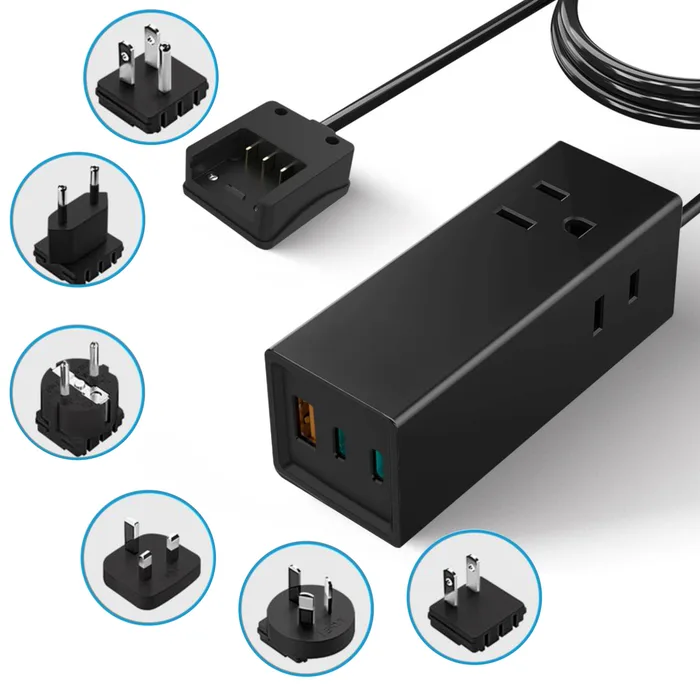
- Buy Ceptics 65W World Travel Adapter (NANFUSE-WS) A small grounded power strip with a 65W USB-C port, two US outlets and six swappable plug attachments.
- Buy TESSAN Universal Travel Adapter (35W, TS-WTA02) A one-piece sliding cube with Type A, C, G and I plugs, a 35W USB-C port and a published 10A replaceable fuse.
- It depends Momax 1-World² Pocket 70W A one-piece GaN adapter with a 70W USB-C port, PPS support and two AC outputs, but a second USB-C port fixed at 5V.
- Skip Epicka TA-105C Universal Travel Adapter A widely sold sliding cube whose USB ports are all 5V, with an ungrounded AC socket and a newer replacement on the maker's own page.
What actually matters
- Plug coverage - The adapter has to physically fit the wall socket where you are going. Type letters tell you this precisely, while country counts do not.
- Grounding - A grounded adapter connects the third pin of your plug to the wall's earth contact. Without it, a device designed to be grounded loses that safety path.
- AC load limit - Every adapter has a maximum current, commonly stated in amps. Exceeding it with a kettle or hair dryer is what blows fuses and overheats contacts.
- Dual-voltage devices - The adapter passes through whatever the wall supplies. Only devices marked for a range such as 100-240V are suitable for use on both sides of the world.
- USB-C Power Delivery output - PD is what lets a USB-C port offer higher voltages for fast charging. A port listed at 5V only will charge slowly whatever the box says.
- Port sharing - Plugging in a second device usually cuts the power available to the first. Good listings publish the split for each combination of ports.
- Fuse and certifications - A stated fuse rating and named certifications show what the maker is willing to put in writing. Missing details are worth treating as unknowns, not as assumed protections.
The specs, in plain English
Green flags vs red flags
Green flags
- The maker lists plug types by letter and names the socket types the adapter does not fit.
- Grounding is stated plainly, one way or the other.
- Max load is given in watts at both a low and a high voltage.
- Each USB port has its own output line, plus the split when several ports are in use.
- The fuse rating is published and a spare fuse is included.
Red flags
- A big wattage number with no per-port breakdown.
- USB-C ports listed at 5V only on an adapter marketed for modern devices.
- Wording that suggests the adapter converts voltage or suits any appliance.
- No mention of grounding on a unit whose socket accepts three-prong plugs.
- Coverage described only as a number of countries, with no plug types named.
Who's who: the brands
- Ceptics - Known for plug kits and compact travel power strips with swappable attachments. Its NANFUSE-WS states a fully grounded connection.
- TESSAN - Sells a wide range of travel plugs and sliding universal cubes, with GaN versions at several wattages.
- Momax - Maker of the 1-World line of one-piece travel adapters with built-in GaN USB chargers.
- Epicka - One of the most widely sold names in sliding universal cubes, with a current range that also includes GaN fast-charging models.
How to read a listing without getting fooled
Start with the AC line. It should give a voltage range such as 100-250V, a maximum current such as 10A, and ideally watts at two voltages. Then look for the word grounded; if it is absent, treat the adapter as ungrounded. Next read the USB lines port by port. A fast port lists several voltages, for example 5V, 9V, 15V and 20V, each with a current, and a maximum wattage. A slow port lists 5V alone. After that, find the lines for combined use, written as something like 45W + 15W, which show what each device gets when two or more are plugged in. Finish with the fuse rating, the certifications named and the plug types covered. Anything the listing leaves out is unknown, and a missing line is not the same as a yes.
How much should you spend?
Budget-tier adapters are usually sliding cubes with basic USB ports, and the main thing to check is whether those ports offer more than 5V. Mid-range units add a USB-C PD port strong enough for a tablet or a thin laptop, and this is where grounded kits with swappable attachments tend to sit. Premium-tier adapters build in a higher-wattage GaN charger and more ports, which can replace a separate laptop charger. Paying more buys USB charging power far more reliably than it buys grounding or a higher AC limit, so read those lines whatever the tier. If you already own a good USB-C charger, a budget grounded plug kit plus that charger can be the most sensible combination.
Questions, answered
What is the difference between Type C, Type E and Type F plugs?
All three use two round pins with the same spacing, which is why a two-pin Type C plug fits most continental European sockets. Type E and Type F add a ground connection in different ways, a pin in the socket for E and side clips for F. An adapter with only a Type C plug will fit those sockets but cannot pass a ground connection through them. Kits that include an E/F attachment are the ones that can.
Is it safe to plug a power strip into a travel adapter?
Only within the adapter's limits. Everything on the strip draws through the adapter's single AC path, so the total has to stay under its amp rating at the local voltage. The strip itself must also be rated for the local voltage, and some North American strips with surge protection are built for 120V only. A travel power strip designed for 100-240V avoids the problem. Our surge protector guide explains the ratings that apply at home.
Can I use a travel adapter on a cruise ship?
Cruise lines set their own rules on what can be brought aboard, and some restrict products with surge protection. Some adapter makers describe their units as cruise friendly, but that is the maker's wording and not the cruise line's approval. Check the prohibited items list for your specific line before you pack. A plain adapter without surge protection is the usual safe assumption.
Do I still need my own charger if the adapter has USB ports?
Not always. An adapter with a USB-C PD port that matches your laptop's needs can stand in for the laptop's own charger, and phones are covered by most PD ports. Wireless charging pads still need a USB source with enough power, which our wireless charger guide covers. If the adapter's ports are 5V only, bring your own fast charger and plug it into the AC socket instead.
Or jump to the head-to-head: Ceptics 65W World Travel Adapter (NANFUSE-WS) vs TESSAN Universal Travel Adapter (35W, TS-WTA02).